
We have already seen Spring MVC hello world example. @RequestMapping is one of important annotation which you use in Spring MVC.
Spring MVC tutorial:
- Spring MVC hello world example
- Spring MVC Hibernate MySQL example
- Spring MVC interceptor example
- Spring MVC angularjs example
- Spring MVC @RequestMapping example
- Spring Component,Service, Repository and Controller example
- Spring MVC @ModelAttribute annotation example
- Spring MVC @RestController annotation example
- Spring MultiActionController Example
- Spring MVC ModelMapSpring MVC file upload example
- Spring restful web service example
- Spring restful web service json example
- Spring Restful web services CRUD example
- Spring security hello world example
- Spring security custom login form example
@RequestMapping is used to define mapping of web request to handler method or class. @RequestMapping can be used at method level or class level. We will see example of it later.
If you use @RequestMapping annotation at class level, it will be used for relative path for method level path.
Lets understand with the help of example:
@RestController
@RequestMapping(value = "/countryController")
public class CountryController {

 @RequestMapping(value = "/countries", method = RequestMethod.GET, headers = "Accept=application/json")
 public List getCountries() {

  List listOfCountries = countryService.getAllCountries();
  return listOfCountries;
 }
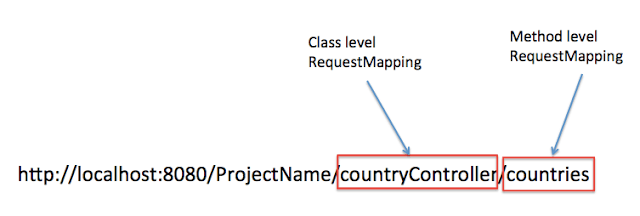
so web request with URL http://localhost:8080/ProjectName/countryController/countries will execute getCountries() method. Below image will make it clear:
Method level RequestMapping example :
@RestController
public class CountryController {

 @RequestMapping(value = "/countries", method = RequestMethod.GET, headers = "Accept=application/json")
 public List getCountries() {

  List listOfCountries = countryService.getAllCountries();
  return listOfCountries;
 }
so web request with URL http://localhost:8080/ProjectName/countries will execute getCountries() method.
Class level RequestMapping example :
@RestController
@RequestMapping(value = "/countries")
public class CountryController {
@RequestMapping(method = RequestMethod.POST, headers = "Accept=application/json")
 public Country addCountry(@RequestBody Country country) {
  return countryService.addCountry(country);
 }

 @RequestMapping(method = RequestMethod.PUT, headers = "Accept=application/json")
 public Country updateCountry(@RequestBody Country country) {
  return countryService.updateCountry(country);

 }
}
If you notice, we did not define method level request mapping here, so it will automatically call corresponding PUT or POST method when you hit :
http://localhost:8080/ProjectName/countries If you want to practice more examples for @RequestMapping annotation, you can go through Spring Rest CRUD example. It will definitely help you to understand @RequestMapping annotation better.

