Turn Matomo's Events reports into a navigable analysis: open a detail page for any event category, action or name and see how it evolves and what it is combined with.
Features
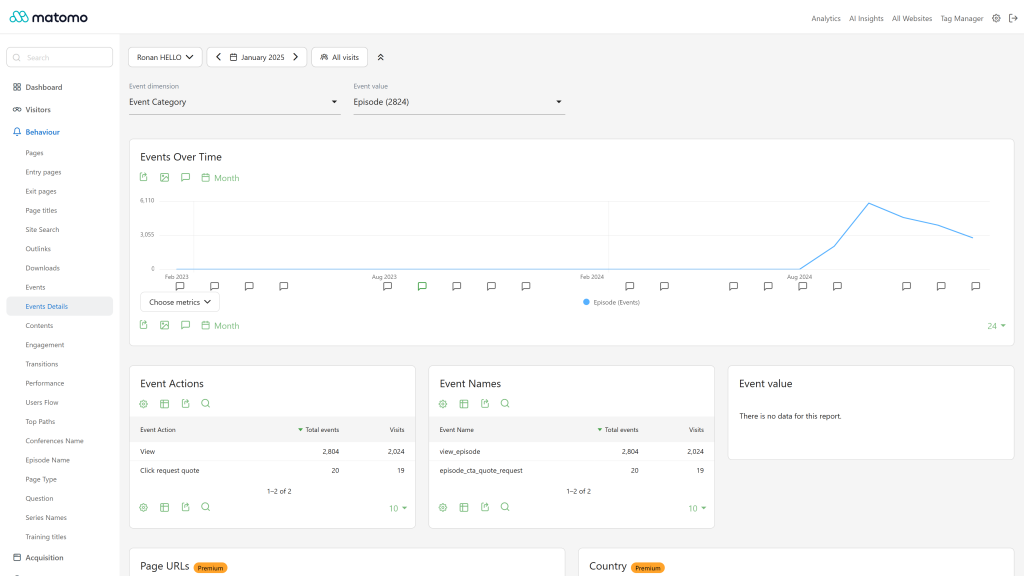
- Event detail pages: a "View Event Details" row action on the Events reports (Categories, Actions, Names) opens a dedicated page for the selected value. Selectors at the top of the page let you switch the dimension (category, action, name) and the value without going back to the report.
- Evolution graph of the selected value over time, with a metric picker (events, visits, event value, events with a value).
- Related breakdowns on each detail page: the two other event dimensions filtered on the selected value (for example the actions and names of a category) and the event values recorded for it.
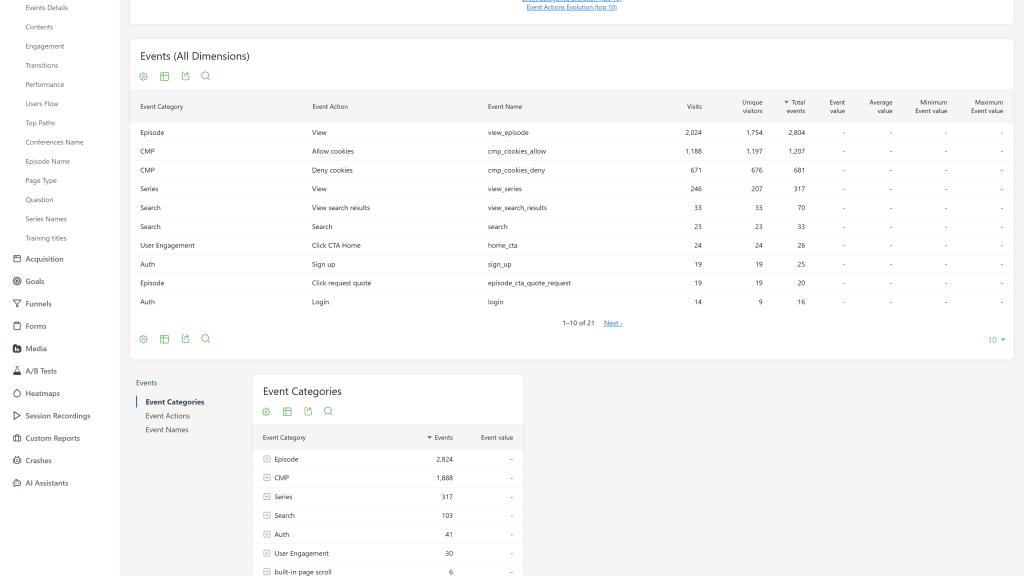
- Events (All Dimensions) report under Behavior > Events: category, action and name in one hierarchical table, with visits, unique visitors, events, total, minimum, maximum and average event value. It is also available as a dashboard widget.
- Top 10 evolution graphs for event names (under Behavior > Events), and for event categories and actions (from the Related Reports links), with one line per value.
- API methods for every breakdown, for example
EventsEnhanced.getEventActionsForCategory, EventsEnhanced.getEventNamesForAction, EventsEnhanced.getEventValuesForName, EventsEnhanced.getEventsWithAllDimensions and EventsEnhanced.getEventNamesEvolution. Report metadata is complete, so API and AI clients (such as the McpServer plugin) can discover them.
- Segments, periods and the standard view permission of the Events reports apply everywhere.
- Translated into 12 languages.
Premium version
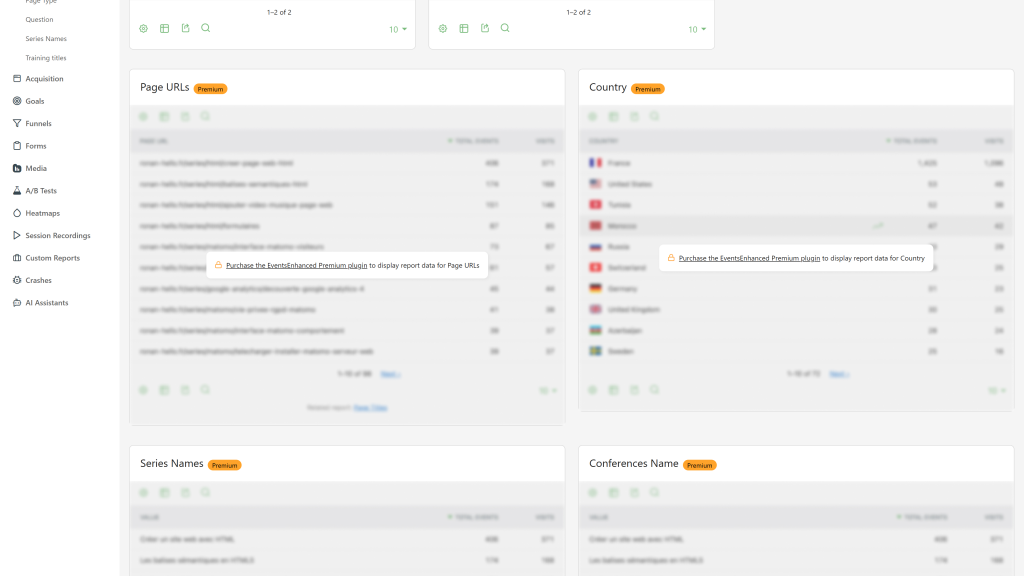
EventsEnhanced Premium adds three reports to every detail page, shown as previews in the free version:
- Page URLs and Page titles where the selected events were actually triggered.
- Countries of the visitors who triggered them.
- Custom Dimensions: values of your action-scoped Custom Dimensions for the selected events.
Requirements
- Matomo 5.x (5.0.0 or later, below 6.0.0)
- The Events plugin (bundled with Matomo and enabled by default).
Installation / Configuration
- Install EventsEnhanced from the Marketplace (Administration > Platform > Marketplace), or copy the
EventsEnhanced folder into the plugins directory of your Matomo installation.
- Activate it in Administration > Plugins.
- Open Behavior > Events, hover a row of any Events report and click the "View Event Details" icon.
There are no settings. Reports are built during archiving, so data appears for periods archived after activation. To see past periods, or to get the corrected numbers of this version for periods archived before an update, invalidate and re-archive them, for every period type (the default of the command), for example ./console core:invalidate-report-data --sites=1 --dates=2025-01-01,2025-12-31 --plugin=EventsEnhanced then ./console core:archive.
Privacy and data
All reports are computed inside your Matomo database from the events you already track. The plugin sends no data to third parties.
Need help with Matomo?
Openmost is an official Matomo Implementation Partner. Event reports are only as useful as the tracking behind them: we design Matomo tracking plans with consistent event naming, goals and custom dimensions, then implement them in your tag manager.
-
Event detail page with evolution and breakdowns
-
Events All Dimensions report
-
Premium reports previewed in the free edition
EventsEnhanced adds a detail page for every event category, action and name. From any Events report (Behavior > Events), hover a row and click the "View Event Details" icon.
Detail pages
Each detail page includes:
- Dimension selectors to switch between category, action and name, and between values, without leaving the page.
- Evolution graph of the selected value, with a metric picker (events, visits, event value, events with a value).
- Related breakdowns:
- Category pages: actions and names filtered on that category
- Action pages: categories and names filtered on that action
- Name pages: categories and actions filtered on that name
- Event values recorded for the selected value
- Page URLs and Page titles (premium): the pages where the selected events were actually triggered, not every page of the visits that contained them.
- Countries (premium): the countries of the visitors who triggered them.
- Custom Dimensions (premium): values of your action-scoped Custom Dimensions for the selected events.
The free plugin shows previews of the premium reports. EventsEnhanced Premium unlocks them.
Additional reports
- Events (All Dimensions): category, action and name in one hierarchical table under Behavior > Events, also available as a dashboard widget.
- Event Names Evolution (top 10) under Behavior > Events, plus Event Categories Evolution and Event Actions Evolution from the Related Reports links.
API methods
EventsEnhanced.getEventActionsForCategory, EventsEnhanced.getEventNamesForCategoryEventsEnhanced.getEventCategoriesForAction, EventsEnhanced.getEventNamesForActionEventsEnhanced.getEventCategoriesForName, EventsEnhanced.getEventActionsForNameEventsEnhanced.getEventValuesForCategory, EventsEnhanced.getEventValuesForAction, EventsEnhanced.getEventValuesForNameEventsEnhanced.getEventsWithAllDimensionsEventsEnhanced.getEventNamesEvolution, EventsEnhanced.getEventCategoriesEvolution, EventsEnhanced.getEventActionsEvolution
Archiving
Reports are built during archiving, so data appears for periods archived after activation. To fill past periods, or to get the corrected numbers of the latest version for periods archived before the update, invalidate and re-archive them as described in the FAQ.
How do I access the event detail pages?
Open any Events report (Behavior > Events), hover a row and click the "View Event Details" icon.
Why is a detail page empty for past periods?
The reports are built during archiving. Periods archived before the plugin was activated have no data until you invalidate and re-archive them, for every period type (the default of the command), for example:
./console core:invalidate-report-data --sites=1 --dates=2025-01-01,2025-12-31 --plugin=EventsEnhanced
./console core:archive
Adjust --sites and --dates to your data. Keep the default periods: a month is built from its week archives, so a week archived before the plugin was active makes the month incomplete.
I updated the plugin, why do past reports still show the old numbers?
Version 5.1.0 fixes how the reports are archived: events without a name are counted under "Event Name not defined", the event value 0 is kept, the "Others" row of a truncated list is shown as "Others", and values with an apostrophe or another special character find their data. Reports archived before the update keep the old numbers until you invalidate and re-archive them with the commands above.
Why don't I see Custom Dimensions on the detail pages?
Custom Dimensions reports (premium) need the CustomDimensions plugin, at least one action-scoped Custom Dimension, and data for that dimension on the selected events.
Can I segment the detail page reports?
Yes, the segment, period and date selected in Matomo apply to every report of the detail page.
Does this plugin require any special permissions?
No. Anyone who can view the Events reports of a site can open its detail pages.
Which versions of Matomo are supported?
Version 5.x of the plugin supports Matomo 5 (5.0.0 or later). Use the 6.x versions for Matomo 6.