Hide anything on your screen. Instantly.
Keep Stripe balances, databases, API keys, and distracting apps covered. No messy app reconfigurations or window rearranging during demos, livestreams, or DJ workflows.
Supports macOS Sequoia (15.0) and later
What is Scrim?
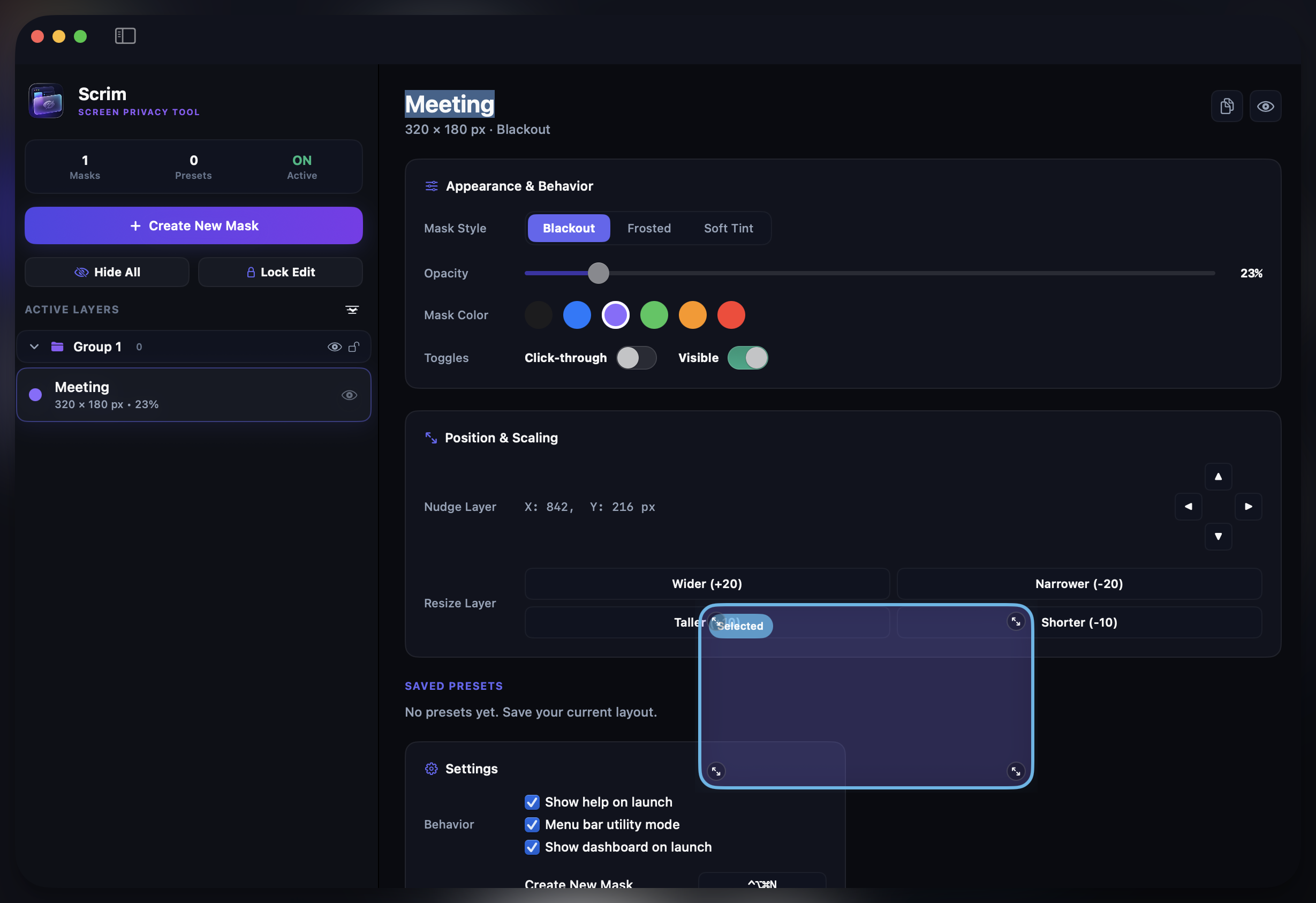
Scrim is a macOS screen privacy utility that places persistent, floating overlay masks above every window to hide sensitive on-screen content during screen sharing, presentations, livestreams, and demos. Built natively in Swift, it runs entirely offline with zero telemetry.
Who Uses Scrim?
Developers & Engineers
Hide API keys, environment variables, and database credentials during pair programming and code reviews on Zoom or Teams.
Sales Engineers & Support
Cover customer data, internal pricing, and admin panels while giving live product demos to prospects.
Streamers & Content Creators
Mask donation alerts, personal messages, or desktop notifications during Twitch and YouTube livestreams.
DJs & Music Producers
Hide track metadata, setlist plans, and software license keys during live DJ sets and production streams.
A seamless flow for presenters.
Protect details with a lightning fast utility that behaves naturally on macOS. Setup is done in less than thirty seconds.
Trigger Swiftly
Press your customizable hotkey ⌘⌥M or click the status menu bar icon to spawn a Scrim overlay block.
Drag & Cover
Position the overlay directly above sensitive metrics or database keys. Scale it to cover the exact pixel boundary.
Share Confidently
Present on Teams, Zoom, or Twitch. Swap tabs and applications effortlessly knowing your secrets are locked behind masks.
Everything built for zero friction.
We understand presentation fatigue. Scrim keeps out of the way, operating reliably as a background macOS utility with robust controls.
Instant Drag-to-Mask
Need to block out a variable section of your UI? Draw dynamic squares around code blocks, profile photos, or emails instantly. Resize freely to align precisely over UI containers.
Click-Through Support
Enable interactive click-through, rendering the mask visually opaque but computationally transparent. Click buttons or highlight text directly underneath your mask without moving it.
Profiles & Auto-Apply
Save groups of masks as profiles (e.g., "Stripe CRM", "AWS Console"). Have them apply automatically when specific target windows or domain URLs become active on screen.
High-Performance Engine
Written natively in Swift to run on macOS Sequoia. Draws zero CPU cycles when passive, runs entirely sandbox-offline, and never gathers tracker metrics or calls home.
How Scrim Compares
A few native Mac apps hide on-screen content. Here is how Scrim stacks up against the closest alternatives on the features that matter during live sharing.
| Feature | Scrim | Cloaky | Perde | Hide My Screen |
|---|---|---|---|---|
| Free-position region masks (cover any area) | ||||
| Resize & move masks freely | ||||
| Click-through mode | ||||
| Frosted glass & tint styles | ||||
| Mask groups with batch toggle | ||||
| Named presets, auto-apply per app | ||||
| Custom rebindable global hotkeys | ||||
| Multi-monitor support | ||||
| One-time purchase (no subscription) | ||||
| Runs 100% offline, no account |
Comparison based on each product's publicly documented features. Scrim is purpose-built for positioning, grouping, and auto-applying privacy masks across every app you share.
One simple, lifetime purchase.
No subscription fatigue. Start free, upgrade once, use forever.
Try the core of Scrim and hide what matters — completely free, forever.
- Up to 2 masks
- Frosted glass & tint styles
- Click-through mode
- Multi-monitor support
- Mask groups & batch toggle
- Named presets & auto-apply
- Custom global hotkeys
- Free lifetime updates
Unlimited Macs. For power users and teams.
- Unlimited masks
- Frosted glass & tint styles
- Click-through mode
- Multi-monitor support
- Mask groups & batch toggle
- Named presets & auto-apply
- Custom global hotkeys
- Free lifetime updates
Frequently Asked Questions
Got questions about permissions, licenses, or privacy? Here are clear answers.
