🚀 Supercharge your YouTube channel's growth with AI.
Try YTGrowAI FreeCopy a File in Python with shutil

A CSV file may need a second copy in another directory while the original stays available. Python’s shutil module provides file-copy functions, and shutil.copy() writes the file at the destination while leaving the source in place.
I’ll show you how to copy a file with shutil.copy() and read the output to see that the source remains in place.
TL;DR: Use shutil.copy for a file
Use shutil.copy(source, destination) to copy a file and retain its permission mode. Choose copy2() when timestamps matter, or copyfile() when only the contents matter.
- Pass a directory to copy() to keep the source filename.
- Pass a full filename to copyfile().
- Use copytree() for a directory and its contents.
What does copying a file in Python do?
A file copy writes the source file’s data to a separate destination path, leaving the source in place. The shutil module provides these operations in Python’s standard library, so a text file or CSV can be copied without reading or parsing its contents. I chose a directory target for the example because copy() keeps the source filename there.
| Function | Use it for | Destination | What it preserves |
|---|---|---|---|
| shutil.copy() | A regular file copy | File path or directory | Contents and permission mode |
| shutil.copy2() | Copy with timestamps when supported | File path or directory | Contents, mode, and additional metadata it can copy |
| shutil.copyfile() | Contents only | Complete file path | Contents, not metadata |
| shutil.copyfileobj() | Open streams or file-like objects | Open destination object | Data from current stream positions |
| shutil.copytree() | A directory tree | New directory path | Files and subdirectories |
copy2() attempts to preserve more metadata than copy(), but no shutil function promises to reproduce every platform-specific detail. Python’s shutil documentation notes that ownership and access-control data may not carry over.
How to copy a file in Python step by step
The example uses pathlib paths for a source file and destination directory, then calls copy() because the copied file should keep its name.
Step 1: Choose a source file and destination directory
The source path names notes.txt. The destination path names the directory that will hold the copy, so copy() can retain the source filename.
Step 2: Copy the file with shutil.copy()
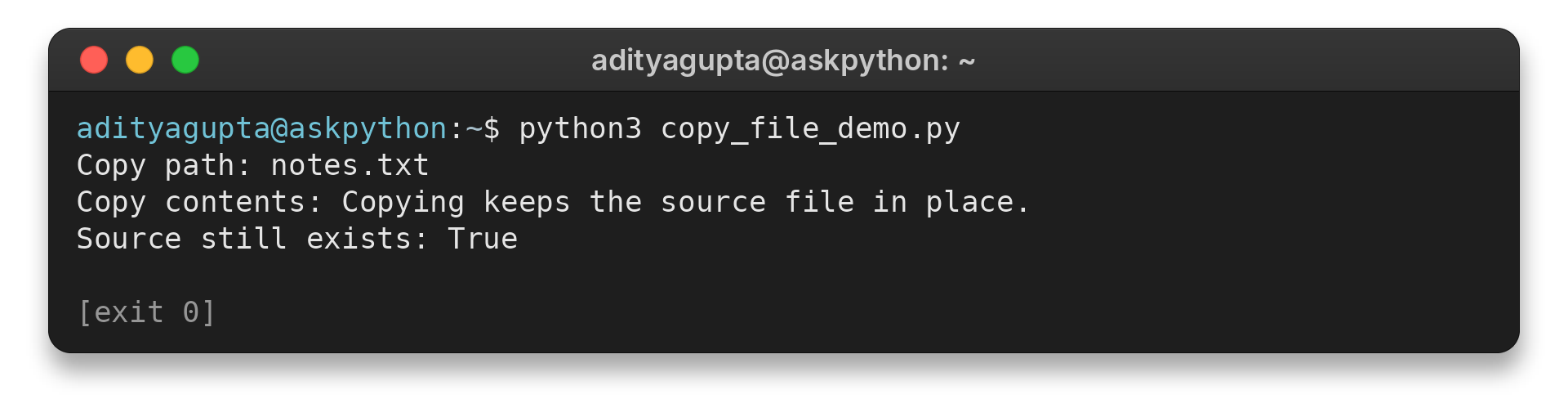
Save this as copy_file_demo.py and run python3 copy_file_demo.py from the same directory to see the copied path, contents, and source status.
from pathlib import Path
import shutil
import tempfile

with tempfile.TemporaryDirectory() as temp_dir:
    root = Path(temp_dir)
    source = root / "notes.txt"
    destination_dir = root / "backup"
    destination_dir.mkdir()
    source.write_text("Copying keeps the source file in place.\n", encoding="utf-8")

    copied_path = Path(shutil.copy(source, destination_dir))
    print(f"Copy path: {copied_path.name}")
    print(f"Copy contents: {copied_path.read_text(encoding='utf-8').strip()}")
    print(f"Source still exists: {source.exists()}")
adityagupta@askpython:~$ python3 copy_file_demo.py
Copy path: notes.txt
Copy contents: Copying keeps the source file in place.
Source still exists: True

[exit 0]
Step 3: Verify the copy and source
The output shows the copied filename and contents, then confirms the original still exists. I ran this example with Python 3.14.7 and all three checks printed as expected.
What should you check before copying a file?
Check the destination first, because an existing file can be overwritten and the required destination form depends on the function.
| Case | What happens | What to do |
|---|---|---|
| Destination file exists | copyfile() replaces it. copy() also overwrites the file at its target. | Choose a unique destination or check before copying if the old copy must remain |
| Source and destination are the same file | copyfile() raises shutil.SameFileError | Compare resolved paths before starting when they may point to the same file |
| Source path is missing | Python raises FileNotFoundError | Check the source path and spelling |
| Destination cannot be written | An OSError, often PermissionError, reports the failed operation | Check that the parent directory exists and the current process can write there |
| Directory destination already exists in copytree() | FileExistsError is raised by default | Use dirs_exist_ok=True (Python 3.8+) only when merging and replacing same-name files is intended |
| Copying through copyfileobj() | The destination stream is not flushed automatically | Flush or close it before reading its copied data |
For batch renames, derive each target path from its source name before copying. The AskPython shutil reference and os module guide explain related file and path operations.
Conclusion: choose the shutil method by its job
These methods cover ordinary files, streams, and directory trees without shell-specific commands, and the Python shutil reference documents platform-specific metadata and symlink behavior.
FAQ
These answers cover destination paths and the source file after a copy.
Does shutil.copy keep the original file?
Yes. shutil.copy writes a separate destination and leaves the source file in place. A later copy can overwrite an existing destination.
How do I copy a file to another directory in Python?
Call shutil.copy(source_path, destination_directory). If the destination is a directory, copy() uses the source filename there.
What is the difference between shutil.copy() and copy2()?
Both copy contents and permission mode. copy2() also attempts to preserve additional metadata such as timestamps, subject to platform limits.
Can shutil.copy() copy a CSV or text file?
Yes. shutil.copy() copies file data without parsing it, so it works for CSV and text files as well as other ordinary files.