





{fmt} is an open-source formatting library providing a fast and safe alternative to C stdio and C++ iostreams.
Q&A: ask questions on StackOverflow with the tag fmt.
Try {fmt} in Compiler Explorer.

- Simple format API with positional arguments for localization
- Implementation of C++20 std::format and C++23 std::print
- Format string syntax similar to Python's format
- Fast IEEE 754 floating-point formatter with correct rounding, shortness and round-trip guarantees using the Dragonbox algorithm
- Portable Unicode support
- Safe printf implementation including the POSIX extension for positional arguments
- Extensibility: support for user-defined types
- High performance: faster than common standard library
implementations of
(s)printf, iostreams,to_stringandto_chars, see Speed tests and Converting a hundred million integers to strings per second - Small code size both in terms of source code with the minimum
configuration consisting of just three files,
base.h,format.handformat-inl.h, and compiled code; see Compile time and code bloat - Reliability: the library has an extensive set of tests and is continuously fuzzed
- Safety: the library is fully type-safe, errors in format strings can be reported at compile time, automatic memory management prevents buffer overflow errors
- Ease of use: small self-contained code base, no external dependencies, permissive MIT license
- Portability with consistent output across platforms and support for older compilers
- Clean warning-free codebase even on high warning levels such as
-Wall -Wextra -pedantic - Locale independence by default
- Optional header-only configuration enabled with the
FMT_HEADER_ONLYmacro
See the documentation for more details.
Print to stdout (run)
#include <fmt/base.h>

int main() {
  fmt::print("Hello, world!\n");
}
Format a string (run)
std::string s = fmt::format("The answer is {}.", 42);
// s == "The answer is 42."
Format a string using positional arguments (run)
std::string s = fmt::format("I'd rather be {1} than {0}.", "right", "happy");
// s == "I'd rather be happy than right."
Print dates and times (run)
#include <fmt/chrono.h>

int main() {
  auto now = std::chrono::system_clock::now();
  fmt::print("Date and time: {}\n", now);
  fmt::print("Time: {:%H:%M}\n", now);
}
Output:
Date and time: 2023-12-26 19:10:31.557195597
Time: 19:10
Print a container (run)
#include <vector>
#include <fmt/ranges.h>

int main() {
  std::vector<int> v = {1, 2, 3};
  fmt::print("{}\n", v);
}
Output:
[1, 2, 3]
Check a format string at compile time
std::string s = fmt::format("{:d}", "I am not a number");This gives a compile-time error in C++20 because d is an invalid
format specifier for a string.
Write a file from a single thread
#include <fmt/os.h>

int main() {
  auto out = fmt::output_file("guide.txt");
  out.print("Don't {}", "Panic");
}
This can be up to 9 times faster than fprintf.
Print with colors and text styles
#include <fmt/color.h>

int main() {
  fmt::print(fg(fmt::color::crimson) | fmt::emphasis::bold,
             "Hello, {}!\n", "world");
  fmt::print(fg(fmt::color::floral_white) | bg(fmt::color::slate_gray) |
             fmt::emphasis::underline, "Olá, {}!\n", "Mundo");
  fmt::print(fg(fmt::color::steel_blue) | fmt::emphasis::italic,
             "你好{}!\n", "世界");
}
Output on a modern terminal with Unicode support:

| Library | Method | Run Time, s |
|---|---|---|
| libc | printf | 0.66 |
| libc++ | std::ostream | 1.63 |
| {fmt} 12.1 | fmt::print | 0.44 |
| Boost Format 1.88 | boost::format | 3.89 |
| Folly Format | folly::format | 1.28 |
{fmt} is the fastest of the benchmarked methods, ~50% faster than
printf.
The above results were generated by building tinyformat_test.cpp on
macOS 15.6.1 with clang++ -O3 -DNDEBUG -DSPEED_TEST -DHAVE_FORMAT, and
taking the best of three runs. In the test, the format string
"%0.10f:%04d:%+g:%s:%p:%c:%%\n" or equivalent is filled 2,000,000
times with output sent to /dev/null; for further details refer to the
source.
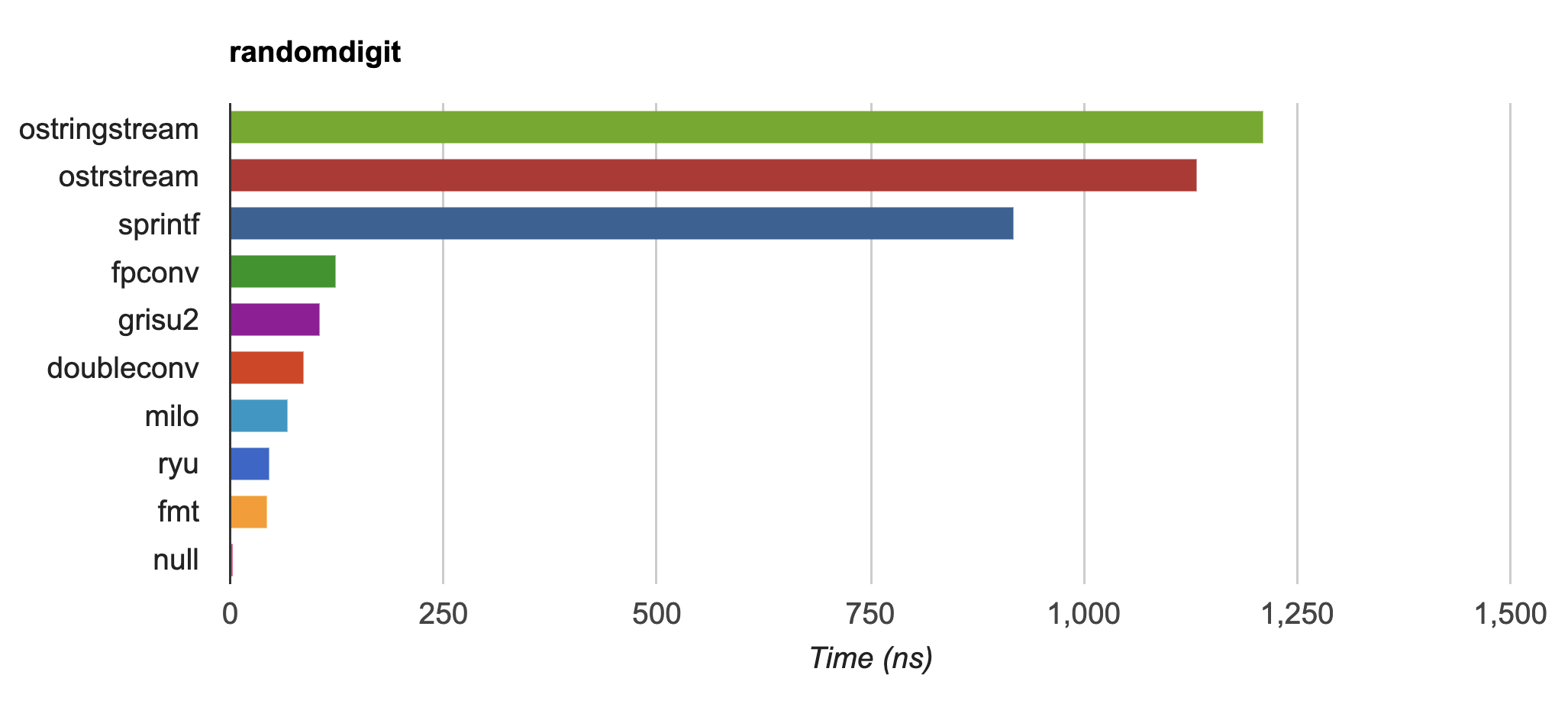
{fmt} is up to 20-30x faster than std::ostringstream and sprintf on
IEEE754 float and double formatting
(dtoa-benchmark) and faster
than double-conversion
and ryu:
The script bloat-test.py from format-benchmark tests compile
time and code bloat for nontrivial projects. It generates 100 translation units
and uses printf() or its alternative five times in each to simulate a
medium-sized project. The resulting executable size and compile time (Apple
clang version 15.0.0 (clang-1500.1.0.2.5), macOS Sonoma, best of three) is shown
in the following tables.
Optimized build (-O3)
| Method | Compile Time, s | Executable size, KiB | Stripped size, KiB |
|---|---|---|---|
| printf | 1.6 | 54 | 50 |
| IOStreams | 28.4 | 98 | 84 |
{fmt} 1122268 |
5.0 | 54 | 50 |
| tinyformat | 32.6 | 164 | 136 |
| Boost Format | 55.0 | 530 | 317 |
{fmt} is fast to compile and is comparable to printf in terms of per-call
binary size (within a rounding error on this system).
Non-optimized build
| Method | Compile Time, s | Executable size, KiB | Stripped size, KiB |
|---|---|---|---|
| printf | 1.4 | 54 | 50 |
| IOStreams | 27.0 | 88 | 68 |
{fmt} 1122268 |
4.7 | 87 | 84 |
| tinyformat | 28.1 | 185 | 145 |
| Boost Format | 38.9 | 678 | 381 |
libc, lib(std)c++, and libfmt are all linked as shared libraries
to compare formatting function overhead only. Boost Format is a
header-only library so it doesn't provide any linkage options.
Notable users include:
