Summary: in this tutorial, you’ll learn how to use the PHP explode() function to split a string by a separator into an array of strings.
Introduction to the PHP explode() function #
The PHP explode() function returns an array of strings by splitting a string by a separator. The following shows the syntax of the explode() function:
explode ( string $separator , string $string , int $limit = PHP_INT_MAX ) : arrayThe explode() function has the following parameters:
$separatoris the delimiter that theexplode()function uses to split the $string.$stringis the input string$limitspecifies how the function will return the result array.
If the $limit is positive, the explode() function returns an array with $limit elements where the last element containing the rest of the string.
If the $limit is zero, explode() function interprets it as one. So the function returns an array with the original string.
If the $limit is negative, the explode() function splits the $string using the $separator. Also, it removes the last $limit elements from the result array.
Prior to PHP 8.0.0, the explode() function returns false if the $separator is an empty string. Starting from PHP 8.0.0, the explode() function throws a ValueError instead.
PHP explode() function examples #
Let’s take some examples of using the explode() function.
1) Simple the PHP explode() function example #
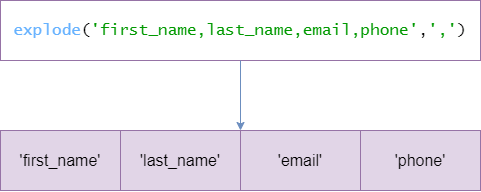
The following example uses the explode() function to split a string by a comma (,):
<?php
$str = 'first_name,last_name,email,phone';
$headers = explode(',', $str);
print_r($headers);Output:
array(4)
{
[0]=> string(10) "first_name"
[1]=> string(9) "last_name"
[2]=> string(5) "email"
[3]=> string(5) "phone"
}
2) Using the PHP explode() function with a positive $limit #
The following example uses the explode() function with the a positive $limit argument:
$str = 'first_name,last_name,email,phone';
$headers = explode(',', $str, 3);
var_dump($headers);Output:
array(3)
{
[0]=> string(10) "first_name"
[1]=> string(9) "last_name"
[2]=> string(5) "email,phone"
}As shown clearly in the output, the returned array contains three elements specified by the $limit argument. Also, the last element has the remaining string.
3) Using the PHP explode() function with a negative $limit #
The following example uses the explode() function with the a negative $limit argument:
<?php
$str = 'first_name,last_name,email,phone';
$headers = explode(',', $str, -1);
var_dump($headers);Output:
array(3)
{
[0]=> string(10) "first_name"
[1]=> string(9) "last_name"
[2]=> string(5) "email"
}In this example, the explode() function returns an array of the string split by the comma (,). Also, it excludes the last element from the result array.
If you use -2 instead of –1 for the $limit, the explode() function will remove the last 2 elements. For example:
<?php
$str = 'first_name,last_name,email,phone';
$headers = explode(',', $str, -1);
var_dump($headers);Output:
array(2)
{
[0]=> string(10) "first_name"
[1]=> string(9) "last_name"
}4) A practical example of the PHP explode() function #
The following str_after() function returns the remainder of a string after the first occurrence of a string:
<?php
function str_after($str, $search)
{
return $search === '' ? $str : array_reverse(explode($search, $str, 2))[0];
}How it works.
- First, split the string into an array of two elements separated by the
$searchstring. - Second, reverse the result array and return the first element of the result array.
The following example uses the str_after() function to get the domain name part of an email:
<?php
// ...
echo str_after('[email protected]', '@');Output:
phptutorial.netSummary #
- Use the PHP
explode()function to return an array of strings by splitting a string by a separator.
Thank you for your feedback!
