Summary: in this tutorial, you will learn how HTML forms work and how to process form data in PHP.
Introduction to PHP form processing #
To create a web form, you use the <form> element as follows:
<form action="form.php" method="post">
</form>The <form> element has two important attributes:
action: specifies the URL that processes the form submission. In this example, theform.phpwill process the form on the web server.method: specifies the HTTP method for submitting the form. The most commonly used form methods arePOSTandGET. In this example, the form method ispost.
The form method is case-insensitive. It means that you can use either post or POST. If you don’t specify the method attribute, the form element will use the get method by default.
Typically, a form has one or more input elements including input, password, checkbox, radio button, select, file upload, etc. The input elements are often called form fields.
An input element has the following important attributes name, type, and value. You will use the name attribute to access the value in PHP.
HTTP POST method #
If a form uses the POST method, the web browser will include the form data in the HTTP request’s body. After submitting the form, you can access the form data in PHP via the associative array $_POST variable.
For example, if a form has an input element with the name email, you can access the email value in PHP via the $_POST['email']. If the form doesn’t have an email input, the $_POST won’t have any element with the key 'email'.
To check if the form data contains the email, you use the isset() like this:
<?php
if(isset($_POST['email']) {
// process email
}The following shows a form with an input element:
<form action="form.php" method="post">
<div>
<label for="email">Email:</label>
<input type="email" id="email" name="email" />
</div>
<button type="submit">Submit</button>
</form>In the form.php file, you can access the email value as follows:
<?php
if (isset($_POST['email'])) {
var_dump($_POST['email']);
}The following shows how to create a simple form (form.php) with an email input field:
<?php
if($_SERVER['REQUEST_METHOD'] === 'POST') {
$email = $_POST['email'];
echo $email;
}
?>
<form action="form.php" method="post">
<div>
<label for="email">Email:</label>
<input type="email" id="email" name="email" />
</div>
<button type="submit">Submit</button>
</form>Output:
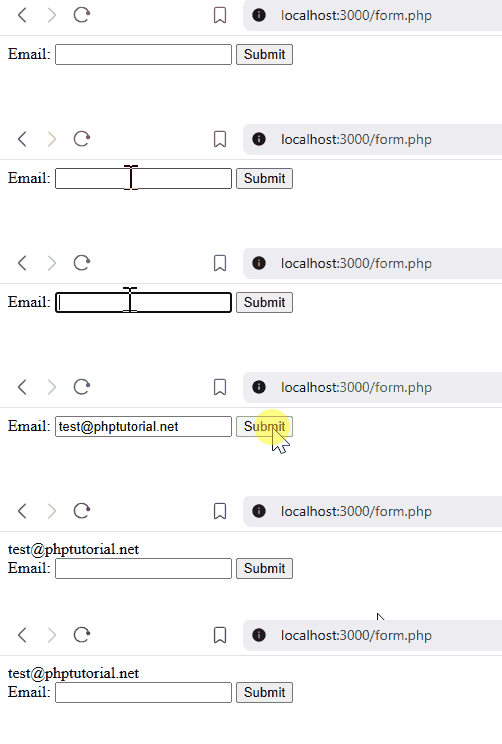
How it works.
First, set the action of the form to form.php. When you enter an email and submit the form, the form.php will process it.
Second, check if the form is posted, get the email from the $_POST variable and display it on the page:
<?php
if($_SERVER['REQUEST_METHOD'] === 'POST') {
$email = $_POST['email'];
echo $email;
}
?>HTTP GET method #
When a form uses the GET method, you can access the form data in PHP via the associative array $_GET variable.
Unlike the POST method, the GET method appends the form data in the URL that processes the form. For example, if the URL that processes the form is search.php and the form has the term input field.
When you enter a search term as php and submit a form, the web browser will append the email to the URL like this /search.php?term=php .
The following example creates a search form with an input field:
<?php
if($_SERVER['REQUEST_METHOD'] === 'GET') {
if(isset($_GET['term'])) {
// get the search term from the URL
$term = $_GET['term'];
if($term){
// perform search and show the result
echo "<p>The result of the search for: <b>$term</b></p>";
}
}
}
?>
<form action="search.php" method="get">
<div>
<label for="term">Search:</label>
<input type="search" name="term" placeholder="Enter search term">
<button type="submit">Search</button>
</div>
</form>Output:

How it works.
First, the form includes a field called term. It uses the GET HTTP method. When you submit the form, search.php will process the form data.
Second, check if the HTTP request is GET using $_SERVER['REQUEST_METHOD']:
if($_SERVER['REQUEST_METHOD'] === 'GET') {If the form has multiple input elements, the web browser will append the input fields to the URL in the following format:
/search.php?name1=value1&name2=value2&name3=value3Third, check if the request has the term by accessing the $_GET['term'] variable:
if(isset($_GET['term'])) {Finally, get the search term and display it on the page if it is not empty:
$term = $_GET['term'];
if($term) {
// perform search and show the result
echo "<p>The result of the search for: <b>$term</b></p>";
}Note that both $_POST and $_GET arrays are superglobal variables. It means that you can access them anywhere in the script.
HTTP GET or POST method #
In general, you should use the GET method when the form only retrieves data from the server. For example, a search form that allows users to search for information should use the GET method.
You should use the POST method when you have a form that causes a change in the server. For example, a form that allows users to subscribe to a newsletter should use the POST method.
Escaping the output #
In the examples above, both forms display the form data directly. However, the page is not secure if malicious users intentionally inject JavaScript code into the data.
For example, if the following JavaScript code is entered in the term field and the form is submitted.
<script>alert('Hello');</script>…you’ll see that the page displays an alert.
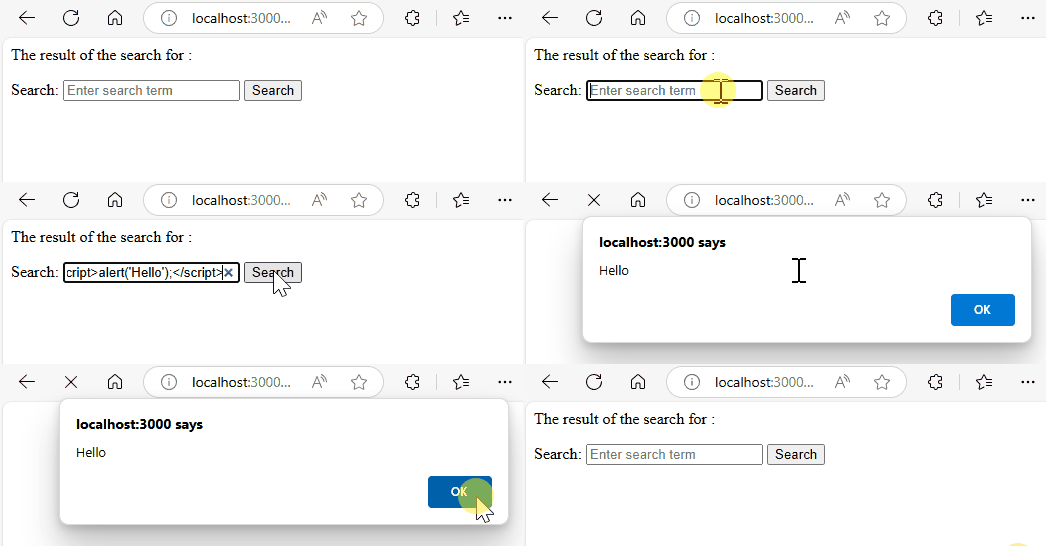
Imagine that the script doesn’t just show an alert but redirect users to a malicious page that mimic the legitimate page, users may enter credential information like username/password and lose it. This type of attack is called cross-site scripting (XSS) attack.
To prevent XSS attacks, before displaying user input on a webpage, you should always escape the data using the htmlspecialchars() function.
For example, the following form shows how to use the htmlspecialchars function to display the search term on the page:
<?php
if($_SERVER['REQUEST_METHOD'] === 'GET') {
if(isset($_GET['term'])) {
// get the search term from the URL
$term = $_GET['term'];
if($term) {
$clean_term = htmlspecialchars($term, ENT_QUOTES, 'UTF-8');
// perform search and show the result
echo "<p>The result of the search for <b>$clean_term</b>:</p>";
}
}
}
?>
<form action="search.php" method="get">
<div>
<label for="term">Search:</label>
<input type="search" name="term" placeholder="Enter search term">
<button type="submit">Search</button>
</div>
</form>If you enter the following term and submit the form, the page will display the term correctly and safely without executing the JavaScript code:
<script>alert('Hello');</script>
PHP self-processing form #
Sometimes, you want to include form and logic for handling form submission in a single PHP file. This form is often referred to as a self-processing form.
To create a self-processing form, you can use the $_SERVER['REQUEST_METHOD'] that returns the request method, e.g., GET or POST.
If the $_SERVER['REQUEST_METHOD'] is GET, you show the form. And if the $_SERVER['REQUEST_METHOD'] is POST, you process it.
Suppose we have a page called form.php:
<?php
if($_SERVER['REQUEST_METHOD'] === 'POST') {
$email = $_POST['email'];
echo $email;
}
?>
<form action="form.php" method="post">
<div>
<label for="email">Email:</label>
<input type="email" id="email" name="email" />
<button type="submit">Submit</button>
</div>
</form>The action of the form is form.php.
This means that when you change the form.php to another such as email.php, then you have to change the action of the form to email.php. This is not conveninent.
PHP provides a variable $_SERVER['PHP_SELF'] that returns the filename of the currently executing script:
$_SERVER['PHP_SELF']If the currently executing script is form.php, the $_SERVER['PHP_SELF'] will return form.php. This allows you to always submit to the same page even if the file name (form.php) changes:
<?php
if($_SERVER['REQUEST_METHOD'] === 'POST') {
$email = $_POST['email'];
echo htmlspecialchars($email);
}
?>
<form action="<?php echo $_SERVER['PHP_SELF']; ?>" method="post">
<div>
<label for="email">Email:</label>
<input type="email" name="email">
</div>
</form>However, this code is also not secure and vulnerable to a cross-site scripting (XSS) attack. For example, if you append the following string to the url:
/%27%22/%3E%3Cscript%3Ealert('XSS Attack')%3C/script%3Esuch as:
/form.php/%27%22/%3E%3Cscript%3Ealert('XSS Attack')%3C/script%3EYou’ll see an alert. It means that you successfully inject JavaScript code into the form:
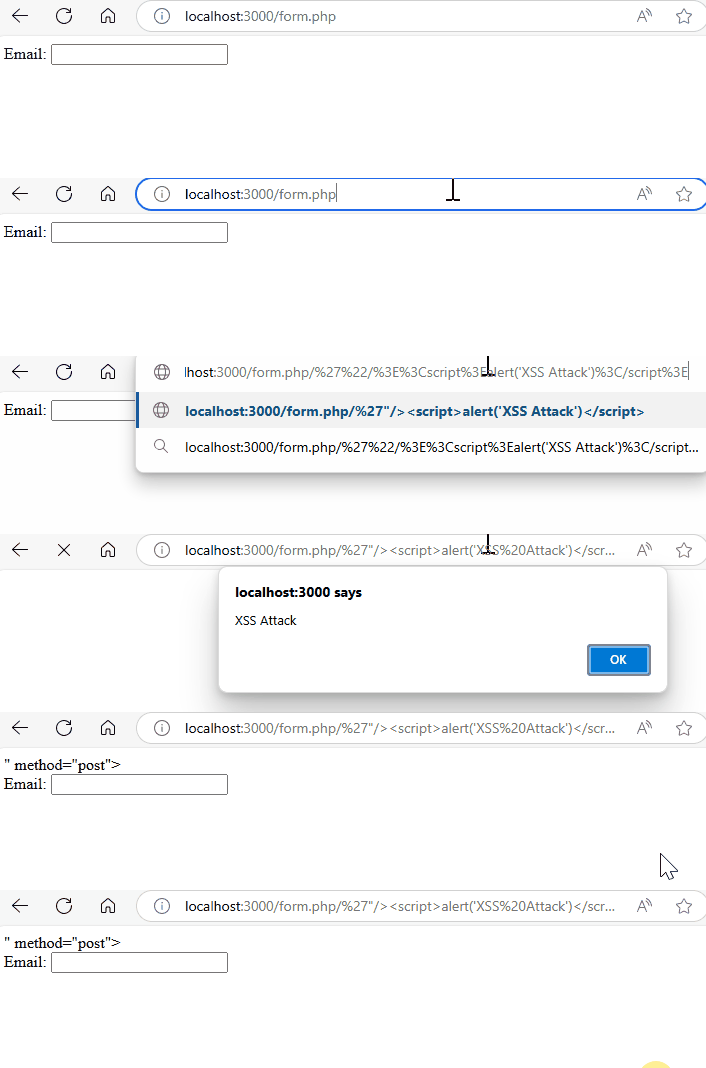
To prevent this XSS attack, you can use the the htmlspecialchars() function:
<?php
if($_SERVER['REQUEST_METHOD'] === 'POST') {
$email = $_POST['email'];
echo htmlspecialchars($email);
}
?>
<form action="<?php echo htmlspecialchars($_SERVER['PHP_SELF']) ?>"
method="post">
<div>
<label for="email">Email:</label>
<input type="email" name="email">
</div>
</form>Organizing code #
To make the code more organized, you can create the following file & directory structure:
.
├── css
│ └── style.css
├── inc
│ ├── header.php
│ ├── footer.php
│ ├── get.php
│ ├── post.php
│ └── .htaccess
└── index.phpThe index.php file in the root directory will include the header.php and footer.php.
If the request method is GET, the index.php file loads the form in the get.php file. Otherwise, it loads the code from the post.php file for processing the POST request.
index.php #
The following shows the index.php file:
<?php
require __DIR__ . '/inc/header.php';
$request_method = strtoupper($_SERVER['REQUEST_METHOD']);
if ($request_method === 'GET') {
require __DIR__ . '/inc/get.php';
} elseif ($request_method === 'POST') {
require __DIR__ . '/inc/post.php';
}
require __DIR__ . '/inc/footer.php';header.php #
The header.php contain the first part of the page:
<!DOCTYPE html>
<html lang="en">
<head>
<meta charset="UTF-8">
<meta name="viewport" content="width=device-width, initial-scale=1.0">
<link rel="stylesheet" href="css/style.css">
<title>PHP Form</title>
</head>
<body>
<main>footer.php #
The footer.php file contains the enclosing tags of the page:
</main>
</body>
</html>get.php #
The get.php file contains the form:
<form action="<?php echo htmlspecialchars($_SERVER['PHP_SELF']) ?>"
method="post">
<div>
<label for="email">Email:</label>
<input type="email" name="email">
<button type="submit">Submit</button>
</div>
</form>post.php #
The following shows the post.php file that handles the form submission:
<?php
if($_SERVER['REQUEST_METHOD'] === 'POST') {
$email = $_POST['email'];
echo htmlspecialchars($email);
}.htaccess #
The .htaccess file prevents direct access to the files in the inc directory. It’s relevant only to the Apache webserver.
Deny from allBy using the .htaccess file, you cannot browse the file directly from the inc folder.
Summary #
- Use the
<form>tag to create an HTML form. - Specify the URL that processes the form submission in the
actionattribute. - Use either
GETorPOSTmethod for themethodattribute of the form for submission. - Use the
$_GETor$_POSTto access the form data. - Use the
htmlspecialchars()function to escape the user input before showing it on a webpage.
Thank you for your feedback!
