Log inSign up
OBS @ gamescom
4,481 posts
OBS @ gamescom profile banner
@OBSProject

OBS @ gamescom

@OBSProject
Open Broadcaster Software, free open source software for video recording & live streaming | News & Updates | For support, visit: obsproject.com/help
obsproject.com
Joined August 2012
55
Following
310.9K
Followers
RepliesRepliesRepostsRepostsMediaMedia

Log in or sign up for X

See what’s happening and join the conversation

Continue with phone
or
Log in with username or email
Terms·Privacy·Cookies·Accessibility·Ads Info·© 2026 X Corp.
  • Pinned
    @OBSProject
    OBS @ gamescom
    @OBSProject
    Jul 27
    OBS Studio 32.2 is now available! Lots more quality of life adjustments and code cleanup as we continue to concentrate on user experience, stability, and long term project health. The biggest change this patch is the overhauled Add Source window.
    Image
    Release OBS Studio 32.2.1 · obsproject/obs-studio
    From github.com
    36
  • @OBSProject
    OBS @ gamescom
    @OBSProject
    Aug 28
    Oh hey, that's us! Thank you for including us @nvidia !💚💙
    Image
    Image
    Image
    11
  • @OBSProject
    OBS @ gamescom
    @OBSProject
    Aug 26
    Our team members Taylor and Jonathan will be roaming the halls of @gamescom today! What booth should we go check out first? #gamescom
    Image
    5
  • @OBSProject
    OBS @ gamescom
    @OBSProject
    Aug 5
    It's official! 📣 We'll be attending @gamescom for the first time later this month. If you'd like to speak to us about the project, OBS Studio specifically, or how your organization may want to work more closely with our team we'd love to chat. Please reach out to us via DMs,
    11
  • @OBSProject
    OBS @ gamescom
    @OBSProject
    Aug 1
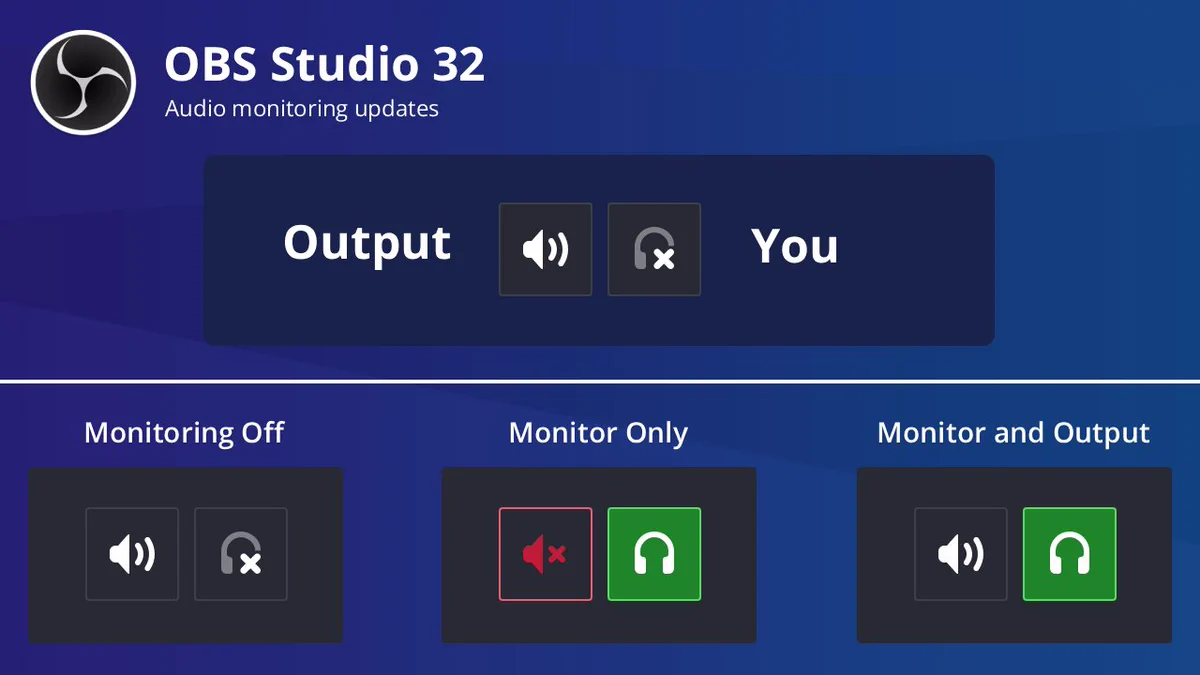
    In OBS Studio 32.1 we updated the audio mixer and simplified audio monitoring. In 32.2 we removed the old options from the advanced audio properties. In 33.0 plugins and third party tools will require updates to use the new handling. You can still get the same results👇
    An image displaying an enlarged view of the new OBS Studio audio mixer buttons for muting and monitoring. The left speaker icon is labeled 'Output'. The right speaker icon is labeled 'You'.

Three images below depict the visual state of these buttons when set to match the old monitoring dropdown options of 'Monitoring Off', 'Monitor Only', and 'Monitor and Output'.
    31
Advertisement
Advertisement