

A thread in Java is the smallest unit of execution within a process. Threads allow multiple tasks to execute concurrently while sharing the resources of the same process. Threads are commonly used for tasks such as background processing, file operations, network requests, and handling multiple client requests.
- Threads share the memory and resources of their process.
- Java provides the Thread class and
Runnableinterface for creating threads.
Create Threads
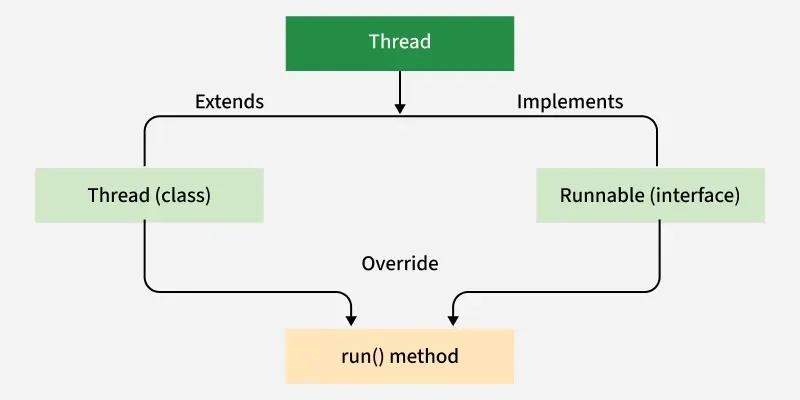
There are two traditional ways to create a thread in Java:
1. By Extending Thread Class
Create a class that extends Thread. Override the run() method, this is where you put the code that the thread should execute. Then create an object of your class and call the start() method. This will internally call run() in a new thread.
import java.io.*;
import java.util.*;

class MyThread extends Thread{

    // initiated run method for Thread
    public void run(){

      	String str = "Thread Started Running...";
        System.out.println(str);
    }
}

public class Geeks{

  	public static void main(String args[]){

      	MyThread t1 = new MyThread();
      	t1.start();
    }
}
Output
Thread Started Running...
Explanation:
- MyThread extends the Thread class.
- The run() method contains the task performed by the thread.
- t1 creates a thread object.
- start() starts a new thread.
- The JVM then invokes the run() method on that new thread.
2. Using Runnable Interface
Create a class that implements Runnable. Override the run() method, this contains the code for the thread. Then create a Thread object, pass your Runnable object to it and call start().
import java.io.*;
import java.util.*;

class MyThread implements Runnable{

  	// Method to start Thread
    public void run(){

      	String str = "Thread is Running Successfully";
        System.out.println(str);
    }

}

public class Geeks{

    public static void main(String[] args){

        MyThread g1 = new MyThread();

        // initializing Thread Object
        Thread t1 = new Thread(g1);

      	// Running Thread
      	t1.start();
    }
}
Output
Thread is Running Successfully
Explanation:
- MyTask implements Runnable.
- The run() method defines the task.
- A MyTask object is created.
- The object is passed to the Thread constructor.
- start() creates a new thread and executes
run().
Note: Extend Thread when when you don’t need to extend any other class. Implement Runnable when your class already extends another class (preferred in most cases).
Thread vs Runnable
| Feature | Extending Thread | Implementing Runnable |
|---|---|---|
| Approach | Extend Thread | Implement Runnable |
| Task and thread | Combined | Separated |
| Can extend another class? | No | Yes |
| Reusability | Less flexible | More flexible |
| Recommended | For simple specialized thread behavior | Preferred for defining a task |
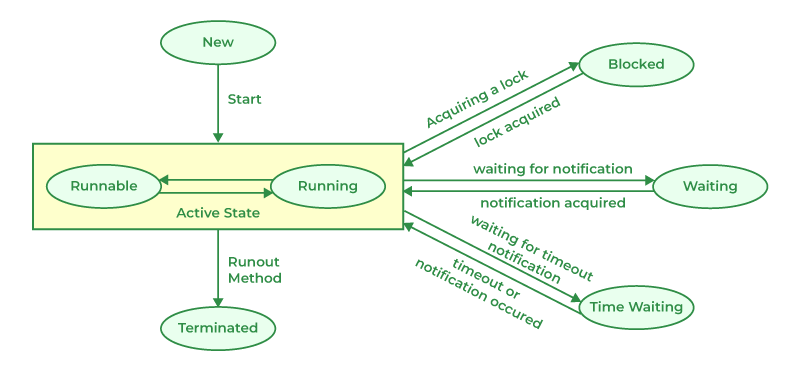
Life Cycle of a Thread
During its thread life cycle, a Java thread transitions through several states from creation to termination.
- New State
- Runnable State
- Blocked State
- Waiting State
- Timed Waiting State
- Terminated State
Running Threads
There are two methods used for running Threads in Java:
- run() Method: Contains the code for the thread. Calling it directly behaves like a normal method call.
- start() Method: Launches a new thread and internally calls run() concurrently.
Example: Using Thread Class and Runnable Interface
// Thread class implementation
class ThreadImpl extends Thread{

    @Override
    public void run(){

        // Output: Thread Class Running
        System.out.println("Thread Class Running");
    }
}

// Runnable interface implementation
class RunnableThread implements Runnable{

    @Override
    public void run(){

        // Output: Runnable Thread Running
        System.out.println("Runnable Thread Running");
    }
}

public class Geeks{

    public static void main(String[] args){

        // Create and start Thread class thread
        ThreadImpl t1 = new ThreadImpl();
        t1.start();

        // Create and start Runnable interface thread
        RunnableThread r = new RunnableThread();
        Thread t2 = new Thread(r);
        t2.start();

        // Wait for both threads to complete
        try {
            t1.join(); // Wait for t1
            t2.join(); // Wait for t2
        } catch (InterruptedException e) {
            e.printStackTrace();
        }
    }
}
Output
Thread Class Running
Runnable Thread Running
Note: We use start() to launch a new thread, which then calls the run() method in parallel. If we call run() directly, it works like a normal method call and no new thread is created.
Java Thread Class
The Thread class is used to create and control threads in Java. Each object of this class represents a single thread of execution.
Syntax
public class Thread extends Object implements Runnable
Advantages of Threads
- Improved performance: Multiple threads can execute tasks concurrently.
- Better resource utilization: Threads share the same memory and resources.
- Responsive applications: UI applications remain responsive while performing background tasks.
