

LinkedList is a part of the Java Collections Framework and is present in the java.util package. It implements a doubly linked list, where each element is stored in a node containing the element and references to the previous and next nodes.
- The size of a LinkedList can grow or shrink dynamically.
- It maintains the insertion order of elements.
- It allows duplicate elements.
import java.util.LinkedList;

public class Geeks {

    public static void main(String[] args){

        // Creating a LinkedList
        LinkedList<String> l = new LinkedList<String>();

        // Adding elements to the LinkedList using add() method
        l.add("One");
        l.add("Two");
        l.add("Three");
        l.add("Four");
        l.add("Five");

        System.out.println(l);
    }
}
Output
[One, Two, Three, Four, Five]
Explanation: The program creates an empty LinkedList of String elements and adds five elements using add(). The elements are printed in the same order in which they were inserted.
Note: LinkedList nodes cannot be accessed directly by index; elements must be accessed by traversing from the head.
Syntax
LinkedList<Type> list = new LinkedList<>();
Hierarchy of LinkedList
It implements the List and Deque interfaces, both of which are sub-interfaces of the Collection Interface.
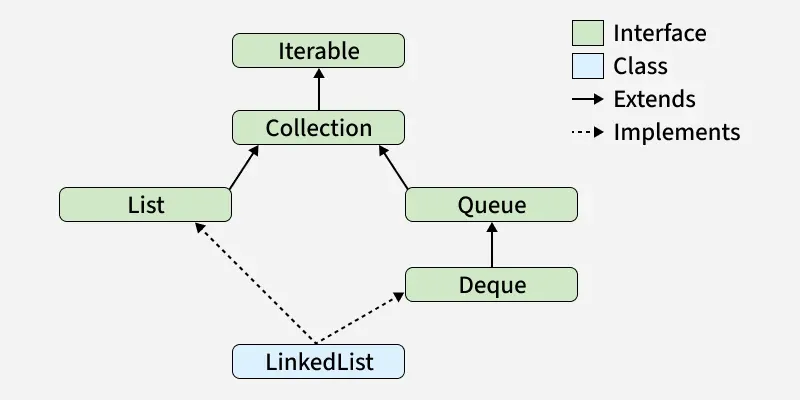
Constructors of LinkedList
In order to create a LinkedList, we need to create an object of the LinkedList class. The LinkedList class consists of various constructors that allow the possible creation of the list. The following are the constructors available in this class:
1. LinkedList()
This constructor is used to create an empty linked list. If we wish to create an empty LinkedList with the name list, then it can be created as:
LinkedList list = new LinkedList();
2. LinkedList(Collection C)
This constructor is used to create an ordered list that contains all the elements of a specified collection, as returned by the collection's iterator. If we wish to create a LinkedList with the name list, then, it can be created as:
LinkedList list = new LinkedList(C);
Performing Different Operations on LinkedList
1. Adding Elements
With the help of the add() method, we can add elements to a LinkedList This method can perform multiple operations based on different parameters. They are:
- add(Object): This method is used to add an element at the end of the LinkedList.
- add(int index, Object): This method is used to add an element at a specific index in the LinkedList.
import java.util.*;

public class Geeks {

    public static void main(String args[])
    {
        LinkedList<String> ll = new LinkedList<>();

        ll.add("Geeks");
        ll.add("Geeks");
        ll.add(1, "For");

        System.out.println(ll);
    }
}
Output
[Geeks, For, Geeks]
Explanation: The program adds two "Geeks" elements and inserts "For" at index 1. Therefore, the final list is [Geeks, For, Geeks].
2. Update Elements
With the help of the set() method, we can update an element in a LinkedList. This method takes an index and the updated element which needs to be inserted at that index.
import java.util.*;

public class Geeks {

    public static void main(String args[])
    {
        LinkedList<String> ll = new LinkedList<>();

        ll.add("Geeks");
        ll.add("Geeks");
        ll.add(1, "Geeks");

        System.out.println("Initial LinkedList " + ll);

        ll.set(1, "For");

        System.out.println("Updated LinkedList " + ll);
    }
}
Output
Initial LinkedList [Geeks, Geeks, Geeks]
Updated LinkedList [Geeks, For, Geeks]
Explanation: The program first creates a list containing three "Geeks" elements. set(1, "For") replaces the element at index 1 with "For"
3. Removing Elements
Removes the first occurrence of the specified element from the list, if it exists. They are:
- remove(Object): Removes the first occurrence of the specified object from the LinkedList.
- remove(int index): Removes the element at the given index and shifts subsequent elements.
import java.util.*;

public class Geeks {

    public static void main(String args[])
    {
        LinkedList<String> ll = new LinkedList<>();

        ll.add("Geeks");
        ll.add("Geeks");
        ll.add(1, "For");

        System.out.println("Initial LinkedList " + ll);

          // Function call
        ll.remove(1);

        System.out.println("After the Index Removal " + ll);

        ll.remove("Geeks");

        System.out.println("After the Object Removal "
                           + ll);
    }
}
Output
Initial LinkedList [Geeks, For, Geeks]
After the Index Removal [Geeks, Geeks]
After the Object Removal [Geeks]
Explanation: remove(1) removes the element at index 1, while remove("Geeks") removes the first occurrence of "Geeks".
4. Iterating a LinkedList
There are multiple ways to iterate through LinkedList. The most famous ways are by using the basic for loop in combination with a get() method to get the element at a specific index and the advanced for-loop.
import java.util.*;

public class Geeks {

    public static void main(String args[])
    {
        LinkedList<String> ll
            = new LinkedList<>();

        ll.add("Geeks");
        ll.add("Geeks");
        ll.add(1, "For");

        // Using the Get method and the for loop
        //Using get(i) in a loop is O(n^2) for LinkedList! Bad practice for large lists
        for (int i = 0; i < ll.size(); i++) {

            System.out.print(ll.get(i) + " ");
        }

        System.out.println();

        // Using the for each loop OR Using iterator is recommended practise
        for (String str : ll)
            System.out.print(str + " ");
    }
}
Output
Geeks For Geeks
Geeks For Geeks
Explanation: The enhanced for loop traverses the LinkedList from the first element to the last and prints each element.
Real-World Usage of LinkedList
- Implementing queues and deques.
- Managing data where frequent insertion and removal at the ends are required.
- Maintaining browser history or similar sequential navigation data.
- Implementing undo/redo-style structures.
Methods for Java LinkedList
| Method | Description |
|---|---|
| add(int index, E element) | Inserts element at given index. |
| add(E e) | This method Appends the specified element to the end of this list. |
| addAll(int index, Collection<E> c) | Inserts all elements of collection starting at index. |
| addAll(Collection<E> c) | Appends all elements of collection to end |
| addFirst(E e) | This method Inserts the specified element at the beginning of this list. |
| addLast(E e) | This method Appends the specified element to the end of this list. |
| clear() | This method removes all of the elements from this list. |
| clone() | This method returns a shallow copy of this LinkedList. |
| contains(Object o) | This method returns true if this list contains the specified element. |
| descendingIterator() | This method returns an iterator over the elements in this deque in reverse sequential order. |
| element() | This method retrieves but does not remove, the head (first element) of this list. |
| get(int index) | This method returns the element at the specified position in this list. |
| getFirst() | This method returns the first element in this list. |
| getLast() | This method returns the last element in this list. |
| indexOf(Object o) | Return first index of element or -1 if element is not present |
| lastIndexOf(Object o) | Return Last index of element or -1 if element is not present |
| listIterator(int index) | This method returns a list-iterator of the elements. |
| offer(E e) | This method Adds the specified element as the tail (last element) of this list. |
| offerFirst(E e) | This method Inserts the specified element at the front of this list. |
| offerLast(E e) | This method Inserts the specified element at the end of this list. |
| peek() | This method retrieves but does not remove, the head (first element) of this list. |
| peekFirst() | This method retrieves, but does not remove, the first element of this list or returns null if this list is empty. |
| peekLast() | This method retrieves, but does not remove, the last element of this list or returns null if this list is empty. |
| poll() | This method retrieves and removes the head (first element) of this list. |
| pollFirst() | This method retrieves and removes the first element of this list or returns null if this list is empty. |
| pollLast() | This method retrieves and removes the last element of this list or returns null if this list is empty. |
| pop() | This method Pops an element from the stack represented by this list. |
| push(E e) | This method pushes an element onto the stack represented by this list. |
| remove() | This method retrieves and removes the head (first element) of this list. |
| remove(int index) | This method removes the element at the specified position in this list. |
| remove(Object o) | This method removes the first occurrence of the specified element from this list if it is present. |
| removeFirst() | This method removes and returns the first element from this list. |
| removeFirstOccurrence(Object o) | This method removes the first occurrence of the specified element in this list. |
| removeLast() | This method removes and returns the last element from this list. |
| removeLastOccurrence(Object o) | This method removes the last occurrence of the specified element in this list. |
| set(int index, E element) | This method replaces the element at the specified position in this list with the specified element. |
| size() | This method returns the number of elements in this list. |
| spliterator() | This method creates a late-binding and fail-fast Spliterator over the elements in this list. |
| toArray() | This method returns an array containing all of the elements in this list in proper sequence. |
| toArray(T[] a) | Returns array of all elements in given type. |
| toString() | This method returns string representation of list. |
ArrayList vs LinkedList
ArrayList | LinkedList |
|---|---|
Underlying structure is Dynamic Array | Underlying structure is Doubly-linked list |
O(1) - Fast random access | O(n) - Slow random access |
Memory is lower (contiguous memory) | Memory is higher (extra pointers per node) |
Iteration speed is faster | Iteration speed is slower. |
Insertion and deletion is slower | Insertion and deletion is faster. |
it is more cache-friendly due to contiguous memory storage | nodes are scattered in memory, making it less cache-efficient. |
