


Inspiration
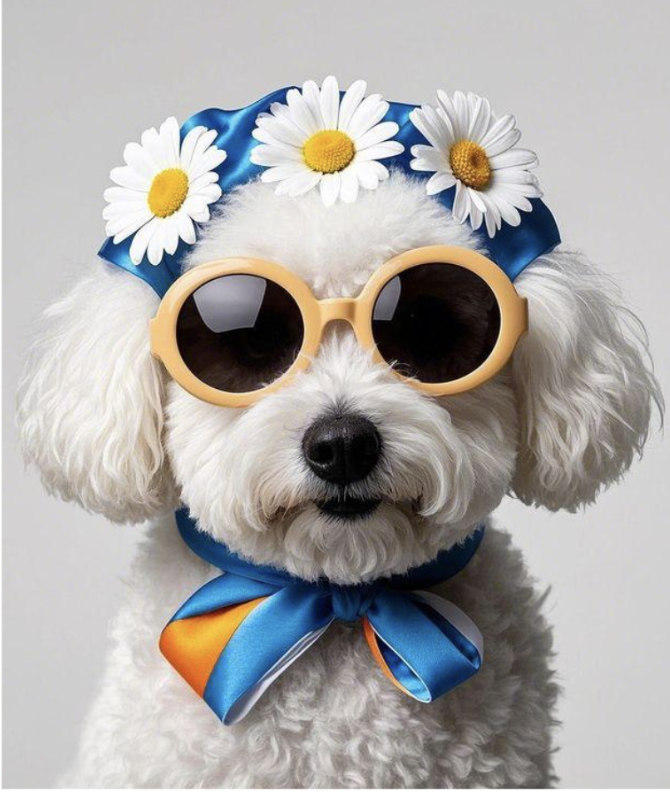
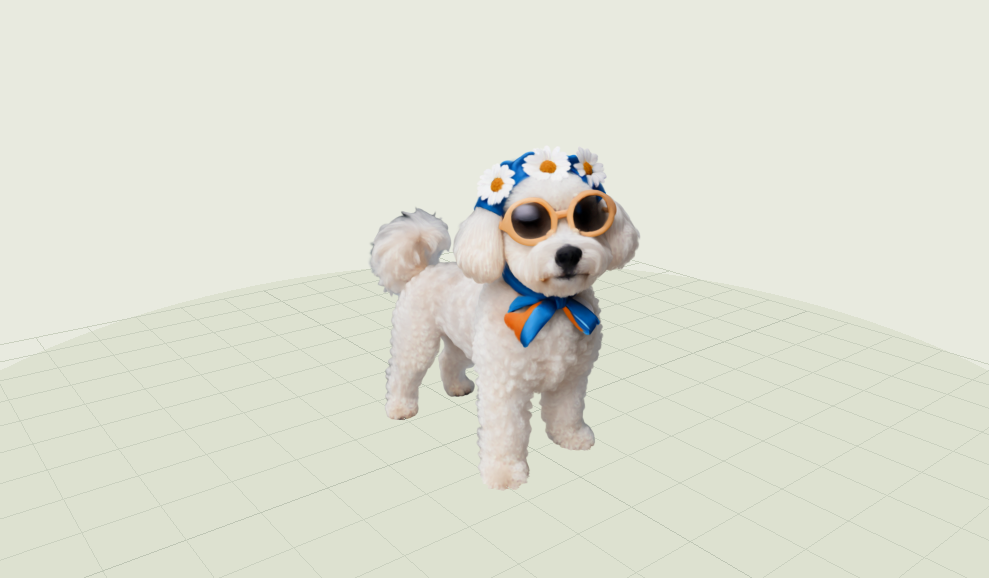
Huawei’s challenge provided photographs of two dogs. We began with the white dog wearing sunglasses, flowers, and a blue bow. We wanted to give that picture a little life: a dog that could look around, respond to us, do tricks, and bring a ball back.
That meant solving several problems together. The photo showed the dog’s personality, but it did not show its complete body or explain how it should move. We needed to reconstruct its appearance, give it an underlying skeleton, and make those pieces work together.
This became Doggin’ Around, an interactive playground that brings image-to-3D research into the browser. Along the way, we explored two different modelling approaches: generating a rig and detailed appearance separately, and fitting an anatomical dog model before optimizing its appearance.
What it does
Doggin’ Around lets you interact with a photo-based 3D dog in real time.
- Give it something to do. Huawei’s white dog has 29 actions, including sitting, running, digging, shaking hands, high fives, backflips, and Gangnam-style dancing.
- Play fetch. Throw a ball and the dog turns toward it, walks or runs after it, slows down, reaches toward the ball, picks it up, and carries it home.
- Catch its attention. The dogs glance around naturally and briefly follow your cursor. Their head movement continues smoothly through animation changes.
- Inspect how it works. Switch between the detailed Gaussian appearance, the underlying mesh, and the skeleton. Adjust animation speed and rendering density, pause a pose, or compare the source photographs.
- Try compatible models. Import an animated GLB with a supported skeleton and animation structure.
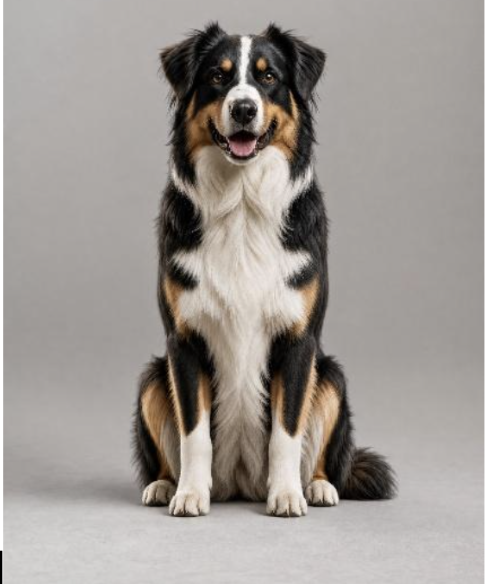
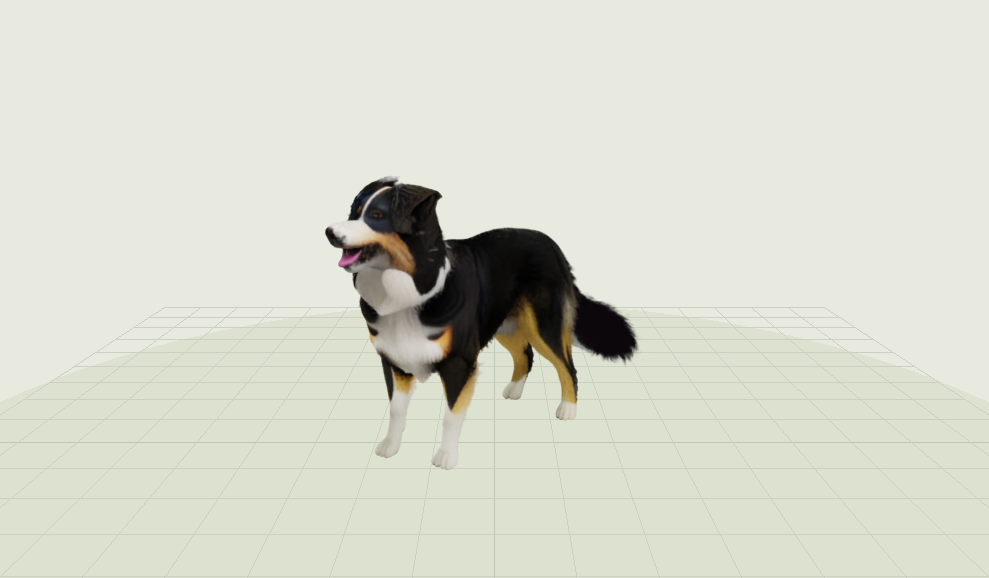
Huawei also provided the seated Tricolor dog photograph. Our local research demo brings that second dog to life with 12 actions. Its licensed research assets are excluded from public production builds.
Model generation currently happens offline. The browser loads the prepared assets and handles rendering, animation, and interaction.
From photos to interactive 3D dogs
Huawei white dog
| Before: Huawei's original cropped photograph | After: our full-body Gaussian dog |
|---|---|
 |
 |
Huawei Tricolor dog
| Before: the original seated photograph | After: our standing Gaussian reconstruction |
|---|---|
 |
 |
How we built it
Both dogs use 3D Gaussian Splatting for their detailed appearance. Think of a Gaussian as a tiny, soft-edged 3D shape with its own color, size, and transparency. Tens of thousands of these shapes combine to represent the dog’s coat and facial details.
The two dogs use different structures to make those shapes move.
| Huawei white dog | Huawei Tricolor dog | |
|---|---|---|
| Body and skeleton | AniGen-generated model with 41 joints | BITE-fitted D-SMAL model with 35 joints |
| Detailed appearance | 50,000 selected TripoSplat Gaussians | 37,525 Gaussians from our reconstruction pipeline |
| Animation connection | Gaussians follow the skeleton | Gaussians follow the deforming mesh |
The math behind the dogs
Several mathematical models connect the photographs, 3D bodies, fur, and animation:
- 3D Gaussian Splatting represents the coat with soft 3D ellipsoids. Each Gaussian uses a center, covariance, color, and opacity. The renderer projects them to the screen and blends them from front to back.
G(x) = alpha * exp(-0.5 * (x - mean)^T * covariance^-1 * (x - mean))
- Linear blend skinning moves the white dog's Gaussians with its skeleton. Each Gaussian receives up to four joint influences whose weights add to one.
new position = sum(weight[j] * joint transform[j] * position)
- BITE and D-SMAL fitting describe the Tricolor dog through adjustable shape, limb, pose, scale, translation, and vertex-offset parameters. This lets us change the seated fit into a standing dog while preserving its estimated anatomy.
vertices = scale * alignment * SMAL(shape, limbs, pose, offsets) + translation
- Surface-bound deformation attaches each Tricolor Gaussian to its ten nearest mesh faces. Closer faces receive more influence through normalized inverse-distance weights.
weight[k] = (1 / max(distance[k], 1e-8)) / sum(1 / max(distance, 1e-8))
- Image reconstruction loss teaches the rendered dog to match the reference views. We combine pixel error with structural similarity, then add geometric penalties that keep the mesh and Gaussians stable.
photo loss = 0.8 * L1 + 0.2 * (1 - SSIM)
- Quintic easing smooths pose changes, head glances, takeoffs, and landings. Its velocity and acceleration reach zero at both ends, which prevents visible snapping.
h(t) = 6t^5 - 15t^4 + 10t^3
Approach 1: Build the Huawei dog’s rig and appearance separately
We began by generating a full-body reference from Huawei’s cropped portrait, preserving the recognizable face and accessories while making the hidden legs and back plausible.
We used AniGen to generate a textured model and skeleton. We then used TripoSplat to generate a more detailed Gaussian appearance from the reference.
Our own binding code aligned the two outputs and connected the Gaussians to the skeleton. We gave the glasses, flowers, head covering, and bow appropriate head or neck attachments so they followed the dog’s movement. After comparing several densities, we selected 50,000 splats, prioritizing the face and accessories.
Approach 2: Fit Huawei’s Tricolor dog anatomy, then optimize its appearance
For Huawei’s second dog, we started with its seated photograph and used BITE to estimate its body shape and pose through D-SMAL, an adjustable 3D dog model. We converted that fitted body into a standing pose.
A generated standing reference then went through Microsoft’s TRELLIS-image-large to create a detailed appearance reference.
We independently implemented the core reconstruction and mesh-binding methods described in SMAL-pets, a paper coauthored by researchers at Huawei and Jagiellonian University. Our implementation adapts those methods to our own preparation, animation, and browser pipeline.
The reconstruction used 96 synthetic views, with eight reserved for validation:
- Build a stable body. For 15,000 optimization steps, the Gaussians stayed attached to the dog’s surface while its shape and appearance improved together.
- Recover coat detail. For another 25,000 steps, the Gaussians could move away from the surface to better represent the coat.
- Refine the fur. We ran a 1,000-step DGE editing pass using 20 views. We inspected the result and retained the improvements that preserved the dog’s identity.
The final model contains 37,525 Gaussians. Each follows ten nearby mesh faces, allowing the appearance to move with the body.
Animation and browser integration
We authored and refined motion in Blender, including weight shifts, paw contact, head movement, and transitions. Huawei’s walking and running also use retargeted Labrador motion-capture data, credited under CC BY 4.0.
For Huawei’s Tricolor dog, we baked the complete animated mesh at 30 frames per second. The browser updates its face transforms on the CPU, while a custom Spark GPU modifier moves, rotates, and scales the Gaussians.
The application uses TypeScript, Three.js, Spark, and Vite. Reconstruction uses Python, PyTorch, PyTorch3D, and gsplat.
We ran the GPU work on temporary RunPod machines, used published checkpoints from Hugging Face, and preserved the results before terminating the machines. Codex assisted with implementation, debugging, and tool coordination. Vitest, Playwright, and Biome supported testing and code quality.
Challenges we ran into
One photograph leaves a lot unseen. Our first direct reconstruction of Huawei’s cropped portrait produced an eight-joint rig. Creating a full-body reference gave the model enough information to produce a much more useful 41-joint skeleton. The hidden anatomy remains a plausible reconstruction.
A detailed appearance still needs a movement system. Generated Gaussians arrive as a static model. We had to align them with an animatable structure and keep the fur, face, and accessories attached during movement.
Small motion errors were immediately noticeable. Sliding paws, a floating ball, or a head snapping back to one angle made the dog feel less convincing. We added contact corrections, matched travel speed to gait, connected fetch to the mouth position, and preserved gaze through action changes. Jump also needed a deliberate sequence: front paws lift first, all four paws become airborne, then the front paws land before the hind paws.
More refinement did not always preserve the dog. The full DGE edit softened Tricolor’s tan markings and eye detail. We kept the original face and body, retained the improved tail geometry, and restored its dark fur color.
Research tools needed substantial integration work. We resolved Python, CUDA, and library compatibility issues, checked coordinate systems, and compared Python deformation with the browser implementation. We also had to keep detailed rendering fast enough for live interaction.
Accomplishments that we're proud of
We built two working modelling pipelines and connected them to the same interactive playground.
Huawei’s white dog preserves its distinctive accessories across 29 actions. Huawei’s Tricolor dog demonstrates our implementation of SMAL-pets’ core reconstruction methods, with full mesh animation and detailed Gaussian appearance.
Both selected models reached 60 FPS in Chrome at 1440 × 960 on our test Mac. We verified animation transitions, paw contact, gaze, pause behavior, fetch, model switching, and density changes through numerical checks and browser tests.
The Tricolor GPU run also stayed within our budget, with a conservative compute and storage estimate of US$2.96 against a US$10 limit.
Most of all, we are proud of the small details: the dog noticing the cursor, planting its paws, reaching down for the ball, and smoothly returning to its next action.
What we learned
We learned how much work sits between an image-to-3D result and an interactive character. Appearance, anatomy, animation, and behavior each need attention, and their connections matter just as much.
We also learned how to turn a research method into a working application. That involved implementing mathematical ideas, adapting older code, checking results numerically, and making deliberate choices when generated outputs changed the dog’s identity.
Visual inspection and automated tests complemented each other. Tests caught unstable transitions and incorrect transforms. Watching the dogs from different angles caught details that numbers alone could miss.
The most useful lesson was to evaluate the whole experience. A recognizable face, believable paw contact, and a smooth head turn all contribute to whether the dog feels convincing.
What's next for Doggin' Around
We want to make the creation process easier so someone can upload a photograph and build their own interactive dog through a guided workflow.
Our next priorities are:
- Improve reconstruction across more breeds, body shapes, and poses.
- Preserve distinctive markings and fine coat detail more consistently.
- Add voice and natural-language commands for choosing actions.
- Expand interaction with toys and environments through physics and collision handling.
- Reduce loading time and improve performance on mobile devices.
- Make a shareable generation workflow using assets and models with suitable redistribution rights.
Longer term, we want these dogs to become characters people can bring into their own games, stories, and virtual spaces.
Built With
- 3d-modelling
- ai
- animation
- blender
- computervision
- dog
- gaussiansplatting
- gpu-computing
- graphics
- huawei
- image-to-3d
- ml
- pytorch
- rendering
- rigging
- typescript
- webgl
- woof




Log in or sign up for Devpost to join the conversation.