

Data loader
Learn how to create data loader pipelines to feed your RAG applications.
To build a structured AI application you need the ability to convert all the information you have into text, so you can generate embeddings, save them into a vector store, and then feed your Agent to answer the user's questions.
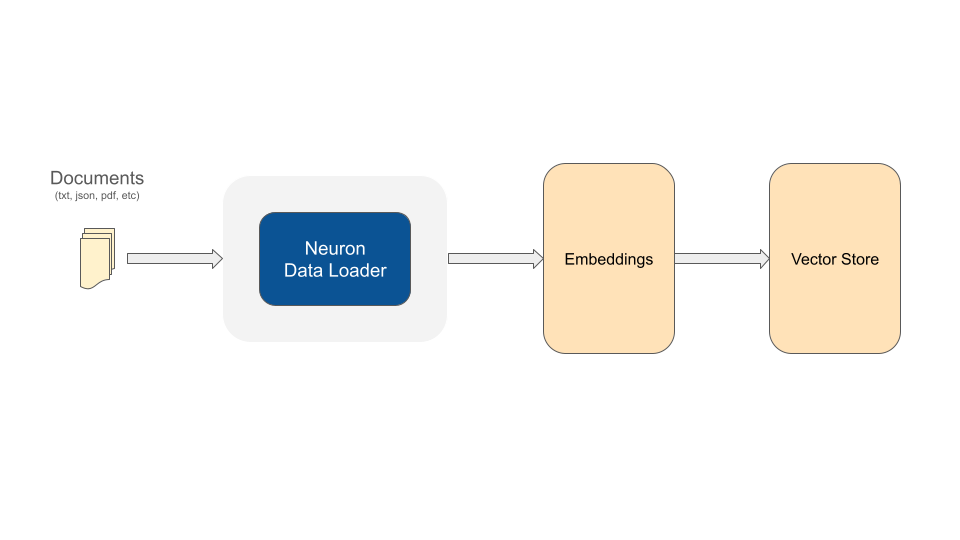
Neuron gives you several tools (data loaders) to simplify this process.
use App\Neuron\MyRAG;
use NeuronAI\RAG\DataLoader\FileDataLoader;

MyRAG::make()->addDocuments(
    // Use the file data loader component to process a text file
    FileDataLoader::for(__DIR__.'/my-article.md')->getDocuments()
);
Using the Neuron toolkit you can create data loading pipelines with the benefits of unified interfaces to facilitate interactions between components, like embedding providers, vector store, and file readers.
FileDataLoader
If you need to extract text from files the FileDataLoader allows you to process any simple text document.
By default FileDataLoader read the content of a file as it is in the file system, but not all file type are ready to be treated as simple text. Neuron provides you with the ReaderInterface and several pre-defined reader components for the most common file formats.
Notice that each file reader is associated to a file extension. So based on the input file extension the data loader will automatically use the appropriate reader.
PDF Reader
To use PdfReader you need to install the poppler utility.
HTML to Markdown Reader
To use HtmlReader you need to install the html2text composer package.
Custom Readers
You are free to create custom document readers just implement the following small interface. Once your calss implement this contract, you can pass it to the data loaders to automatically transform your documents.
StringDataLoader
If you are already getting text from your database or other sources, you can use the StringDataLoader to convert this text into documents, ready to be embedded and stored by the other Neuron components in the chain:
Document meta-data
After getting the array of documents from a data loader you can eventually attach custom meta-data to the document that will be saved in the vector store along with other document default fields:
Once you have these custom fields in the vector store you can use hybrid search for databases that support this feature.
Text Splitter
Neuron data loaders get files or text in input and generate an array of \NeuronAI\RAG\Document objects. These documents are embeddable units. The original text is split into smaller pieces of text to be converted into embeddings and saved in the vector store.
The logic data loaders use to split a long text into chunks can be customized using different strategies. Neuron has a dedicated component for this purpose called "Splitter", and it can be attached to the data loader based on the strategy you prefer or need:
DelimiterTextSplitter (default)
This is the default splitter for all data loaders.
Each of these parameters has an impact on the performance and accuracy of your RAG agent.
Max Length
Each chunk will not be longer than this value, and it will be divided into smaller documents eventually. The length can impact the accuracy of embeddings representations. The longer your units of text are, the less accurate the embeddings representation will be.
Separator
The text is first split into chunks based on a separator. By default the component uses the period character. You can eventually customize this separator by using any delimiter for your text.
Overlap
Sometimes it could be useful to bring words from the previous and next chunk into a document to increase the semantic connection between adjacent sections of the text. By default no overlap is applied.
SentenceTextSplitter
Splits text into sentences, groups into word-based chunks, and optionally applies overlap in terms of words.
MaxWords: maximum number of words per chunk
OverlapWords: number of overlapping words between chunks
Implement Custom Splitters
You can implement a custom splitting logic implementing the SplitterInterface:
You can interact with external service or create your custom logic to split a long text into smaller chunks. Once you have created your custom implementation you can use it in with the data loaders:
Load documents into a RAG
Each document carries the text to embed, its source, and any metadata required by the RAG schema. The schema is configured when defining the RAG. See Configure documents and schemas in a RAG.
Add schema metadata before ingestion
The vector store validates every document against the schema. Add required and filterable metadata after loading and before calling addDocuments().
Use the type declared in the schema. For example, an integer field requires 2026, not '2026'.
Metadata not declared in the schema is also allowed. It must contain JSON-safe values: strings, integers, floats, booleans, null, or arrays containing those values.
Undeclared metadata is stored and returned, but it cannot be used in filters.
Create documents manually
Create a Document directly when a loader is unnecessary. Setting the source makes later replacement or deletion predictable.
Split a document after adding metadata
When creating a document manually, metadata can be added before splitting. Built-in splitters copy the source and metadata to every resulting chunk.
Embed and store the documents
RAG::addDocuments() completes ingestion. It validates each document, creates its embedding, and stores it in the configured vector database.
Documents are processed in batches of 50 by default. Change the batch size when required by the embedding provider:
Schema validation happens before the embedding request. Missing required metadata or a wrong type therefore fails before consuming embedding tokens or writing partial data for that batch.
Common validation errors
Neuron rejects invalid documents before database I/O. The most common causes are:
a required field is missing or null;
a metadata value has a different type from the schema;
metadata contains an object or another non-JSON-safe value;
an application tries to use a reserved document property as metadata.
Reindex Knowledge Source
Reindexing is a hot topic in RAG system design because the practice of breaking text into chunks makes it difficult to update individual pieces of information when the content of the original knowledge changes.
In Neuron The Document class is designed to carry some metadata to help you identify the source of each piece of knowledge stored into the vector database, like sourceType and sourceName fields. Using this information you can easily update the vector store with the updated version of the content from a file previously used as a source of knowledge.
The new version of the file must have the same path and name you used originally, otherwise the documents will be added as new ones.
If sourceType and sourceName of the Documents are already present into the vector store, they will be deleted and the Documents of the new version will be saved. Other documents will be stored as usual into the vector database.
Use standalone components
In the examples below we used the RAG agent instance to process the final part of the ingestion pipeline: generate embeddings for document chunks, and store them into jthe vector database.
In alternative of take advantage of the RAG agent instance you can use the embedding provider and the vector store as standalone components. Remember that the vector store here must be same connected to the RAG agent.
With this simple process you can ingest GB of data into your vector store to feed your RAG agent.
Last updated
