




XTTSFeatured
Apps
Announcements
Updates from app maintainers.
Maestro v2.6.0 is out! Live Preview & Reference Mode long videosMaestro v2.6.0 is out! MiniMax H3 Reference Mode now supports long videos (like this stock footage) & Maestro auto-splits across seamless windows. Combine w/ Character Swap LoRA; keep the background true, or add effects.& x20; Maestro v2.6.0 Updates: • Live generation previews: Watch motion develop while rendering, with looping Tiny VAE video, pause/resume, and mobile playback. Now enabled by default. Can be turned off in settings. • Bring your own H3 checkpoints: Download compatible community models directly from the Model Browser, via URL or CivitAI, including INT4 and GGUF, with verified recipes and automatic workflow setup. • Long reference videos across windows: Load a longer source video and have Maestro advance through it window by window. Control videos and timeline soundtracks follow along, and Auto duration can follow the source.& x20; • Object and sound-effect references: Give Maestro an AT-AT image to preserve its design, or a laser-blaster sample to guide matching generated effects across windows. • LongCat in Avatar mode: A dedicated home for character animation, with anchor images, voice inputs, and single- or multi-speaker controls.

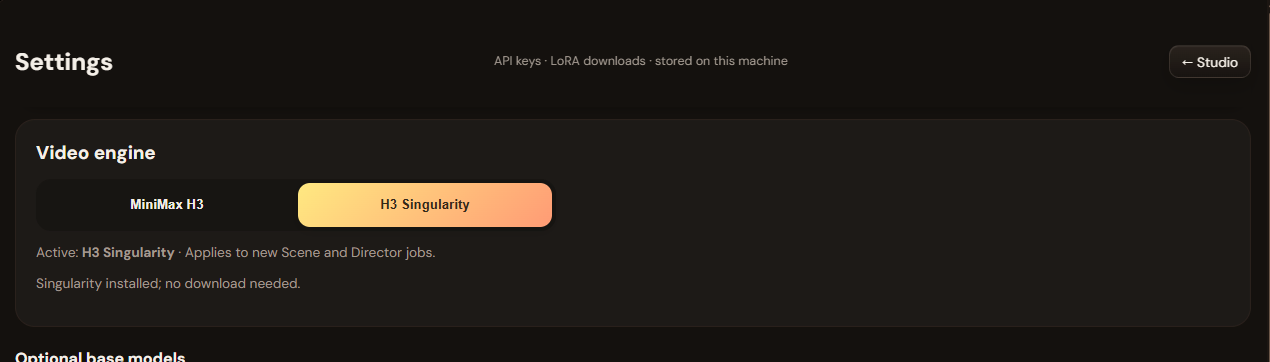
H3 Studio Singularity Update (v2026‑10‑04)A major update focused on film planning, character workflows, and reference control. - AI Director: Enter your story and target duration to create character cards, locations, and editable scenes directly inside Studio. No external JSON workflow required. - Character LoRA mode: Assign a compatible character LoRA, retain the character’s name and voice settings, and exclude previously generated card images while enabled. - Organized LoRAs: Categorized selectors, automatic trigger words from available metadata, and independent weights for up to three adapters. - Asset references in Scene and Director: Select characters, locations, creatures, and vehicles for production. Vehicle sheets include front, rear, left, and right views. - Shot review: Check your written plan and preview suggested repairs before applying them. - Optional H3 Singularity: Switch the main model from Settings. Singularity requires a separate download and remains experimental. - Interface improvements: Responsive LoRA cards, wider Settings forms, improved image deletion, and expanded English/Turkish translations. Updating: Stop Studio, select Update in Pinokio, restart, then refresh your browser with Ctrl+F5 . AI Director requires a configured LLM provider. Character likeness and continuation quality depend on the model, adapters, and references used.

Cutloom: make a finished short-form video from one topic, on your own PC Cutloom turns a topic into a vertical video for TikTok, YouTube Shorts or Reels. It writes the script, records the voiceover, finds stock footage and adds captions. You can edit every line before you export. How it works Pick a topic (or let it suggest ten). Write or generate the script, then edit any line. It matches stock footage to each scene. You can swap clips or use your own. Choose a voice, captions and optional background music. Export an MP4. What you need Windows with Pinokio (made and tested on Windows only; Mac and Linux are untested) No graphics card for the main app A free Pexels key for stock footage An OpenAI key is optional. It gives natural AI voices and AI-written scripts, at roughly a few cents per short, billed to you by OpenAI. Without it you can paste your own script and use a free built-in voice. Free and Pro Free makes 15-second videos at 720p with a small watermark. Pro is $29 one-time, with no subscription. It adds 30 and 60-second videos, 1080p, other shapes (16:9, 1:1, custom), no watermark, background music, batch mode and your own clips. There's also an optional AI-clip add-on that needs Pro. Honest limits Stock footage is matched by keywords, so some scenes will look generic. That's why every scene is editable. It can't promise views or income. Platforms reduce reach on repetitive videos, so use your own topics and facts. I'd love feedback on the install and on the first video you make: what broke, what confused you, and what's missing. Site and pricing: https://cutloom.netlify.app

Orange 1.0: ComfyUI for People Who Don't Want to Use ComfyUIA little while ago I posted about Orange , a frontend I built for turning ComfyUI workflows into simple tools. The idea is still the same: You build the complicated workflow in ComfyUI. Everybody else gets a simple app. Since the first post, most of my work has been making Orange easier to actually install, configure, and live with. Now I'm calling it Orange v1.0.0 . Pinokio is now the easy way to install it The Pinokio launcher has changed quite a bit. You can install: Orange + ComfyUI A complete managed local setup. or: Orange Only For people already running ComfyUI through Stability Matrix, another launcher, another computer, or a remote GPU server. Managed installs can also temporarily switch to an existing ComfyUI without removing the bundled one. The launcher also handles a bunch of boring-but-important stuff now: - Cleaner startup - Port conflict detection - Separate Orange and ComfyUI updates - ComfyUI rollback - Quiet terminal output - Useful generation and error activity - Full logs in the background when you actually need them First run doesn't assume what you want Fresh installs now open a setup flow that checks the connected ComfyUI first. Orange looks at the backend, GPU, nodes, and models before suggesting anything. You can use the included curated workflows, reuse compatible models you already have, download missing pieces, or skip all of it and add your own workflows. Nothing forces you into the starter setup. There's now a curated workflow library I wanted new installs to have a few useful examples without turning Orange into a giant model manager. The current library includes things like: - Z-Image Turbo - Krea 2 Turbo - FLUX.2 Klein image editing - SeedVR2 upscaling Orange checks what's already installed before downloading anything and selects appropriate model variants based on the connected hardware where possible. Workflow Preflight became a big part of Orange One of the biggest changes is Workflow Preflight . Before a workflow gets handed to users, Orange can check it against the available ComfyUI backends. It can catch things like: - Missing custom nodes - Missing models - Bad Orange mappings - Backend-specific compatibility problems - Workflow assets that aren't portable That also feeds into multi-backend routing, so Orange can avoid sending a workflow to a machine that can't actually run it. This is where I want most of the complexity to live. Not on the Generate screen. Orange can also look less like Orange There's now a full personalization system for deployments that aren't really supposed to look like my weird orange cat project. You can change the app name, tagline, colors, logos, icons, and themes. So the same Orange backend can become a branded internal image tool without rebuilding the frontend. The philosophy hasn't changed I still don't want Orange to become another generic ComfyUI parameter editor. If the workflow engineer can decide something once, the person generating an image shouldn't have to decide it every time. Models, samplers, schedulers, LoRAs, CFG, node settings, and other workflow-engineering decisions generally stay inside ComfyUI. The Orange user should get something much closer to: Prompt → Generate Everything complicated happens behind that button. Orange is now MIT licensed Orange and the Pinokio launcher are now released under the MIT License . Third-party models still keep their own licenses, so Orange also documents those separately where the curated library downloads them. v1.0 I'm calling the current version Orange v1.0.0 . Not because it's finished, but because the basic shape of the project feels settled now. From here I want to spend more time actually using it with real workflows and fixing problems that show up in real deployments instead of adding controls just because ComfyUI has them. Orange: https://github.com/saintbrodie/Orange Pinokio launcher: https://github.com/saintbrodie/orange-pinokio If you're using ComfyUI to build tools for people who should never have to look at the node graph, I'd love to hear what you're doing and what Orange is still missing.
PulseForgeFeatured
A fully local, cross-platform audio visualizer editor. Create reactive music videos with layered graphics, AI-transcribed lyrics, and frame-perfect MP4 exports — all running in your browser
TheAwaken1/PulseForgev5.0updated 15d ago
theDAWFeatured
Full-featured DAW, DJ, and VJ app interoperable w/Ableton, Reaper, Resolume & more. Stable Audio 3, Magenta RT2, Lyria 3 Pro, Suno API, Chimera track fusion, Demucs stems, MIDI generate/notate, rule-based composer (harmony, counterpoint, fugue), orchestra sound bank w/concert-hall reverb, VST3 instruments, MPE, native Audima Labs Sway support, img > spectrogram > music, drawing > music, VST3 & .gan plugins, automix & key-lock, GLSL shaders, volumetric video, Quest 3 XR interface, MIDI auto-map, RAG assistant, asset library with example projects
gantasmo/theDAW-Pinokiov7.0updated 1h ago
God's Eye ViewFeatured
A live 3D intelligence console for planet Earth.
bilawalsidhu/gods-eye-viewv3.6updated 2 min ago
MiniJamFeatured
Describe any song in plain English, compose a structured caption and lyrics locally, and generate it with MiniMax Music 3.
cocktailpeanut/minijamv7.0updated 1mo ago
MiniMax H3 ComfyUIFeatured
MiniMax H3 omni-modal video generation in ComfyUI. Text/image/video/audio in, video with native 32kHz stereo audio out (768p default, 1080p+ supported). Disk-optimized: pruned INT8 + NVFP4 weights (~63GB instead of ~290GB). NVIDIA only.
ThomasEricB/minimax-h3-pinokiov8.0updated 17d ago
SongGeneration StudioFeatured
AI Song Generation with Full Style Control - Generate complete songs with lyrics, vocals, and instrumental tracks using Tencent AI Lab's SongGeneration (LeVo) model. [NVIDIA ONLY]
6Morpheus6/SongGeneration-Studiov3.7updated 3d ago
AgentsViewFeatured
Browse, search, and analyze sessions from Claude Code, Codex, and other coding agents locally.
cocktailpeanut/agentsview.pinokiov8.0updated 2mo ago
GeoLibreFeatured
A free, open-source GIS for visualizing, exploring, and analyzing geospatial data locally in your browser.
cocktailpeanut/geolibre.pinokiov7.0updated 2mo ago
Uncensored Local StudioFeatured
Run image generation, GGUF language models, Whisper speech recognition, and Kokoro speech synthesis locally from one offline studio.
cocktailpeanut/uncensored-local-studio.pinokiov8.0updated 10d ago
MuScriptorFeatured
Local multi-instrument audio-to-MIDI transcription from Kyutai and Mirelo.
cocktailpeanut/muscriptor.pinokiov8.0.0updated 1mo ago
MaestroFeatured
An all-in-one, 100% local AI creative studio, director, and multi-track editor. Generate with MiniMax H3, LTX-2.5/2.3, Wan, Flux, Qwen, and more; turn an idea or song into a planned production; then finish it on the timeline. Requires an NVIDIA GPU (6GB+ VRAM).
Blizaine/Maestrov8.0updated 2h ago
UnderfitFeatured
LoRA fine-tuning dashboard for Stable Audio 3
cocktailpeanut/underfit.pinokiov7.0updated 2mo ago
StableDAWFeatured
Browser-based AI audio DAW for Stable Audio 3 with text-to-audio, inpainting, LoRA training, FFmpeg effects, waveform editing, sequencer, piano roll, and persistent library. https://github.com/gantasmo/stabledaw
cocktailpeanut/stabledaw.pinokiov7.0updated 1mo ago
Image to PromptFeatured
Generate editable Ideogram JSON prompts from uploaded images.
cocktailpeanut/image-to-promptv7.0updated 24d ago
IdeopromptFeatured
Describe an image, get a 100% schema-valid Ideogram 4 JSON prompt — generated fully locally with an embedded llama.cpp (no Ollama or LM Studio required).
cocktailpeanut/ideopromptv7.0updated 2mo ago
Wan2GP - AMDFeatured
[AMD ONLY] Super Optimized Gradio UI for AI video creation for GPU poor machines (6GB+ VRAM). Supports Wan 2.1/2.2, Qwen, Hunyuan Video, LTX Video, Flux and more. (On Windows supported by all dedicated AMD GPUs from RDNA 2 - RDNA 4)
6Morpheus6/wan2gp-amdv8.0updated 7d ago
OdysseusFeatured
Self-hosted AI workspace for local-first chat, agents, tools, memory, research, documents, email, and model endpoint management.
cocktailpeanut/odysseus.pinokiov7.0updated 10d ago
SearXNGFeatured
A privacy-respecting metasearch engine that runs locally.
cocktailpeanut/searxng.pinokiov7.0updated 3mo ago
TripoSplatFeatured
Image-to-3D Gaussian splat generation from VAST-AI-Research. Requires a CUDA-capable GPU.
cocktailpeanut/triposplat.pinokiov7.0updated 2mo ago