

A Jagged Array in Java is a multidimensional array in which each row can have a different number of elements. Unlike a regular 2D array, where rows usually have the same number of columns, a jagged array allows each row to have its own length.
- Each row is stored as a separate array.
- Different rows can contain different numbers of elements.
- It is useful when the amount of data varies from one row to another.
For example:
Row 0 → 10 20 30
Row 1 → 40 50
Row 2 → 60 70 80 90
Here, the rows contain 3, 2, and 4 elements respectively, making it a jagged array.
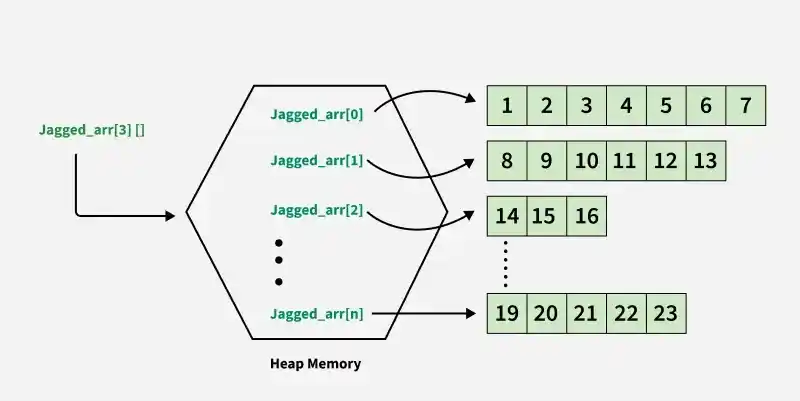
Creating a Jagged Array
First, create the outer array by specifying only the number of rows. Then, allocate a different size to each row.
class Geeks {
    public static void main(String[] args) {

        // Declare a jagged array with 2 rows
        int[][] arr = new int[2][];

        // Allocate different sizes to each row
        arr[0] = new int[3];
        arr[1] = new int[2];

        // Initialize the array
        int count = 0;

        for (int i = 0; i < arr.length; i++) {
            for (int j = 0; j < arr[i].length; j++) {
                arr[i][j] = count++;
            }
        }

        // Display the jagged array
        for (int i = 0; i < arr.length; i++) {
            for (int j = 0; j < arr[i].length; j++) {
                System.out.print(arr[i][j] + " ");
            }
            System.out.println();
        }
    }
}
Output
0 1 2
3 4
Explanation: In this example, arr[0] contains 3 elements, whereas arr[1] contains only 2 elements.
Declaration and Initialization of Jagged Array
A jagged array can be declared by specifying the number of rows while leaving the column size unspecified.
Syntax
dataType[][] arrayName = new dataType[numberOfRows][];
Different Ways to Initialize a Jagged Array
Method 1: Using new for Each Row
In this method, both the outer array and each inner array are explicitly created using the new keyword.
int[][] arr = new int[][] {
new int[] {10, 20, 30, 40},
new int[] {50, 60, 70, 80, 90, 100},
new int[] {110, 120}
};
Method 2: Omitting new int[][]
Here, Java automatically determines the outer array structure from the provided inner arrays, so new int[][] can be omitted.
int[][] arr = {
new int[] {10, 20, 30, 40},
new int[] {50, 60, 70, 80, 90, 100},
new int[] {110, 120}
};
Method 3: Using Array Initializer Syntax
This is the simplest and most concise approach, where both the outer and inner arrays are initialized directly using values.
int[][] arr = {
{10, 20, 30, 40},
{50, 60, 70, 80, 90, 100},
{110, 120}
};
Note: All three approaches create a jagged array containing rows of different lengths.Example 1: Jagged Array with Increasing Row Size
In this example, row i contains i + 1 elements.
class Geeks {
    public static void main(String[] args)
    {

        int rows = 5;

        // Declare a jagged array
        int[][] arr = new int[rows][];

        // Allocate different sizes to rows
        for (int i = 0; i < arr.length; i++) {
            arr[i] = new int[i + 1];
        }

        // Initialize the array
        int count = 0;

        for (int i = 0; i < arr.length; i++) {
            for (int j = 0; j < arr[i].length; j++) {
                arr[i][j] = count++;
            }
        }

        // Display the array
        System.out.println("Contents of 2D Jagged Array:");

        for (int i = 0; i < arr.length; i++) {
            for (int j = 0; j < arr[i].length; j++) {
                System.out.print(arr[i][j] + " ");
            }
            System.out.println();
        }
    }
}
Output
Contents of 2D Jagged Array:
0
1 2
3 4 5
6 7 8 9
10 11 12 13 14
Explanation: The first row contains one element, the second row contains two elements, and so on. Each row is allocated independently using new int[i + 1].
Example 2: Jagged Array Using User Input
The size and elements of each row can also be provided at runtime.
import java.util.Scanner;

class Geeks {
    public static void main(String[] args)
    {

        Scanner scan = new Scanner(System.in);

        System.out.print(
            "Enter the number of sub-arrays: ");
        int numberOfArrays = scan.nextInt();

        // Declare the jagged array
        int[][] jaggedArray = new int[numberOfArrays][];

        // Allocate memory for each row
        for (int i = 0; i < numberOfArrays; i++) {
            System.out.print("Enter the size of sub-array "
                             + (i + 1) + ": ");

            int size = scan.nextInt();
            jaggedArray[i] = new int[size];
        }

        // Read elements
        for (int i = 0; i < numberOfArrays; i++) {
            System.out.println(
                "Enter the elements of sub-array " + (i + 1)
                + ":");

            for (int j = 0; j < jaggedArray[i].length;
                 j++) {
                jaggedArray[i][j] = scan.nextInt();
            }
        }

        // Display the jagged array
        System.out.println("The jagged array is:");

        for (int i = 0; i < jaggedArray.length; i++) {
            for (int j = 0; j < jaggedArray[i].length;
                 j++) {
                System.out.print(jaggedArray[i][j] + " ");
            }
            System.out.println();
        }

        scan.close();
    }
}
Output:
The jagged array is:
1 2 3
5 6 7 8
6 7
1 2 3 4
Explanation: The number of rows and the size of every row are entered at runtime. Since each row is allocated separately, different rows can contain different numbers of elements.
Advantages of Jagged Arrays
- Flexible row sizes: Each row can contain a different number of elements.
- Efficient memory usage: Memory is allocated according to the number of elements required in each row.
- Runtime allocation: The size of individual rows can be determined dynamically.
- Suitable for irregular data: Useful when data naturally contains groups of different sizes.
Limitations of Jagged Arrays
- Code can be slightly more complex than with a regular rectangular array.
- Developers must use the length of each individual row while traversing the array.
- Assuming every row has the same length can cause ArrayIndexOutOfBoundsException.
Note: Jagged arrays are useful when rows naturally require different sizes. They should not be described as inherently faster than regular 2D arrays; their primary benefits are flexibility and potentially more efficient memory usage.
