Windows 11 includes a command-line tool, Store CLI, that lets you search for, install, list, and update Microsoft Store...
Tag Archive for: commands
4sysops - The online community for sys and AI ops
Windows Terminal v1.23 and v1.24: new features and installation
Microsoft has released Windows Terminal version 1.23 as a stable update, and version 1.24 as the latest preview, both...
Install Microsoft AI Shell on Mac
Microsoft has released AI Shell v1.0.0‑preview.5, which provides a Windows-only security patch, while Preview 4 delivered substantial improvements—enhanced macOS side‑pane support in...
Warp Launch Log 3: MCP support, refine prompt, image upload, reusable prompts, git support
Warp, the top terminal app with AI support, has introduced new features in its GA release, including MCP support...
Microsoft Edit: Terminal editor for Windows and Linux
Microsoft. has recently launched Edit, a lightweight terminal editor for Windows and Linux. It revives the spirit of the...
Install an MCP server in the Warp terminal
In a remarkably short period, MCP has established itself as the standard for secure and efficient connections between AI...
OpenAI Codex CLI: AI-powered assistant for the terminal?
OpenAI Codex CLI is a new open-source command-line tool that integrates AI models into any terminal. It enables you...
Game-changing new AI features for the Warp terminal: Active AI and Agent Mode
Warp, the best terminal app by far, has introduced impressive new AI features: Active AI and Agent Mode. I...
New in Windows Terminal: Restore buffers, code snippets, scratchpad and regex
Windows Terminal unveiled a range of noteworthy features in versions 1.21 and 1.22 Preview, including the capacity to retrieve...
Warp: A modern AI-powered terminal for Linux and macOS, with Windows edition on the horizon
Warp is a modern AI-powered terminal emulator that essentially allows you to execute commands in plain English. The Linux...
ShellGPT: An AI assistant for the command line
ShellGPT is an AI tool for Windows, macOS, and Linux that integrates OpenAI's GPT with standard command-line interfaces such...
Switch between Windows Terminal and the legacy console
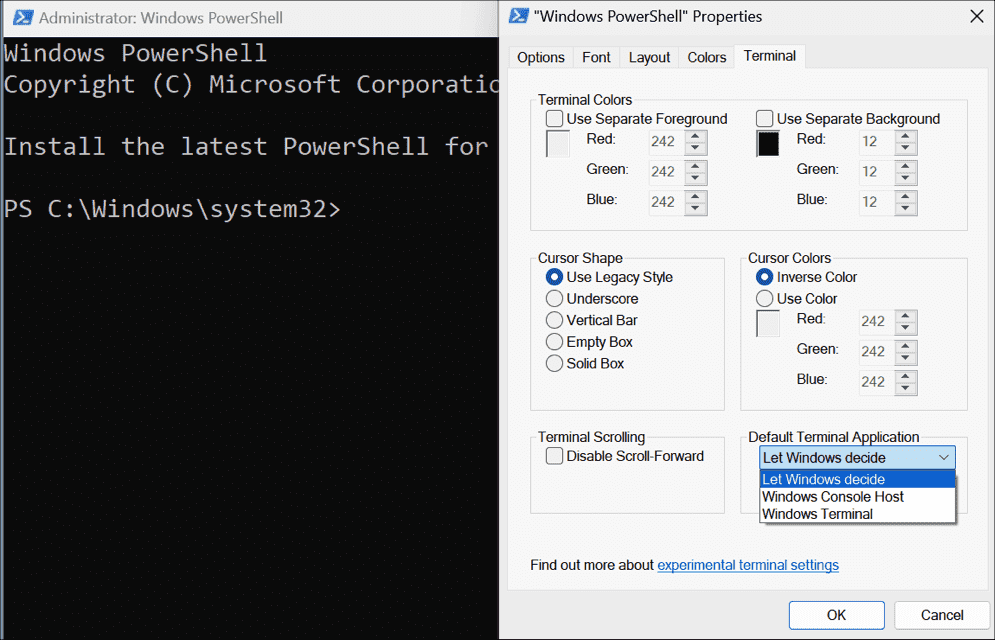
The new graphical console brings a number of improvements over the classic console host. However, for the foreseeable future,...
Ten sed command examples
Learn how to manipulate text in Linux using the powerful sed command. This post covers sed command examples of...
Sleep computer (remotely) from the command line
Sometimes, you might want to send a computer into power-saving mode remotely or from the command line. The onboard...
Kill Windows a process with Tskill and Taskkill
In my previous post, Terminate Windows processes with PsKill, I explained how to use PsKill to kill Windows processes...
PsLoggedOn: View logged-on users in Windows
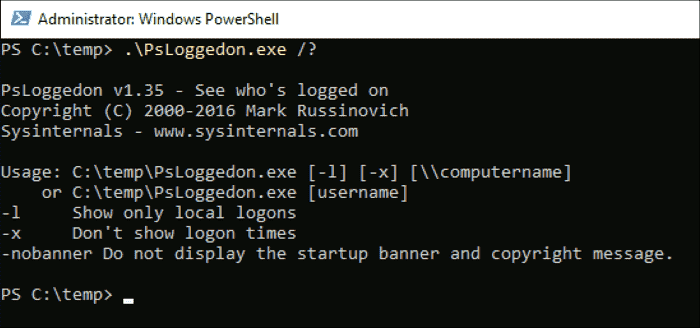
PsLoggedOn, a command line tool that is part of the Sysinternals suite, gets information about users logged on to...
Terminate Windows processes with PsKill
PsKill is a command-line tool that is part of the Sysinternals suite. As the name suggests, it allows you...
Automate file downloads with Windows FTP or curl
If you need to download files regularly from an FTP server, Windows offers two onboard tools to automate this...
PsInfo: Get disk space, installed applications, and other information about local and remote Windows systems
PsInfo, a command-line tool that is part of the Sysinternals suite, gets key information about Windows systems, such as...
How to use curl on Windows
Curl (client URL) is a command-line tool powered by the libcurl library to transfer data to and from the...

.png)