Free offline calculator for basic math
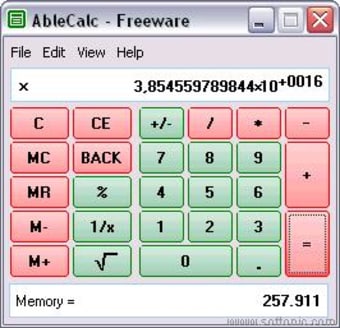
AbleCalc is a lightweight and portable calculator app designed for desktop users who need quick, no-nonsense arithmetic. It handles the core math operations—addition, subtraction, multiplication, division, and modulus—through a clean, uncluttered interface. With no menus to navigate or advanced features to sift through, it delivers exactly what it promises: fast and simple number crunching.
Because it runs as a standalone executable, AbleCalc requires no installation or internet access. It’s especially useful for older systems, shared workstations, or USB toolkits, offering a dependable offline solution when modern apps feel too bulky or unnecessary for basic math tasks.
Minimalist design with practical function
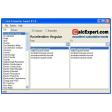
AbleCalc focuses on delivering essential math functions with clarity and zero distractions. It supports five basic operations—addition, subtraction, multiplication, division, and modulus—while avoiding scientific notation by default. Instead, it displays full numeric values, which improves readability, especially for users unfamiliar with exponential formats. A small visual symbol shows which operation is active, and a basic memory feature allows for temporary storage of values, making multi-step problems more manageable without introducing unnecessary complexity.
Portability is one of AbleCalc’s biggest strengths. The app runs as a standalone executable, meaning it requires no installation or internet access. This makes it a reliable choice for older machines, shared workstations, classroom environments, or USB-based toolkits. It launches instantly, uses minimal memory, and maintains stability throughout. The interface is stripped down to its core elements, but that’s what makes it effective—no menus to navigate, no bloated toolbars, and no setup process getting in the way of basic math.
Still, AbleCalc is a relic of its time. The last update was in 2007, and it shows. It lacks modern scaling support, looks dated on high-resolution monitors, and offers no themes, scientific functions, or customization. Users needing trigonometry, history logs, or keyboard shortcuts will have to look elsewhere. Despite these limitations, its focused design and offline reliability make it useful for quick calculations—especially when modern alternatives feel bloated or overengineered for simple tasks.
A reliable fallback for fast arithmetic
AbleCalc won’t replace advanced calculators or apps with scientific, statistical, or graphing functions, but it doesn’t try to. For users who value speed, simplicity, and offline reliability, it remains a dependable tool. Whether you’re working on a legacy machine, need a quick portable option, or just want a no-frills way to crunch numbers, this freeware classic still earns its keep—quietly doing the job without the noise of modern extras.