
-
After Effects
Flow
Flow provides a simple, clean, and intuitive curve editor to adjust your keyframe easing.
Now with multi-library support, responsive overshoot & undershoot, kbar export, and more!
Unlock special upgrade price
Please log in to see if you qualify for upgrade pricing (see upgrade notice below).
-
Trial
-
EULAEND USER LICENSE AGREEMENT
This software ("the Software Product") and accompanying documentation is licensed and not sold. This Software Product is protected by copyright laws and treaties, as well as laws and treaties related to other forms of intellectual property. The author owns intellectual property rights in the Software Product. The Licensee's ("you" or "your") license to download, use, copy, or change the Software Product is subject to these rights and to all the terms and conditions of this End User License Agreement ("Agreement").
Acceptance
YOU ACCEPT AND AGREE TO BE BOUND BY THE TERMS OF THIS AGREEMENT BY SELECTING THE "ACCEPT" OPTION AND DOWNLOADING THE SOFTWARE PRODUCT OR BY INSTALLING, USING, OR COPYING THE SOFTWARE PRODUCT. YOU MUST AGREE TO ALL OF THE TERMS OF THIS AGREEMENT BEFORE YOU WILL BE ALLOWED TO DOWNLOAD THE SOFTWARE PRODUCT. IF YOU DO NOT AGREE TO ALL OF THE TERMS OF THIS AGREEMENT, YOU MUST SELECT "DECLINE" AND YOU MUST NOT INSTALL, USE, OR COPY THE SOFTWARE PRODUCT.License Grant
This Agreement entitles you to install and use one copy of the Software Product. In addition, you may make one archival copy of the Software Product. The archival copy must be on a storage medium other than a hard drive, and may only be used for the reinstallation of the Software Product. This Agreement does not permit the installation or use of multiple copies of the Software Product, or the installation of the Software Product on more than one computer at any given time, on a system that allows shared used of applications, on a multi-user network, or on any configuration or system of computers that allows multiple users. Multiple copy use or installation is only allowed if you obtain an appropriate licensing agreement for each user and each copy of the Software Product.Restrictions on Transfer
Without first obtaining the express written consent of the author, you may not assign your rights and obligations under this Agreement, or redistribute, encumber, sell, rent, lease, sublicense, or otherwise transfer your rights to the Software Product.Restrictions on Use
You may not use, copy, or install the Software Product on any system with more than one computer, or permit the use, copying, or installation of the Software Product by more than one user or on more than one computer. If you hold multiple, validly licensed copies, you may not use, copy, or install the Software Product on any system with more than the number of computers permitted by license, or permit the use, copying, or installation by more users, or on more computers than the number permitted by license.You may not decompile, "reverse-engineer", disassemble, or otherwise attempt to derive the source code for the Software Product.
Restrictions on Alteration
You may not modify the Software Product or create any derivative work of the Software Product or its accompanying documentation. Derivative works include but are not limited to translations. You may not alter any files or libraries in any portion of the Software Product.Restrictions on Copying
You may not copy any part of the Software Product except to the extent that licensed use inherently demands the creation of a temporary copy stored in computer memory and not permanently affixed on storage medium. You may make one archival copy which must be stored on a medium other than a computer hard drive.Disclaimer of Warranties and Limitation of Liability
UNLESS OTHERWISE EXPLICITLY AGREED TO IN WRITING BY THE AUTHOR, THE AUTHOR MAKES NO OTHER WARRANTIES, EXPRESS OR IMPLIED, IN FACT OR IN LAW, INCLUDING, BUT NOT LIMITED TO, ANY IMPLIED WARRANTIES OF MERCHANTABILITY OR FITNESS FOR A PARTICULAR PURPOSE OTHER THAN AS SET FORTH IN THIS AGREEMENT OR IN THE LIMITED WARRANTY DOCUMENTS PROVIDED WITH THE SOFTWARE PRODUCT.The author makes no warranty that the Software Product will meet your requirements or operate under your specific conditions of use. The author makes no warranty that operation of the Software Product will be secure, error free, or free from interruption. YOU MUST DETERMINE WHETHER THE SOFTWARE PRODUCT SUFFICIENTLY MEETS YOUR REQUIREMENTS FOR SECURITY AND UNINTERRUPTABILITY. YOU BEAR SOLE RESPONSIBILITY AND ALL LIABILITY FOR ANY LOSS INCURRED DUE TO FAILURE OF THE SOFTWARE PRODUCT TO MEET YOUR REQUIREMENTS. THE AUTHOR WILL NOT, UNDER ANY CIRCUMSTANCES, BE RESPONSIBLE OR LIABLE FOR THE LOSS OF DATA ON ANY COMPUTER OR INFORMATION STORAGE DEVICE.
UNDER NO CIRCUMSTANCES SHALL THE AUTHOR, ITS DIRECTORS, OFFICERS, EMPLOYEES OR AGENTS BE LIABLE TO YOU OR ANY OTHER PARTY FOR INDIRECT, CONSEQUENTIAL, SPECIAL, INCIDENTAL, PUNITIVE, OR EXEMPLARY DAMAGES OF ANY KIND INCLUDING LOST REVENUES OR PROFITS OR LOSS OF BUSINESS) RESULTING FROM THIS AGREEMENT, OR FROM THE FURNISHING, PERFORMANCE, INSTALLATION, OR USE OF THE SOFTWARE PRODUCT, WHETHER DUE TO A BREACH OF CONTRACT, BREACH OF WARRANTY, OR THE NEGLIGENCE OF THE AUTHOR OR ANY OTHER PARTY, EVEN IF THE AUTHOR IS ADVISED BEFOREHAND OF THE POSSIBILITY OF SUCH DAMAGES. TO THE EXTENT THAT THE APPLICABLE JURISDICTION LIMITS THE AUTHOR'S ABILITY TO DISCLAIM ANY IMPLIED WARRANTIES, THIS DISCLAIMER SHALL BE EFFECTIVE TO THE MAXIMUM EXTENT PERMITTED.
Limitation of Remedies and Damages
Any claim must be made within the applicable warranty period. All warranties cover only defects arising under normal use and do not include malfunctions or failure resulting from misuse, abuse, neglect, alteration, problems with electrical power, acts of nature, unusual temperatures or humidity, improper installation, or damage determined by the author to have been caused by you. All limited warranties on the Software Product are granted only to you and are non-transferable. You agree to indemnify and hold the author harmless from all claims, judgments, liabilities, expenses, or costs arising from your breach of this Agreement and/or acts or omissions.Governing Law, Jurisdiction and Costs
This Agreement is governed by the laws of New York, without regard to New York's conflict or choice of law provisions.Severability
If any provision of this Agreement shall be held to be invalid or unenforceable, the remainder of this Agreement shall remain in full force and effect. To the extent any express or implied restrictions are not permitted by applicable laws, these express or implied restrictions shall remain in force and effect to the maximum extent permitted by such applicable laws.Updated: Oct 21, 2025 1:35 AM
What's Flow?
Flow gives After Effects an intuitive curve editor to adjust keyframe easing.
Gone are the days of fighting with speed & influence (what do those even mean?!), or navigating through some bloated 8000-features-in-one garbage pile to find their easing system – just make a curve, hit Apply and you're gold!
Flow is a collaboration between Zack Lovatt and renderTom.

Flow Features
Flow consists of two main components: the Graph Editor and the Library.
The graph editor is all about easing – lose AE's internal graph editor in favour of a modern, snappier, normalized environment.
The library is all about presets – have you come up with some on-brand, snappy easing curves? Have a go-to animation style and want to bring it everywhere you go? Save your curve as a preset, and build out your own custom easing libraries.
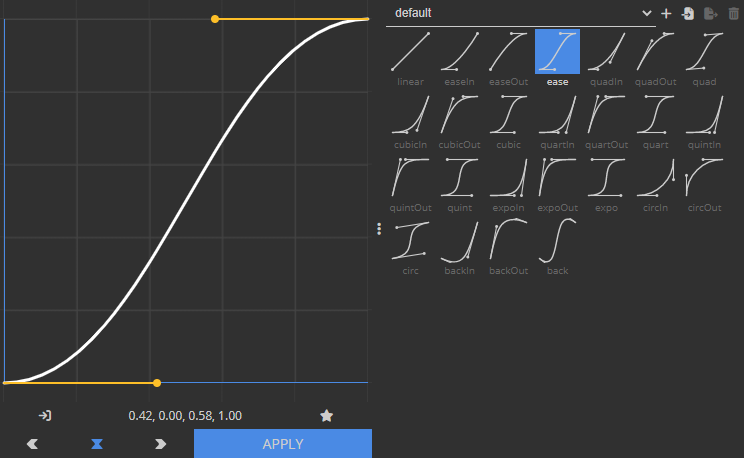
Beyond the basics, Flow lets you:
- share your library with others,
- apply curves as expressions,
- quickly copy or paste your curve as cubic bezier values,
- ditch Flow's UI altogether by exporting your library to KBar,
- and more!
New: Flow v1.5 introduces multi-library support, responsive overshoot & undershoot of graph values, dynamic controls location, kbar export, and much more!.
For further information on how to use Flow & what it can help you accomplish, check out our user guide.
Looking to kickstart your presets library?
Flow ships with 25 commonly-used animation curves, or you can download some additional preset packs below.
| Flow's built-in default presets | |


|
|

@Oddernod |
Ryan Summers' uber-mega flawless Flow Curves pack | Download |
|---|---|---|


|
||

@aembury |
Andrew Embury's extravaganza animation presets | Download |
|---|---|---|


|
||

@FoughtTheLaw |
Matthew Law's time-saving Animation Presets | Download |
|---|---|---|


|
||

@JustinLawes |
Justin's animation Presets for Flow | Download |
|---|---|---|


|
||

@Workbench_tv |
Workbench Flow's library | Download |
|---|---|---|


|
||
 |
Google's Material Design Easing Curves | Download |
|---|---|---|


|
||
Discussions
Want to talk about it?
Head over to r/aescripts to chat with fellow users about this product.
Need Support?
Please open a support ticket to be connected directly with the author of this product
Version History
1.5.2 -
Nov 8, 2023
- Error message when using an unsupported AE version
- "Sine" preset
Changed
- Control points Shift + Drag snapping logic
- "Ease" preset to uses AE's ease, not CSS ease
Fixed
- Some "Failed to load Flow" issues
- Control points jumping when starting to click & drag
- Issues when importing libraries from older versions of Flow
- KBar buttons not displaying errors properly
- KBar buttons not working on MacOS
1.5.1 -
Jul 14, 2023
- **minimum AE version raised to AE 17.5 / CC 2020!**
Fixed
- Crash when dragging elements over panel
- Dragging divider getting stuck 'on' if cursor leaves panel
1.5.0 -
Jul 9, 2023
- Multi-library support
- KBar support
- Ability to copy curves in the css `cubic-bezier()` format
- Ability to specify location of Flow Controls
- Responsive overshoot/undershoot
- Preference to set keyboard modifier behaviour in auto-apply mode
- Preference to remember behaviour when applying expressions
- Preference to remember behaviour when applying overshoots
- Preference to control when the last curve updates
Changed
- **minimum AE version raised to AE 17.0 / CC 2020!**
- Updated UI look & feel
- Updated licensing framework
- Save Preset button now indicates whether curve is already saved
- Shift + Dragging in graph editor now snaps to grid cells
- Clarified and reduced alerts & error messages
- Improved error handling experience
- Improved graph/library resizing experience
- Removed preset 'delete' hover button
- Removed 'apply as' toggle in favour of keyboard shortcut
Fixed
- Display issue when licensing banner is visible
- Issue when saving presets with unsavory characters in the name
- Issue where graph handles would sometimes get stuck behind the Graph buttons area
- Issue which caused presets to redraw when graph was closed
1.4.2 -
Jul 5, 2021
- Replaced internal docs with web docs
Fixed:
- Flow not showing up in AE 22.x (edited)
1.4.1 -
Jul 17, 2020
- Fixed issue with reserved keywords in expressions
1.4.0b -
Jan 2, 2019
- "Read Values" now tries to select a corresponding Flow library item, if one exists.
- "Read Values" on a property with a Flow expression now tries to identify the original curve applied.
- Applying a curve to an unseparated Position property now prompts you to separate dimensions.
- SHIFT + CTRL applies inverted easing. (#144)
Changed
- Adds some quality-of-life improvements to expressions.
- Updates expressions for AE 16.0 compatibility.
Fixed
- "Read Values" for Scale returning incorrect values.
1.3 -
Jul 30, 2018
- Adds “Last Curve” visualization & pref
- Adds “Edit Curve” function to update curve values
- Prefs and library now writes to disk! Allows them to sync between AE versions.
- Lots and lots and lots of optimization and code cleaning
- Library Item Resize Buttons now default on!
- Increases max size of library item icons
- Increases max graph size for super tall resolution monitors
- Improves context menu experience
- Improves Preferences section
- Improves Readme
- Upgrades to new aescripts licensing framework
- Fixes bug with ‘ease direction’ not resetting when switching between Keys and Expression
- Fixes bug with ‘apply as’ not updating from prefs properly
- Fixes expression errors when using multiple Flow expressions
1.2.2 -
May 6, 2018
1.2.1 -
Oct 24, 2017
1.2 -
Oct 2, 2017
- Adds "Apply to All" option for Expressions and Clipping alert window
- "Show Alerts" option now controls "Save Curve", "Delete Preset", "Export Library" alerts.
1.1.3 -
Jan 19, 2017
1.1.2 -
Dec 9, 2016
- Errors now prompt to create support ticket
- Fixes bug with Wacom tablets triggering drag & drop
1.1.1 -
Nov 16, 2016
1.1 -
Nov 14, 2016
- Adds Flow Settings panel & AE colour theme!
- Adds error logging
- Flow remembers last graph values, ease direction and 'apply as' state
- Revises Expressions to be cleaner & more efficient (thanks @conigs!)
- Webfonts are now local; should remove slow offline loads!
- Fixes bug with library width not filling panel properly
- Fixes bug with new lib items not being selected
- Fixes bug with Flow rarely refusing to load
- Fixes bug with the graph shrinking 14px every load
- Fixes bug with lib items not deselecting after using 'read keys' or editing values
- Fixes bug in which user could get stuck on user lib when adding EDU license
- Fixes bug in which resizing the panel adjusted font sizes inappropriately
- Fixes bug in CC14 where dragging the slider all the way right bounces back
- Fixes stutters when resizing panels and window
- Several aesthetic and optimization tweaks
1.0.2 -
Sep 21, 2016
1.0.1 -
Sep 20, 2016
- Fixes bug with 'alt' and 'mirror' mode not working together
- Fixes bug with Bezier Values dropping decimals
- Fixes bug with 'Read Key' values not saving after graph resize
1.0 -
Sep 15, 2016
Compatibility
After Effects
2026, 2025, 2024, 2023, 2022, 2021, 2020
