

Description
Tired of the limitations of the standard WordPress block editor? Plover Kit is a powerful WordPress blocks plugin that enhances the Gutenberg block editor with a beautiful pattern library, advanced custom blocks, and extensive design controls for core blocks. Add magazine layouts, table of contents, icons, animations, and more—all while keeping your site fast with its modular design. Build professional websites faster, without touching code.
🚀 Key Features & Enhancements
🎨 Advanced Core Block Controls
Go beyond the default settings. Plover Kit adds advanced design options to standard WordPress blocks like Cover, Columns, Query Pagination, Buttons, and more. Gain precise control over:
- Spacing & Sizing: Set height, width, min/max dimensions with responsive controls (Block Measures).
- Visual Styles: Apply advanced text-shadow, drop-shadow, and box-shadow (Block Shadow).
- Layout & Positioning: Control CSS Position (relative, absolute, sticky, fixed), Z-Index (CSS Position), and Display properties (CSS Display).
- Block Sticky: Make elements sticky on scroll (Block Sticky).
- Event Handler: Add custom JavaScript event handlers (click, double-click, hover, etc.) to button block for advanced interactions (Event Handler).
- Code Highlighting: Enhance the core Code block with syntax highlighting (Code Highlight).
🆕 Powerful Custom Blocks
Instantly add complex functionality with dedicated blocks:
- Magazine Layout: Elevate your WordPress site with the Magazine Layout dynamic content presentation..
- Table of Contents: Auto-generate a nested list of headings for better navigation.
- Breadcrumb: Simple, customizable breadcrumb navigation.
- Icon & Icon Button: Access a library of 2000+ free icons to enrich your design.
- Counter Block: Animate numbered counters for stats and milestones.
- Reading Time Block: Display an estimated reading time for your articles.
- Code Snippet Block (Premium): Insert saved code snippets from your Code Snippets library anywhere on the page.
💎 Complete Icon Solution
Add beautiful icons anywhere with our integrated icon system. Access a library of 2000+ free icons or upload your own SVGs.
- Icon Block: Place icons as standalone elements anywhere on the page.
- Inline Icon (Premium): Insert icons directly inside any text or heading, right alongside your words.
- Icon Button: Easily add icons to the standard Button block to make your calls-to-action pop.
- Icon Library: Manage, upload, and organize your custom SVG icons or choose from 2000+ online icons — all in one place.
✨ Dynamic & Visual Effects
Add motion and flair without slowing down your site:
- Entrance Animation: Bring elements to life as they scroll into view.
- Hover Animation: Engage visitors with interactive hover effects.
- Typing Animation: Create dynamic, eye-catching text animations.
- Shape Divider: Craft beautiful visual separations between sections.
- Particles Effect: Add subtle, modern background particle effects to your design.
- Rough Notation: Mimic hand-drawn annotations like circles and underlines.
- Preloader: Display animated elements while your site content loads.
🧩 Time-Saving Libraries
- Pattern Library: Insert ready-made, professional layouts with a single click.
- Icon Library: Choose from 2000+ online icons or upload and manage your own custom SVG icons.
- Code Snippets: Create and insert HTML, JavaScript, or CSS snippets to site header or footer section like Google Analytics code, AdSense Code, Facebook Pixels code, and more. No more editing theme files such as
header.php— your code stays safe even when switching themes.
Why Choose Plover Kit?
- Modular Design: Activate only the features you need for optimal performance.
- Built for the Block Editor: Seamlessly integrates with WordPress and most block themes.
- Unlocks Design Potential: Turns the block editor into a true page builder alternative.
Privacy
The following features of this plugin require access to our external services.
- Icon Library
- Pattern Library
Read Privacy policy and Terms & Conditions of this plugin.
Screenshots
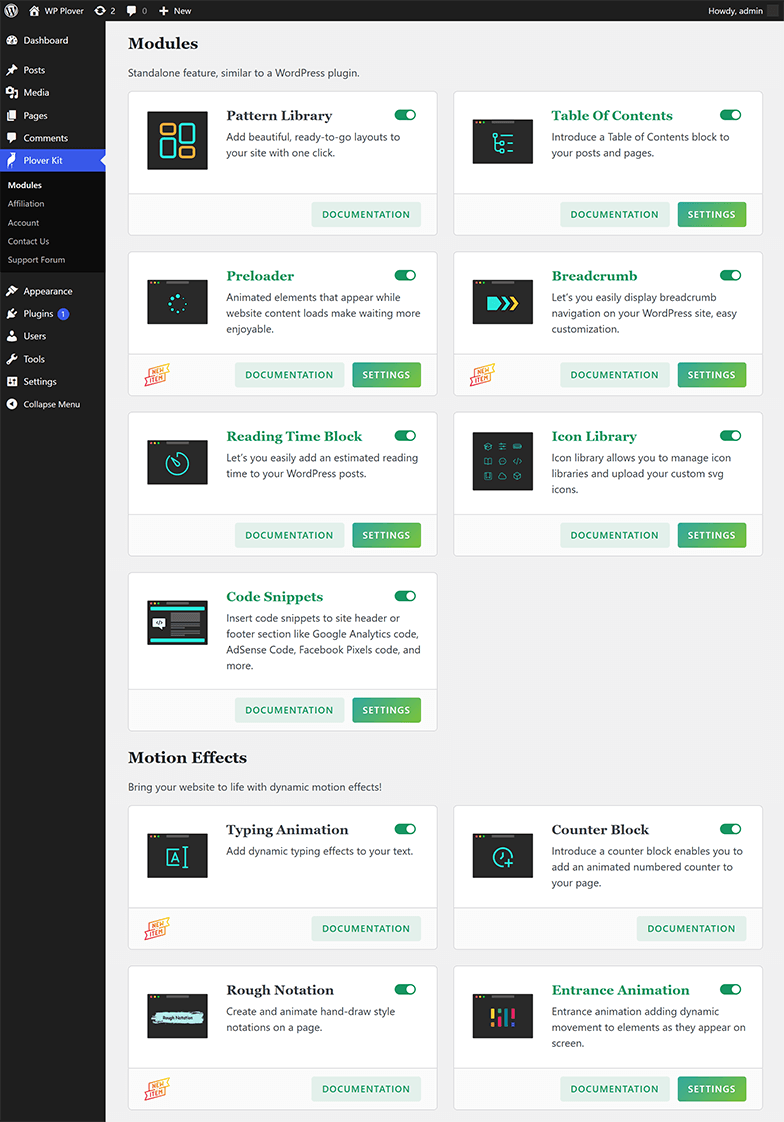
Plover Kit Modules Screen 
Pattern Library 
Icon Tools 
Icon Library 
Magazine Layout Block 
Particles Effect 
Hover animation 
Typing Animation 
Entrance Animation 
Counter Block 
Rough Notation 
Table of Contents 
Breadcrumb Settings 
Shape Divider 
Code Highlight Options and Preview 
Preloader 
Block Shadow Preview 
Block Sticky Options 
JavaScript Event Handler


Blocks
This plugin provides 6 blocks.
- Plover: Table of Contents Add a Table of Contents block to your posts and pages.
- Plover: Reading Time Let’s you easily add an estimated reading time to your WordPress posts.
- Plover: Breadcrumb Let’s you easily display breadcrumb navigation on your WordPress site, easy customization.
- Plover: Code Snippet Insert code snippets to current post
- Plover: Counter Add an animated numbered counter to your page
- Plover: Patterns Add beautiful, ready-to-go layouts to your site with one click.
FAQ
-
Does Plover Kit work with any WordPress theme?
-
Yes. Plover Kit is built for the block editor (Gutenberg) and works with any modern WordPress theme that supports blocks, including classic themes with the block editor enabled. For the best experience, we recommend using a block theme like Plover Themes, Twenty Twenty-Four, or any other FSE-compatible theme.
-
Will Plover Kit slow down my website?
-
No. Plover Kit follows a modular design – you only enable the modules you actually need. Unused modules are completely disabled and do not load any code on your site. This ensures optimal performance and minimal impact on page speed.
-
Do I need coding skills to use Plover Kit?
-
No coding required. All features are designed to be used directly within the WordPress block editor – no shortcodes, no custom PHP, no editing theme files. You can add icons, animations, layout controls, and more with just a few clicks.
-
The free version includes most basic features, while some advanced options and modules require upgrading to the premium version. The Premium customers also receive priority and private technical support.
Check our Free vs Premium page for details.
-
Can I use Plover Kit with other page builders (Elementor, Beaver Builder, etc.)?
-
Plover Kit is specifically designed for the WordPress block editor (Gutenberg). While it may coexist with other page builders, its features are only available when editing with blocks. We recommend using it with block-based themes and workflows.
-
How do I enable or disable specific modules?
-
After installing and activating the plugin, go to Plover Kit Modules in your WordPress admin. You’ll see a list of all available modules with toggle switches. Simply turn on the ones you need and turn off the ones you don’t.
-
Does Plover Kit collect any data? / What about privacy?
-
Some features like Icon Library and Pattern Library fetch content from our external servers to provide up-to-date icons and patterns. No personal data is collected. You can review our full Privacy policy and Terms & Conditions.
-
I’m missing a feature. Can I request it?
-
Absolutely! We love feedback. Please visit our support forum or contact us via our website to suggest new features.
-
Is there a multi-language support?
-
Yes. Plover Kit is translation-ready and has been translated into several languages. You can contribute translations via translate.wordpress.org.
-
How do I get support?
-
For free users, please use the WordPress.org support forum. Premium users get priority support via email – check your purchase receipt for details.
Reviews


Contributors & Developers
“Plover Kit – Blocks, Patterns, and Gutenberg Editor Enhancements” is open source software. The following people have contributed to this plugin.
Contributors
“Plover Kit – Blocks, Patterns, and Gutenberg Editor Enhancements” has been translated into 1 locale. Thank you to the translators for their contributions.
Translate “Plover Kit – Blocks, Patterns, and Gutenberg Editor Enhancements” into your language.
Interested in development?
Browse the code, check out the SVN repository, or subscribe to the development log by RSS.
Changelog
1.5.10
- Add: Premium inline icon text format
- Add: Z-Index control for particles block
- Ref: Update icon library design
- Ref: Update core to v1.2.9
- Fix: .icon-library-not-available style error
- Fix: Table of Contents JavaScript scrolling Invalid ID Error
- Fix: Rough Notation may cause editor errors in certain situations
1.5.9
- Ref: Update icon library design
- Ref: Update core to v1.2.8
1.5.8
- Ref: Update core to v1.2.7
- Add: New magazine layout module
1.5.7
- Ref: WordPress v6.9 compatible
- Ref: Update Freemius SDK
- Fix:
sprintfmissing in toc extension
1.5.6
- Add: New Preloader module
- Ref: Update Freemius SDK
1.5.5
- Ref: Update core to v1.2.5
- Ref: Update Freemius SDK
- Add: Premium breadcrumb module
1.5.4
- Ref: Update core to v1.2.4
- Ref: Update Freemius SDK
- Fix: Counter block alignment error
1.5.3
- Add: New Rough Notation Module
- Fix: Nonce check error when importing patterns
1.5.2
- Add: Premium typing animation module
- Ref: Update core to v1.2.2
- Fix: Dashboard translation error
1.5.1
- Add: Premium reading time block
- Ref: Update core to v1.2.1
- Fix: Image and button shadow errors
1.5.0
- Add: New counter block
- Add: Premium entrance options and animations
- Add: Premium hover animations
- Ref: Update core to v1.2.0
- Ref: Update Freemius SDK
1.4.0
- Add: Premium css display options
- Add: New Block Measures premium module
- Add: New Shape Divider module
- Add: New Particles Effect module
- Add: New CSS position module
- Ref: Improve the pattern library user experience
- Fix: Responsive values not working on frontend
- Fix: Pattern Library performance issues
1.3.4
- Add: Affiliate page
- Ref: Disable theme promotion on module setting page
- Ref: Update core to v1.0.16
1.3.3
- Add: Plover theme suggestion
- Fix: Remove extra slash from url
- Ref: Remove WP_Filesystem dependence
- Ref: Update Freemius SDK
- Ref: Update core to v1.0.15
1.3.2
- Add: TOC scroll offset (Premium)
- Add: TOC JavaScript scrolling (Premium)
- Add: TOC indent size support (Premium)
- Add: More TOC list style (Premium)
- Add: Heading linkable (Premium)
- Fix: TOC crashes under WP6.4
- Ref: Update core to v1.0.13
1.3.1
- Fix: SVN error
1.3.0
- Add: New table of contents module
1.2.6
- Ref: Update core to v1.0.9
- Fix: Editor performance issues
1.2.5
- Ref: WP6.7 compatible
- Ref: Update core to v1.0.8
- Fix: https://wordpress.org/support/topic/missing-plus-button-for-new-posts-when-the-plugin-is-active/
1.2.4
- Add: Exclude code snippet by post types (Premium)
- Add: Exclude code snippet by author (Premium)
- Add: Exclude code snippet by posts, pages or products (Premium)
- Add: Code snippet shortcode or snippet block for individual pages or posts (Premium)
1.2.3
- Ref: Update core to v1.0.7
1.2.2
- Fix: Resource url is broken in edge case
- Ref: Update Freemius SDK
- Ref: Update core to v1.0.6
1.2.1
- Ref: Update code snippet status error
1.2.0
- Add: New Code Snippets module, https://wpplover.com/docs/plover-kit/modules/code-snippets/
- Ref: Avoid enqueuing core styles on frontend
- Ref: Update core to v1.0.5
1.1.2
- Fix: Pattern library empty list error
- Ref: Ready for plover theme
- Ref: Update Freemius SDK
- Ref: Update core to v1.0.4
- Ref: Update dashboard design
1.1.1
- Ref: Import pattern icons
- Fix: Icon editor preview error
1.1.0
- Add: Pattern library
1.0.1
- Ref: Guideline compatible
1.0.0
- Hello Word!
