

Descrição
Loggedin is a lightweight WordPress plugin that lets you easily limit the number of simultaneous active sessions a user can have. This is a crucial feature for membership sites, online courses, and other platforms where you need to prevent users from sharing their accounts.
🎁 Features
- Set Global Limits: Define a maximum number of concurrent logins for all users.
- Flexible Login Behavior: Choose to either block new logins when the limit is reached or automatically log out the oldest session to allow a new one.
- Prevent Account Sharing: By limiting sessions, you can effectively stop users from sharing their login credentials with others.
- Admin Control: Easily force log out a user from the admin dashboard, giving you full control over active sessions.
- Developer-Friendly: The plugin is built with a hook-based architecture, making it highly customizable and extensible for developers.
📦 Addons
Enhance LoggedIn’s functionality with these simple yet powerful add-ons.
-
Limit Per User: For more granular control, the Limit Per User addon allows you to set specific login limits for individual users, overriding the global settings. This is perfect for offering different tiers of access or special privileges.
-
Real-time Logout: This add-on ensures a truly seamless experience by checking for logouts in real time. When a user’s session is terminated in the background due to a login limit, the add-on will automatically refresh their page, instantly restricting access.
🐛 Bug Reports
Found a bug? We welcome your bug reports! Please report any issues directly on the Loggedin GitHub repository.
Please note: GitHub is for bug reports and development-related issues only. For support, please use the WordPress.org support forums.
Capturas de tela
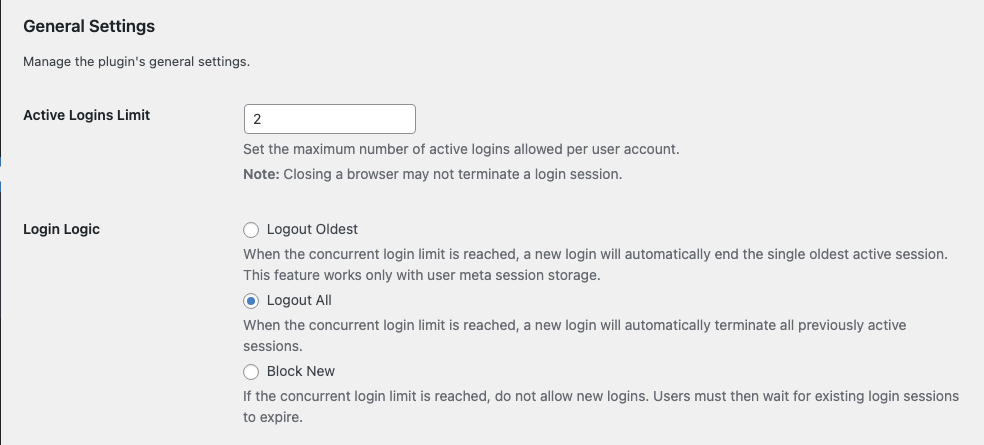
Settings 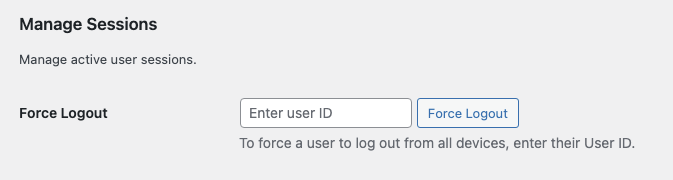
Manage Sessions


Instalação
- Install Loggedin either via the WordPress.org plugin repository or by uploading the files to your server. (See instructions on how to install Loggedin)
- Activate the plugin.
- Go to Users > Loggedin to configure it.
Perguntas frequentes
-
Where can I find the settings for Loggedin?
-
You can find the plugin settings by navigating to Users > Loggedin in your WordPress admin dashboard.
-
What are the available login logic options?
-
Currently, the plugin offers three built-in login logic options:
- Logout Oldest: When a user reaches the login limit, their oldest active session will be automatically terminated to allow for the new login.
- Logout All: All other active sessions for the user will be logged out when a new session is started.
- Block New: The new login attempt will be blocked if the user has already reached the maximum number of active sessions.
Additional logic options can be added using third-party plugins or custom code. For more details, see our documentation here.
-
How long does a login session last?
-
The duration of a login session is determined by WordPress’s default settings.
- If the “Remember Me” box is checked during login, the session will last for 14 days.
- If the “Remember Me” box is not checked, the session will last for 2 days.
You can customize this duration using the
auth_cookie_expirationfilter. Here’s an example of how to set the session to one month:function custom_auth_cookie_expiration( $expire ) { return MONTH_IN_SECONDS; // Sets the session to one month } add_filter( 'auth_cookie_expiration', 'custom_auth_cookie_expiration' ); -
What if a user has reached the login limit but doesn’t know which devices are active?
-
Administrators can forcefully log a user out of all their active sessions from the dashboard.
- Find the user’s WordPress ID.
- Go to Users > Loggedin in your WordPress admin panel.
- Navigate to the Manage Sessions section.
- Enter the user ID and click the Force Logout button to end all of their active sessions.
-
Can I bypass the login limit for specific users or roles?
-
Yes, you can bypass the limit for certain users or roles by adding a few lines of code to your theme’s
functions.phpfile or a custom plugin.To bypass specific user IDs, use the following code:
function loggedin_bypass_users( $bypass, $user_id ) {
    // Add the user IDs you want to bypass to this array.
    $allowed_users = array( 1, 2, 3, 4, 5 );
    return in_array( $user_id, $allowed_users );
}

add_filter( 'loggedin_bypass', 'loggedin_bypass_users', 10, 2 );
To bypass specific user roles, use this code:
function loggedin_bypass_roles( $prevent, $user_id ) {
    // Add the roles you want to bypass to this array.
    $allowed_roles = array( 'administrator', 'editor' );
    $user = get_user_by( 'id', $user_id );
    $roles = ! empty( $user->roles ) ? $user->roles : array();
    return ! empty( array_intersect( $roles, $allowed_roles ) );
}

add_filter( 'loggedin_bypass', 'loggedin_bypass_roles', 10, 2 );
Avaliações


Colaboradores e desenvolvedores
“Loggedin – Limit Concurrent Sessions” é um programa de código aberto. As seguintes pessoas contribuíram para este plugin.
Colaboradores

Loggedin – Limit Concurrent Sessions” foi traduzido para 5 localidades. Agradecemos aos tradutores por suas contribuições.
Traduzir o “Loggedin – Limit Concurrent Sessions” para seu idioma.
Interessado no desenvolvimento?
Navegue pelo código, consulte o repositório SVN ou assine o registro de desenvolvimento por RSS.
Registro de alterações
2.0.4 (02/01/2026)
👌 Improvements
- Review notice check.
🐛 Bug Fixes
- Invalid nonce action prevents notices from being dismissed.
2.0.3 (09/12/2025)
👌 Improvements
- Remove debug code.
2.0.2 (11/11/2025)
🐛 Bug Fixes
- Nonce verification for Force Logout.
- Uninstall cleanup.
2.0.1 (11/11/2025)
🐛 Bug Fixes
- Fatal errors.
- Empty addons page.
2.0.0 (10/11/2025)
📦 New
- Settings page
- Addons
- Logout Oldest logic – Thanks #19.
👌 Improvements
- Coding standards.
- Sanitization.
1.3.2 (01/10/2024)
🐛 Bug Fixes
- Security fixes.
1.3.1 (19/09/2020)
👌 Improvements
- Support ajax logins – Thanks Carlos Faria.
1.3.0 (28/08/2020)
👌 Improvements
- Improved “Allow” logic to check only after password check.
1.2.0 (07/06/2019)
📦 New
- Added ability to choose login logic.
1.1.0 (06/06/2019)
📦 New
- Added ability to force logout users.
- Added cleanup on plugin uninstall.
- Added review notice.
👌 Improvements
- Code improvement
1.0.1 (02/07/2016)
🐛 Bug Fixes
- Fixing misspelled variable.
1.0.0 (16/06/2016)
📦 New
- Initial version release.
