February 2026 Improvements

Fixes

As part of our ongoing commitment to quality and responsiveness, we’ve addressed a number of issues reported by a few users in specific scenarios. These updates ensure a smoother, more reliable experience across the platform.

  1. AdvanceCM Invoices – Previously, the Tokeet logo appeared on AdvanceCM-generated invoices. This is now fixed; the AdvanceCM logo displays correctly.

  2. VRBO Reviews – Reviews were not appearing in the Booking > Reviews tab for VRBO bookings for few users. This issue is now resolved.

  3. Registration – Invalid email error messages were shown even after updating to a correct email address. This is now resolved.

  4. Task Automation – Status was not being displayed in automated tasks. It was observed by one user account & this is now fixed.

  5. Inquiries – Custom Channel Source was not displayed correctly in Inquiries and Booking Details; this is now corrected.

  6. Applied Discounts – Previously, updating a booking would remove applied discounts. It was observed by one user account and this issue has been resolved.

  7. [Booking details-Source field issue] Custom Channel Source Not Displayed Correctly in Inquiries and Booking Details for some user accounts which is fixed now.

  8. Hold Events – Fixed an issue where hold events could not be saved when recurring was enabled for one user account.

  9. Task Logs – Logs now accurately maintain all actions performed by vendors via the Vendor App.

  10. Automations – Rentals that were restricted for inquiry automations are no longer receiving emails.This was observed for some scenarios.

  11. iCal Export Timezone Bug – Corrected a one-day date shift issue for non-UTC timezones when external systems import the Tokeet iCal feed for one user account.

  12. Checkin Integration – Fixed an error that occurred when enabling rentals in the Chekin Integration

  13. Cost Estimator Issue – Resolved a problem where estimates for the Website rate category were showing the Default Rate. Now only the correct rate category is applied.

  14. Currency Display – Fixed an issue where users with ZAR as the default currency were still seeing USD on the Security Deposit page.

  15. [Inbox] In some scenarios users were unable to drag and drop file as attachment, this is fixed now.

Improvements & features

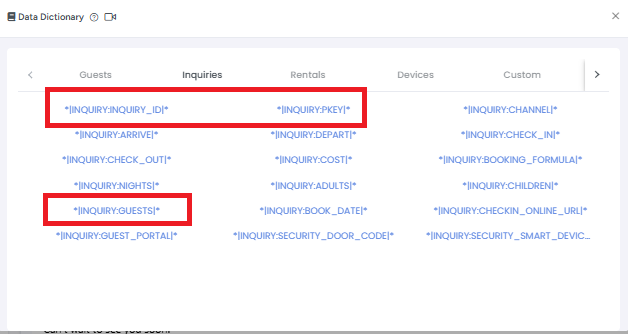
  1. New Data Dictionary Tokens Added

    We’ve added new Data Dictionary Tokens to give you more flexibility and context when working with guest messages and automations.

    What’s new:

    • Access Tokeet’s Internal Inquiry ID directly in guest messages and automations

    • Fetch the Channel Listing Inquiry ID for better cross-platform reference

    • Use the Total Guest Count token, including both adults and children, for any specific inquiry

    These new tokens make automations more powerful and help personalize and manage guest communication more effectively.
    Image

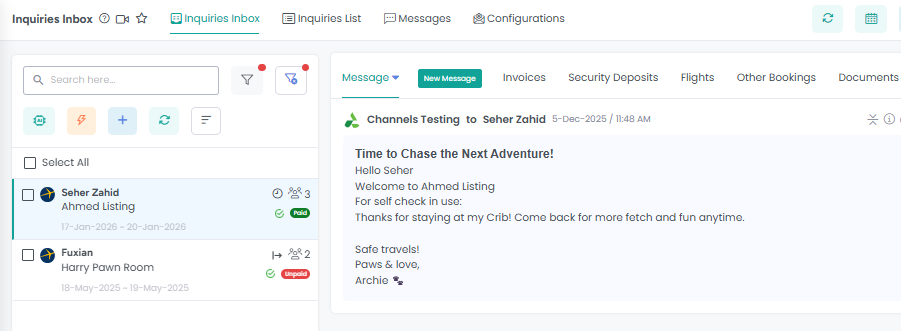
2. Inbox UI Improvement

We’ve improved the Inbox experience in AdvanceCM by relocating the action buttons from the bottom-right corner to be adjacent to the active tabs.

Why this matters:

  • Faster access to actions while working in the Inbox

  • Improved usability and workflow efficiency

  • Cleaner and more intuitive interface aligned with active tabs

This update makes managing conversations quicker and more seamless

Image

3. AI Documents Limit Increased

We’ve increased the AI Documents limit in Knowledgeable, allowing you to add up to 300 documents.

What’s improved:

  • Upload and manage up to 300 documents in Knowledgeable

  • Greater flexibility for building richer AI-powered knowledge bases

  • Improved support for larger and more complex documentation sets

This enhancement helps you get even more value from AI-driven documents and automations.

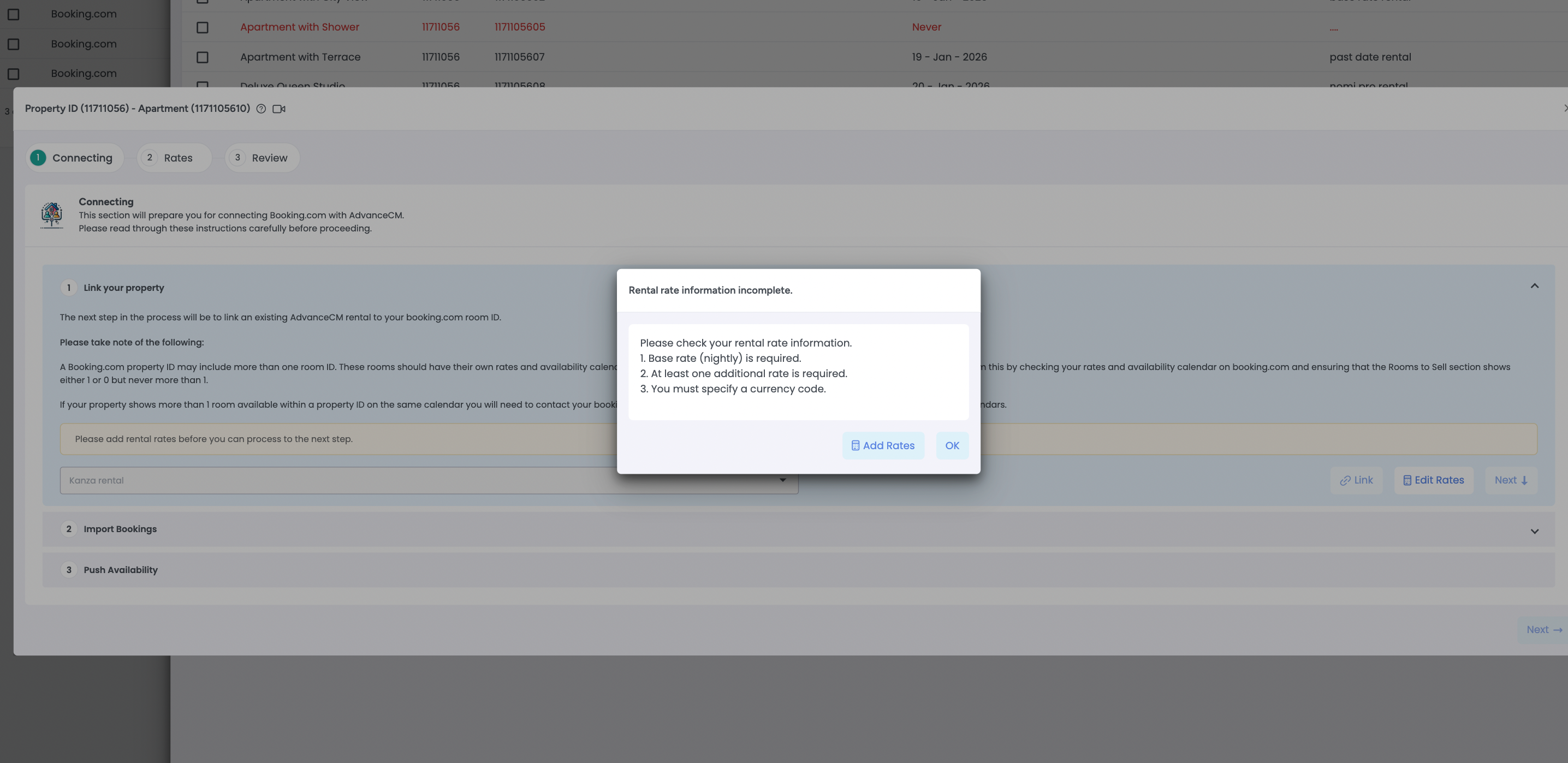
4- Channel Connection Wizard Validation Update

We’ve improved the Channel Connection Wizard for API-based channels (Airbnb, Booking.com, Expedia, Agoda, and others) to ensure a smoother and more successful connection process.

What’s new:

  • The wizard now validates that required rates are configured before allowing a rental to be linked

  • If no rates are found, we are showing a warning message to prevent connection issues

  • Users are guided to add rates directly within the wizard, without needing to exit the connection flow

This update helps prevent setup errors, reduces failed channel connections, and streamlines onboarding.
Image

4- Expedia Bookings – Reviews Tab Added
A new Reviews tab is now available in Booking Details for Expedia bookings, making it easier to view and manage guest reviews directly within the booking flow.

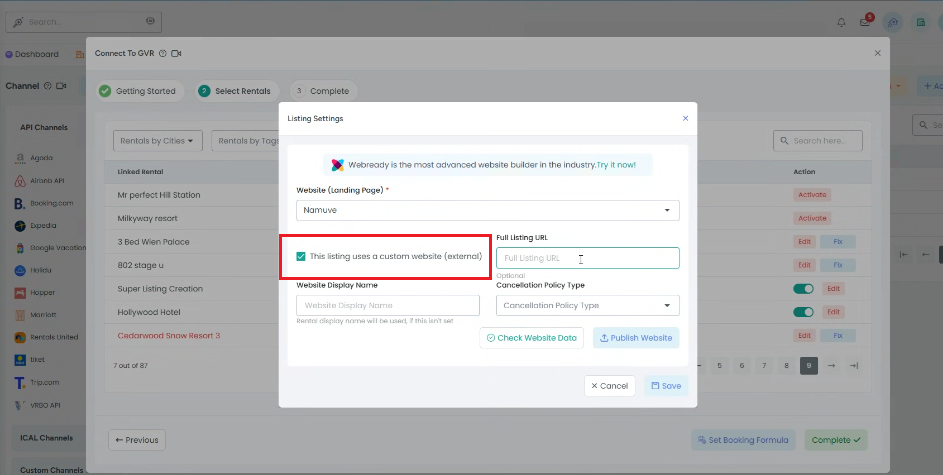
5- Google Vacation Rentals (GVR) Integration Enhanced
The GVR integration now supports properties using a custom website, while allowing the Tokeet Booking Engine to function as the official GVR landing page. This improves flexibility and expands distribution options without changing your booking setup.
Image

AdvanceCM Mobile App — New Features & Enhancements

We’ve introduced several powerful updates to the AdvanceCM Mobile App to help you manage finances, bookings, and guest communication more efficiently—anytime, anywhere.

What’s new:

  • Extras Module
    Add and manage extras directly from the mobile app.

  • Charges Module
    Create and manage additional charges on the go.

  • Discounts Module
    Apply and manage discounts directly from the mobile app.

  • Expense Module
    View and manage expenses directly within the mobile app.

  • Autopilots
    Access and manage Autopilot-related actions on the go.

  • Invoice Payments
    Charge invoices directly from the mobile app for faster and more convenient payment collection.

  • Cost Estimator
    Generate accurate booking cost estimates from your mobile device.

  • Messages Module Improvements

    • Copy and paste text in guest messages

    • Tap a guest’s phone number to automatically open WhatsApp (if installed)

These updates make the AdvanceCM Mobile App more powerful, flexible, and aligned with your day-to-day operational needs.

  • Rate Push

    Push mapped rates, push availability, enable/disable auto sync inside Mobile App now.

📥 Download the AdvanceCM Mobile App:

Stay connected and manage your business wherever you are.

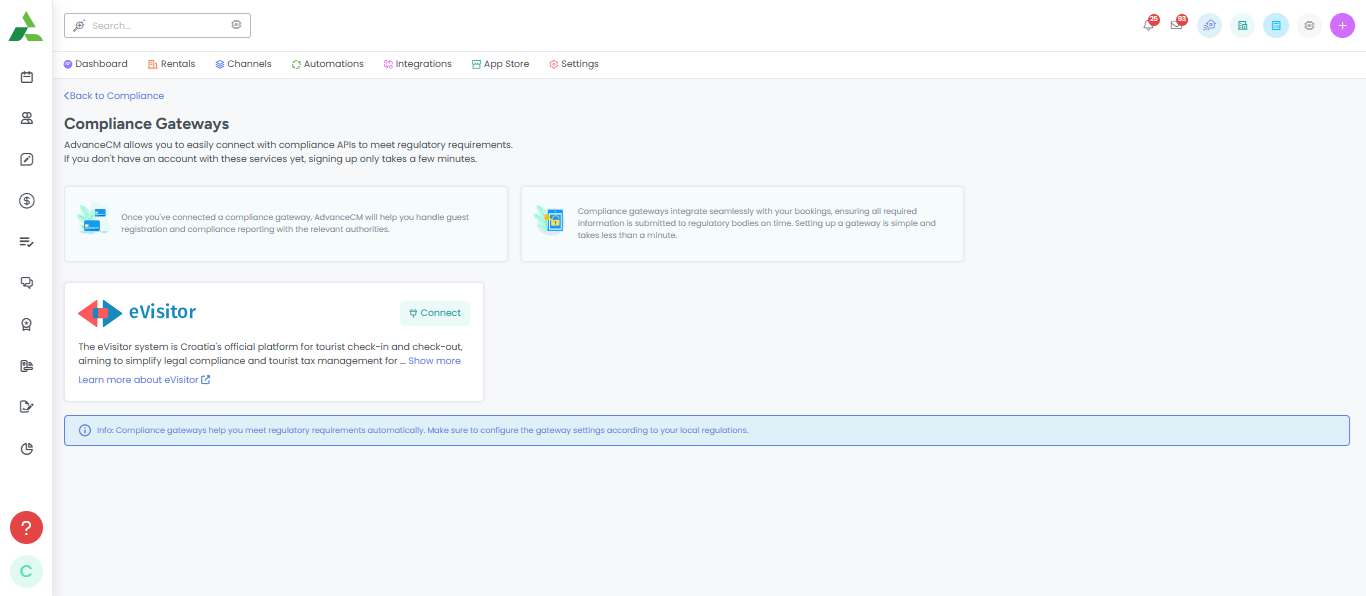
New Integration: eVisitor Now Available in AdvanceCM

We’ve introduced a new eVisitor integration in AdvanceCM to help hosts and property managers in Croatia streamline guest registration and stay compliant with local regulations.

Key Features:

  • Automatic Rental Sync: Push your properties from AdvanceCM to E-Visitor in just a few clicks.

  • Guest Information Sync: Automatically send guest registration data (check-ins/check-outs) to E-Visitor.

  • Reduced Errors: Avoid manual data entry and ensure all information is accurate and compliant.

  • Time-Saving: Streamline your operations by automating regulatory reporting.

This update makes guest registration easier by managing everything directly from AdvanceCM.

Image

Learn more about this integration here

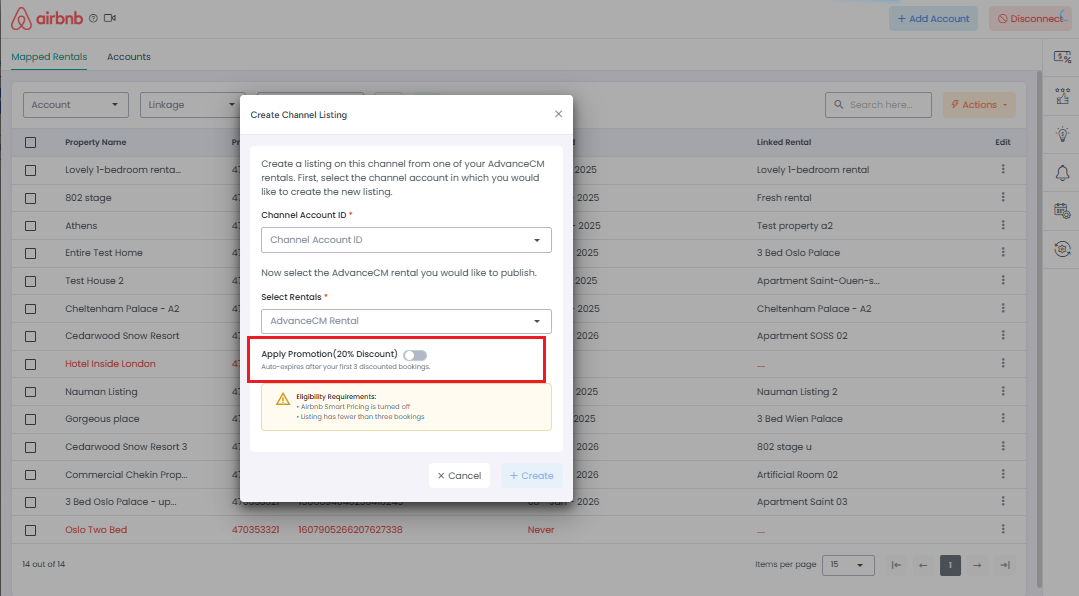
New Feature: Airbnb New Listing Promotion support in AdvanceCM (20% Off)

We’ve added support for Airbnb’s New Listing Promotion in AdvanceCM!

Hosts can now enable a 20% discount on the first three bookings for eligible new Airbnb listings—directly from AdvanceCM. This promotion is fully synced with Airbnb and follows the same rules and behavior you see on Airbnb.

What’s included:

  • Apply the 20% New Listing Promotion from Price Settings for existing listings (If listing has less than 3 bookings)

  • Enable the promotion during listing creation in AdvanceCM

  • Automatic eligibility checks (Smart Pricing OFF, fewer than 3 bookings)

  • Real-time sync with Airbnb via the Promotions API

  • Auto-expiration after 3 discounted bookings, with clear status updates

This update helps new listings gain visibility and secure bookings faster—without leaving AdvanceCM.

Image

Learn more about this integration here

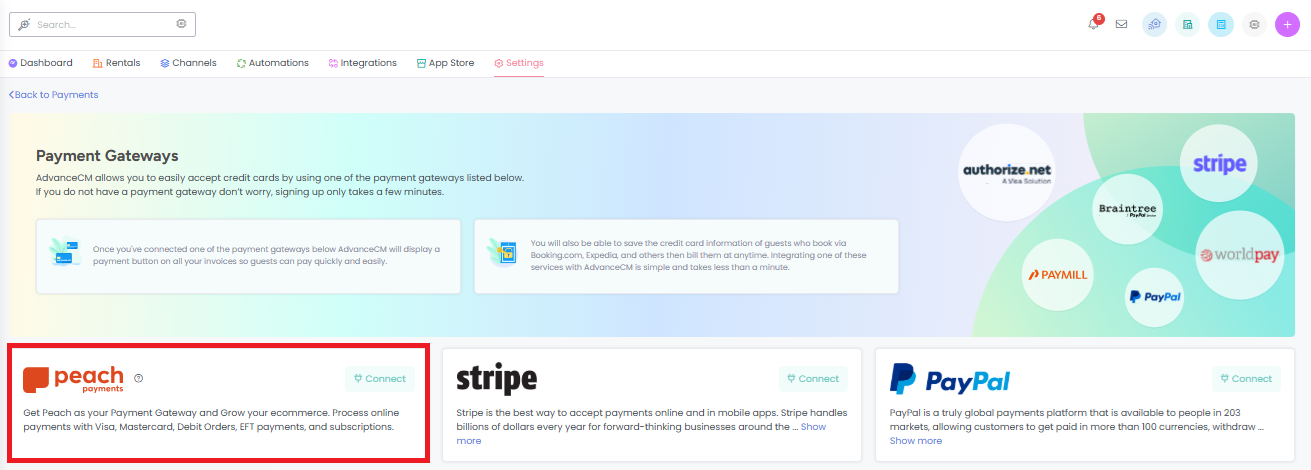
New Integration: Peach Payments with AdvanceCM

We’re excited to announce that AdvanceCM now integrates with Peach Payments, enabling South African and Kenya customers to accept secure online payments seamlessly.

Key Benefits:

  • Accept payments from multiple methods including credit/debit cards.

  • Streamline your property management by linking payments directly to AdvanceCM.

  • Reduce manual processing and improve financial accuracy.

Getting started is easy — connect your Peach Payments account in AdvanceCM Integrations and start accepting payments today!

Image

Learn more about this integration here

December Improvements

Fixes

As part of our ongoing commitment to quality and responsiveness, we’ve addressed a number of issues reported by a few users in specific scenarios. These updates ensure a smoother, more reliable experience across the platform.

  1. Marriott Primary Image Issue: Fixed an issue where the primary image set in the Rentals → Gallery tab was not appearing correctly.

  2. Website Currency Mismatch: Resolved an issue where the AdvanceCM website displayed USD instead of the configured EUR currency for a user account.

  3. Smart Devices Automation: Fixed incorrect listing information being pulled in the “Code first used” automated message.

  4. Inquiry List View: Remaining Amount in booking rows now updates correctly without requiring a full page refresh.

  5. Inquiry Detail Overlay: Restored visibility of the Add Invoice button in the Invoices tab.

  6. Incident Module: Fixed the Incident AI Settings button not being clickable for test accounts.

  7. AI Actions: Resolved an issue where tasks created via AI were not opening in certain scenarios.

  8. Reviews Dashboard: Corrected the count displayed in the Overall Average tile.

  9. ACM Registration: Fixed the Send me the code button not working for some users.

  10. ACM Registration: Resolved missing Download AdvanceCM SMS after code verification in specific cases.

  11. AdvanceCM Dashboard: Fixed booking count mismatches between the Dashboard and Inquiries list view.

  12. Booking.com Listing Editing: Resolved internal server errors occurring when adding or editing products in limited cases.

  13. Payment Gateway Activity Logs: Status column now displays correct descriptive text instead of 0/1.

  14. Automations: Fixed TV3 App triggers not functioning correctly within the AdvanceCM platform for some accounts.

  15. VRBO Channel – Gallery Images Issue
    An issue in the VRBO channel connection wizard caused image uploads to fail due to a frontend error, even when valid images were used. This issue has now been resolved. It was reported by a few users and affected certain image types.

  16. Booking.com – Invoice Sending Issue
    Invoice sending was failing for invoices containing Booking.com (BDC) bookings. This issue has been fixed and was reported by a single user.

  17. Widgets – Rentals Visibility Issue
    The widget was not displaying all available rentals on the website for some user accounts. This has now been fixed.

  18. Date Feeds – Incorrect Booking Formula Total
    The booking formula total was not showing the correct amount in date feeds. This issue has been resolved.

  19. Guests – WhatsApp Number Validation
    Previously, no error appeared when the WhatsApp Number field was missing a country code. An error message is now applied to guide users.

  20. Multi Calendar – Year Navigation Fix
    Year navigation arrows were causing incorrect calendar movement and blank month dropdown values. This issue has now been resolved.

  21. Invoices – Booking Status Update Issue
    Booking status was not updating correctly when tax was applied per person, whether on a flat or percentage basis. This issue has now been resolved.

  22. Inbox – Message Sorting Issue
    Sorting messages by Newest or Oldest was not working correctly for some user accounts. This has now been fixed.

Improvements & features

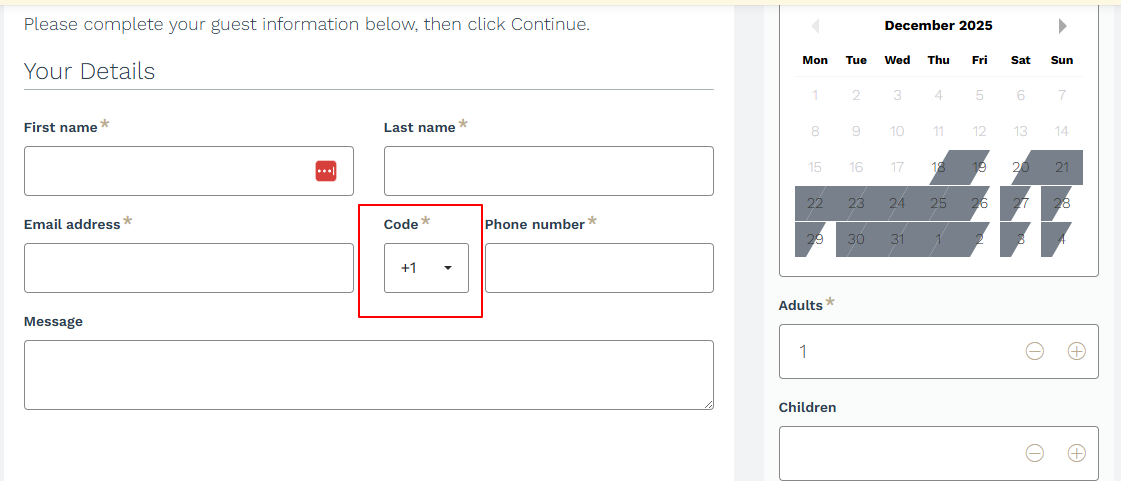
  1. To improve guest communication and reduce booking issues, a mandatory country/area code dropdown is added to the phone number field in the Booking Engine widget. This ensures guests enter properly formatted phone numbers, improving contact accuracy and preventing missed communication opportunities.

Image

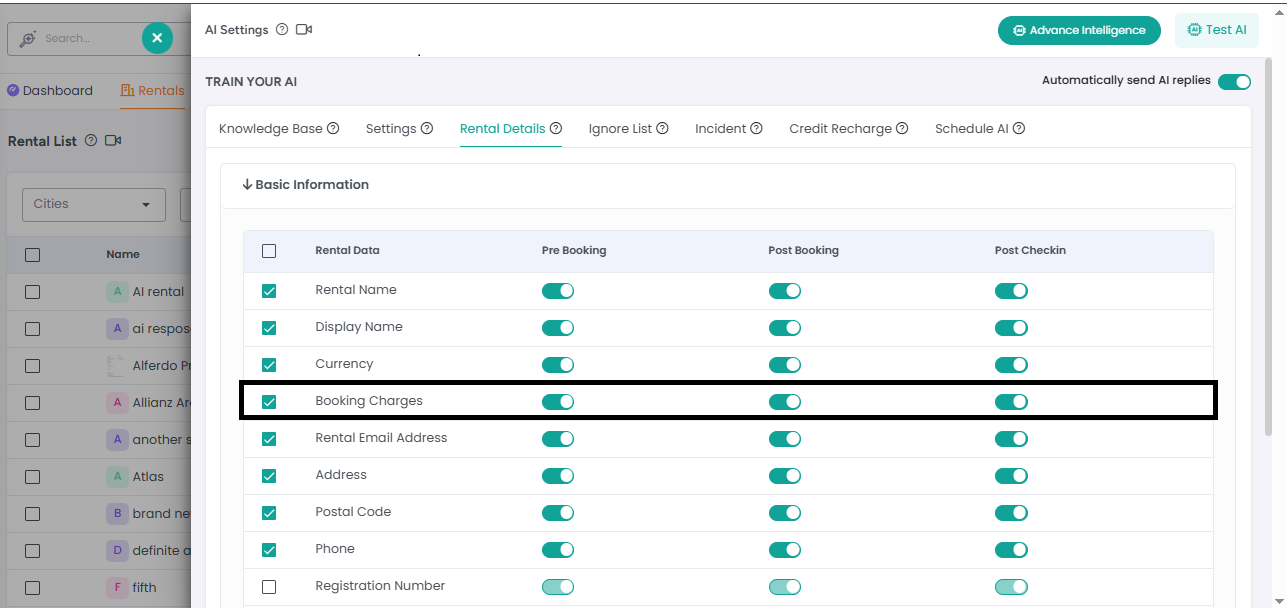
2. AI related Post-Booking Messages – Booking Charges Toggle:

Added a new toggle in Rental Settings that allows Property Managers to control whether booking charges are included in AI-generated post-booking messages. Guests will now only see payment information if the toggle is enabled, improving message relevance and clarity.

Image

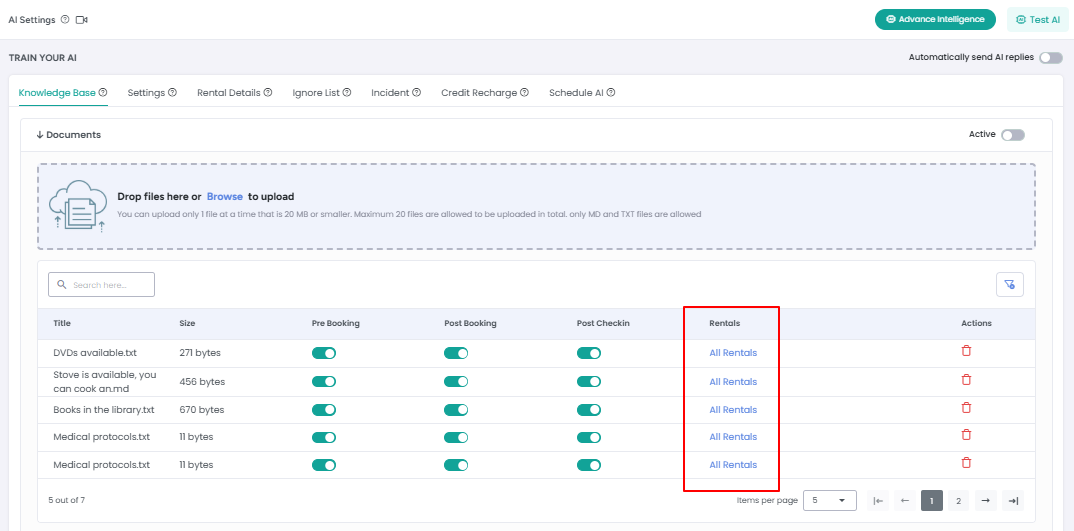
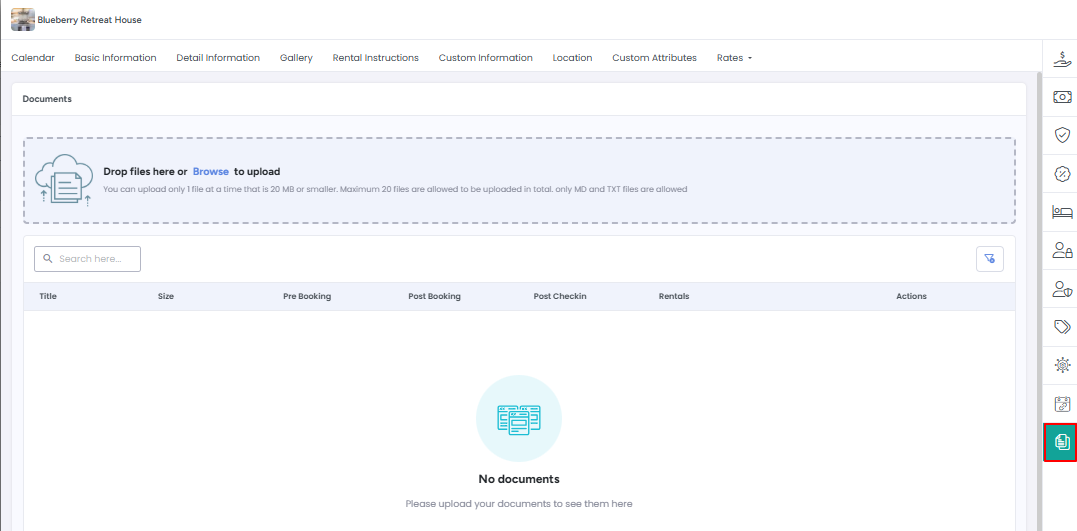
3-[AI Knowledge base] Listing-to-Document Mapping & AI Document Management

  • Added the ability to manually link specific listings to their corresponding AI Knowledgebase documents.

  • Clear visual indicators now show which document is linked to each listing.

  • Introduced “Add Document” feature in the Rentals module for AI use, allowing property managers to easily create and manage documents for AI-generated messages.

  • Ensures accurate, listing-specific information is sent in AI-generated messages and displayed in the Knowledge base, reducing errors for managers with multiple listings.

Image
Image

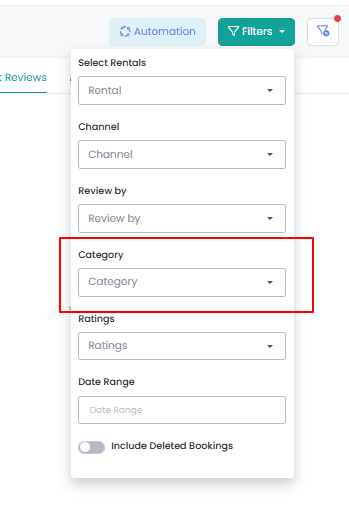
4- [Reviews Dashboard] Added the ability to filter reviews by categories for connected channels, making it easier to analyze and compare review performance across different platforms.

Image

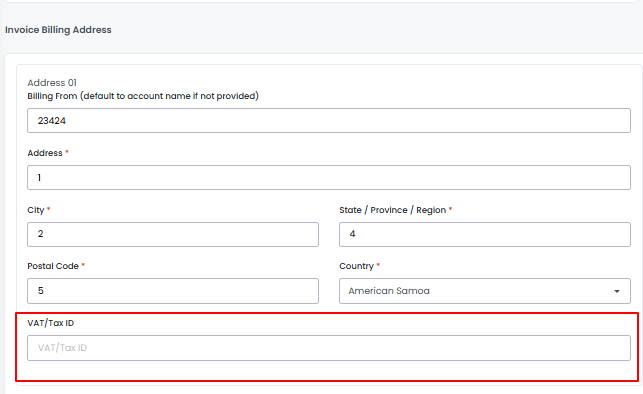
5- VAT Field Added to Invoice Billing Addresses

We’ve added a separate VAT field to each Invoice Billing Address. This means you can now assign different VAT values per billing address, making invoice management more flexible and accurate.

This update is especially useful when working with multiple invoice templates that require different VAT configurations.

Image

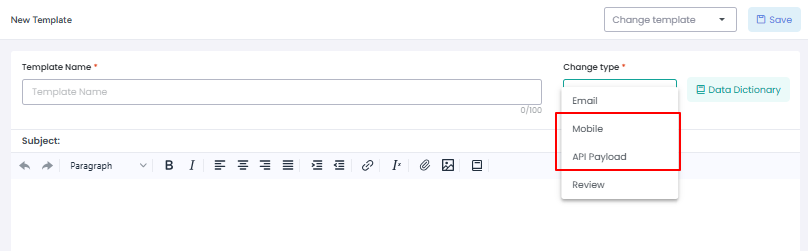
6- In Templates module Payload word is renamed as API Payload to make it more easy. Similarly Push Notifications word is renamed as Mobile.

Image

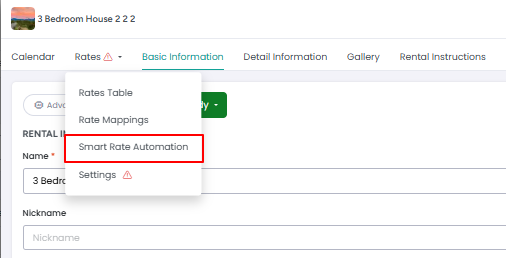
7- Rentals Module- Smart Rate Automation Added
Smart rate automation has been added under the Rates Settings of a rental, allowing more flexible and automated pricing control. Additionally, the layout has been improved to remove the horizontal scroll that previously appeared, resulting in a cleaner and smoother user experience.

Image

New Feature Announcement: Margins Channels Price Breakdown Report

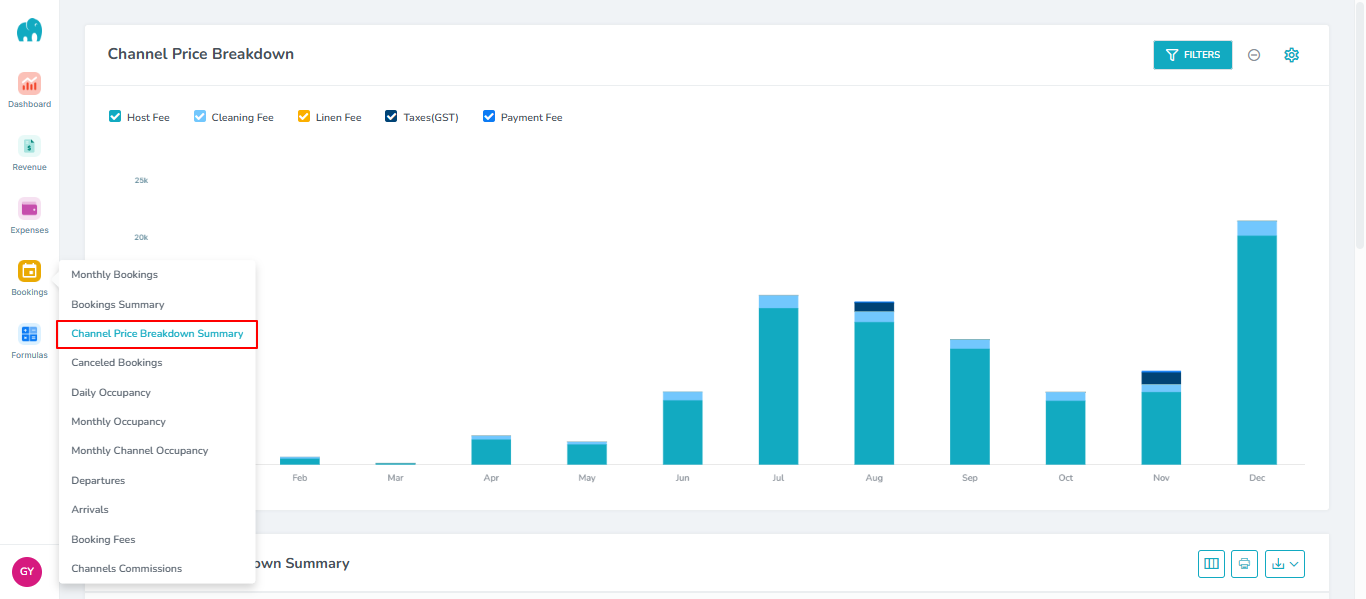
We’re excited to introduce the Channels Price Breakdown Report in Margins App – a powerful new tool designed to give you complete visibility into your pricing and margins across all channels.

Key Highlights:

  • Channel-wise Analysis: See how each channel contributes to your revenue and profit.

  • Detailed Price Breakdown: Understand cost structures, markups, and discounts for every listing.

  • Data-Driven Decisions: Make informed pricing and distribution strategies to maximize profitability.

  • Export & Share: Download reports for your team or stakeholders with ease.

This report is now available under Margins's Bookings→ Channels Price Breakdown Summary. Start using it today to optimize your revenue and pricing strategy across all your channels!

Image

Learn more about this report here.

New Feature Announcement: Margins Invoice Taxes Report

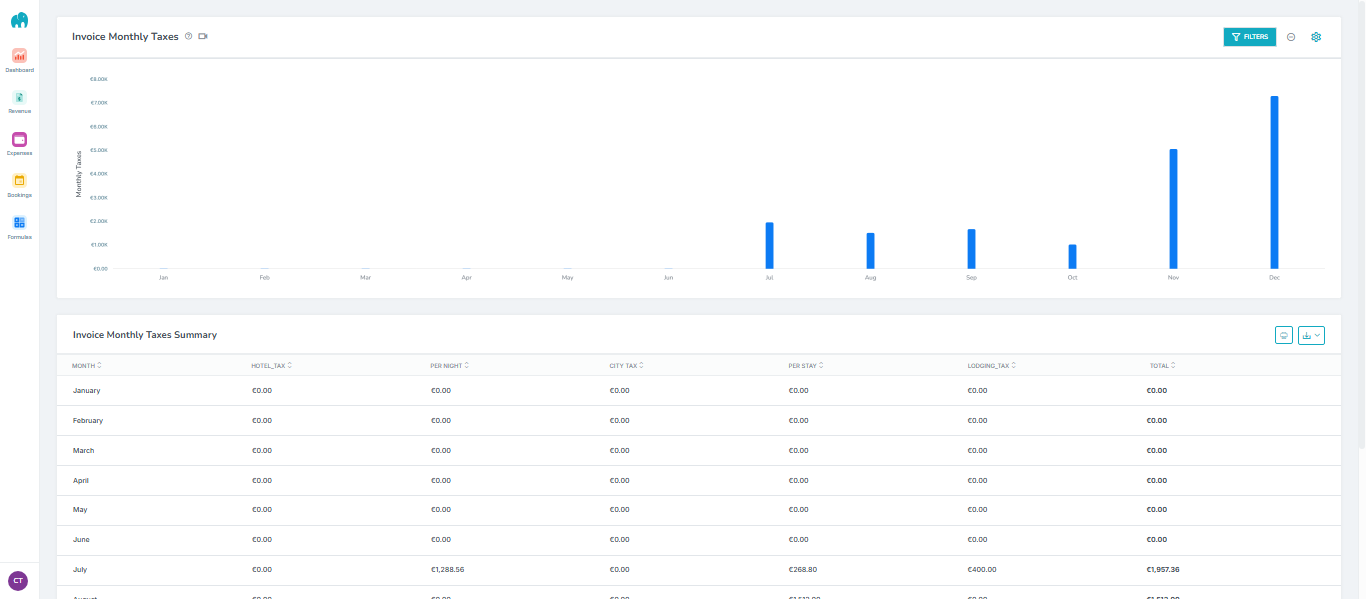
We’ve introduced a new Invoice Taxes report based on the paid date, giving you more accurate and meaningful insights into your tax data. This report includes only paid invoices, allowing you to clearly track tax totals by month and better align reporting with actual cash flow.

You can view monthly tax summaries and easily print or download the report in CSV or Excel format for your records.

This new report helps simplify tax reporting and improves financial visibility.

Image

Learn more about this report here.

AdvanceCM integrates with Expedia Messaging API

We’re excited to announce that Expedia Messaging API integration is now fully supported in AdvanceCM, bringing seamless two-way guest communication directly into your Inbox!

What’s New?

Two-Way Messaging
You can now receive and reply to all Expedia guest messages straight from the AdvanceCM Inbox, without logging into Expedia Partner Central.

Unified Communication
All Expedia conversations appear under the Messages tab with full booking details — making it easier to manage guest interactions in one place.

Real-Time Sync
Messages sync instantly between Expedia and AdvanceCM, ensuring no delays and no missed messages.

This update significantly improves communication efficiency for property managers using Expedia.
More control, less switching platforms — all inside AdvanceCM! Click here to learn more about it.

Image

November Improvements

Fixes

As part of our ongoing commitment to quality and responsiveness, we’ve addressed a number of issues reported by a few users in specific scenarios. These updates ensure a smoother, more reliable experience across the platform.

[Automations / Autopilot]

  1. Added confirmation dialog when enabling or disabling Autopilot or Automation toggles.
    Users will now see confirmation popups:

    • “Do you want to enable this automation?”

    • “Do you want to disable this automation?”
      This ensures accidental changes are avoided.

  2. [Booking.com Reviews]

    Fixed an issue where guest review content for Booking.com bookings was not visible for one user. User can now view full review text as expected.

  3. [HVMI Connection Wizard]

    Fixed alignment-related display issues in the HVMI connection setup wizard.

  4. [Invoices]

    • Fixed an issue where Elastic Search returned only one record for certain invoice searches. It now correctly returns all matching invoices.

    • Fixed a bug where VAT text appeared on printed invoices even after VAT was removed from the account. The VAT label no longer appears when VAT is disabled.

    • Fixed invoice amount mismatch between the Detail View and List View for certain users.

  5. [Facebook Integration]

    Fixed issue where users were unable to send messages to Facebook guests on other bookings.
    Messages now send properly after connecting the Facebook account.

  6. [Inbox Messages]

    Added error icon display when a message fails to send in the Inbox → Messages tab.

  7. [Hopper Channel Integration]

    Added validation to ensure account names must be at least 5 characters, as required by Hopper API.

  8. [Multi Calendar]

    Fixed issue where bookings older than one year were not appearing on the calendar.The issue is resolved for affected users.

  9. [Rentals → Tags Tab]

    Fixed issue preventing users from deleting all tags from a rental.

  10. [User Session / Remember Me]

    Fixed issue where user sessions were not retained even when “Remember Me” was enabled.

  11. [Task Automation]

    Fixed issue where enabling a task automation triggered multiple duplicate tasks (up to 46 in some cases).
    Automation now triggers only once per intended task.

  12. [Parent–Child Rental Relation]

    Fixed issue where ongoing bookings did not block the calendar for linked child rentals. Now, ongoing parent bookings correctly block associated child rentals.

  13. [Airbnb Import]

    Fixed issue where rental currency was always set to USD after import. Currency now matches the original rental currency before import.

  14. [Automations]

    Fixed issue preventing users from saving booking confirmation automations due to unexpected errors (specific accounts affected).

  15. [Booking.com Channel Automation]

    Fixed issue where task automation did not trigger for Booking.com bookings when the channel dropdown was set to “Booking.com”.

  16. [VRBO Channel Connection]

    • Added a message prompt for Trial users, informing them that only paid users can connect VRBO.

    • Fixed issue where connected VRBO rentals appeared in the rental list but not under the VRBO API list.

  17. [Booking Autopilot]

    Fixed issue where changing Pre-Arrival automation timing (e.g., from 2 days 5 hours to 2 days 0 hours) did not save correctly and reverted to previous values.

  18. [Extra Autopilot]

    Fixed issue where Notify Guest logs were inaccessible in Extra Autopilot. Logs are now fully viewable.

  19. [Extras]

    Fixed issue where newly added categories appeared blank in the dropdown list.

  20. [Inquiries List View]

    Fixed issue preventing users from uploading CSV files from the Inquiry List section. File uploads now work as expected.

  21. [Expenses]

    Fixed currency mismatch issue where expenses were showing with a dollar sign ($) instead of the correct rental currency (e.g., INR). Currency now displays accurately based on the rental’s configuration

  22. [Hopper Channel] Validation Added

    • Added a rule ensuring the Account Name cannot be less than 5 characters.

    [Channels – VRBO] Configuration Flow Fixed

    • Fixed an issue where the VRBO Channel Config step was being skipped when clicking Connect.

    • The setup now correctly starts from Step 1.

    • If the user already completed configurations, the VRBO tile will correctly display: Account: 1 | Listing: 0

  23. [Expedia] Duplicate Bookings Issue Resolved

    • Fixed an issue causing certain Expedia bookings to appear duplicated for some user accounts.

  24. [Channel Adjustments – Webready] Duplicate Entry Fixed

    • Resolved an issue where adding a Channel Adjustment for Webready caused it to appear twice in the Calendar after refreshing rates.

  25. [Calendar – Booking Detail Overlay] UI Enhancement

    • The Total Amount is now displayed in green for bookings with the status PAID, improving visibility and quick recognition.

  26. Airbnb Inquiry Guest Count Issue

    The Airbnb inquiry data was not fetching the correct adult and children count for one user. This issue has now been resolved, and the system accurately retrieves and displays guest composition information.

  27. 🔧 Booking.com (BDC)

    • Fixed an issue where Booking.com API updates were deleting all notes (user + system notes). This fix has been applied for affected users.

  28. Activity Feed

    • Resolved a bug causing duplicate notifications to be created every minute for the same document for one user account.

    • Corrected log behavior where a contract signed by the user was incorrectly logged as Contract Signed by Guest.

  29. Parent–Child Rental Relations

    • Improved calendar blocking logic: If a rental has an ongoing booking (past arrival + future departure), linking a child rental will now properly block the calendar for the child unit.

  30. Reviews

    • Comments and tags generated based on star ratings are now properly displayed on posted reviews.

  31. Airbnb Channel Adjustment

    • Fixed an issue where Airbnb channel adjustments were unchecking multiple rentals automatically.This occurred when a rental was deleted in Airbnb via Tokeet, temporarily breaking the API connection for 30–45 minutes.The problem has now been resolved.

  32. Airbnb Reviews

    • Fixed an error encountered when trying to set Review Status on Airbnb related bookings. This was appearing for limited number of users only.

  33. Inquiry tags

    • Inquiry tags were showing as undefined inside Inquiry detail overlay for some user accounts which is fixed now.

Improvements & features

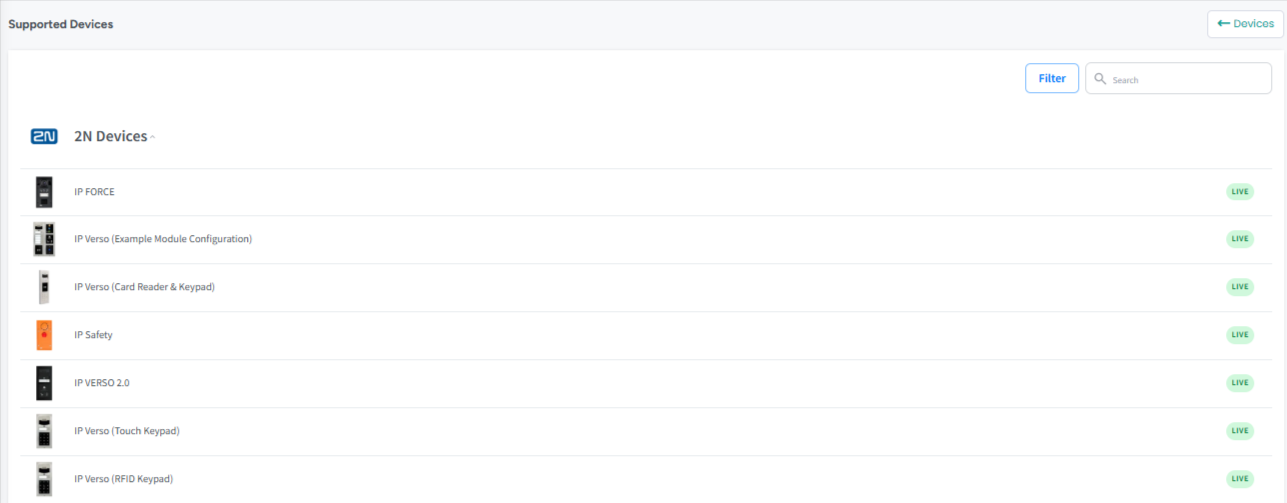
  1. Added the ability for users to view the list of smart lock devices supported by AdvanceCM.
    This enhancement helps property managers quickly identify which smart lock models can be integrated with AdvanceCM for seamless access management.

    Image

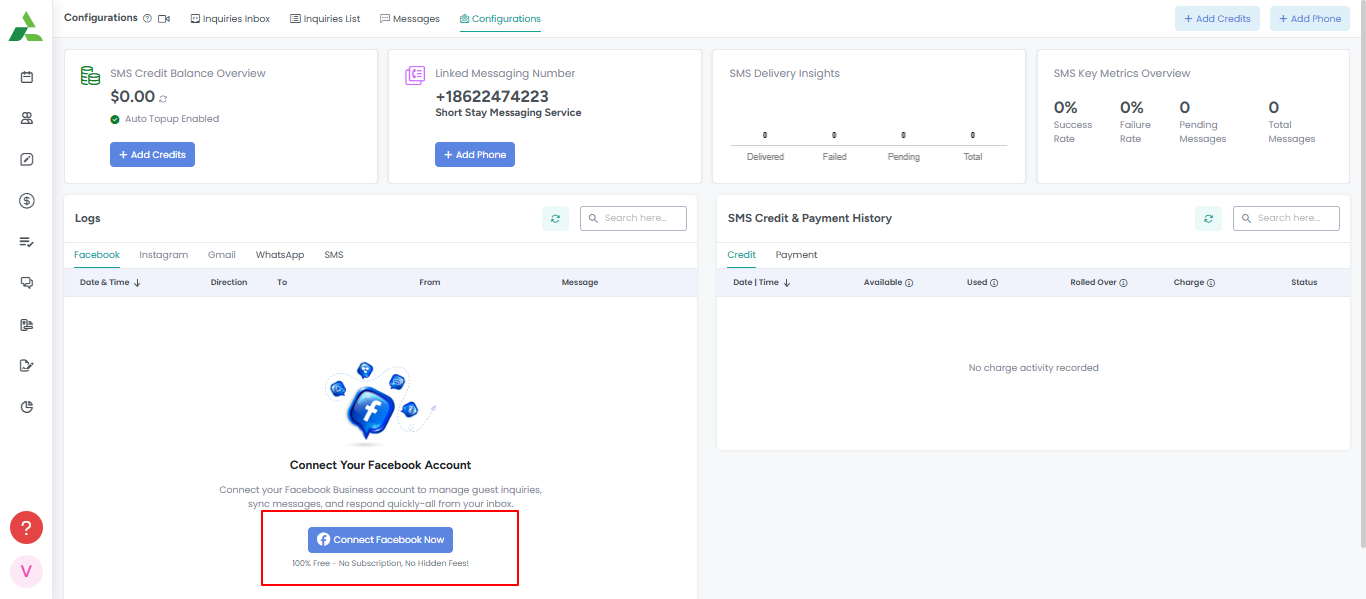
  2. Added a “Connect” button to all social media integrations (such as Facebook) under the Configuration tab.
    This update improves accessibility, allowing users to easily link their social media accounts directly from the configuration section.

    Image

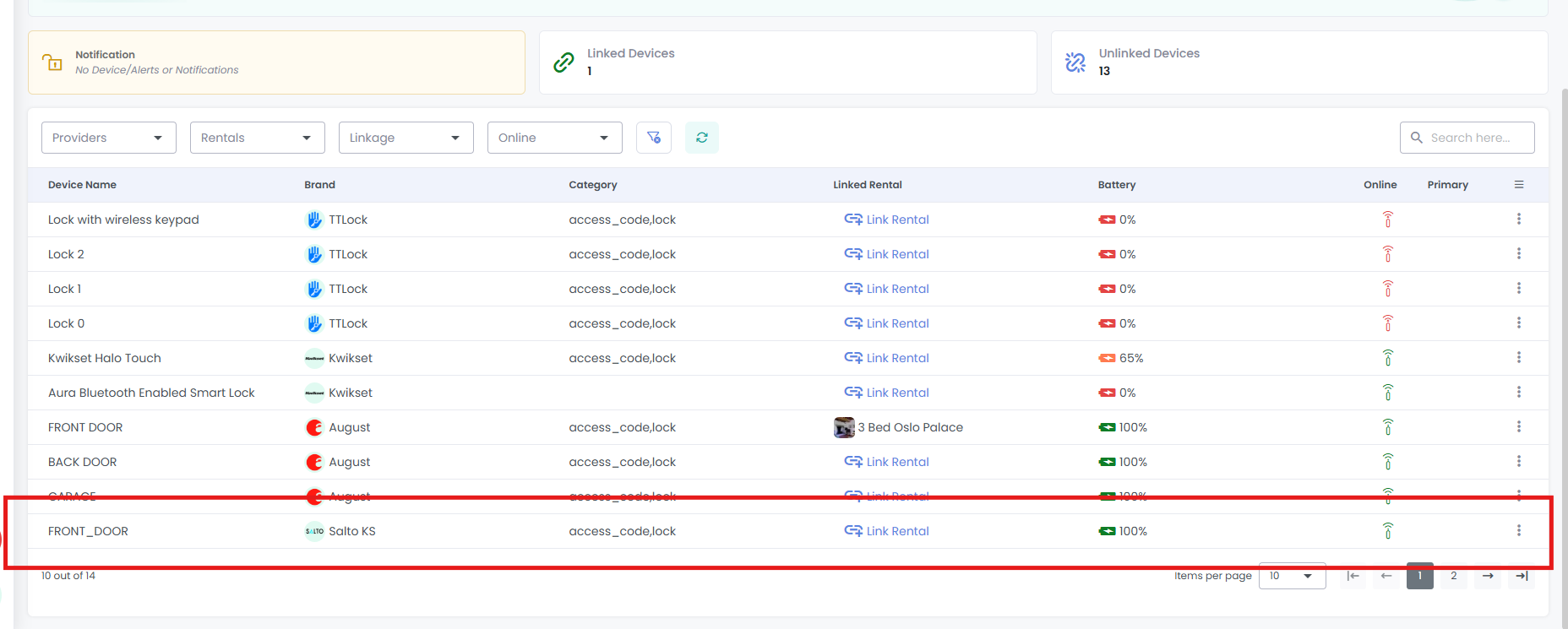
    3.[Smart Devices] Added "Salto KS" as an option in the supported Smart Devices list.

Image