
描述
Simple Exit Notifier is a lightweight plugin that displays a popup notification when users click on external links. This helps alert users that they are about to leave your website, ensuring transparency and improving user experience.
Features:
- Enable/Disable Toggle: Easily turn the notifier on or off globally.
- Customizable Popup: Change heading, message, and button texts.
- Full Color Customization: 8 color pickers for header, body, and button colors – perfect for matching your site’s theme or dark mode.
- Overlay Opacity: Adjust the background overlay darkness.
- Modal Width: Set custom width for the popup.
- Animation Styles: Choose from fade, slide up, slide down, or none.
- Custom CSS: Add your own CSS for advanced styling.
- Delay Timer: Optional countdown before users can proceed.
- Remember User Choice: Allow users to skip the popup for future visits.
- External Link Icon: Display an icon next to external links.
- Multiple Exception Classes: Exclude links using multiple CSS classes.
- Domain Whitelist: Specify trusted domains that won’t trigger the popup.
- Page Exclusions: Disable the popup on specific pages.
- Keyboard Accessible: Escape to close, Tab to navigate, focus trapping.
- Click Overlay to Close: Users can click outside the modal to dismiss.
- Clean Uninstall: Removes all plugin data when deleted.
- Lightweight and Fast: Minimal impact on page load times.
Use Cases:
- Warn users before they leave your site.
- Highlight external links with customizable notifications.
- Comply with regulations requiring external link warnings.
- Match popup appearance to your site’s dark mode theme.
Support
Please submit your support requests through the WordPress forums for Simple Exit Notifier.
For any additional requests or suggestions, please contact us directly at hello@chrsinteractive.com
License
This plugin is licensed under the GPLv2 or later. See License URI for details.
屏幕截图
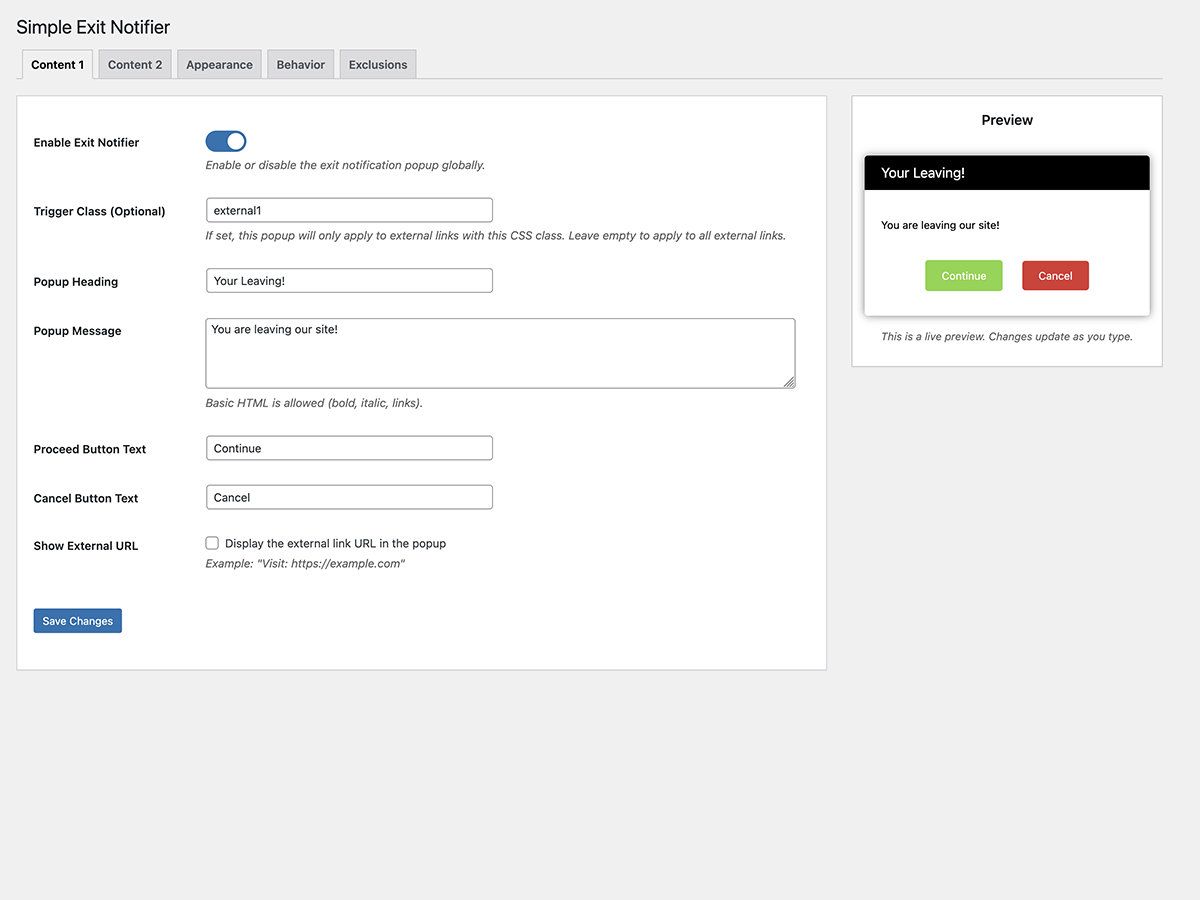
Content 1 Tab: Default popup settings with enable/disable toggle, trigger class, and customizable texts. 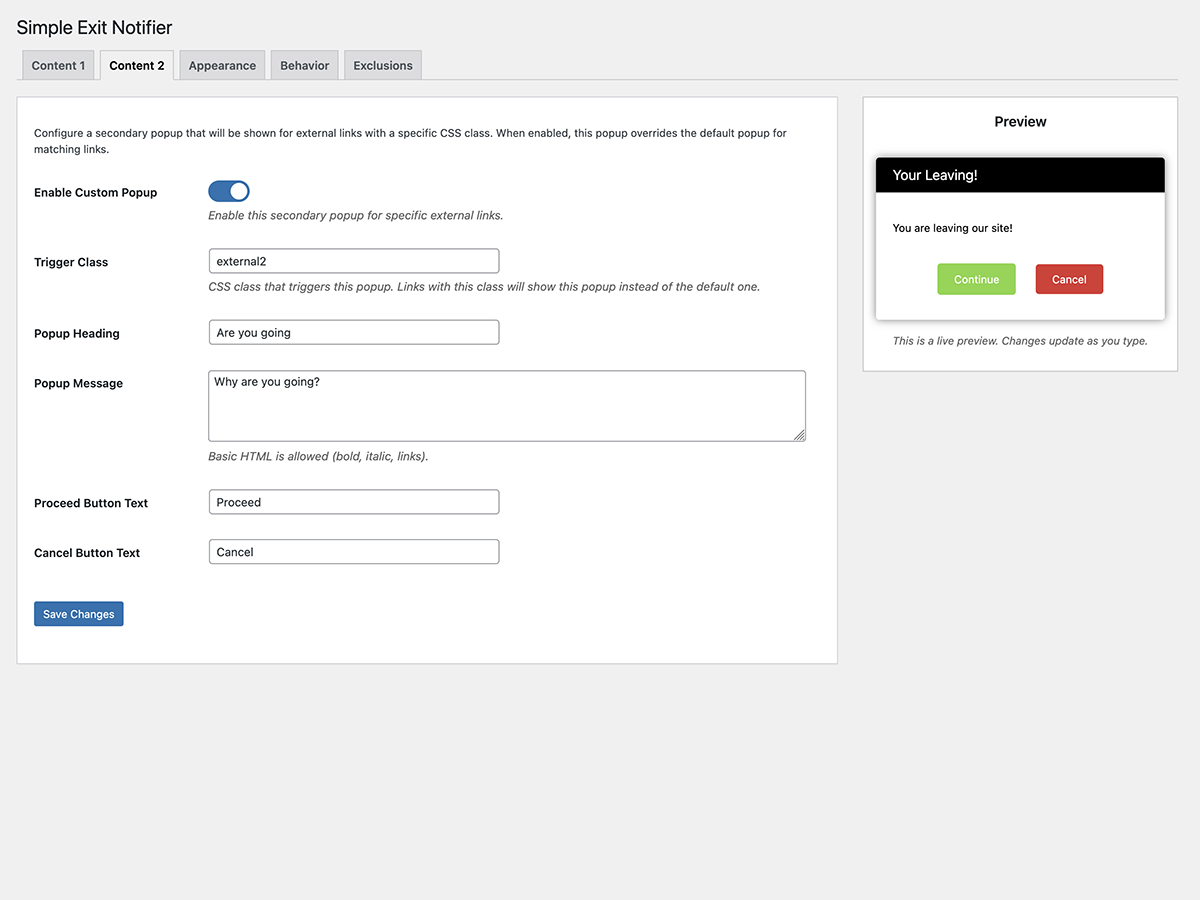
Content 2 Tab: Custom popup settings for targeted links with separate content options. 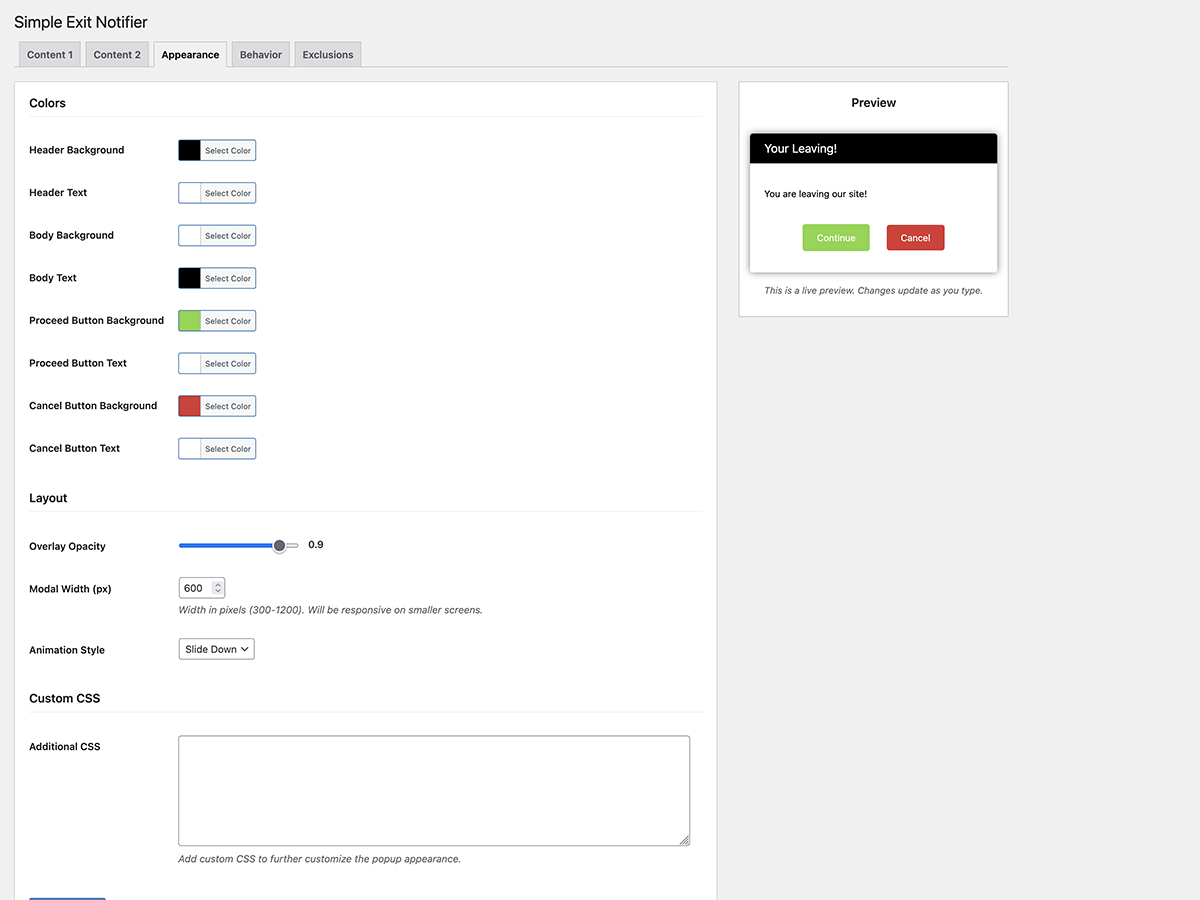
Appearance Tab: Color pickers for header, body, and buttons, plus overlay and animation settings. 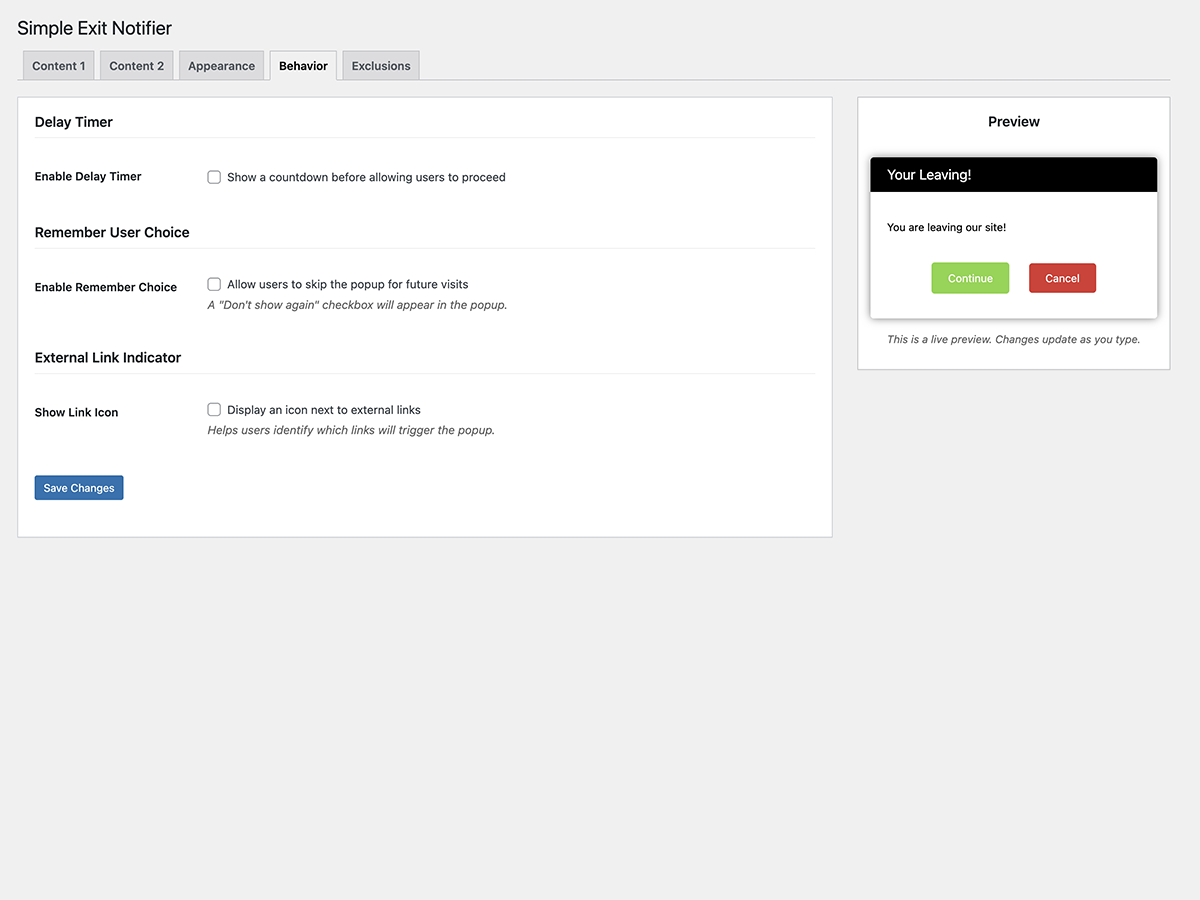
Behavior Tab: Delay timer, remember choice, and external link icon settings. 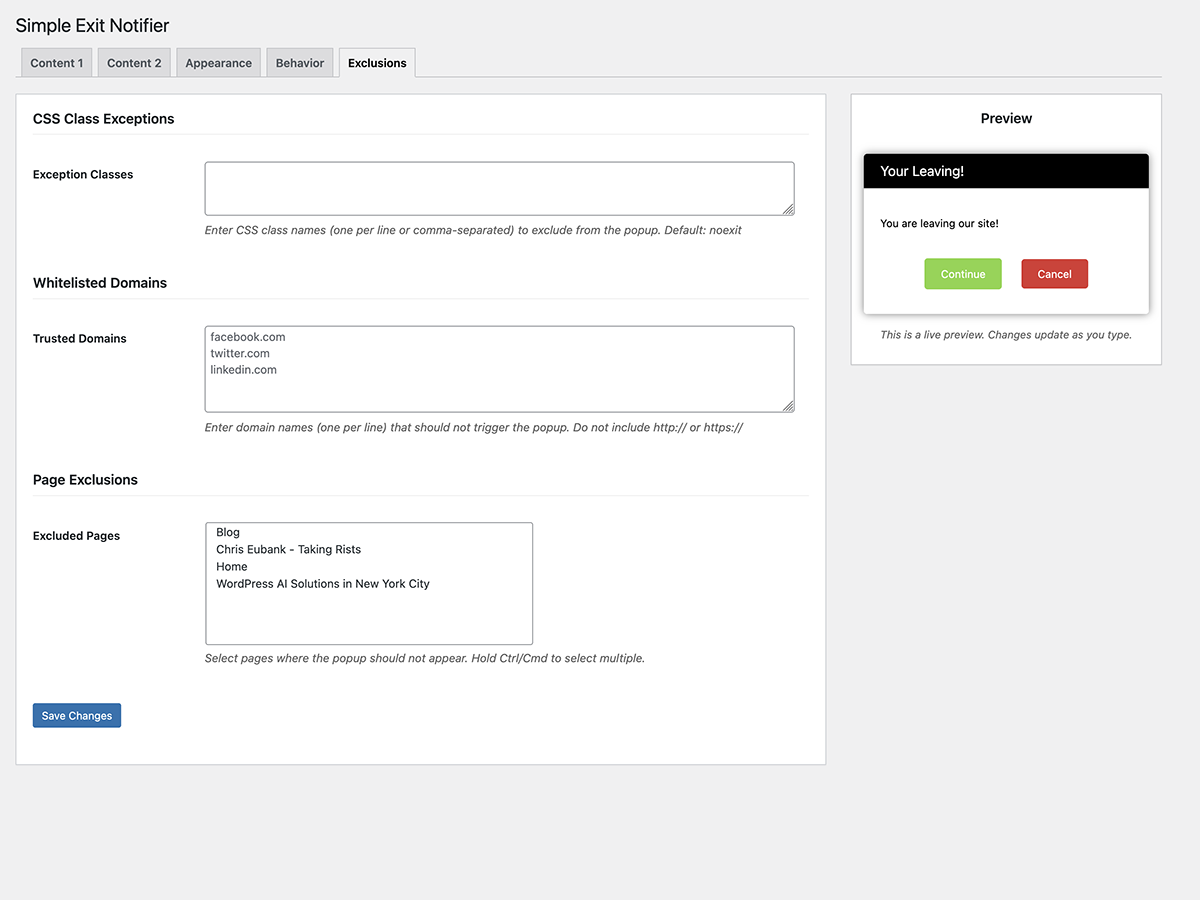
Exclusions Tab: Exception classes, whitelisted domains, and page exclusions.


安装
- Download the plugin zip file or install directly from the WordPress Plugin Repository.
- Upload the plugin to your WordPress site:
- Go to
Plugins > Add New. - Click
Upload Pluginand choose the plugin zip file. - Click
Install Now.
- Go to
- Activate the plugin via the
Pluginsmenu in WordPress. - Configure the settings under
Settings > Exit Notifier.
常见问题
-
How do I enable or disable the popup?
-
Go to
Settings > Exit Notifierand use the “Enable Exit Notifier” toggle in the Content 1 tab. -
How do I customize the popup appearance?
-
Go to
Settings > Exit Notifierand click the “Appearance” tab. You can customize all colors, opacity, modal width, animation style, and add custom CSS. -
How do I match the popup to my dark mode theme?
-
Use the color pickers in the Appearance tab to set dark background colors and light text colors for both the header and body of the popup.
-
Can I show different popups for different links?
-
Yes! Use the Content 1 and Content 2 tabs to create two different popups. Add a CSS class to specific links and set the corresponding “Trigger Class” to control which popup appears.
-
How do I show the popup only for specific links?
-
In the Content 1 tab, enter a CSS class in the “Trigger Class” field. The popup will only appear for external links with that class. Leave empty to show for all external links.
-
How do I add a delay before showing the popup?
-
Enable “Delay Timer” in the Behavior tab and set the number of seconds to wait before the popup appears.
-
How do I exclude certain external links from showing the popup?
-
In the Exclusions tab, enter CSS class names (one per line or comma-separated). Add any of these classes to links you want to exclude. Default:
noexit -
How do I whitelist certain domains?
-
In the Exclusions tab, enter domain names (one per line) that should not trigger the popup. Example:
facebook.com -
How do I exclude specific pages from showing the popup?
-
In the Exclusions tab, use the “Excluded Pages” dropdown to select pages where the popup should not appear.
-
Does the plugin work with both `http` and `https` links?
-
Yes, it works seamlessly with both protocols.
-
Will the popup appear for internal links?
-
No, the popup is triggered only for external links.
-
Can users opt to not see the popup again?
-
Yes! Enable “Remember User Choice” in the Behavior tab. Users will see a “Don’t show again” checkbox.
-
Does the plugin support translations?
-
Yes, the plugin is translation-ready. Use
.potfiles to add translations.
评价


贡献者及开发者

更新日志
2.0.1
- Updated: Minimum PHP requirement changed from 8.4 to 8.2 for broader compatibility.
2.0.0
- Major Feature Update: Complete redesign of admin interface with tabbed navigation.
- Added: Global enable/disable toggle for the exit notifier.
- Added: 8 color pickers for full popup customization (header, body, and button colors).
- Added: Overlay opacity slider.
- Added: Modal width setting.
- Added: Animation style options (fade, slide up, slide down, none).
- Added: Custom CSS field for advanced styling.
- Added: Delay timer with countdown before users can proceed.
- Added: “Remember User Choice” feature with configurable duration.
- Added: External link icon indicator with position options.
- Added: Support for multiple exception CSS classes.
- Added: Domain whitelist to skip popup for trusted external domains.
- Added: Page exclusions to disable popup on specific pages.
- Added: Live preview panel in admin settings.
- Improved: Backward compatibility with existing settings from version 1.x.
- Improved: Better organized settings in logical tabs.
1.2.0
- Updated: WordPress 6.9 compatibility.
- Updated: PHP 8.4 compatibility.
- Updated: Added type hints to all function parameters and return types.
- Updated: Added proper DocBlocks to all classes and methods.
- Updated: Applied WordPress Coding Standards (WPCS) throughout.
- Updated: Maintained backward compatibility with existing settings.
- Updated: Improved checkbox sanitization using absint().
- Updated: Improved external link detection using URL API.
- Enhancement: Added ARIA attributes for improved accessibility.
- Enhancement: Added rel=”noopener noreferrer” to external links for security.
- Enhancement: Added explicit button type attributes.
- Enhancement: Added keyboard accessibility (Escape to close, focus trapping).
- Enhancement: Added click-to-close on overlay.
- Enhancement: Added focus management (returns focus after modal closes).
- Enhancement: Added body scroll lock when modal is open.
- Enhancement: Added visible focus states for keyboard navigation.
- Enhancement: Added hover states for buttons.
- Added: Uninstall script to clean up options on plugin deletion.
1.1.0
- Added: “Settings” link on the Plugins page for quick access to the settings page.
- Added: “Display External Link in Popup” option to display the external link (href) within the popup.
- Added: Dynamic preview on the settings page that updates as fields are edited.
- Fixed: Fallback to default “noexit” exception class when the “Exception Class” field is empty.
- Fixed: Default text now displays for popup title, message, and buttons if settings fields are left blank.
- Updated: Improved localization handling for fallback text and checkbox behavior.
- Enhancement: Two-column layout for the settings page on desktop for better usability.
1.0.0
- Initial release.
- Displays popup for external links.
- Excludes links with a custom exception class.
- Fully customizable texts for heading, message, and buttons.
