
Beskrivelse
The plugin has its own admin options page (settings page) where you can:
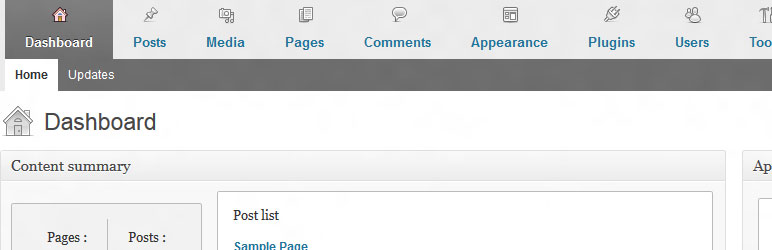
- add user-friendly horizontal menu and dashboard metaboxes
- completely remove blogging plarform widgets
- change logo and link of the login page
- customize admin bar menu
- add custom content to the admin footer
- hide notices (core update notice, plugin update notice and theme update notice)
- hide screen options and help tag
- change basic site settings e.g. hide site generator and feed links
It gives your clients a better experience of their new website.
Support for translation!
- Polish translation
- Dutch translation by Jos Wolbers
Plugin is ready for WordPress 3.6
Skærmbilleder

user-friendly horizontal menu and new dashboard metaboxes

Installation
- Upload
cms-admin-areato the/wp-content/plugins/directory - Activate the plugin through the ‘Plugins’ menu in WordPress
- Go te the admin area options page (Settings-> Admin Area Options)
FAQ
If you have any questions, or require additional information, please contact me netbiel@gmail.com
Anmeldelser
Der er ingen anmeldelser for denne widget.
Bidragsydere & udviklere
“CMS admin area” er open source-software. Følgende personer har bidraget til dette plugin.
Bidragsydere
Oversæt “CMS admin area” til dit eget sprog.
Interesseret i udvikling?
Gennemse koden, tjek SVN repository, eller abonner på udviklerloggen via RSS.
Ændringslog
1.0
- The plugin has its own admin options page (settings page) with 3 tabs
- Plugin is ready for WordPress 3.6
0.9.3
- Plugin is ready for WordPress 3.5
