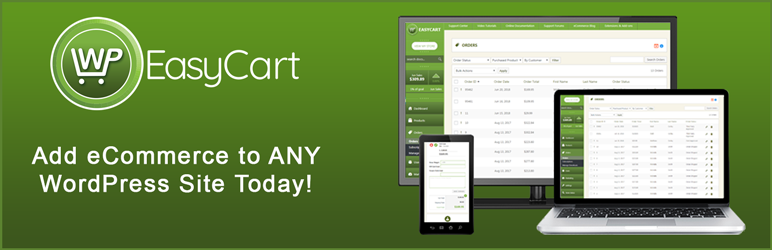

Beskrivelse
WP EasyCart er et kraftfuldt GRATIS WordPress e-handelsbutik & WordPress Shopping Cart plugin, der installeres på nye eller eksisterende hjemmesider.
Få en hurtig WordPress e-handelsbutik med indkøbsvogn på få minutter! Sælg detailprodukter, abonnementer, digitale downloadbare varer, gavekort, donationer, tjenester og meget mere!
EasyCart er en komplet Stripe-, Square- og PayPal-vogn i én! Brug Stripe-betalinger til at sælge abonnementer og produkter med tilbagevendende fakturering samt tilbyde Apple Pay, Google Pay og Microsoft Pay.
Sælg dine produkter på sociale medier med vores Facebook- og Instagram-premiumudvidelse. WP EasyCart gør det nemt at sælge på Facebook og Instagram med din WordPress-vogn.
WP EasyCart tilbyder 30+ betalingsløsninger, der er SCA-kompatible (Stripe, Square og PayPal Express) samt GDPR-kompatible muligheder. International e-handelsvogn er ikke noget problem for EasyCart.
e-handel indkøbsvogn udgaver
WP EasyCart fås i 3 forskellige udgaver af indkøbskurven, der dækker alle behov for en online butik.
GRATIS e-handelsudgave – Ubegrænset antal produkter, ubegrænset antal ordrer og salg med PayPal Express, Square og Stripe.
Professionel eCommerce Edition – Ingen gebyrer, 30+ ekstra betalingsgateways, Live Shipping Calculators, Kuponer, Kampagner, Redigering af ordrer, Digital Wallet Payments (Apple Pay & Google Pay), Abonnementsprodukter og meget mere!
Premium eCommerce Edition – Alt i Professional Edition plus apps til desktop, tablet, iPhone og Android plus 10+ Premium Extensions! Facebook & Instragram, ShipStation, Stamps.com, Quickbooks for Desktops, MailChimp og andre!
populære links
- WP EasyCart hjemmeside
- Hvad er der i Professional Edition?
- Hvad er der i Premium Edition?
- Demoer og temaer til online e-handel
- Har du brug for onlinesupport?
- Sammenlign e-handelsudgaver
- Sammenlign konkurrerende indkøbsvogne
e-handelsbutik til alle temaer
WordPress Shopping Cart plugin vil automatisk oprette 3 nye sider i WordPress for butikken, indkøbskurven og kontoen. Tilpas med alle vores grundlæggende designfunktioner, udnyt multi-currency & multi-language funktioner, tilføj endda en af vores dusin widgets til en sidebar for at hjælpe dig med at begynde at sælge dine produkter.
WP EasyCart er en komplet Stripe-, Square- og PayPal-vogn i ét system. Indkøbsvognen giver dig mulighed for at udnytte Stripe, Square og PayPal betalinger i én vogn.
Gå GRATIS eller Gå PRO/Premium
WP EasyCart er et GRATIS eCommerce plugin, der lader dig sælge ubegrænset antal produkter, administrere ordrer, oprette grundlæggende forsendelse & skatter, og indsamle betalinger ved hjælp af PayPal Express samt Square eller Stripe i din kurv!
Opgrader til Professional- eller Premium-indkøbskurven, og lås op for ordreredigering, abonnementer, tilbagevendende betalinger, medlemskabsindhold, Apple Pay, Google Pay, Microsoft Pay, 30+ yderligere betalingsprocessorer, kuponer, kampagner og andre fantastiske funktioner.
Med Premium-udgaven får du alle de fantastiske funktioner i en Professional-udgave plus adgang til mere end 10 udvidelser.
* Facebook & Instragram Feed
* ShipStation
* Quickbooks til stationære computere
* Frimærker.com
* Groupon-importør
* Mailchimp
* Og mange flere…
Brugere af Premium Edition kan også bruge vores eksterne apps til PC/Mac-computere, iPad/Android-tablets og iPhone/Android-telefoner. Du kan ikke kun sælge med mobil e-handel, men du kan også administrere din butik på mobile enheder.
Sammenlign alle udgaver af indkøbsvognsbutikker: Sammenlign alle udgaver af indkøbskurve
Betalings muligheder
WP EasyCart’s GRATIS udgave af indkøbskurven leveres med PayPal Express, Square og Stripe til at indsamle betalinger fra næsten alle lande i verden sikkert og hurtigt.
Professional & Premium-udgaverne kommer med 30+ live betalingsprocessorer såsom Square, Stripe, Authorize.net, FirstData, Payment Express, PayPal Pro, Intuit og mange andre.
Professionelle & Premium-brugere kan bruge Stripe-betalingssystemets omfattende betalingssystem, der tilbyder abonnementer, Digital Wallet Payments, Apple Pay, Google Pay, Microsoft Pay og nogle af de bedste værktøjer til beskyttelse mod svindel i branchen.
Lås ALLE de betalingsgateways op, som vi tilbyder i en af disse populære udgaver. Se en komplet liste over alle betalingsgateways i den gratis og betalte udgave: Se alle betalingsgateways her
Forsendelse & Skatter
WP EasyCart’s GRATIS udgave af indkøbskurven leveres med omfattende tabelprisforsendelse til pris, vægt, mængde og procentbaserede systemer. Opsætning af standardskatter baseret på stater/provinser & lande.
Professional & Premium-udgaverne af indkøbskurven omfatter alle vores live forsendelsesintegrationer med USPS, UPS, FedEx, DHL, Canada Post og Australia Post. Med hensyn til skatter og afgifter kan du bruge TaxCloud API til nøjagtige by for byskattesatser.
Sammenlign alle udgaver af indkøbsvognsbutikker: Sammenlign alle udgaver af indkøbskurve
Ordrehåndtering
WP EasyCart’s GRATIS udgave af indkøbskurven giver dig mulighed for at administrere ordrer fra WordPress. Udskriv salgskvitteringer &; pakkesedler, tilføj forsendelsesnoter, e-mail kunder og se ordreoplysninger nemt på ét sted.
Professional & Premium shopping cart udgaver giver dig mulighed for at redigere linjeelementer, tilføje nye linjeelementer og redigere alle kundernes ordredata for at få en komplet forretningsløsning.
Sammenlign alle udgaver af indkøbsvognsbutikker: Sammenlign alle udgaver af indkøbskurve
Marketing
Alle EasyCart eCommerce plugins leveres med SEO-redigering for hvert produkt, menu og kategori, du opretter for at hjælpe med at sælge dine varer. Med social deling kan dine besøgende også straks linke til de produkter, du sælger.
Med Professional & Premium-udgaverne låser du op for alle de e-handelsmarkedsføringsmuligheder, der er tilgængelige i EasyCart, herunder kuponer, kampagner, gavekort og systemer til opgivne indkøbskurve.
Forbind din butik med Facebook og Instagram med vores Premium-udvidelse. Administrer feed-informationer, og skub automatisk de seneste lager- og produktoplysninger til Facebook og Instagram hver time, dag eller uge.
Sammenlign alle udgaver af indkøbsvognsbutikker: Sammenlign alle udgaver af indkøbskurve
Hvordan kommer man i gang med eCommerce plugin?
Du skal blot installere WordPress Shopping Cart plugin, aktivere og gå gennem indstillingerne for at få din indkøbskurv op og køre.. Konfigurer din indkøbskurv til at bruge PayPal Express, Square eller Stripe for en hurtig og nem måde at få din e-handelsplatform til at køre og sælge dine varer hurtigt.
Lås din WordPress-indkøbskurv op, når du er klar med flere kraftfulde funktioner ved at besøge WP EasyCart.
Sammenlign alle udgaver af indkøbsvognsbutikker: Sammenlign alle udgaver af indkøbskurve
Vi har et komplet e-handelssupportcenter hos WP EasyCart, herunder en online brugervejledning, videovejledninger og fællesskabsfora.
Se vores installationsvideo
Vores populære serie af videoer om indkøbsvogne til e-handel:
- Video 1: Installation af WP EasyCart
- Video 2: Installer 14 dages PRO prøveperiode!
- Video 3: Oprettelse af dit første produkt
- Video 4: Oprettelse af en produktmulighed
- Video 5: Oprettelse af produktkategorier
- Video 6: Grundlæggende designtilpasning
- Video 7: Opsætning af betalingsgateway
- Video 8: Opsætning af skatter og afgifter
- Video 9: Opsætning af forsendelse
- Video 10: Test og lancering af dit websted
Du kan finde flere videoer i vores videobibliotek!
Skærmbilleder
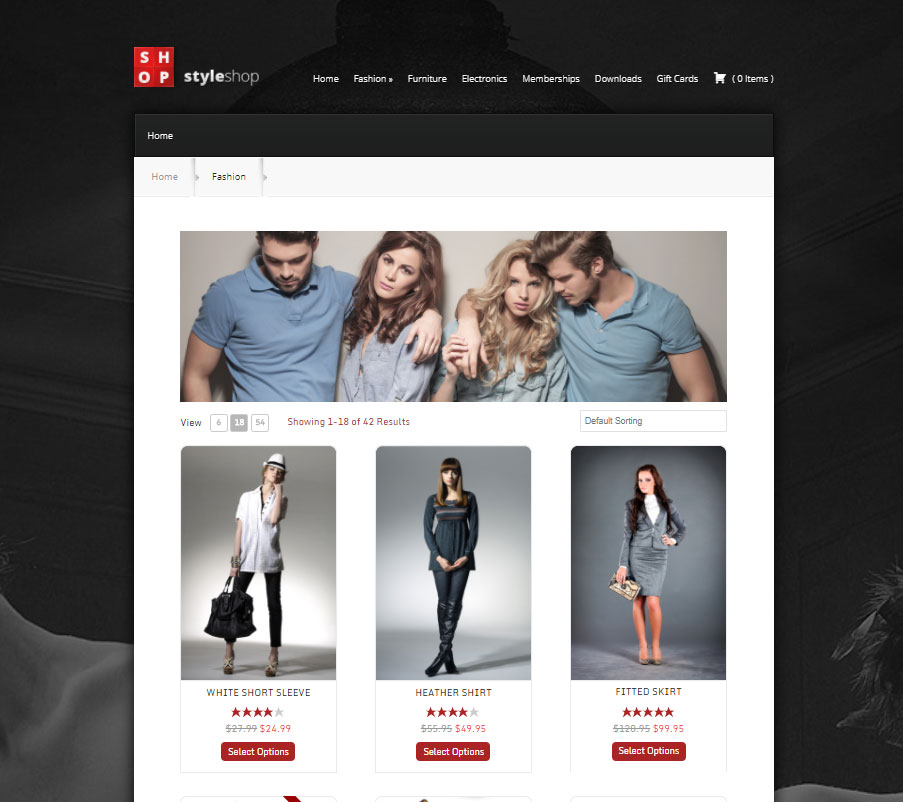
Professionel eCommerce indkøbsvogn passer til næsten alle temaer! 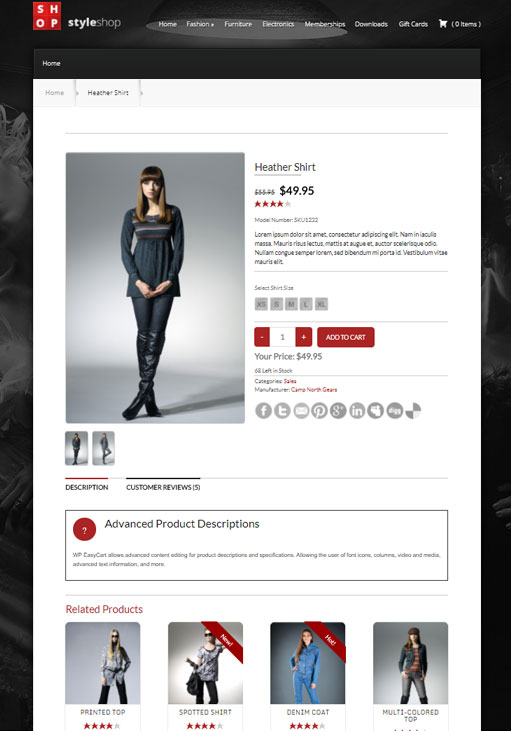
Smukke produktdetaljer vises! 
Fliser produkter i 1,2,3,4 eller 5 kolonne layouts! 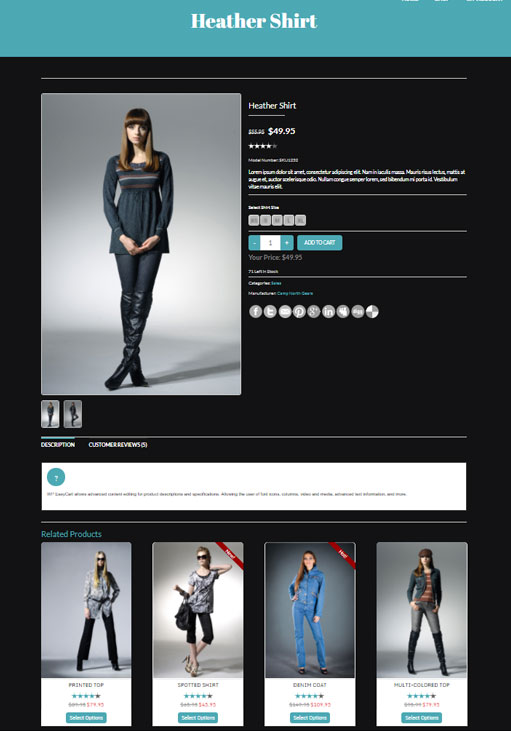
Brug temaer med mørk baggrund eller lys baggrund! 
Brug vores widgets i sidebars! 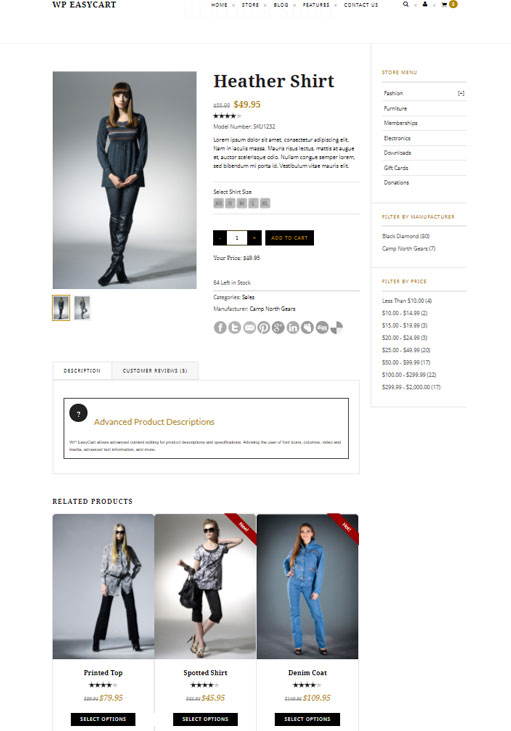
Smukke butiksvinduer og relaterede produkter! 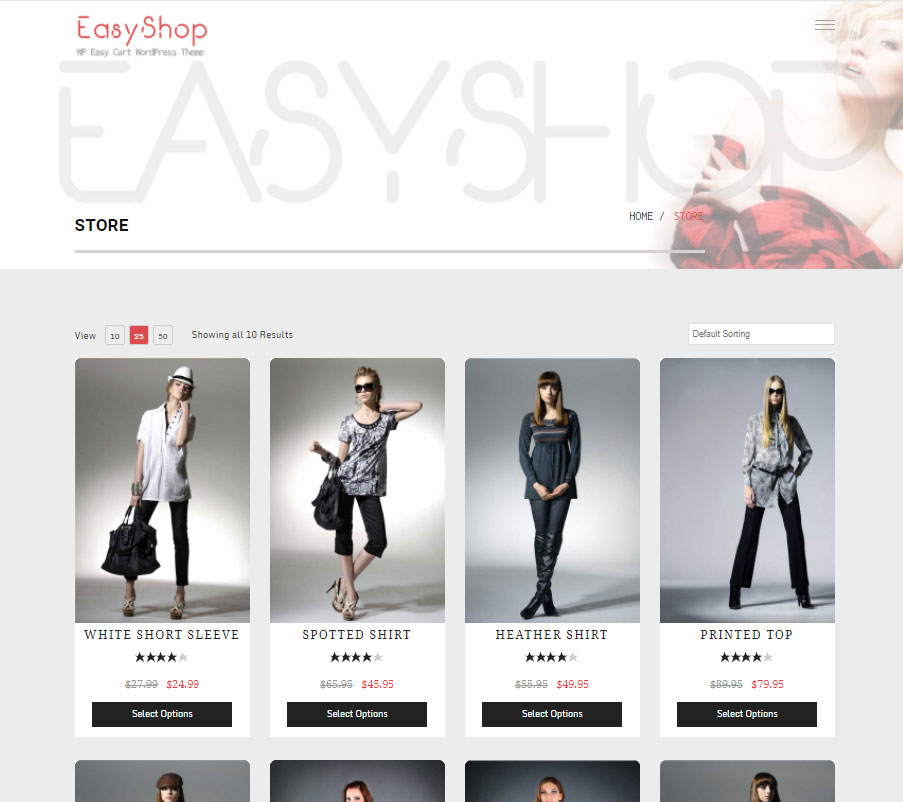
Vælg mellem flere foruddesignede layouts! 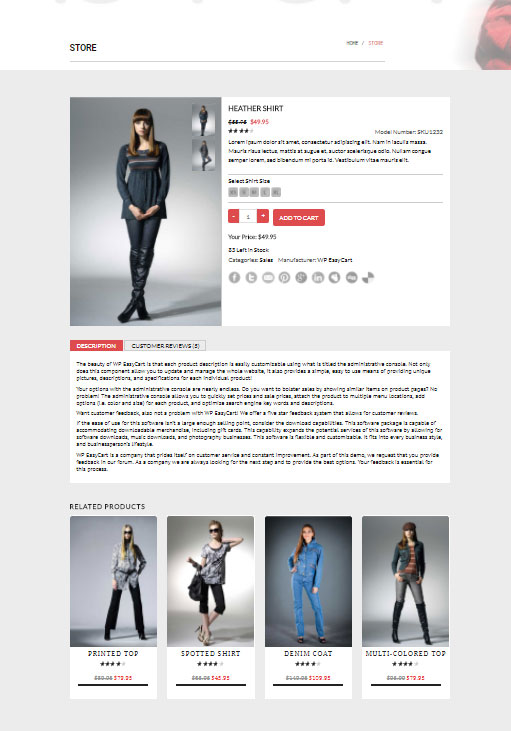
Administrer alle dine produktoplysninger fra vores administrative konsol! 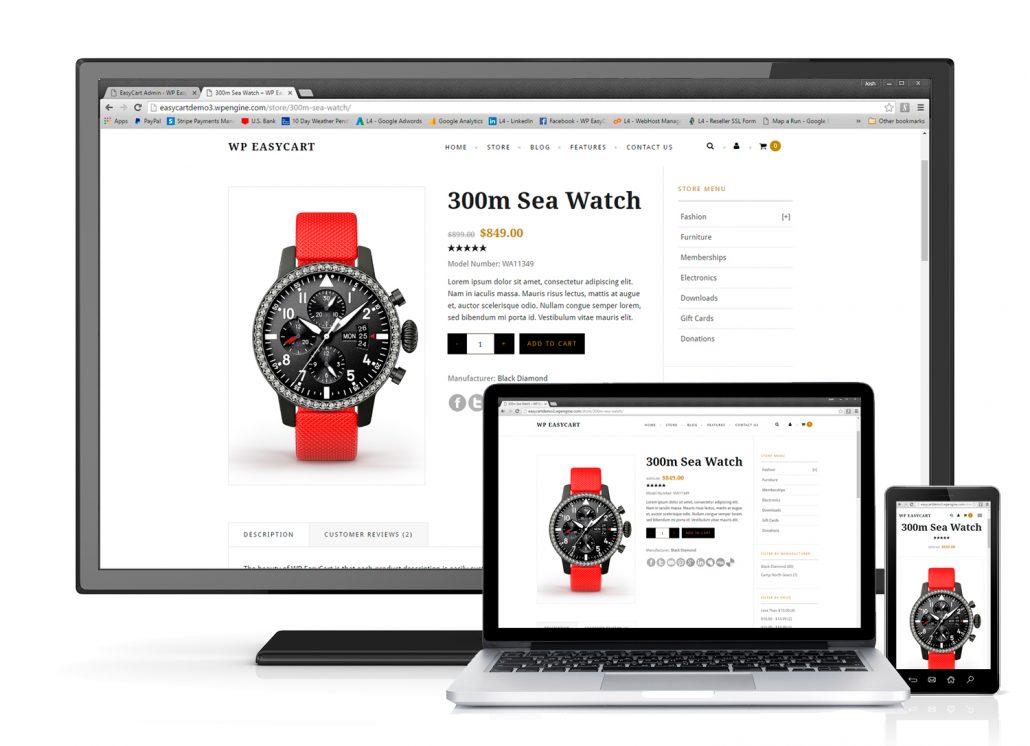
Responsivt design til mobil, tablet og desktop! 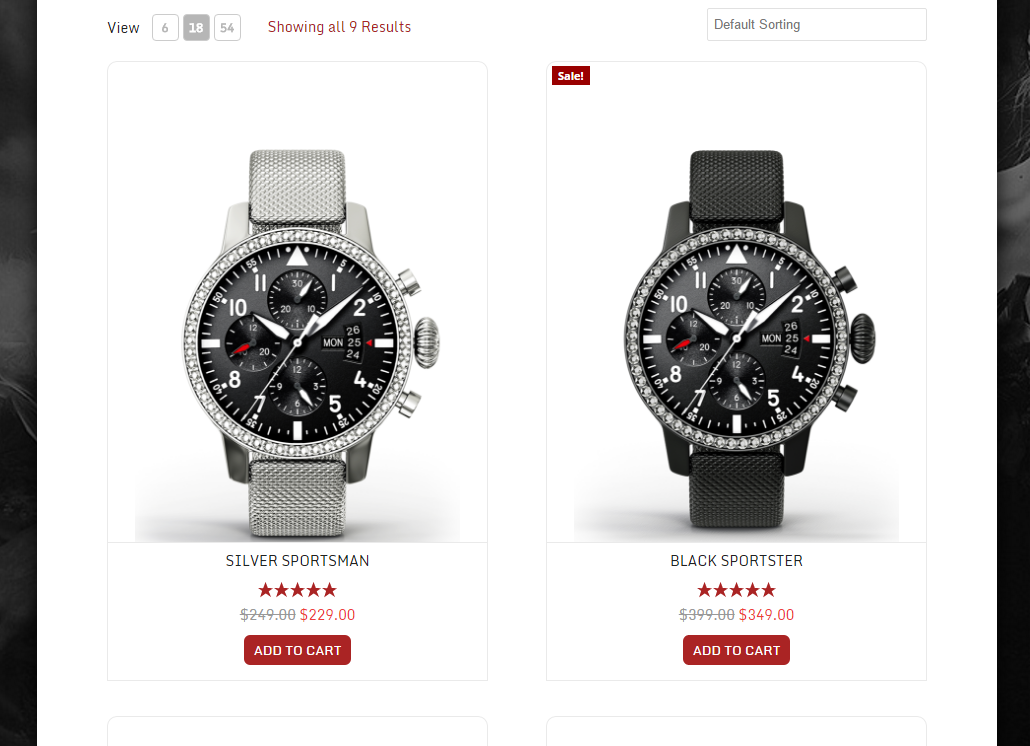
Smukke layouts med responsive billedområder! 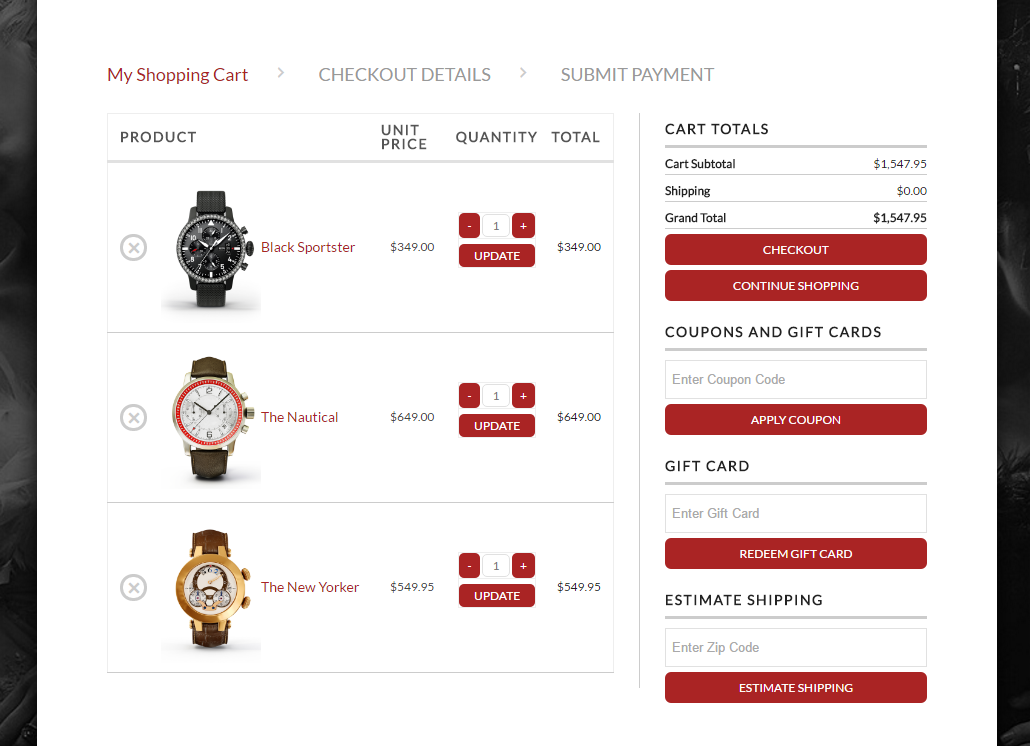
Strømlinet og kraftfuld checkout med 30+ gateways allerede integreret! 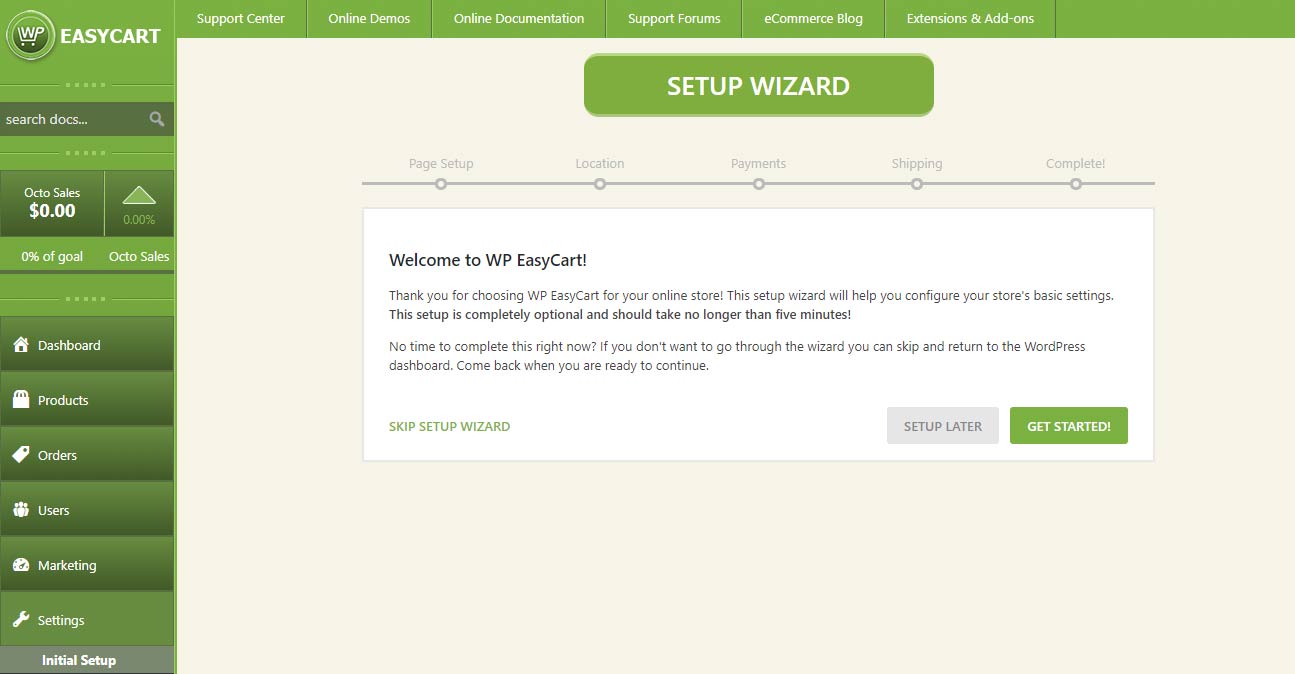
Administrativ guiden til 5 trin i opsætningsprocessen! 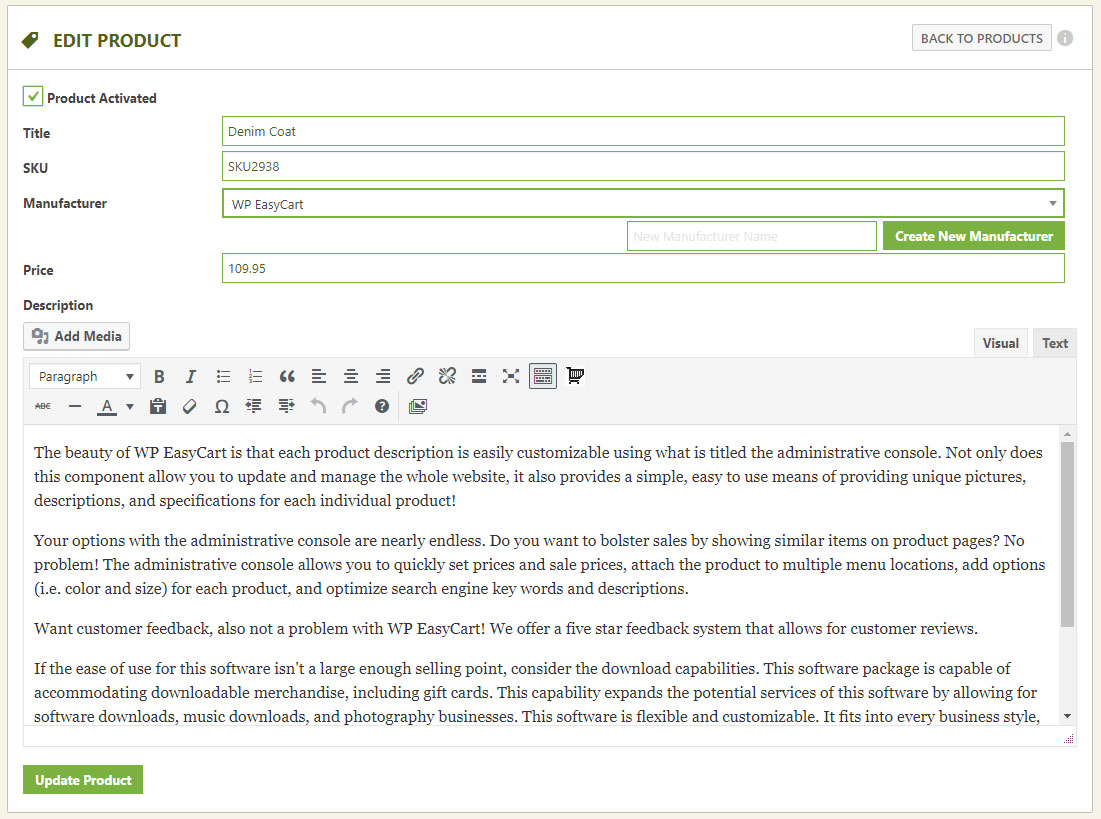
Administrer alle dine produkter i butikken med lethed! 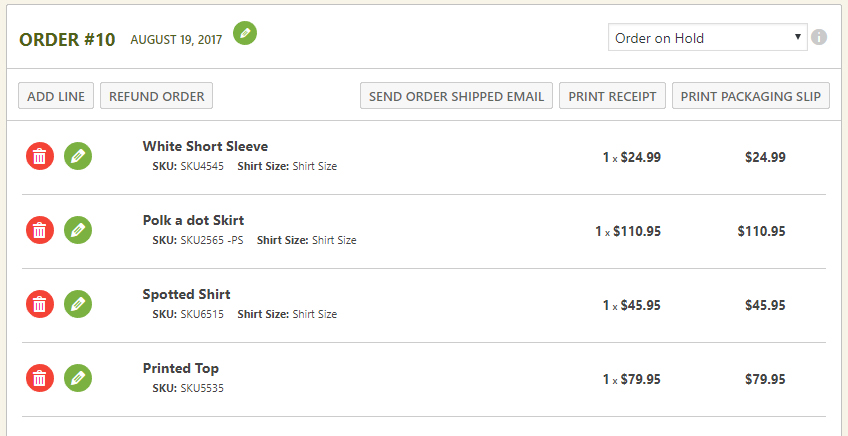
Butiksordreadministration er nemmere end nogensinde før og meget effektiv!


Blokke
Dette plugin giver 1 blok.
- WP EasyCart
Installation
Installer et komplet WordPress Shopping Cart & eCommerce plugin på mindre end 5 minutter! Udnyt den mest kraftfulde Stripe-vogn, Square-vogn, & PayPal-vogn til WordPress i et par enkle trin!
-
Installer og aktiver WordPress Shopping Cart plugin. Log ind i din WordPress-administrator, gå til plugins -> tilføj nye og søg efter ‘EasyCart’.
-
Når du har installeret og aktiveret, anbefaler vi, at du gennemgår vores enkle 5-trinsguide for at konfigurere de første sider, betaling, skatter og afgifter samt forsendelse. Det tager kun 1 minut, og du kan altid ændre disse indstillinger via WP EasyCart -> indstillingssiden.
-
Begynd at tilføje dine butiksprodukter ved hjælp af produktmenuen!
Se vores installationsvideo
Populære videoer om installation af indkøbsvogne til e-handel
- Video 1: Installation af WP EasyCart
- Video 2: Installer 14 dages PRO prøveperiode!
- Video 3: Oprettelse af dit første produkt
- Video 4: Oprettelse af en produktmulighed
- Video 5: Oprettelse af produktkategorier
- Video 6: Grundlæggende designtilpasning
- Video 7: Opsætning af betalingsgateway
- Video 8: Opsætning af skatter og afgifter
- Video 9: Opsætning af forsendelse
- Video 10: Test og lancering af dit websted
Du kan finde flere videoer i vores videobibliotek!
Dokumentation for installation
Brugerne vil elske vores komplette online dokumentation og gratis ressourcer, herunder online hjælpedokumentation, et komplet bibliotek med videovejledninger samt et fællesskabsforum og en vidensbase. Premium- og professionelle brugere vil elske den ekstra support, de køber med en licens, og den individuelle tekniske support med vores 5-stjernede tekniske team. BARE LÆS VORES ANMELDELSER!
Online dokumentation: WP EasyCart Dokumentation
Online videovejledninger: WP EasyCart Video Tutorials
Online fora: WP EasyCart Forums
Har du brug for teknisk support? Sammenlign priserne for Professional og Premium
FAQ
-
Hvor kan jeg få dokumentation eller demoer af indkøbskurve?
-
Vi tilbyder en fuld service hjemmeside med online dokumentation, video tutorials, community support fora samt demonstrationssteder der kører vores forskellige skabeloner på WP EasyCart.
-
Kan jeg bruge jeres e-handelssoftware til at vise, men ikke sælge produkter?
-
Absolut! Hvis du ikke har brug for at sælge noget, men gerne vil bruge vores software til at vise produkter, er du velkommen til at gøre netop det! Du kan bare sætte butikken i katalogtilstand, og det fjerner muligheden for at tilføje produkterne til indkøbskurven.
-
Kan jeg sælge mine produkter på Facebook & Instagram?
-
Ja! Med vores Premium-udgave kan du bruge vores Facebook- og Instagram-feed til at offentliggøre dine produkter i et Facebook-katalog. Dette giver dig mulighed for at oprette et katalog af produkter på Facebook, oprette overbevisende carousal-annoncer på tværs af sociale medier og meget mere!
-
Den gratis version kommer lige her på WordPress og tilbyder begrænsede funktioner til dig, herunder muligheden for at have en PayPal-vogn, Square-vogn, Stripe-vogn, manuelle betalinger, ubegrænsede produkter, produktvariationer, ordrehåndtering og meget mere. Funktioner som kuponer, live forsendelsespriser, kampagner, ordreredigering, 30+ gateways, live forsendelsesbærere og mange flere er ikke inkluderet i den GRATIS version. Ved at opgradere til Professional eller Premium låses ALLE kernefunktioner op og får du opdateringer og support i et år. Ved at opgradere til Premium får du alt i Professional cart plus adgang til vores over 10 udvidelser og iPad-, Android- og skrivebordsprogrammer.
-
Facebook & Instagram giver dig mulighed for at sælge på tværs af sociale medier. Quickbooks tilbyder automatiseret synkronisering ned til din desktop Quickbooks version. ShipStation tilbyder synkronisering af ordrer til nem forsendelsesstyring, etiketter og e-mail-sporing. Stamps.com giver mulighed for at købe og betale for porto. Groupon, ekstra faner, mandrill og mailchimp e-mail, optimal logistik, affiliate WP Rates og Bluecheck tilbyder en række udvidelser til integration med tredjepart, som du får som en del af vores premium-udgave. Besøg vores websted for at få alle Premium-fordele, herunder vores mobilapps og push-meddelelsessystemer.
-
Hvordan fungerer en e-handelslicens med din software?
-
Det GRATIS plugin er den fulde version af WordPress eCommerce-softwaren til indkøbsvogn; PRO- og administrationssoftwaren, der downloades fra vores websted, er dog licenseret software. PRO-softwaren vil tilføje alle kernefunktioner, og Premium-versionen vil give adgang til vores administrative software, apps og udvidelser. Du kan fortsætte med at køre det GRATIS WordPress-plugin, men skal købe en licens for at bruge vores PRO- eller administrative software.
Hver licens er god for én webside-URL eller WordPress-installation. Du kan til enhver tid overføre en licens fra et udviklingsmiljø til et produktionsmiljø; det er din licens, når du først har købt en.
Licensering giver dig funktioner som kuponer, kampagner, live-forsendelsesprisberegnere og meget mere. Plus du vil modtage support fra vores personale individuelt i stedet for gennem vores åbne supportsystemer i fællesskabet. Du kan få flere oplysninger om licensering på vores websted. -
Skal jeg betale månedligt?
-
Nej, der er ingen månedlige gebyrer at betale med EasyCart. WP EasyCart giver dig mulighed for at bruge plugin’et på ét WordPress-websted i 12 måneder med opgraderinger og support. Den gratis udgave har 2% EasyCart-gebyrer pr. transaktion. Den professionelle/premium-udgave har 0% EasyCart-gebyrer pr. transaktion. *Normale betalingsbehandlingsgebyrer gælder altid.
-
Vil det fungere i mit tema?
-
Ja! EasyCart fungerer på 3 WordPress-sider, som automatisk oprettes ved installationen. Vores installationsprogram fører dig hurtigt gennem trinene, og hvis du har problemer med temaet, kan din temaudvikler eller vores personale hjælpe dig.
-
Hvilke betalingsgateways til e-handel har du?
-
Vi tilbyder over 30 forskellige gateways. De populære omfatter Square, SquareUp, PayPal Standard, PayPal Pro, PayPal Payflow, Authorize.net, Stripe.com, FirstData, eWay, Payment Express, Sagepay, 2Checkout, Dwolla, Nets Nexaxept, Payfort, Realex, Redsys, Skrill, beanstream, braintree, Chronopay, Virtual merchant, Geomerchant, intuit, MIGS, Moneris Canada, Moneris US, NMI, Payline, Paypoint, Secure Pay, WorldPay og andre. Se vores dokumentation for en fuldstændig ajourført liste.
Anmeldelser


Bidragsydere & udviklere
“Indkøbskurv & e-handelsbutik” er open source-software. Følgende personer har bidraget til dette plugin.
Bidragsydere

“Indkøbskurv & e-handelsbutik” er blevet oversat til 2 sprog. Tak til oversætterne for deres bidrag.
Oversæt “Indkøbskurv & e-handelsbutik” til dit eget sprog.
Interesseret i udvikling?
Gennemse koden, tjek SVN repository, eller abonner på udviklerloggen via RSS.
Ændringslog
5.8.12
- New Feature – USPS V3 now available, toggle it on in your shipping settings.
- New Feature – If you are connected to Stripe sandbox and live site, you may enable an EasyCart user as a test user. Test users can checkout through the sandbox for testing while your store is live.
- Improvement – UPS now using updated oAuth API version, which means almost no disconnects moving forward.
- Improvement – Cart session does not start until something is added to the cart to prevent caching issues.
- Improvement – AJAX calls now specifically state top not cache in hopes some server setups do not cache the responses.
- Improvement – The order stores a converted cart ID, which can be used in tracking conversions more easily for third party integrations.
5.8.11
- New Feature – Choose coupons to apply to the first order only.
- New Feature – Enable and connect direct Google Tags integration.
- New Feature – Allow a specific user to enter a different billing from shipping address to override global option.
- New Feature – You may now dupicate an order from the admin.
- New Feature – New Elementor element for cart icon display (typically used in custom menus).
- New Feature – New shortcode for cart icon display: [ec_cart_icon]
- Bug Fix – Advanced swatches, checkboxes, and radio selects (with price changes) display fixed for Elementor product templates.
- Bug Fix – Square coupon fix to prevent order insert errors to Square display.
- Bug Fix – Canada Tax for Quebec calculation fixed.
- Bug Fix – Added US military APO states.
- Bug Fix – BOGO coupon calculation for order display.
5.8.10
- Bug Fix – 5.8.10: Same issue for email receipts fixed where the new signature feature was added in 5.8.8.
- Bug Fix – 5.8.9: Some versions of php had an email receipt error and has been resolved.
- New Feature – Automated email signature can be added in text format and/or image upload format.
- New Feature – Enable automated refund email upon refund submitted.
- New Feature – Send a refund issued email from the admin.
- Improvement – Estimate shipping expanded to automatically detect Canadian provinces/territories from the postal code. Useful for live shipping rates.
- Bug Fix – Subscriptions of zero price caused an error.
- Bug Fix – If you have a one-time fee for subscriptions, next bill total was showing incorrectly.
5.8.7
- Bug Fix – Stripe error for specific combination of features.
- Bug Fix – Object cache issue on updating state or country shipping options fixed.
- Bug Fix – Subscription purchase, account creation, plus recaptcha enabled, and cart disabled fixed.
- Bug Fix – Subscription purchase, account creation, duplicate email error was not properly reloading the recaptcha (if enabled).
5.8.6
- Bug Fix – Redsys api updated to remove deprecated PHP function.
- New Feature – Filter added to allow Stripe automatic action handling to be disabled.
5.8.5
- New Feature – Elementor store widget now allows to show products by dynamic ID to help with category and manufacturer templates.
- New Feature – Stripe subscriptions now allow an upcoming payment alert. Payment alerts are determined in your Stripe account and Stripe webhook.
- Improvement – Feature to trim the gateway log adjusted to prevent memory overflow.
- Improvement – Subscription details page upgraded.
- Improvement – Rating system on front-end requires a click to select your rating, instead of hover.
- Bug Fix – Gift card totals were not applying to Canadian taxes.
- Bug Fix – Order details, order receipt print, and order packing slip (if date enabled) now convert the date to match the WordPress timezone. This should align with order list values.
5.8.4
- Patch from 5.8.3 – Error in creating users from the admin fixed.
- Patch from 5.8.2 – Error in the main store js quick fix.
- Improvement – Order list keeps the name visible.
- Improvement – Order list combined first and last name into a customer name column.
- Improvement – Order list, order date updated to show Today, Yesterday, Tuesday, and so on (if within last week).
- Improvement – Order list, order date that is in the same year removed year from the display for better readability.
- New Feature – Order list, customer name can be clicked to view customer details and quick copy for email and phone.
- Bug Fix – Square importer added checks for missing data coming from Square for syncs.
- Bug Fix – If the admin links to a user that was deleted, it displays the appropriate error message.
- Bug Fix – Improved testing for remote server to use only when required to connect to PayPal or Stripe.
- Bug Fix – PHPMailer file removed and replaced with WordPress version.
5.8.1
- Update – Works with WordPress 6.8!
5.7.15
- Bug Fix – Intuit updated their refresh token format, update to fix token format validation.
- Bug Fix – Corrected translations for typo.
5.7.14
- Bug Fix – Minification error in the JS file fixed.
- Bug Fix – Cookie path upgraded for those that do not have one set.
- Bug Fix – Pickup date/time small adjustment for disabling future dates at the correct time.
- Bug Fix – Newletter popup second h1 bug fixed.
5.7.13
- Bug Fix – Newsletter popup, switched h1 to h2 to prevent seo issues.
- Bug Fix – Australian states/territories with 3 characters were not passing to PayPal correctly.
- Bug Fix – Elementor product details template with modifier images that switch from a radio button selection were not working.
- Bug Fix – For those using different languages, the locale is now passed to Stripe to allow the payment form language to match the selected language.
- Bug Fix – Canada tax element IDs were incorrect, causing the values to not update dynamically.
- Improvement – Tax rates update, if necessary, on update of shipping method selection.
- Improvement – Live shipping rates update table, each item has it’s own update button.
5.7.12
- New Feature – Live shipping rates are now sortable via drag and drop.
- New Feature – Basic options can be included in an add to cart direct link using the url variable feature.
- Bug Fix – Duplication of a basic product with stripe fix to stop adding products incorrectly to your Stripe product catalog.
- Bug Fix – Stripe prorate behavior fix.
5.7.11
- New Feature – If product is deactivated, a WordPress admin (or WP EasyCart user role) user can still view the product details.
- New Feature – You can now use modifiers in your ec_add_to_cart URL (if all modifiers have URL keys and are of non-complex types). System will verify data before adding to the cart or redirect the user to the product if missing a parameter.
- New Shortcode – [ec_account_register] to allow you to place the registration account form on any page.
- Bug Fix – For live shipping that relies on SimpleXML, system now handles a failure in response from the live rate provider.
- Bug Fix – Stripe subscriptions and proration fixed.
- Bug Fix – Square with tax on shipping fixed so that orders are created properly in the Square dashbaord.
- Bug Fix – Object cache issue with shipping settings fixed.
5.7.10
- Bug Fix – Store status tax section shows set up with Canada Tax.
- Bug Fix – Button click in admin issue on somse systems fixed.
- Bug Fix – Google Merchant schema output fixed for special characters.
- Bug Fix – Redirect feature for ec_account shortcode fixed.
- Improvement – User list includes user ID.
- Improvement – User list can be searched by user ID.
5.7.9
- New feature – Add your Stripe webhook signing secret for extra webhook security.
- Improvement – Added verification for webhooks.
5.7.8
- New Feature – Order status updates, text notifications, now allow for extra dynamic content. View the docs for details.
- Bug Fix – Fixed our caching error prevention system to work when jquery is loaded deferred.
- Bug Fix – Quickview added h1 tags to your page.
- Bug Fix – Restrict access feature needed to account for value 0, not just empty string.
5.7.7
- New Feature – Option item images now allow for a default image. Defaults may be left blank to continue with the first image being automatically selected.
- New Feature – Verified for WordPress 6.7.
- Bug Fix – Option item images with missing option images fixed to use default or empty image icon if necessary.
- Bug Fix – Missing option item simages with flipbook image display, skips empty option items.
- Bug Fix – Rare case of cart item data for restaurant and pickup dates fixed to only show applicable data in the admin.
5.7.6
- New Feature – Order statuses can now have assigned color codes. Set this up in the checkout settings.
- New Feature – Order status added to mobile display.
- New Feature – UPS added SurePost, which may be useful to some users.
- Bug Fix – Order date bug added in previous version, corrected to match your WordPress timezone again, rather than the server timezone.
- Bug Fix – Inventory updates match the correct color of the row based on the current inventory level.
- Bug Fix – Order export fix to prevent duplicate order details rows.
- Bug Fix – Order quick edit now updating display automatically, broken in previous version if you use the new features.
- Bug Fix – Preorders prevent manual entry of invalid date.
5.7.5
- New Feature – Restaurant style products with open/close times and holidays.
- New Feature – Preorder for pickup style products with open/close times and holidays.
- New Feature – Cart schedule to open and close checkout for retails, restaurant style, and preorder for pickup style products.
- New Feature – Product sync for Square, new option to allow you to deactivate products and variants without the sync reactivating.
- Bug Fix – UPS token issues resolved.
- Bug Fix – Square and PayPal Wallet buttons hidden when appropriate to match Stripe settings.
- Bug Fix – Tip system error when no values entered on setup.
- Bug Fix – Carriage return issue for text areas.
- Bug Fix – Subscriptions with duration set were not cancelling on time.
5.7.4
- Bug Fix – Manufacturers fix for latest PHP versions.
- Bug Fix – Square product sync, timeout issue for large sites.
- Bug Fix – Disabled enter key for add to cart form.
- Bug Fix – Square inventory sync issue for specific product types.
- Bug Fix – AmazonPay fix for hide from cart page feature.
- Bug Fix – Upgraded our table code to hide bulk actions when none exist.
5.7.3
- Bug Fix – SecureNet bug fix.
- Bug Fix – Moneris Canada bug fix.
- Bug Fix – Square product sync, prevent error in update by verifying the model number is not changing to an existing model number.
- Bug Fix – Stripe, prevent multiple payment intents when first cart is loading rapidly.
- Bug Fix – Amazon S3 bug fix.
- New Filter – Filter added to allow you to customize pages where the EasyCart scripts load.
5.7.2
- Bug Fix – Promotion bug fix for specific types of promotions.
- Bug Fix – AWS S3 files fix for a specific version of PHP and web server.
5.7.1
- Improvement – Price now included in inquiry email (unless pricing disabled for inquiry products).
- Improvement – Store sidebar search, includes a clear search button in the box if previous search is shown.
- Bug Fix – Fix the filter open button for an Elementor store display, mobile, when no results.
- Bug Fix – Elementor add to cart feature, when return to page, was showing success for all add to cart elements on the page.
- Bug Fix – USPS weight calculation fix for domestic rates.
- Bug Fix – Fedex rates for the UK fixed county codes to align with Fedex requirements.
- Bug Fix – UPS negotiated rates fix.
- Bug Fix – Promo display feature upgraded to include more promotion types.
- Bug Fix – Subscriptions and applying a coupon fix to show/hide the discount total line when applicable.
- Bug Fix – Subscription option items were not being translated properly.
- Bug Fix – Elementor product swatches fix to not show disabled variants.
5.6.9
- New Feature – Enable showing promotional discount on products and in the cart.
- Improvement – Subscription option labels added to stripe, but only on new modifier items (due to Stripe limitation).
- Bug Fix – Subscriptions and shipping, nonce error fixed.
- Bug Fix – Object cache bug with new modifiers.
- Bug Fix – Price points not saving correctly, nonce error.
- Bug Fix – Divi theme was causing issues with variant titles on swatch images, in some cases breaking them in the cart.
- Bug Fix – Elementor paging links were breaking the selected option filters when multiple were selected.
- Bug Fix – Disabling paging in the default settings was overriding the selection in Elementor or a shortcode.
- Bug Fix – If you are on a page greater than 1, then adjust products per page, it should reset to page 1.
- Bug Fix – Object caching with option filters was not pulling unique lists.
- Bug Fix – Inquiry product with price adjustments was not working.
5.6.8
- Bug Fix – Square sync bug fixed.
5.6.7
- Bug Fix – Quick fix from 5.6.6 to 5.6.7 to fix terms issue on payment page for Paypal.
- Bug Fix – Paypal on payment page with required terms fixed.
- Bug Fix – Splits name into first and last for Mailerlite, ActiveCampaign, and ConvertKit.
- Bug Fix – Error of updating line item totals instead of subtotal on final cart page (specific situations).
5.6.5
- Bug Fix – Abandoned cart email image fix.
- Bug Fix – Gift card amount left now reflects gift card total rather than purchased total on resend.
- Bug Fix – FedEx update to allow for API connection (upgraded).
- Bug Fix – Restricted store login improved to include Recaptch (if enabled) and forgot password link.
- Bug Fix – Force Facebook title meta to correct casing.
- Bug Fix – AmazonPay link fix.
- Bug Fix – Google QR code api depricated, upgraded to built in API.
- Bug Fix – Google Merchant Feed fixed for images and additional images.
- Bug Fix – Visbility with Square products now used.
- Bug Fix – Security patch.
5.6.4
- Bug Fix – Square switched fields to allow more characters in the description, this will improve product syncs with your Square catalog.
- Bug Fix – MailerLite subscriber fix for orders.
- Bug Fix – Subscriber system with square fixed.
- Bug Fix – Subscriptions with override pricing modifiers fixed.
- Bug Fix – Variant SKU passed to order receipt and admin details in place or base SKU.
- Bug Fix – Product quick editor changed to popup overlay for better theme compatibility.
- Bug Fix – Product image settings now available in the product edit screen with image tag options.
- Bug Fix – PayPal experience setting updated.
- Improvement – Manual payments now indicates that the payment has not been received or has been received when you mark paid and resend the receipt.
- Improvement – Google merchant upgraded to include more features and options.
- Improvement – Google merchant upgraded to include variants.
5.6.3
- Patch – New install db error fix.
5.6.2
- Bug Fix – Cookie domain issue on some servers fixed, uses constants if they are available.
- Bug Fix – Square catalog api upgrade to allow multiple categories.
- Bug Fix – Stripe subscriptions fix for modifier pricing.
- Bug Fix – Evalon/Opayo/Sagepay endpoint adjustment.
- Bug Fix – Visual bug for adding modifiers to a product in PRO.
- Bug Fix – Optionitem edit warnings fixed.
- Bug Fix – Stripe payments, there was a small window for an item to be out of stock, but order paid.
5.6.1
- New Feature – Admin filter reviews by product
- New Feature – Sidebar system allows for manufacturer filter.
- New Feature – Dollar off coupon allows for discounting of shipping when subtotal is less than coupon total.
- Bug Fix – Opayo endpoint updates before deadline.
- Bug Fix – Subscription quantity feature was not allowing an update without updating billing.
- Bug Fix – Create account button rounded corners bug.
- Bug Fix – Subscription renewal emails image fix.
- Bug Fix – iOS bug with disabled variants showing in dropdown fixed.
5.6.0
- New Feature – Amazon S3 added in the option item download features (both override and additional files).
- Bug Fix – Add to cart shortcode fix.
- Bug Fix – Variation tracking, improvement to switching from infinite to tracked for single variants.
- Bug Fix – Orders, filter by product, updated to order by product title.
- Bug Fix – Fix for USPS dimensions with option item adjustments.
- Bug Fix – Shipping rate validation implemented.
- Bug Fix – Shipping on Stripe wallet payments had issues.
- Bug Fix – Multiple combo boxes with option item quantity tracking and enable/disable feature didn’t always work.
- Bug Fix – Candian tax rate saving fixed.
- Bug Fix – Store manager type now may upload images for products.
- Bug Fix – Subscription renewals were missing the model number in the order details.
- Bug Fix – Subscriptions updated to use products + prices instead of plans so that management of price points is easier.
- Bug Fix – Security fixes.
5.5.19
- New Feature – Will now start logging stock adjustments for orders to help track down changes in stock for managers.
- New Feature – Disable accordion or datepicker js in cases where themes have conflicting elements.
- Bug Fix – Inquiry with SKU changes on variants now showing in email.
- Bug Fix – Twitter icon switched to X.
- Bug Fix – YouTube thumbnails fixed, usuing too small of images.
- Bug Fix – Spaces not allowed in coupons, now stripped on entry of coupon code in the front end to prevent input errors.
- Bug Fix – Special characters in reviews and google meta fix.
- Bug Fix – Flex fees calcualtion fix in the reports.
- Bug Fix – Variant tracking with infinite amount bug.
- Bug Fix – Out of stock admin emails needed to be translated.
5.5.18
- Bug Fix – Coupons causing visual error on shipping rates when not a shippable coupon code.
- Bug Fix – Categories list in admin: Bug from previous version.
- Bug Fix – Product display for option item images with first option disabled or without images. Updated to be more consistent with the product details display.
5.5.17
- New Feature – Square inventory sync, you may now enable webhooks to have instant updates between Square and your store. Only applies to inventory count.
- Bug Fix – Some product elements not clearing object cache on update.
- Bug Fix – Square tokens upgraded to new version prior to the EOL in April of 2024.
- Bug Fix – Product SKU verification no longer case sensitive.
- Bug Fix – Elementor templates for gift cards fixed.
- Bug Fix – Order ID display in order history of accounts.
- Bug Fix – Sort order in tables for admin now includes default as the secondary sort order to break sorting ties.
- Bug Fix – Paypal express button checkout: Address line 2 was missing from order information.
5.5.16
- Bug Fix – Square inventory syncing fixed to sync inventory totals from Square automatically.
- Bug Fix – Square inventory updating to square on purchase fixed, there were cases where the wrong ID would be saved to the database. Users having this issue should resync their products in the cart importer.
- Bug Fix – Purchasing gift cards with coupon codes was not allowed, fixed to allow discounts on gift cards, while still not allowing purchasing gift cards with other gift cards.
- Bug Fix – Shipping + Exclude from calculation feature initialized with no shipping total showing on account order details.
- Bug Fix – Shipping + Exclude from calculation + live rates + handling rates was missing handling fee.
- Bug Fix – Print receipt bug when current session does not match the guest key.
- Bug Fix – PayPal with live rates and no rate selected bug fix.
- Bug Fix – Marketing link in grey menu lead to broken delete links for coupons.
- Bug Fix – Standard shipping message when no items in the calculation, but a handling fee added was not passing through to the order.
- Bug Fix – Having a single payment method was not working with flex-fee filter by payment method.
- Bug Fix – Flex fees with wallet payments fixed (when filtering to card payments).
- Bug Fix – Flex fees with Square payments fixed (when filtering to card payments).
- Bug Fix – Exclude from shipping, but still using handling rates was not working with wallet payments.
- Bug Fix – Wallet payment was not switching payment method, which is needed for flex fees.
- Bug Fix – Exporting images, where images are all in your media library, excel was forcing a comma formatted list into an integer. We have updated the export/import to use the format ml:# (media library:ID) so that it is easier to manage.
- Bug Fix – Back in stock notification email needed to be updated.
- Bug Fix – Category filter on product list page was not pulling in the total items properly, preventing pagination.
- Bug Fix – Product filter on order list page was not pulling in the total items properly, preventing pagination.
- Bug Fix – Option images, with out of stock variations, but backorders allowed was not showing all images.
- Bug Fix – Option images, with out of stock variations, was leading to mismatching image, thumbnails, magnification, and lightbox view.
5.5.15
- Bug Fix – Admin resend gift card email was not working
- Bug Fix – Stock validation in specific situations was causing inconsistent payment results. Typically has to do with items selling out during the checkout process or a max per item limit.
- Bug Fix – Various fixes for shipping rates with excluded shipping as the only product in cart.
- Bug Fix – Various fixes for shipping rates with handling fees.
- Bug Fix – Various fixes for shipping rates with handling fees and discounts.
- Bug Fix – Switching store page was not refreshing permalinks.
- Bug Fix – If you use an image optimizer, that switches out images for webp images, it was breaking thumbnail selection in the image popup for products.
- Bug Fix – With Smush, thumbnails could be losing the data attribute needed to show full image on click, this has been resolved.
5.5.14
- Bug Fix – Required company name was not applying in the account section when enabled.
- Bug Fix – VAT show included/excluded had duplicate wording (wrong for included).
- Bug Fix – PayPal issues with email missing on initial checkout resolved.
- Bug Fix – PayPal issues with method shipping rates in some cases.
- Bug Fix – PayPal transaction id was not storing properly, making refunds not possible directly from WordPress. Please refund directly from PayPal if you see an error from those orders when refunding.
- Bug Fix – Linking issues possible on some servers for tables in the admin (logs, products, orders, etc…), not a common issue.
- Bug Fix – Entering a text value into a percentage field and saving could cause issues on PHP8+.
- Improvement – Moved setting to stay on product details after add to cart from checkout panel to product details settings panel.
5.5.13
- Bug Fix – Firefox had an issue with the admin toggles, which were adjusted to improve mobile compatibility.
- Bug Fix – Problem with shipping coupon discounts resolved.
- Bug Fix – Issues with PayPal when using custom price labels on modifiers.
- Bug Fix – Issue with Stripe when a connection error occurs. Now handles this error case more gracefully.
5.5.12
- New Feature – Elementor elements for all product pieces including everything from images, to pricing, to add to cart, and more.
- New Feature – Post tags added to allow you to target product, category, or manufacturer type posts. You may need to correct this in the diagnostics by fixing post tags.
- New Feature – Post tags added automatically to products when a category is attached. This allows you to target products by category for custom post templates.
- New Feature – Post tags feature, fix post tags, in the diagnostics area.
- New Feature – Min and max characters on text input modifiers.
- New Feature – New checkout setting to require company name field on checkout.
- New Feature – Manage variants more quickly by showing only enabled variants and filter out by specific variant items.
- New Feature – Flex fee can now apply to payment types (card, klarna, affirm, etc…).
- New Feature – Buy now, pay later with Stripe, you can add a custom minimum amount before customers use this feature.
- Improvement – Inquiry mode moved to inline instead of popup.
- Improvement – Upgraded PayPal api, which enables new features and faster checkout.
- Bug Fix – Variants and modifiers both work with inquiry mode emails.
- Bug Fix – Fixed issue of shipping disabled + shipping restrictions.
- Bug Fix – PayPal and other wallets with address restrictions fixed.
- Bug Fix – Object caching flush features added to prevent data being incorrect when using systems like redis.
- Bug Fix – Mobile design correction for entire admin area.
- Bug Fix – Mobile menu improved for easy navigation.
- Bug Fix – Fixed issue with adding products multiple times to a category.
- Bug Fix – Issue with enabling variant quantity tracking, but product has no variants.
- Bug Fix – Backorder products were not allowed in checkout when out of stock.
- Bug Fix – Sandbox for PayPal was not working
- Bug Fix – Shipping restriction setting on free version was not saving properly.
- Bug Fix – Cases where account required to checkout, disable wallets until a user is logged in.
- Bug Fix – Edge cases for variant images fixed, especially useful when images only available for a few of many variants.
- Bug Fix – Stripe buy now, pay later options were not sending emails or labeling the payment method correctly.
- Bug Fix – Category widget was throwing errors in PHP8.
- Bug Fix – Pricing hidden to public was still showing in the meta.
- Bug Fix – Search widget was not working with dashes or underscores.
- Bug Fix – Search was not finding variant model numbers.
- Bug Fix – Add to cart widget upgraded to latest codebase.
- Bug Fix – Correctly resetting variant selections below change when necessary when switching an earlier variant.
- Bug Fix – Can now use a combination of image and html swatches.
5.5.10
- Bug Fix – No quantity tracking was causing issues.
5.5.9
- Bug Fix – Reverted PHPMailer to V5 from V5.5 to fix php issues with 5.5.
5.5.8
- New Feature – If using catalog mode, enable vacation mode messaging (if that is your intent of using catalog mode).
- Bug Fix – Switching subscriptions from EasyCart bug.
- Bug Fix – Intuit connection issues bug.
- Bug Fix – Possible issue with Square payments form, depending on server setup.
- Bug Fix – Product export feature, some servers cannot handle 500 at a time blocks. Added option to set your own block size, defualt is 500.
- Bug Fix – Product importer, escaping specific characters issue.
- Bug Fix – UPS success messages added on connection.
- Bug Fix – UPS diagnostics problem with new connection method.
- Bug Fix – UPS, needed a way to disconnect.
- Bug Fix – Shortcode error with menu system in EasyCart (old shortcode editor).
- Bug Fix – Recaptcha with subscriptions fixed.
- Bug Fix – Stripe V1 method with subscriptions and tax fixed.
- Bug Fix – Intuit payments issue fixed.
- Bug Fix – Stripe subscriptions, fix in admin to switch from one subscription to another.
- Bug Fix – Square, PayPal, and Stripe, preventing checkout with invalid country (wallet payments mostly).
- Bug Fix – Flex fees added to reports and report exports.
- Bug Fix – Flex fees added to order export.
- Bug Fix – PHP Mailer class updated to latest version.
- Bug Fix – Amazon Payments, if missing data prevent error on checkout page.
- Bug Fix – Flexfee not rounding correctly when inserting to the database.
5.5.7
- Bug Fix – GA4 remove from cart issue.
- Bug Fix – Store restriction saving issue fixed.
5.5.6
- …
