
WordPress.org

Deutsch

  • Themes
  • Plugins
  • News
  • Support
  • Über
    • Learn WordPress
    • Documentation (en)
    • Foren
    • Developers (en)
    • WordPress.tv
  • Meetups
  • Mitmachen
  • FAQ
  • Hol dir WordPress
Hol dir WordPress
WordPress.org

Plugin Directory

Hide/Remove Metadata

  • Ein Plugin einreichen
  • Meine Favoriten
  • Anmelden
  • Ein Plugin einreichen
  • Meine Favoriten
  • Anmelden
Image
Image

Hide/Remove Metadata

Von Catch Plugins
Herunterladen
  • Details
  • Rezensionen
  • Installation
  • Entwicklung
Support

Beschreibung

Hide/Remove Metadata is a free, simple yet extremely handy WordPress plugin that helps you hide or remove author and published date from your website effortlessly. The plugin is super easy to use and comes with only the essential features to hide or remove author and date. Simple and straight. There are times when you might not want to publicize the author’s name or the date when the article was published; Hide/Remove Metadata is perfect for situations like these. You can also choose to hide only one of them, either author or date. And if you want both of them to stay hidden, you can turn on the Hide option for both. Hide/Remove Metadata is extremely useful and takes less than a minute to set up. You can either completely or partially hide the author’s information and published date. Select CSS to partially hide them or select PHP to completely remove the information. The hide author and date plugin comes with a responsive design, which means your website will not be affected in any way; it will look as beautiful as it was. Download Hide/Remove Metadata today!

Screenshots
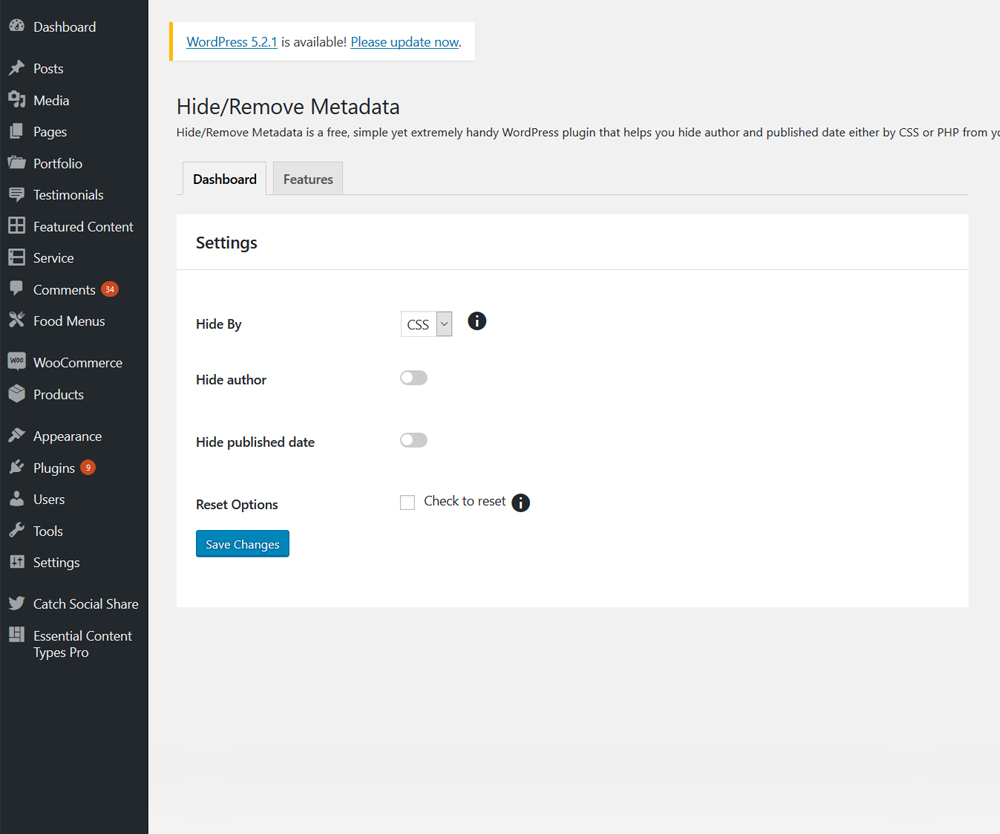
  • Image
    Main Page

Installation

The easy way (via Dashboard) :

  • Go to Plugins > Add New
  • Type in the Hide/Remove Metadata in Search Plugins box
  • Click Install Now to install the plugin
  • After Installation click activate to start using the Hide/Remove Metadata
  • Go to Hide/Remove Metadata from Dashboard menu

Not so easy way (via FTP) :

  • Download the Hide/Remove Metadata
  • Unarchive Hide/Remove Metadata plugin
  • Copy folder with hide-metadata.zip
  • Open the ftp \wp-content\plugins\
  • Paste the plug-ins folder in the folder
  • Go to admin panel => open item „Plugins“ => activate Hide/Remove Metadata
  • Go to Hide/Remove Metadata from Dashboard menu

Rezensionen

Image

Did not work using the CSS options, but the PHP option worked well

tbwriter 27. Dezember 2023
The CSS option didn’t do anything for my site, but when I selected the PHP option, it removed the date as it was supposed to. It has an option to remove the author too, but I didn’t try that as I don’t want to remove the author information from my posts. Thanks for making this plugin.
Image

Working fine on WordPress 6.1.1

susodp 3. Januar 2023
PHP option remove the icon as well, working fine on WordPress 6.1.1
Image

Din’t work for me.

Izabela Wilson 6. November 2022
Sadly didn’t work nor css or php either.
Image

Doesn’t Work

Patrick 5. September 2021 2 Antworten
Just doesn’t work on my site
Image

It worked…BUT

balirooms 11. Juli 2021
It worked! (Using the PHP option) BUT! It left the little calendar icon and the separator line. I’ll live with that.
Image

Works great

maxidavis 27. Mai 2021
It’s good that you can choose what you want to hide and with what technique.
Alle 13 Rezensionen lesen

Mitwirkende und Entwickler

„Hide/Remove Metadata“ ist Open-Source-Software. Folgende Menschen haben an diesem Plugin mitgewirkt:

Mitwirkende
  • Image Catch Plugins
  • Image Catch Themes
  • Image Sakin Shrestha
  • Image Pratik Shrestha
  • Image Mahesh Maharjan
  • Image dreamsapana

„Hide/Remove Metadata“ wurde in 1 Sprache übersetzt. Danke an die Übersetzenden für ihre Mitwirkung.

Übersetze „Hide/Remove Metadata“ in deine Sprache.

Interessiert an der Entwicklung?

Durchstöbere den Code, sieh dir das SVN Repository an oder abonniere das Entwicklungsprotokoll per RSS.

Änderungsprotokoll

1.2.9 (Released: May 11, 2025)

  • Compatibility check up to version 6.8

1.2.8 (Released: April 09, 2024)

  • Compatibility check up to version 6.5

1.2.7 (Released: November 15, 2023)

  • Compatibility check up to version 6.4

1.2.6 (Released: December 14, 2022)

  • Compatibility check up to version 6.1

1.2.5 (Released: February 24, 2022)

  • Compatibility check up to version 5.9

1.2.4 (Released: August 05, 2021)

  • Bug Fixed: User icon still showing when PHP is selected.
  • Bug Fixed: User still showing when CSS is selected.
  • Compatibility check up to version 5.8

1.2.3 (Released: March 07, 2021)

  • Compatibility check up to version 5.7

1.2.2 (Released: December 22, 2020)

  • Bug Fixed: option type check issue

1.2.1 (Released: December 17, 2020)

  • Bug Fixed: Option not saving on first save
  • Updated: Moved plugin menu under tools menu in dashboard

1.2 (Released: August 11, 2020)

  • Bug fixed: PHP version backward compatibility (Reported by: dundeeuniversity )
  • Bug fixed: Used appropriate escaping for CSS output
  • Compatibility check up to version 5.5

1.1 (Released: March 17, 2020)

  • Compatibility check up to version 5.4

1.0.1 (Released: November 12, 2019)

  • Added pot file
  • Compatibility check up to version 5.3

1.0.0 (Released: Jun 04, 2019)

  • Initial Release

Meta

  • Version 1.2.9
  • Zuletzt aktualisiert vor 8 Monaten
  • Aktive Installationen 20.000+
  • WordPress-Version 5.9 oder höher
  • Getestet bis 6.8.3
  • Sprachen

    English (UK) und English (US).

    Übersetze in deine Sprache

  • Schlagwörter
    authordatehidemetadataremove
  • Erweiterte Ansicht

Bewertungen

3.5 von 5 Sternen.
  • 7 5-Sterne-Rezensionen 5 Sterne 7
  • 1 4-Sterne-Rezension 4 Sterne 1
  • 0 3-Sterne-Rezensionen 3 Sterne 0
  • 1 2-Sterne-Rezension 2 Sterne 1
  • 4 1-Sterne-Rezensionen 1 Stern 4

Meine Rezension hinzufügen

Alle Rezensionen anzeigen

Mitwirkende

  • Image Catch Plugins
  • Image Catch Themes
  • Image Sakin Shrestha
  • Image Pratik Shrestha
  • Image Mahesh Maharjan
  • Image dreamsapana

Support

Möchtest du etwas mitteilen? Brauchst du Unterstützung?

Support-Forum anzeigen

Spenden

Möchtest du die Weiterentwicklung dieses Plugins unterstützen?

Für dieses Plugin spenden

  • Über
  • News
  • Hosting (engl.)
  • Datenschutz
  • Showcase (engl.)
  • Themes
  • Plugins
  • Vorlagen
  • Learn
  • Support
  • Entwicklung (engl.)
  • WordPress.tv ↗
  • Mitwirken (engl.)
  • Veranstaltungen
  • Spenden (engl.) ↗
  • Five for the Future (engl.)
  • WordPress.com ↗
  • Matt (engl.) ↗
  • bbPress (engl.) ↗
  • BuddyPress (engl.) ↗
WordPress.org
WordPress.org

Deutsch

  • Das X-Konto (früher Twitter) von WordPress.org besuchen
  • Das Bluesky-Konto von WordPress.org besuchen
  • Das Mastodon-Konto von WordPress.org besuchen
  • Das Threads-Konto von WordPress.org besuchen
  • Die Facebook-Seite von WordPress.org besuchen
  • Das Instagram-Konto von WordPress.org besuchen
  • Das LinkedIn-Konto von WordPress.org besuchen
  • Das TikTok-Konto von WordPress.org besuchen
  • Den YouTube-Kanal von WordPress.org besuchen
  • Das Tumblr-Konto von WordPress.org besuchen
Code ist Poesie.
Advertisement