
Beschreibung
Put your plain text mathematical expressions between [pmath size=xx]…[/pmath] shortcode tags. Useful xx-size integer values range from 8 to 24 (default is 12).
Get more information WPMathPub Plugin
How To
To toggle to the math mode within your blog’s content, you must use the [pmath size=xx]…[/pmath] markdown tag. The plugin automatically replaces your math text commands into HTML image tags that look sort of like this:
<img src=“MathFileName.png“ style=“vertical-align:-xxpx; display: inline-block ;“ alt=“your math text command“ title=“your math text command“/>.
Use the shortcode block to enter math equations from the Gutenberg WordPress block editor.
The math commands must be separated by a space character or surrounded by {}.
Examples:
- [pmath size=12]S(f)(t)=a_{0}+sum{n=1}{+infty}{a_{n} cos(n omega t)+b_{n} sin(n omega t)}[/pmath]
- [pmath size=24]delim{lbrace}{matrix{3}{1}{{3x-5y+z=0} {sqrt{2}x-7y+8z=0} {x-8y+9z=0}}}{ }[/pmath]
- [pmath]delim{|}{{1/N} sum{n=1}{N}{gamma(u_n)} – 1/{2 pi} int{0}{2 pi}{gamma(t) dt}}{|} le epsilon/3[/pmath]
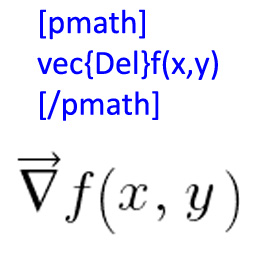
- [pmath size=16]vec{Del}f(x,y) ~ = ~ {partial{f}}/{partial{x}}hat{i} ~ + ~ {partial{f}}/{partial{y}} hat{j}[/pmath]
- [pmath size=16]{Del}f(x,y) ~ = ~ {partial{f}}/{partial{x}}i ~ + ~ {partial{f}}/{partial{y}} j[/pmath]
Math elements supported:
- Usual commands
- Parenthesis
- Math space
- Greek letters
- Symbols
- Arrows
- Sets
- Roots
- Limits
- Big operators
- Delimiters
- Matrix
- Constructions
- Differential operators (Grad, Div, Curl)
Credits
- Thanx to Pascal Brachet for the original PhpMathPublisher library.
Screenshots
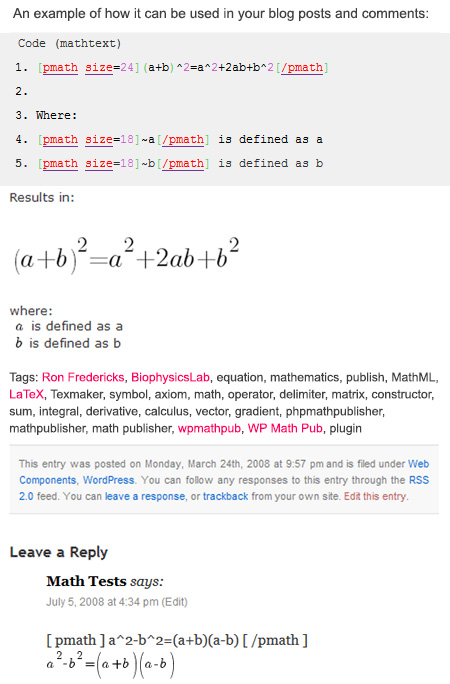
WordPress post with [pmath] tags mixed with plain text 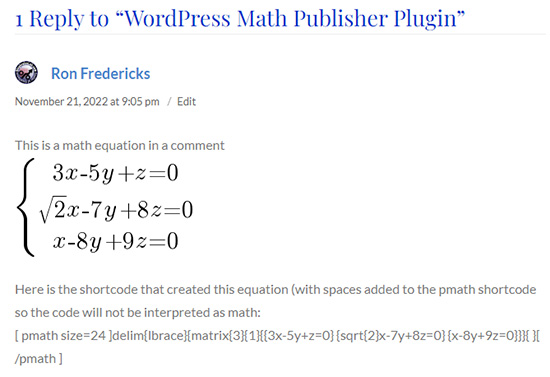
WordPress comments with [pmath] tags mixed with plain text (as shown from WP v:2.5.1 admin tool’s detail view) 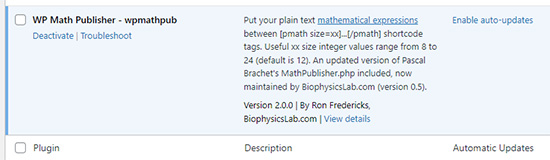
WordPress plugin management page after upload and activation 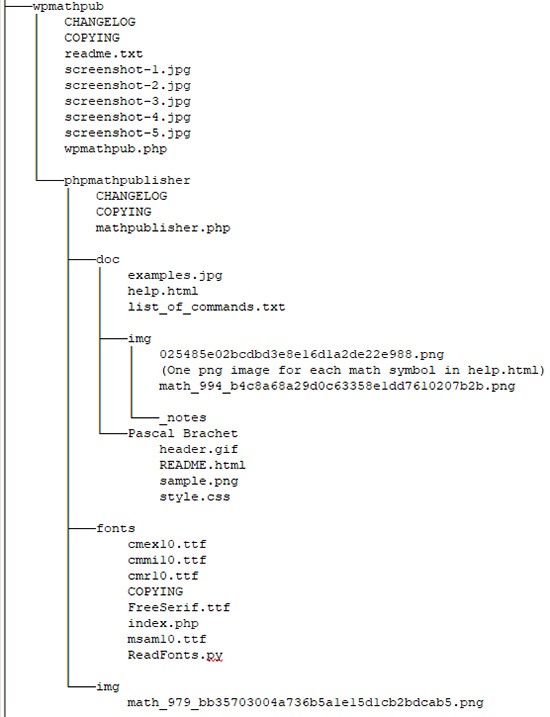
Sample directory structure of this plugin within a WordPress installation 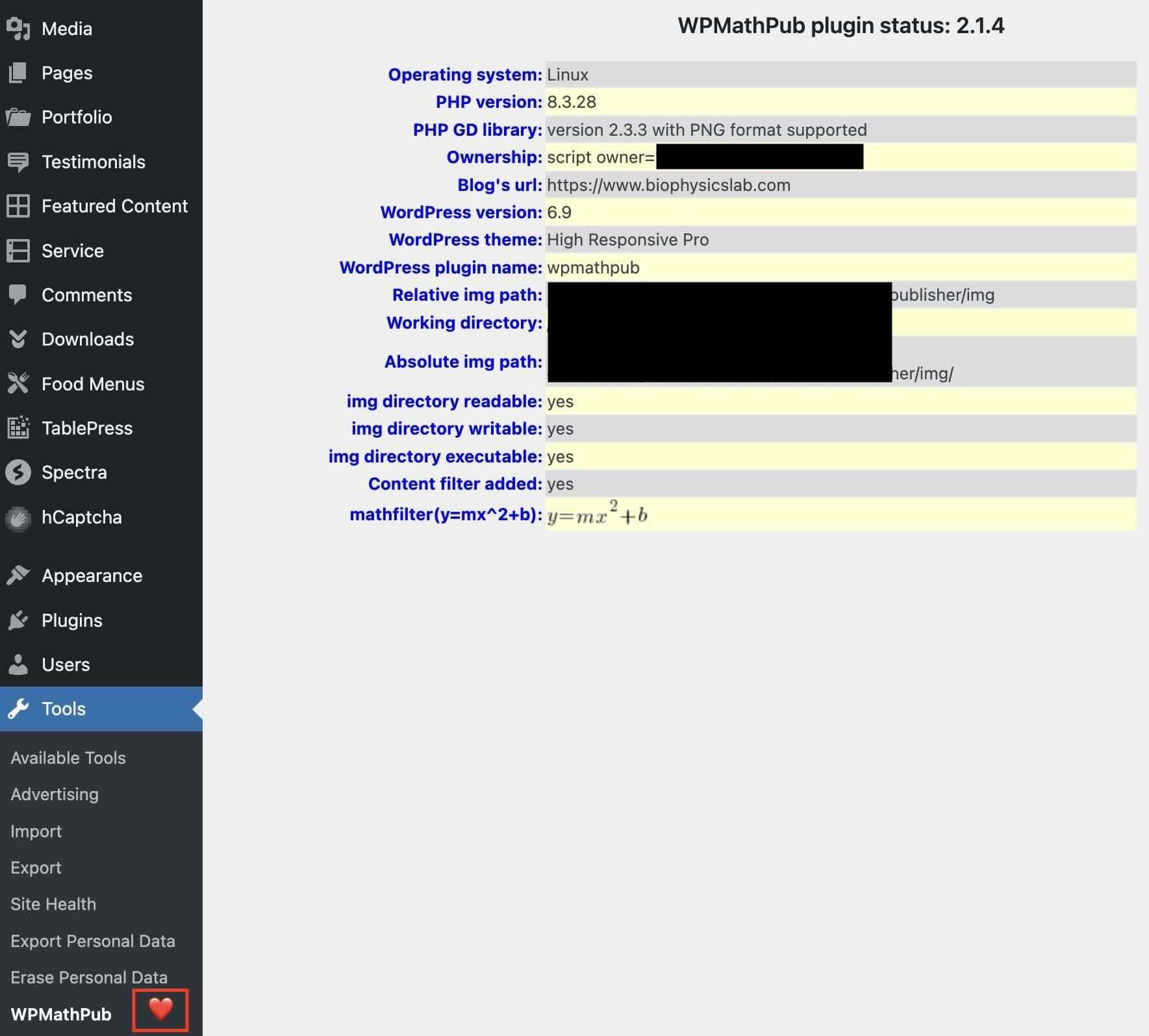
Status display from the author’s blog > Manage > WPMathPub menu 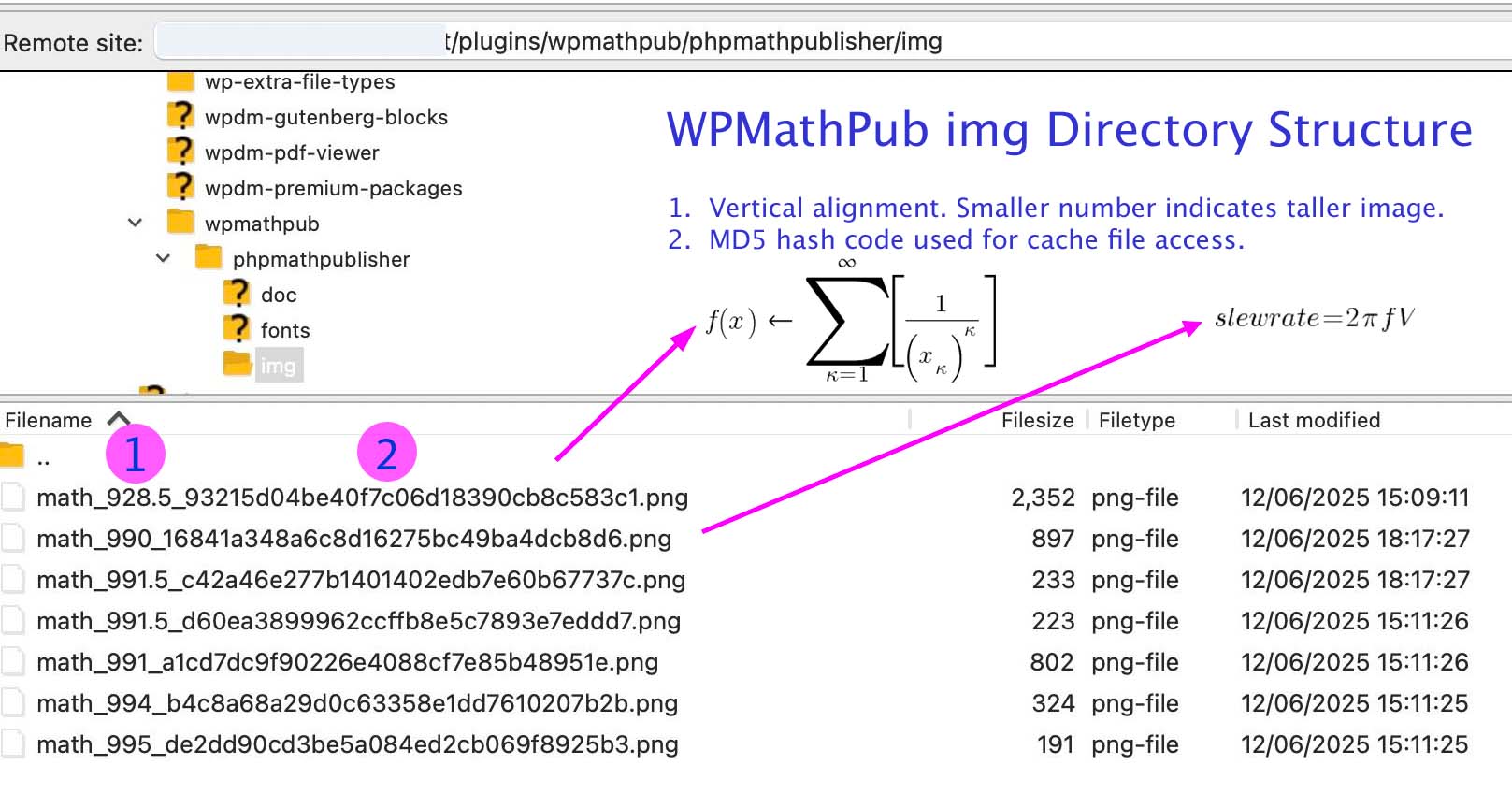
Show how the img subdirectory manages PNG images created by pmath shortcode tags


Installation
Find the plugin within your installed WordPress Add Plugin menu
Or upload from your computer
1. Unzip into your /wp-content/plugins/ directory. If you’re uploading it, make sure to upload
the top-level folder wpmathpub.
2. Make sure the newly installed ./wpmathpub/phpmathpublisher/img directory is readable and writable on your web server (See FAQ for more details)
3. Activate the plugin through the usual ‚Plugins‘ menu in WordPress
4. Look for installation issues using the WordPress Dashboard > Tools > wpmathpub table
FAQ
-
Where can I learn more about wpmathpub’s graphics library?
-
wpmathpub (aka WordPress Math Publisher) is based on Pascal Brachet’s PhpMathPublisher library.
Unfortunately, Pascal’s links to phpMathPublisher are now gone. Instead, BiophysicsLab has picked up support for this library for WordPress use. Support includes porting the original PHP 5 code to PHP 8.x, along with the addition of the gradient symbol (Del) based on the Greek nabla symbol for the display of vector field equations when combined with WPMathLab vector construction (see docs).
A quick set of examples and list of all shortcode tags with their associated LaTeX font symbols are included with the plugin in the Doc section. An online link to this file (https://www.biophysicslab.com/wp-content/plugins/wpmathpub/phpmathpublisher/doc/help.html)
-
The [pmath] tag doesn’t seem to work. How can I solve this problem?
-
Starting with version 1.0.7, use the wpmathpub plugin status display table from your blog’s admin site’s „Manage“ or „Tools“ menu. See screenshot #5 (in the screenshots tab) for details. The status display will:
- Check your system for correct access to required directories,
- Determine if required libraries are available, and
- Show a sample math conversion from text to image format.
Use the results within the table to help troubleshoot installation issues.
-
Do some plugins interfere with the wpmathpub plugin?
-
Starting with version 1.0.7, an enhanced priority scheme was implemented to improve reliability and better cooperation with some high bandwidth video streaming plugins.
At this time, only one plugin is known to play havoc with display of math images from within comments called: Live Comment Preview. Blog posts are not affected. This plugin causes the [pmath] start tag to get out of sync with the [/pmath] end tag.
If you suspect plugin interference, a simple test is to disable all of your plugins except wpmathpub. If wpmathpub works without other plugins, start turning on your plugins one by one to see which one(s) are interfering with [pmath] tag filtering. If you find one, let me know – I may be able to find a solution.
-
During installation how can I make sure the ‚img‘ directory has write access?
-
Use the wpmathpub plugin status display table from your blog’s admin site’s „Manage“ or „Tools“ menu
The ‚img‘ directory needs write access to create new math images from your blog’s math text. Starting with version 1.0.5, the wpmathpub plugin automatically assigns the correct access rights to the ‚img‘ directory on Linux/Unix installations. This auto-assignment feature can be turned off in wpmathpub.php by setting AUTOCHMOD to false:
define(„AUTOCHMOD“, false);
Below is a sample bash shell session demonstrating how to manually locate the ‚img‘ directory, change its mode to include write access, and verify the change was made:
-bash-3.00$ cd wp-content
-bash-3.00$ cd plugins
-bash-3.00$ cd wpmathpub
-bash-3.00$ cd phpmathpublisher
-bash-3.00$ chmod 755 img
-bash-3.00$ stat -c %a img
755
-bash-3.00$ stat -c %A img
drwxr-xr-x -
How are images created and stored on your WordPress site?
-
The img subdirectory controls the creation of a PNG image for each pmath shortcode block you create on your blog, pages, and comments. When your content is displayed to users, the pmath shortcode tags are replaced with new PNG images as they are needed. When you first install WPMathPub plugin the img directory is nearly empty. A few example images are included with the plugin. If you delete the plugin, all PNG images are removed along with the plugin itself. If you reinstall the plugin, the PNG images will be recreated as they are needed during page views by your users.
See screenshot #6 (in the screenshots tab) for details.
-
By default, the WPMathPub plugin supports user-generated math equations in comments. Starting with WPMathPub plugin version 1.0.6, you can disable the use of [pmath] tags in comments by changing ENGAGECOMMENTS flag to false in wpmathpub.php:
define(„ENGAGECOMMENTS“, false);
This setting will not affect the display of math equations in blog posts and pages.
-
Can I use HTML entities like „& gt;“ (for „>“) in my math text equations?
-
Starting in WPMathPub version 2.0.0, new symbols are recommended to replace the >, <, >=, <=, and <> test operators with gt, lt, ge, le, and ne.
Specifically, the „>“ symbol and its HTML entity „& gt;“ will create unusual results in the Gutenberg block editor.
-
Starting with WPMathPub version 1.0.5 both blog posts, pages, and comments support pmath tags.
-
I have a new Q
-
You may go to the WordPress WPMathPub support page to ask questions to the community:
WordPress WPMathPub Support Page
Rezensionen


Mitwirkende und Entwickler
„WPMathPub“ ist Open-Source-Software. Folgende Menschen haben an diesem Plugin mitgewirkt:
Mitwirkende
Übersetze „WPMathPub“ in deine Sprache.
Interessiert an der Entwicklung?
Durchstöbere den Code, sieh dir das SVN-Repository an oder abonniere das Entwicklungsprotokoll per RSS.
Änderungsprotokoll
2.1.3
- Minor documentation fixes
2.1.2
- Minor documentation fixes
2.1.1
- Minor documentation fixes
2.1.0
- Remove obsolete files for improved security
- Minor documentation fixes
2.0.3
- get svn to delete unused files from the repository
- Sorry for so many small changes!
2.0.2
- get svn to copy all required files to the repository
2.0.1
- Remove obsolete files for improved security
- Minor documentation fixes
2.0.0
- Fix bug using greater-than „>“ symbol in Gutenberg block editor.
- Add new vector math symbol „del“.
- Update documentation now located at BiophysicsLab.com.
- Verified plugin works with latest WordPress release (6.1.1)
- Tested plugin on PHP 7.4
- Remove obsolete files for improved security
1.3.0
- Update phpmathpublisher code for fatal errors and test plugin on PHP 7
1.2.0
- Update wpmathpub code for PHP 7
1.1.0
- Improved documentation
1.0.9
- Improved documentation
1.0.8
- Improved documentation
1.0.7
- Fixed a few bugs, improved documentation.
