

Beschreibung
Englisch
WPS Hide Login is a very light plugin that lets you easily and safely change the url of the login form page to anything you want. It doesn’t literally rename or change files in core, nor does it add rewrite rules. It simply intercepts page requests and works on any WordPress website. The wp-admin directory and wp-login.php page become inaccessible, so you should bookmark or remember the url. Deactivating this plugin brings your site back exactly to the state it was before.
This plugin is kindly proposed by WPServeur the specialized WordPress web host.
Discover also our other free extensions:
– WPS Limit Login to block brute force attacks.
– WPS Bidouille to optimize your WordPress and get more info.
– WPS Cleaner to clean your WordPress site.
This plugin is only maintained, which means we do not guarantee free support. Consider reporting a problem and be patient.
Französisch
WPS Hide Login est un plugin très léger qui vous permet de changer facilement et en toute sécurité l’url de la page de formulaire de connexion. Il ne renomme pas littéralement ou ne modifie pas les fichiers dans le noyau, ni n’ajoute des règles de réécriture. Il intercepte simplement les demandes de pages et fonctionne sur n’importe quel site WordPress. Le répertoire wp-admin et la page wp-login.php deviennent inaccessibles, vous devez donc ajouter un signet ou vous souvenir de l’URL. Désactiver ce plugin ramène votre site exactement à l’état dans lequel il était auparavant.
Ce plugin vous est gentiment proposé par WPServeur l’hébergeur spécialisé WordPress.
Plus d’infos sur son utilisation : https://wpformation.com/wps-hide-login-url-connexion-wordpress/
Découvrez également nos autres extensions gratuites :
– WPS Limit Login pour bloquer les attaques par force brute.
– WPS Bidouille pour optimiser votre WordPress et faire le plein d’infos.
– WPS Cleaner pour nettoyer votre site WordPress.
Ce plugin est seulement maintenu, ce qui signifie que nous ne garantissons pas un support gratuit. Envisagez de signaler un problème et soyez patient.
Kompatibilität
Englisch
Requires WordPress 4.1 or higher. All login related things such as the registration form, lost password form, login widget and expired sessions just keep working.
Es ist außerdem kompatibel mit jedem Plugin, das sich in das Anmeldeformular einklinkt, einschließlich:
- BuddyPress,
- bbPress,
- Jetpack,
- WPS Limit Login,
- und User Switching.
Offensichtlich funktioniert es nicht mit Plugins, die wp-login.php fest einprogrammiert haben.
Funktioniert mit Mulitsite, sowohl mit Subdomains als auch mit Unterordnern. Die Aktivierung im Netzwerk ermöglicht dir, eine netzwerkweite Vorgabe festzulegen. Einzelne Websites können ihre Anmeldeseite in etwas anderes umbenennen.
If you’re using a page caching plugin other than WP Rocket, you should add the slug of the new login url to the list of pages not to cache. WP Rocket is already fully compatible with the plugin.
Französisch
Nécessite WordPress 4.1 ou supérieur. Toutes les choses liées à la connexion telles que le formulaire d’inscription, le formulaire de mot de passe perdu, le widget de connexion et les sessions expirées continuent de fonctionner.
Il est également compatible avec tout plugin qui se connecte au formulaire de connexion, notamment:
- BuddyPress,
- bbPress,
- Jetpack,
- WPS Limit Login,
- und User Switching.
Évidemment, cela ne fonctionne pas avec les plugins ou les thèmes hardcoded wp-login.php.
Fonctionne en multisite, avec sous-domaines ou sous dossiers. L’activer pour un réseau vous permet de définir une valeur par défaut pour l’ensemble du réseau. Les sites individuels peuvent toujours renommer leur page de connexion pour autre chose.
Si vous utilisez un plugin de mise en cache de pages autre que WP Rocket, vous devez ajouter le slug de la nouvelle URL de connexion à la liste des pages à ne pas mettre en cache. WP Rocket est déjà entièrement compatible avec le plugin.
Screenshots
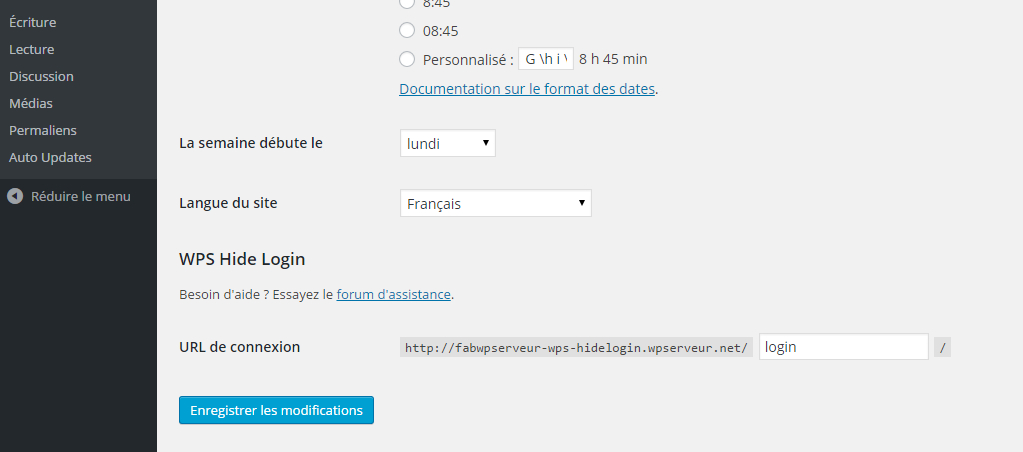
Eine Single-Site-Installation aufsetzen 
Netzwerkweite Einstellungen


Installation
Englisch
- Gehe auf Plugins > Hinzufügen.
- Suche nach WPS Hide Login.
- Schau nach diesem Plugin, lade es herunter und aktiviere es.
- Die Seite wird dich zu den Einstellungen weiterleiten. Ändere deine Anmeldungs-URL dort.
- Du kannst diese Einstellung jederzeit ändern, wenn du möchtest. Gehe einfach zurück zu Einstellungen › WPS Hide Login.
Französisch
- Aller dans Extensions › Ajouter.
- Suche nach WPS Hide Login.
- Recherchez ce plugin, téléchargez-le et activez-le.
- La page vous redirigera vers les paramètres. Changez votre URL de connexion.
- Vous pouvez changer cette option quand vous le souhaitez, il vous suffit de retourner dans Paramètres > WPS Hide Login.
FAQ
-
Ich habe meine Anmelde-URL vergessen!
-
Either go to your MySQL database and look for the value of
whl_pagein the options table, or remove thewps-hide-loginfolder from yourpluginsfolder, log in through wp-login.php and reinstall the plugin.Auf einer Multisiteinstallation steht die Option
whl_pagein der Tabelle sitemeta, wenn keine solche Option in der Tabelle options vorhanden ist. -
Registration and lost password URL
-
You have to give the url. example: /login?action=register or /login?action=lostpassword
But there is no redirection via the plugin, the default URL of WordPress (/wp-login.php?action=register or /wp-login.php?action=lostpassword) otherwise everyone could know the url of administration of your site. -
Ich bin ausgesperrt!
-
Dieser Fall kann durch Plugins ausgelöst werden, die deine .htaccess-Dateien verändern, um Regeln hinzuzufügen oder zu verändern oder von einer alten WordPress-MU-Konfiguration, die nicht aktualisiert wurden, seit die Multisite hinzugefügt wurde.
Prüfe als erstes deine .htaccess-Datei und vergleiche sie mit einer normalen Version, um zu sehen, ob die Probleme daher stammen.
-
J’ai oublié mon identifiant de connexion !
-
Allez dans votre base de données MySQL et recherchez la valeur de ‚whl_page‘ dans la table des options, ou supprimez le dossier ‚wps-hide-login‘ de votre dossier ‚plugins‘, connectez-vous via wp-login.php et réinstallez le plugin .
Sur une installation multisite, l’option ‚whl_page‘ sera dans la table de sitemeta, si l’option n’existe pas dans la table des options.
-
URL d’inscription et de mot de passe oublié
-
Il vous faut donner l’url. exemple : /login?action=register ou /login?action=lostpassword
Mais il n’y pas de redirection via le plugin, de l’url par défaut de WordPress (/wp-login.php?action=register ou /wp-login.php?action=lostpassword) sinon tout le monde pourrait connaître l’url d’administration de votre site. -
Je suis bloqué !
-
Ce cas peut provenir de plugins modifiant vos fichiers .htaccess pour ajouter ou modifier des règles, ou d’une ancienne configuration de WordPress MU non mise à jour depuis l’ajout de Multisite.
La première étape consiste à vérifier votre fichier .htaccess et à le comparer à un fichier .htaccess normal, pour voir si le problème provient de ce fichier.
Rezensionen


Mitwirkende und Entwickler
„WPS Hide Login“ ist Open-Source-Software. Folgende Menschen haben an diesem Plugin mitgewirkt:
Mitwirkende


„WPS Hide Login“ wurde in 37 Sprachen übersetzt. Danke an die Übersetzer für ihre Mitwirkung.
Übersetze „WPS Hide Login“ in deine Sprache.
Interessiert an der Entwicklung?
Durchstöbere den Code, sieh dir das SVN-Repository an oder abonniere das Entwicklungsprotokoll per RSS.
Änderungsprotokoll
1.9.18
- Tested up to 6.9
- Fix early translation loading (Thanks @mondalaci)
1.9.17.2
- Getestet bis WordPress 6.8
1.9.17.1
- Fix link dashboard in admin network > sites
1.9.17
- Getestet bis WordPress 6.6
- Fix link dashboard in admin network > sites
1.9.16.7
- Fix Fatal Error with BuddyBoss
1.9.16.6
- Fix Fatal Error with BuddyBoss Platform
1.9.16.5
- Fix Fatal Error with BuddyBoss
1.9.16.4
- Fix vulnerability : https://www.sprocketsecurity.com/resources/discovering-wp-admin-urls-in-wordpress-with-gravityforms
1.9.16.3
- Fix NOTICE: PHP message: PHP Warning: Private methods cannot be final as they are never overridden by other classes (https://wordpress.org/support/topic/private-methods-cannot-be-final-as-they-are-never-overridden-by-other-classes-2/)
1.9.16.2
- Fix post_password if already logged in
1.9.16.1
- Change section desc
1.9.16
- Fix vulnerability : Login Page Disclosure
1.9.15.2
- Fix number tags
1.9.15.1
- Revert fix
1.9.15
- Fix vulnerability (Thanks @petitphp) : Login Page Disclosure
1.9.14
- Getestet bis WordPress 6.5
1.9.13.2
- Remove admin notice
1.9.13.1
- Remove admin notice
1.9.13
- Fix dismiss admin notice
1.9.12
- Fix vulnerability (Thanks Naveen Muthusamy – Patchstack) : Bypass Vulnerability with multisite WordPress /wp-admin/install.php.
- Add warning in options discussions settings.
- Add warning in dashboard if comment_registration option is activated.
1.9.11
- Getestet bis WordPress 6.4
1.9.9
- Tested up to 6.3
1.9.8
- Update readme
1.9.7
- Tested up to 6.1
- Fix : is_login (Thanks @container)
1.9.6
- Tested up to 6.0
1.9.4
- Tested up to 5.9
1.9.3
- Fix : PHP Warning: Undefined array key „path“
1.9.2
- Add action before redirect
- Fix redirect with wp-cli (Thanks @netson)
1.9.1
- Fix : by-pass security issue allowing an unauthenticated user to get login page by setting a random referer string via curl request.
1.9
- Fix : redirect ajax add_to_cart
1.8.8
- Fix : redirect_url (Thanks Don)
1.8.7
- Fix : remove redirect in doing cron
1.8.6
- Getestet bis WordPress 5.8
1.8.5
- Fix : Force refresh permalinks update option ‚whl_page‘
1.8.4
- Getestet bis WordPress 5.7
1.8.3
- Fix : remove WP_Review
1.8.2
- Fix notice „Notice: Trying to get property ‚href‘ of non-object“
1.8.1
- Fix fatal error with vendor wp-dismissible-notices-handler and wp-review-me
1.8
- Fix multisite subdomain for website menu (Thanks Eric Celeste)
1.7
- Fix vulnerability (Thanks Sebastian Schmitt) : Posting „post_password“ with arbitrary content to /wp-login.php reveals the normal wordpress login page.
1.6.1
- Fix : loopback request site-health
1.6
- Getestet bis WordPress 5.6
- Neu: Kompatibel mit PHP 8
1.5.7
- Fix : Text Domain Issue
1.5.6
- Fix : flush rewrite rules after install or update option
- Getestet bis WordPress 5.4
1.5.5
- Add filter to redirect in cases where the user is already logged in.
- Fix : add rawurldecode for all $_SERVER[‚REQUEST_URI‘] (Thanks @nintechnet)
1.5.4.2
- Revert to code in tag 1.5.3
1.5.4.1
- Korrektur: home_url / site_url
1.5.4
- Korrektur: Kompatibel mit WPML (Danke @susansiow)
1.5.3
- Korrektur: Sicherheitslücken geschlossen (Danke @juliobox)
1.5.2.2
- Getestet bis WordPress 5.2
- Korrektur: Domain-Sprache
1.5.2.1
- Fix : Notice: Undefined index: query
1.5.2
- Fix : Action URL wp_send_user_request()
1.5.1
- Fix : Action URL get_the_password_form()
1.5
- Enhancement: Add custom redirection URL
1.4.5
- Fix : function wp_login_url on page 404 now returns an empty link
1.4.4
- Fix : Too many redirects when a user clicks “Log in with WordPress.com”
1.4.3
- Fix : Fatal Error with multisite WP
1.4.2
- Fix : Error with library for compat WordPress and PHP
1.4.1
- Fix : Remove message review if PHP is too old
1.4
- Enhancement code with composer, namespace and autoload
1.3.4.2
- Fix : Remove message review if PHP is too old
1.3.4.1
- Fix : Deprecated method
1.3.4
- Add : Review message
- Fix : Redirect url wp-admin/options.php
1.3.3
- Add : Filter hook for enable wp-signup (@sumobi)
1.3.2
- Fix : Encoding of the login with a space in the emails
1.3.1
- Fix : redirect change admin email
1.3
- Fix : redirect wp-register.php
1.2.7
- Enhancement for Woocommerce email notification
1.2.6.1
- Revert redirect after login
1.2.6
- Fix : redirect after login
1.2.5.1
- Fix : add action in hook activate
1.2.5
- Remove : redirect activate
1.2.4
- Remove: Third party wpserveur
1.2.3.1
- Enhancement: Add translations cs_CZ, da_DK, es_ES, it_IT, ru_RU
- Fix: Parse error classes/plugin.php l.530
1.2.3
- Fix: change 403 to 404 error on wp-admin
- Fix: activate plugin
- Enhancement: Third party wpserveur
1.2.2
- Enhancement: Compatibility 4.9.x
1.2.1
- Verbesserung: Verhindert den Zugriff auf die Anmeldeseite mit einer URL-kodierten Version von wp-login.php
1.2
- Verbesserung: Verhindert eine Umleitung zur Anmeldungs-URL, wenn man direkt auf /wp-admin/customize.php zugreift
- Verbesserung: Leitet zur Admin-URL um, wenn man bereits angemeldet ist und die Anmeldungs-URL ohne die Aktionsabfragezeichenkette aufruft
1.1.7
- Fix: change fake 404 on wp-admin when not logged-in to a 403 forbidden to prevent fatal errors with various themes & plugins
1.1.6
- Fix: bug with Yoast SEO causing a Fatal Error and blank screen when loading /wp-admin/ without being logged-in
1.1.5
- Fix: Stop displaying the new login url notice everywhere when settings are updated (thanks @ kmelia on GitHub)
- Improvement: better way of retrieving the 404 template
1.1.4
- Fix: bypass the plugin when $pagenow is admin-post.php
1.1.3
- Fix: issue if no 404 template in active theme directory
1.1.2
- Modified priority on hooks to fix a problem with some configurations
1.1.1
- Check for Rename wp-login.php activation before activating WPS Hide Login to prevent conflict
1.1
- Fix : CSRF security issue when saving option value in single site and multisite mode. Thanks to @Secupress
- Improvement : changed option location from permalinks to general, because register_setting doesn’t work on permalinks page.
- Improvement : notice after saving is now dismissible (compatibility with WP 4.2)
- Uninstall function is now in it’s separate file uninstall.php
- Some cleaning and reordering of code
1.0
- Initial version. This is a fork of the Rename wp-login.php plugin, which is unmaintained https://wordpress.org/plugins/rename-wp-login/. All previous changelogs can be found there.
