Detect Internet Connection using HTML CSS & JavaScript

In this tutorial, we will explore how to detect an internet connection using HTML, CSS, and JavaScript. Modern web applications rely heavily on connectivity. When the user goes offline or their internet becomes unstable, it can affect page performance, API calls, data saving, and overall user experience. That’s why showing a clear connection status notification has become essential in web development.
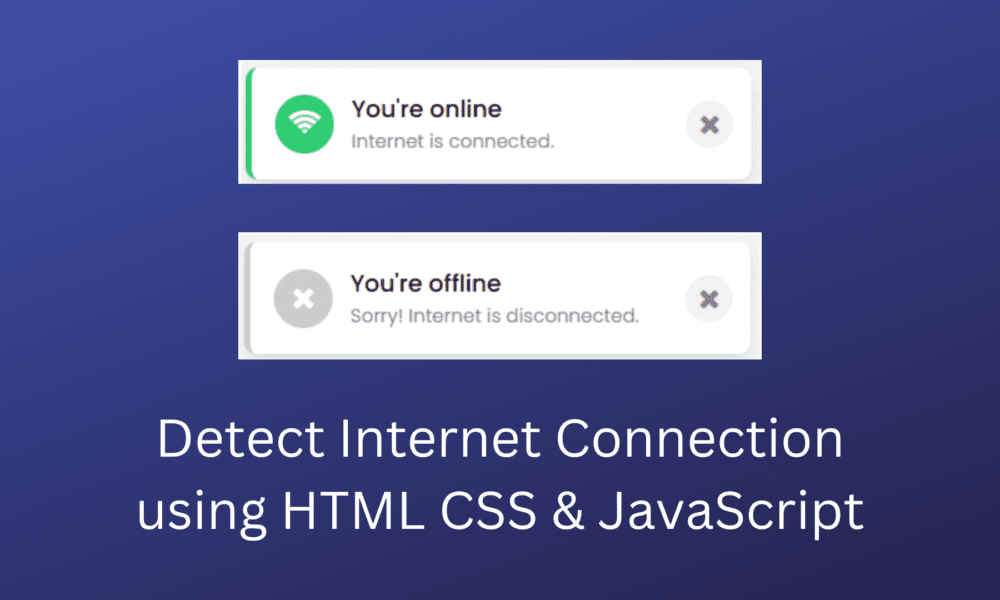
We will build a simple system that displays a toast notification whenever the user loses or regains internet access. When the connection is active, the message will indicate that everything is working fine. When the connection drops, the user will immediately see a visual warning. This is a practical approach used in many modern apps like Gmail, YouTube, and social media platforms. They detect online and offline events and communicate them instantly.
Our example uses a clean HTML layout, basic CSS styling, and JavaScript’s built-in online and offline events. These events help us listen to changes in the browser’s network status without refreshing the page. With a few lines of JavaScript, we can check connection state, show custom notifications, and improve user interaction. By the end of this tutorial, you will understand how to detect internet connectivity changes in real time and display user-friendly alerts using simple front-end code.
Check Internet Connection
Simple To create this program [Checking Online-Offline Status]. we will need to create three files, HTML File, CSS File, and JavaScript File. Simply, create these files and just paste the following codes into your files.
First, create an HTML file with the name index.html and paste the below codes into your HTML file.
index.html
<!DOCTYPE html>
<html lang="en">
<head>
    <meta charset="UTF-8">
    <title>How to check Detect Internet Connection using HTML CSS & JavaScript - devnote.in</title>
    <link rel="stylesheet" href="style.css">
    <meta name="viewport" content="width=device-width, initial-scale=1">
    <script src="https://code.jquery.com/jquery-3.6.0.min.js"></script>
    <link rel="stylesheet" href="https://cdnjs.cloudflare.com/ajax/libs/font-awesome/4.7.0/css/font-awesome.min.css">
</head>
<body>
    <div class="main_wrapper">
        <div class="toast_cls">
            <div class="content">
                <div class="icon"><i class="fa fa-wifi" aria-hidden="true"></i></div>
                <div class="details">
                    <span>You're online</span>
                    <p>Internet is connected.</p>
                </div>
            </div>
            <div class="close-icon"><i class="fa fa-times"></i></div>
        </div>
    </div>
  <script src="script.js"></script>
</body>
</html>
script.js
const wrapper = document.querySelector(".main_wrapper"),
toast = wrapper.querySelector(".toast_cls"),
title = toast.querySelector("span"),
subTitle = toast.querySelector("p"),
wifiIcon = toast.querySelector(".icon"),
closeIcon = toast.querySelector(".close-icon");

window.onload = ()=>{

    // First example start
    // let xhr = new XMLHttpRequest();
    // xhr.open("GET", "https://reqres.in/api/users", true);
    // xhr.onload = ()=>{
    //     if(xhr.status == 200 && xhr.status < 300){
    //         toast.classList.remove("offline");
    //         title.innerText = "You're online";
    //         subTitle.innerText = "Internet is connected.";
    //         wifiIcon.innerHTML = '<i class="fa fa-wifi"></i>';
    //         closeIcon.onclick = ()=>{
    //             wrapper.classList.add("hide");
    //         }
    //         setTimeout(()=>{
    //             wrapper.classList.add("hide");
    //         }, 5000);
    //     }else{
    //         offline();
    //     }
    // }
    // xhr.onerror = ()=>{
    //     offline();
    // }
    // xhr.send();
    // First example end

    // Second example start
    function ajax(){
        $.ajax({
            url: "https://reqres.in/api/users",
            type: "post",
            success: function (response, textStatus, xhr) {
                if(xhr.status == 200 || xhr.status < 300) {
                    toast.classList.remove("offline");
                    title.innerText = "You're online";
                    subTitle.innerText = "Internet is connected.";
                    wifiIcon.innerHTML = '<i class="fa fa-wifi"></i>';
                    closeIcon.onclick = ()=>{
                        wrapper.classList.add("hide");
                    }
                    setTimeout(()=>{
                        wrapper.classList.add("hide");
                    }, 5000);
                } else {
                    offline();
                }
            },
            error: function(jqXHR, textStatus, errorThrown) {
                offline();
            }
        });
    }
    // Second example end

    function offline() {
        wrapper.classList.remove("hide");
        toast.classList.add("offline");
        title.innerText = "You're offline";
        subTitle.innerText = "Sorry! Internet is disconnected.";
        wifiIcon.innerHTML = '<i class="fa fa-times"></i>';
    }

    // this setInterval function call ajax after every 20000ms
    setInterval(()=>{
        ajax();
    }, 2000);
}
style.css
@import url('https://fonts.googleapis.com/css2?family=Poppins:wght@200;300;400;500;600;700&display=swap');
*{
    margin: 0;
    padding: 0;
    box-sizing: border-box;
    font-family: 'Poppins', sans-serif;
}
body{
    overflow: hidden;
    background: #f2f2f2;
}
.main_wrapper{
    position: absolute;
    right: 40px;
    bottom: 20px;
    animation: toast_animation 2s ease forwards;
}
@keyframes toast_animation {
    0% {
        transform: translateX(100%);
    }
    40% {
        transform: translateX(-10%);
    }
    80%, 100%{
        transform: translateX(20px);
    }
}

.main_wrapper.hide {
    animation: hide_toast_animation 1s ease forwards;
}

@keyframes hide_toast_animation {
    0% {
        transform: translateX(20px);
    }
    40% {
        transform: translateX(-10%);
    }
    80%, 100% {
        opacity: 0;
        pointer-events: none;
        transform: translateX(100%);
    }
}
.main_wrapper .toast_cls{
    background: #fff;
    padding: 20px 15px 20px 20px;
    border-radius: 10px;
    border-left: 5px solid #2ecc71;
    box-shadow: 1px 7px 14px -5px rgba(0,0,0,0.15);
    width: 430px;
    display: flex;
    align-items: center;
    justify-content: space-between;
}
.main_wrapper .toast_cls.offline{
    border-color: #ccc;
}
.toast_cls .content{
    display: flex;
    align-items: center;
}
.content .icon{
    font-size: 25px;
    color: #fff;
    height: 50px;
    width: 50px;
    text-align: center;
    line-height: 50px;
    border-radius: 50%;
    background: #2ecc71;
}
.toast_cls.offline .content .icon{
    background: #ccc;
}
.content .details{
    margin-left: 15px;
}
.details span{
    font-size: 20px;
    font-weight: 500;
}
.details p{
    color: #878787;
}
.toast_cls .close-icon{
    color: #878787;
    font-size: 23px;
    cursor: pointer;
    height: 40px;
    width: 40px;
    text-align: center;
    line-height: 40px;
    border-radius: 50%;
    background: #f2f2f2;
    transition: all 0.3s ease;
}
.close-icon:hover{
    background: #efefef;
}
Output
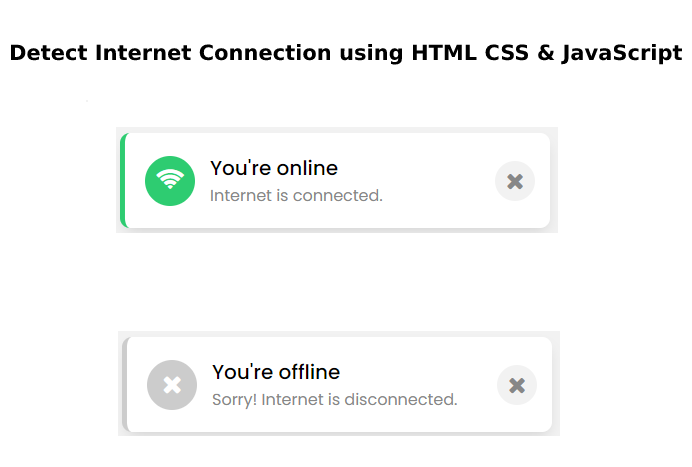
Now check you have successfully created a Toast Notification to Detect Internet Connection using HTML CSS & JavaScript. Note: If your code doesn’t work or facing any error/problem then please write a comment.