


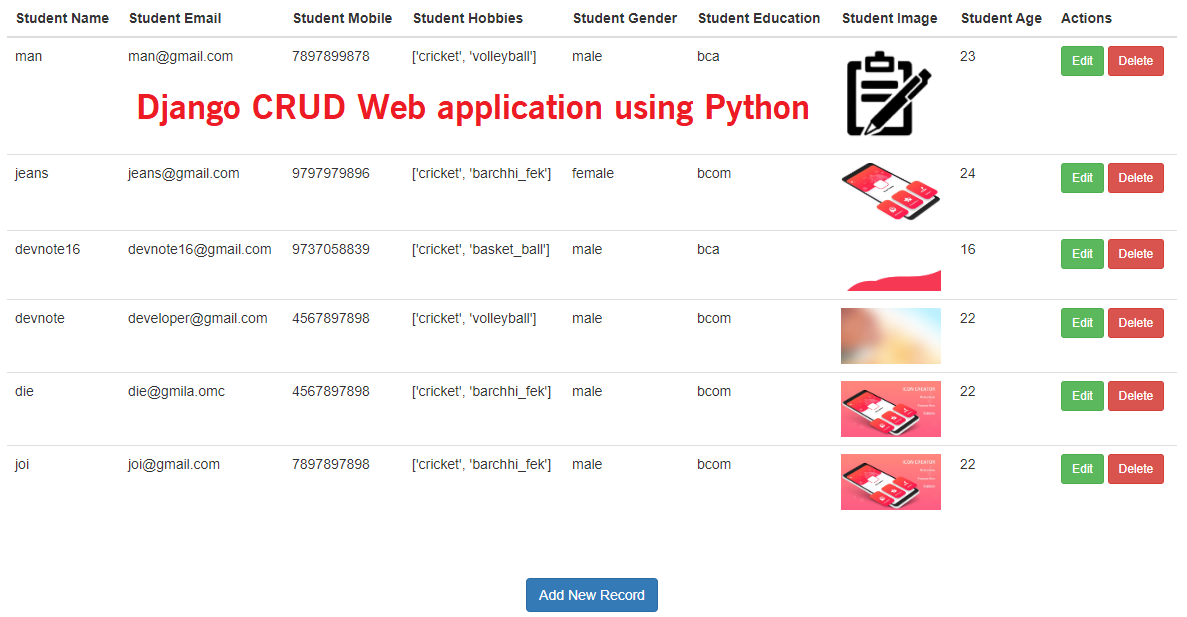
Django CRUD Web application using Python

Django is based on MVT (Model View Template) architecture and revolves around CRUD (Create, Retrieve, Update, Delete) operations. we are going to fabricate a straightforward yet lovely CRUD application utilizing the Python Web Development Framework called Django.
We will start our application by creating a new Django project, and then we will configure it step by step and CRUD application.
What is CRUD?
CRUD stands for Create, Retrieve, Update & Delete. These are the four basic operations which are executed on Database Models.
Django CRUD Tutorial
Step 1 : Install Django
Also read : How to Install Django | Basic Configuration
$ pip install django==2.1.7Step 2 : Create a Django Project
$ django-admin startproject CRUD#Move CRUF directory
$ cd CRUD#Run the development server
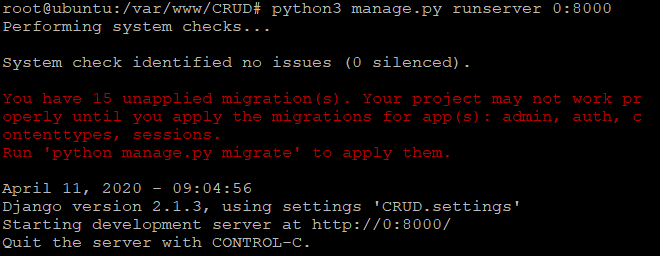
$ python manage.py runserver 0:8000Open the settings.py file to specify the allowed hosts
settings.py
#CRUD/settings.py
...
ALLOWED_HOSTS = ['*']
Also read : Django Invalid HTTP_HOST Header | ALLOWED_HOSTS
See something like this :
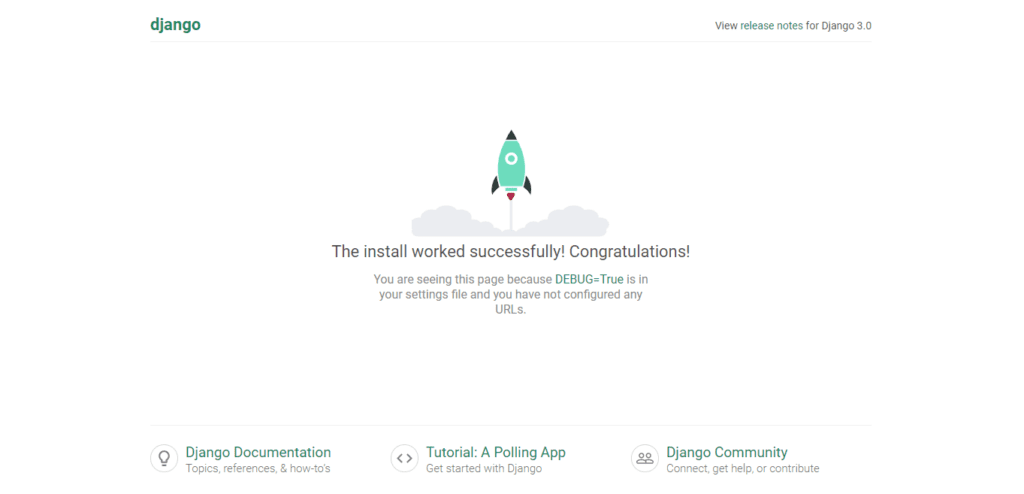
Open url http://localhost:8000/. see something like this :
Step 3: Create a new app.
$ python manage.py startapp student#Other Important Settings
Open the settings.py file to specify add the student app to installed apps. Something like the below :
settings.py
#CRUD/settings.py

# Application definition
INSTALLED_APPS = [
    'django.contrib.admin',
    'django.contrib.auth',
    'django.contrib.contenttypes',
    'django.contrib.sessions',
    'django.contrib.messages',
    'django.contrib.staticfiles',
    'student', #added
]

#student Static Files Settings
STATIC_ROOT = os.path.join(BASE_DIR, '/')
STATICFILES_DIRS = (
    os.path.join(BASE_DIR, "static"),
)
#User_Uploaded_Files
MEDIA_URL = '/media/'
MEDIA_ROOT = os.path.join(BASE_DIR, 'media/')
Step 4 : Making Models for student App
Open models.py and paste this code. We are making a model or database table for our student app.
models.py
#student/models.py
from django.db import models

class Stud(models.Model):
    name = models.CharField(max_length = 50 )
    email = models.EmailField(blank = True )
    number = models.IntegerField()
    hobbies = models.CharField(blank = True, max_length =255 )
    gender = models.CharField(blank = True, max_length =50 )
    education = models.CharField(blank = True, max_length =50 )
    image = models.FileField(upload_to='student_image',blank = True)
    age = models.CharField(blank = True,max_length =50 )

    class Meta:
        db_table = "student"
name, email, number, hobbies, gender, education, image and age of the Stud object. The important part here is the image field. It is set as FileField.
Step 5 : Making Model Forms in student Directory
Make a new file forms.py in student directory.
forms.py
#student/forms.py
from django import forms
from student.models import Stud

class StudForm(forms.ModelForm):
    name= forms.CharField(widget= forms.TextInput(attrs={'class':'form-control','placeholder':'Enter name'}))
    email= forms.EmailField(widget= forms.EmailInput(attrs={'class':'form-control','placeholder':'Enter Email','help_text':'A valid email address'}))
    number= forms.IntegerField(widget= forms.NumberInput(attrs={'class':'form-control','min':'0','placeholder':'Enter Number'}))

    checkbox = [('cricket','Cricket'),('barchhi_fek','Barchhi Fek'),('volleyball','Volleyball'),('basket_ball','Basket Ball')]

    hobbies = forms.MultipleChoiceField(required=False,widget= forms.CheckboxSelectMultiple, choices=checkbox)
    radiobutton = [('male','Male'),('female','Female')]
    gender = forms.ChoiceField(widget= forms.RadioSelect, choices=radiobutton)
    selectoption = [('bba','BBA'),('bca','BCA'),('bcom','BCOM'),('b.ed','B.ed')]
    education = forms.ChoiceField(widget= forms.Select(attrs={ "class":"form-control input_felid"}),choices=selectoption)
    image = forms.FileField(required=False,widget= forms.FileInput(attrs={ 'class':'form-control'}))
    age = forms.IntegerField(widget= forms.NumberInput(attrs={'class':'form-control','min':'0','max':'100','placeholder':'Enter Age'}))

    class Meta:
        model = Stud
        fields = '__all__'
#Make Migrations
Run the commands below to make migrations :
$ python manage.py makemigrationsRun the commands below to migrate :
$ python manage.py migrateStep 6 : Views File
The view functions are our actual CRUD operations in Django. Now, we are editing views.py in the student folder.
views.py
#student/views.py

from django.shortcuts import render ,redirect
from student.forms import StudForm
from student.models import Stud
from django.http import HttpResponse
from django.contrib import messages

def create_stud(request):
    form = StudForm()
    if request.method == "POST":
        form = StudForm(request.POST, request.FILES)

        if form.is_valid():
            try:
                form.save()
                messages.success(request, "Created successful!")
                return redirect('/show_stud')
            except:
                message = "Something we are wrong!"
                form = StudForm()
            return render(request, 'create.html',{'message':message,'form':form})
    else:
        form = StudForm()
    return render(request, 'create.html',{'form':form})

def show_stud(request):
    stud = Stud.objects.order_by('-id');
    return render(request, 'index.html', {'stud':stud})

def edit_stud(requst, id):
    stud = Stud.objects.get(id=id)
    return render(requst, 'edit.html',{'stud':stud})

def update_stud(request, id):
    stud = Stud.objects.get(id=id)
    if request.method == "POST" :
        form = StudForm(request.POST, request.FILES, instance = stud)
        if form.is_valid():
            form.save()
            messages.success(request, 'Update successful!')
            return redirect("/show_stud")
        message = 'Something we are wrong!'
        return render(request, 'edit.html',{'message':message,'stud':form})
    else:
        form = Stud.objects.get(id=id)
        stud = StudForm(instance = form)
        content = {'stud':stud,'id':id}
        return render(request, 'edit.html',content)

def delete_stud(request, id):
    stud = Stud.objects.get(id=id)
    stud.delete()
    messages.success(request, 'Deleted successful!')
    return redirect("/show_stud")
Step 7 : Make Templates.
The first thing create the templates folder in the student folder. Inside student/templates. We are going to make all our templates in that folder.
index.html
#student/templates/index.html

<!DOCTYPE html>
<html lang="en">
<head>
    <meta charset="UTF-8">
    <title>Student Records</title>
    {% load static %}
    <link rel="stylesheet" href="https://maxcdn.bootstrapcdn.com/bootstrap/3.4.1/css/bootstrap.min.css">
</head>
<body>
    <div class="container">
        <div class="row">
            {% if messages %}
            <ul class="messages">
                {% for message in messages %}
                     <li  {% if message.tags %} class=" {{ message.tags }} " {% endif %}> {{ message }} </li>
                {% endfor %}
            </ul>
            {% endif %}
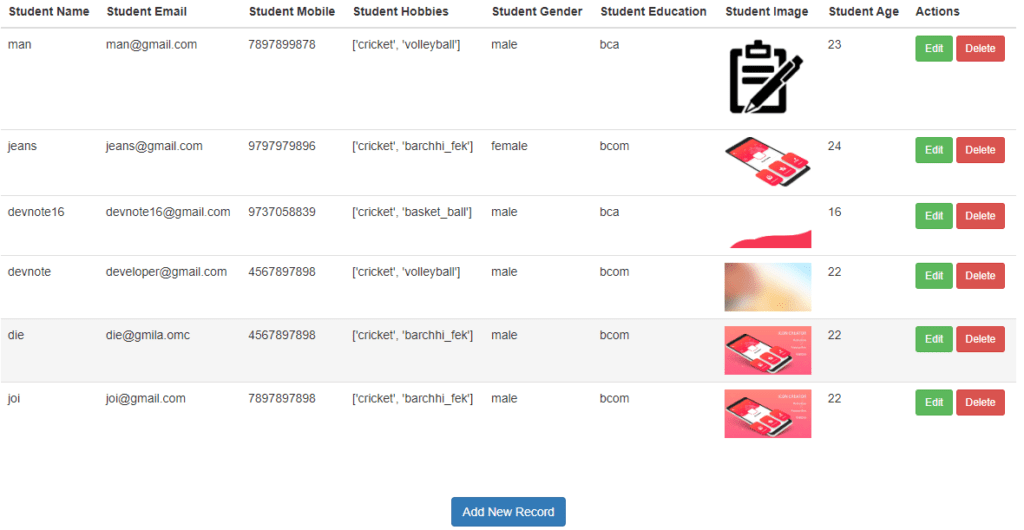
            <table class="table table-hover">
                <thead>
                    <tr>
                        <th>Student Name</th>
                        <th>Student Email</th>
                        <th>Student Mobile</th>
                        <th>Student Hobbies</th>
                        <th>Student Gender</th>
                        <th>Student Education</th>
                        <th>Student image</th>
                        <th>Student Age</th>
                        <th>Actions</th>
                    </tr>
                </thead>
                <tbody>
                    {% for value in stud %}
                    <tr>
                        <td>{{ value.name }}</td>
                        <td>{{ value.email }}</td>
                        <td>{{ value.number }}</td>
                        <td>{{ value.hobbies }}</td>
                        <td>{{ value.gender }}</td>
                        <td>{{ value.education }}</td>
                        <td>{% if value.image %}<img src="/media/{{ value.image }}" class="img img-responsive" width="100px">{% endif %}</td>
                        <td>{{ value.age }}</td>
                        <td><a class="btn btn-success btn-sm" href="/update_stud/{{ value.id }}">  Edit</a><a class="btn btn-danger btn-sm" onclick="return confirm('Do you really want to delete this item!')" href="/delete_stud/{{ value.id }}"> Delete</a></td>
                    </tr>
                    {% empty %}
                    <tr><td>No Record Found!</td></tr>
                    {% endfor %}
                </tbody>
            </table>
        </div>
    </div>
    <br><br>
    <center><a href="/create_stud" class="btn btn-primary">Add New Record</a></center>
    <script src="https://code.jquery.com/jquery-3.4.1.min.js" />
    <script src="https://maxcdn.bootstrapcdn.com/bootstrap/3.4.1/js/bootstrap.min.js" />
</body>
</html>
create.html
#student/templates/create.html

<!DOCTYPE html>
<html lang="en">
<head>
    <meta charset="UTF-8">
    <title>Create</title>
    {% load static %}
    <link rel="stylesheet" href="https://maxcdn.bootstrapcdn.com/bootstrap/3.4.1/css/bootstrap.min.css">
</head>
<body>
    <form method="POST" class="post-form" action="/create_stud" enctype="multipart/form-data">
        {% csrf_token %}
        <div class="container">
            <br>
            <div class="form-group row">
                <label class="col-sm-1 col-form-label"></label>
                <div class="col-sm-4">
                    <h3>Student Details</h3>
                </div>
            </div>
            <div class="form-group row">
                <label class="col-sm-2 col-form-label">Student Name:</label>
                <div class="col-sm-4">
                    {{ form.name }}
                </div>
            </div>
            <div class="form-group row">
                <label class="col-sm-2 col-form-label">Student Email:</label>
                <div class="col-sm-4">
                    {{ form.email }}
                </div>
            </div>
            <div class="form-group row">
                <label class="col-sm-2 col-form-label">Student Phone:</label>
                <div class="col-sm-4">
                    {{ form.number }}
                </div>
            </div>
            <div class="form-group row">
                 <label class="col-sm-2 col-form-label">Student Hobbis:</label>
                    <div class="col-sm-4">
                        {{ form.hobbies }}
                    </div>
            </div>
            <div class="form-group row">
                <label class="col-sm-2 col-form-label">Student Gender:</label>
                    <div class="col-sm-4">
                        {{ form.gender }}
                    </div>
            </div>
            <div class="form-group row">
                <label class="col-sm-2 col-form-label">Student Education:</label>
                    <div class="col-sm-4">
                        {{ form.education }}
                    </div>
            </div>
            <div class="form-group row">
                <label class="col-sm-2 col-form-label">Student image:</label>
                    <div class="col-sm-4">
                        {{ form.image }}
                    </div>
            </div>
            <div class="form-group row">
                <label class="col-sm-2 col-form-label">Student Age:</label>
                    <div class="col-sm-4">
                        {{ form.age }}
                    </div>
            </div>
            <div class="form-group row">
                <label class="col-sm-1 col-form-label"></label>
                <div class="col-sm-4">
                    <button type="submit" class="btn btn-primary">Submit</button>
                </div>
            </div>
        </div>
    </form>
    <script src="https://code.jquery.com/jquery-3.4.1.min.js" />
    <script src="https://maxcdn.bootstrapcdn.com/bootstrap/3.4.1/js/bootstrap.min.js" />
</body>
</html>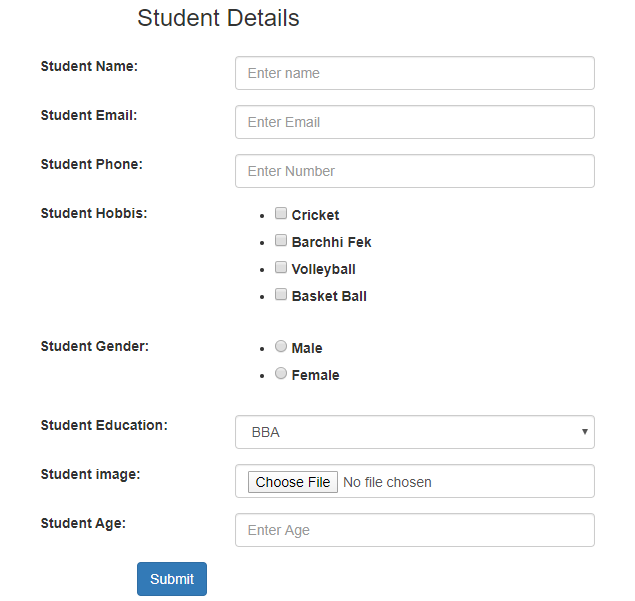
edit.html
#student/templates/edit.html

<!DOCTYPE html>
<html lang="en">
<head>
    <meta charset="UTF-8">
    <title>Edit</title>
    {% load static %}
    <link rel="stylesheet" href="https://maxcdn.bootstrapcdn.com/bootstrap/3.4.1/css/bootstrap.min.css">
</head>
<body>
        <form method="POST" class="post-form" action="/update_stud/{{id}}" enctype="multipart/form-data">
        {% csrf_token %}
        <div class="container">
            <div class="form-group row">
                <label class="col-sm-1 col-form-label"></label>
                <div class="col-sm-4">
                    <h3>Student Details</h3>
                </div>
            </div>
            <div class="form-group row">
                <label class="col-sm-2 col-form-label">Student Name:</label>
                <div class="col-sm-4">
                     {{ stud.name }}
                </div>
            </div>
            <div class="form-group row">
                <label class="col-sm-2 col-form-label">Student Email:</label>
                <div class="col-sm-4">
                    {{ stud.email }}
                </div>
            </div>
            <div class="form-group row">
                <label class="col-sm-2 col-form-label">Student Phone:</label>
                <div class="col-sm-4">
                    {{ stud.number }}
                </div>
            </div>
            <div class="form-group row">
                 <label class="col-sm-2 col-form-label">Student Hobbis:</label>
                    <div class="col-sm-4">
                        <label for="id_hobbies_0"><input type="checkbox" name="hobbies" {% if 'cricket' in stud.hobbies.value %}checked{% endif %} value="cricket" id="id_hobbies_0">Cricket</label>
                        <label for="id_hobbies_1"><input type="checkbox" name="hobbies" {% if 'barchhi_fek' in stud.hobbies.value %}checked{% endif %} value="barchhi_fek" id="id_hobbies_1">Barchhi Fek</label><br>
                        <label for="id_hobbies_2"><input type="checkbox" name="hobbies" {% if 'volleyball' in stud.hobbies.value %}checked{% endif %} value="volleyball" id="id_hobbies_2">Volleyball</label>
                        <label for="id_hobbies_3"><input type="checkbox" name="hobbies" {% if 'basket_ball' in stud.hobbies.value %}checked{% endif %} value="basket_ball" id="id_hobbies_3">Basket Ball</label>
                    </div>
            </div>
            <div class="form-group row">
                <label class="col-sm-2 col-form-label">Student Gender:</label>
                    <div class="col-sm-4">
                            {{ stud.gender }}
                    </div>
            </div>
            <div class="form-group row">
                <label class="col-sm-2 col-form-label">Student Education:</label>
                    <div class="col-sm-4">
                            {{ stud.education }}
                    </div>
            </div>
            <div class="form-group row">
                <label class="col-sm-2 col-form-label">Student image:</label>
                    <div class="col-sm-4">
                            {{ stud.image }}
                            {% if stud.image.value %}
                                    <img src="/media/{{stud.image.value}}" class="img img-responsive" width="90px">
                            {% endif %}
                    </div>
            </div>
            <div class="form-group row">
                <label class="col-sm-2 col-form-label">Student Age:</label>
                    <div class="col-sm-4">
                            {{ stud.age }}
                    </div>
            </div>
            <div class="form-group row">
                <label class="col-sm-1 col-form-label"></label>
                <div class="col-sm-4">
                    <button type="submit" class="btn btn-primary">Submit</button>
                </div>
            </div>
        </div>
    </form>
    <script src="https://code.jquery.com/jquery-3.4.1.min.js" />
    <script src="https://maxcdn.bootstrapcdn.com/bootstrap/3.4.1/js/bootstrap.min.js" />
</body>
</html>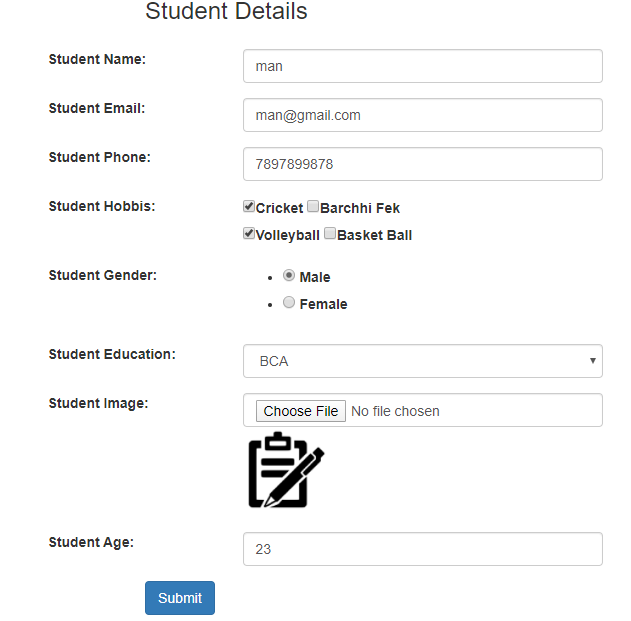
Step 8 : URLs File.
We need to configure the urls file.
urls.py
#CRUD/urls.py

from django.contrib import admin
from django.urls import path, include #added
from django.conf import settings #added
from django.conf.urls.static import static #added
urlpatterns = [
    path('admin/', admin.site.urls),
    path('', include('student.urls')), #added
] + static(settings.MEDIA_URL, document_root=settings.MEDIA_ROOT) + static(settings.STATIC_URL, document_root=settings.STATIC_ROOT) #added
And student app in create the urls.py file Inside the student folder.
urls.py
#student/urls.py

from student import views
from django.conf.urls import include, url
from django.urls import path

urlpatterns = [
    path('create_stud', views.create_stud),
    path('', views.show_stud),
    path('show_stud', views.show_stud),
    path('update_stud/', views.update_stud),
    path('delete_stud/', views.delete_stud),
]
Download Here : Django-CRUD-Web-application





Nice code, thank you.