Magic Navigation Menu using HTML CSS and Javascript

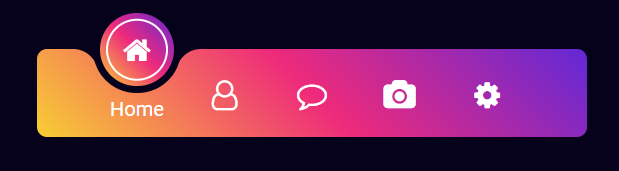
Today, In this tutorial, I will explain How to create a Magic Navigation Menu using HTML CSS, and Javascript with examples. I will give you an example of How to create a magic navigation menu indicator using HTML, CSS, and Javascript with example.
Magic Navigation Menu using HTML CSS and Javascript
index.html
<!DOCTYPE html>
<html lang="en">

<head>
    <meta charset="UTF-8">
    <meta http-equiv="X-UA-Compatible" content="IE=edge">
    <meta name="viewport" content="width=device-width, initial-scale=1.0">
    <title>Magic Navigation Menu using HTML CSS and Javascript</title>
    <link rel="stylesheet" href="styles.css">
    <link rel="stylesheet" href="https://cdnjs.cloudflare.com/ajax/libs/font-awesome/4.7.0/css/font-awesome.min.css">
</head>

<body>
    <div class="navigation">
        <ul>
            <li class="list active">
                <a href="#">
                    <span class="icon">
                        <i class="fa fa-home"></i>
                    </span>
                    <span class="text">Home</span>
                    <span class="circle"></span>
                </a>
            </li>
            <li class="list">
                <a href="#">
                    <span class="icon">
                        <i class="fa fa-user-o"></i>
                    </span>
                    <span class="text">Contact</span>
                    <span class="circle"></span>
                </a>
            </li>
            <li class="list">
                <a href="#">
                    <span class="icon">
                        <i class="fa fa-comment-o"></i>
                    </span>
                    <span class="text">Chat</span>
                    <span class="circle"></span>
                </a>
            </li>
            <li class="list">
                <a href="#">
                    <span class="icon">
                        <i class="fa fa-camera"></i>
                    </span>
                    <span class="text">Gallery</span>
                    <span class="circle"></span>
                </a>
            </li>
            <li class="list">
                <a href="#">
                    <span class="icon">
                        <i class="fa fa-cog"></i>
                    </span>
                    <span class="text">Customize</span>
                    <span class="circle"></span>
                </a>
            </li>
            <div class="selected"></div>
        </ul>
    </div>

    <script src="scripts.js"></script>
</body>

</html>
styles.css
@import url('https://fonts.googleapis.com/css2?family=Roboto:ital,wght@0,100;0,300;0,400;0,500;0,900;1,700&display=swap');
* {
    margin: 0;
    padding: 0;
    box-sizing: border-box;
    font-family: 'Roboto', sans-serif;
}

body {
    display: flex;
    justify-content: center;
    align-items: center;
    min-height: 100vh;
    background: #06021b;
}

.navigation {
    position: relative;
    width: 440px;
    height: 70px;
    background: linear-gradient(45deg, #f9ce34, #ee2a7b, #6228d7);
    display: flex;
    justify-content: center;
    align-items: center;
    border-radius: 8px;
}

.navigation ul {
    display: flex;
    width: 350px;
}

.navigation ul li {
    position: relative;
    width: 70px;
    height: 70px;
    list-style: none;
    z-index: 1;
}

.navigation ul li a {
    position: relative;
    display: flex;
    justify-content: center;
    align-items: center;
    flex-direction: column;
    width: 100%;
    text-align: center;
}

.navigation ul li a .icon {
    position: relative;
    display: block;
    line-height: 75px;
    font-size: 24px;
    text-align: center;
    color: #fff;
    transition: 0.4s;
}

.navigation ul li.active a .icon {
    transform: translateY(-36px);
}

.navigation ul li a .text {
    position: absolute;
    color: #fff;
    font-size: 16px;
    opacity: 0;
    transform: translateY(20px);
    transition: 0.4s;
}

.navigation ul li.active a .text {
    opacity: 1;
    transform: translateY(10px);
}

.navigation ul li a .circle {
    position: absolute;
    display: block;
    width: 50px;
    height: 50px;
    background: transparent;
    border-radius: 50%;
    border: 1.8px solid #fff;
    transform: translateY(-37px) scale(0);
}

.navigation ul li.active a .circle {
    transition: 0.4s;
    transition-delay: 0.4s;
    transform: translateY(-37px) scale(1);
}

.selected {
    position: absolute;
    top: -50%;
    width: 70px;
    height: 70px;
    background: linear-gradient(45deg, #f9ce34, #ee2a7b, #6228d7);
    border: 6px solid #06021b;
    border-radius: 50%;
    display: flex;
    justify-content: center;
    align-items: center;
    transition: .5s;
}

.selected::before {
    content: '';
    position: absolute;
    top: 50%;
    left: -22px;
    width: 20px;
    height: 20px;
    background: transparent;
    border-top-right-radius: 20px;
    box-shadow: 1px -10px 0 #06021b;
}

.selected::after {
    content: '';
    position: absolute;
    top: 50%;
    right: -22px;
    width: 20px;
    height: 20px;
    background: transparent;
    border-top-left-radius: 20px;
    box-shadow: -1px -10px 0 #06021b;
}

.navigation ul li:nth-child(1).active~.selected {
    transform: translateX(calc(70px * 0));
}

.navigation ul li:nth-child(2).active~.selected {
    transform: translateX(calc(70px * 1));
}

.navigation ul li:nth-child(3).active~.selected {
    transform: translateX(calc(70px * 2));
}

.navigation ul li:nth-child(4).active~.selected {
    transform: translateX(calc(70px * 3));
}

.navigation ul li:nth-child(5).active~.selected {
    transform: translateX(calc(70px * 4));
}

.color-white {
    color: #FFF;
}
scripts.js
const listClass = document.querySelectorAll('.list');

function activeLink() {
    listClass.forEach((value) =>
    value.classList.remove('active'));
    this.classList.add('active');
}

listClass.forEach(
    (value) => value.addEventListener('click', activeLink)
);
Output: