


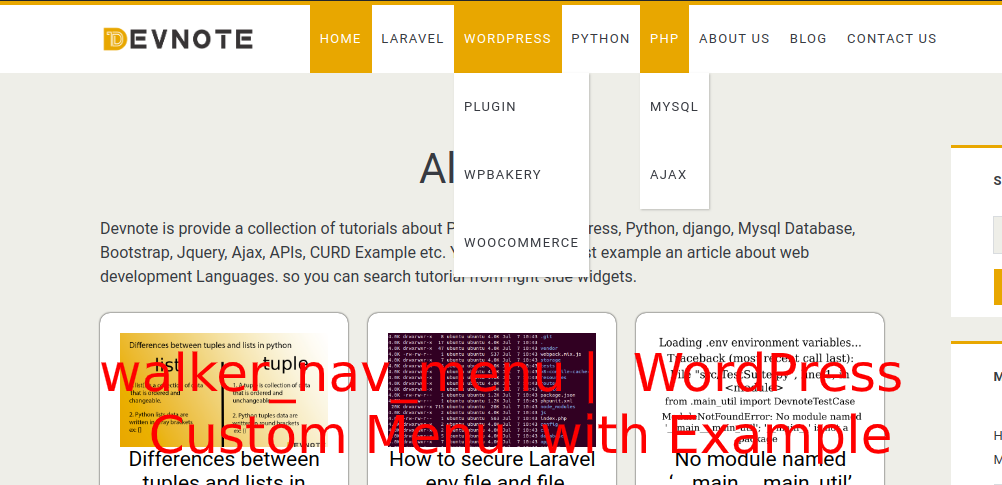
walker_nav_menu | WordPress Custom Menu with Example

Today, we will learn about walker_nav_menu | WordPress Custom Menu with an Example. WordPress function Walker_Nav_Menu class is located in wp-includes/nav-menu-template.php. The WordPress menus can be easily created from inside the admin area and quickly added to these pre-set locations. In this tutorial, we’re going to look at how you can create your own navigation menu and then displayed it in a location of your choice without a plugin.
If you don’t know how to start customizing the walker_nav_menu menu, then you’ve come to the right place. Let’s get started with walker_nav_menu | WordPress Custom Menu with Example navigation.
header.php
wp_nav_menu( array $args = array(
    'menu'              => "", // Menu ID, slug, name, or object.
    'menu_class'        => "", // Menu class.
    'menu_id'           => "", // Menu slug.
    'container'         => "",
    'container_class'   => "", // 'menu-{menu slug}-container'
    'container_id'      => "",
    'fallback_cb'       => "", // Default is 'wp_page_menu'. 'false' for no fallback.
    'before'            => "",
    'after'             => "",
    'link_before'       => "", // before link.
    'link_after'        => "", // after link.
    'echo'              => "", // Default true.
    'depth'             => "", // (int) Default 0. dropdown menu use
    'walker'            => new My_Custom_Nav_Walker(),// custom walker class.
    'theme_location'    => "", // register_nav_menu().
    'items_wrap'        => "", // Uses printf() format.
    'item_spacing'      => "", //  Accepts 'preserve' or 'discard'
) );
# Exapmle
wp_nav_menu(array('theme_location' => 'your-menu-location', 'container' => false, 'menu_class' => 'nav navbar-nav', 'walker' => new My_Custom_Nav_Walker()));functions.php
if (!class_exists('My_Custom_Nav_Walker')) {
class My_Custom_Nav_Walker extends Walker_Nav_Menu {

    function display_element($element, &$children_elements, $max_depth, $depth = 0, $args, &$output) {
        if (!$element)
            return;
        $id_field = $this->db_fields['id'];

        if (is_array($args[0]))
            $args[0]['has_children'] = !empty($children_elements[$element->$id_field]);
        else if (is_object($args[0]))
            $args[0]->has_children = !empty($children_elements[$element->$id_field]);
        $cb_args = array_merge(array(&$output, $element, $depth), $args);
        call_user_func_array(array(&$this, 'start_el'), $cb_args);

        $id = $element->$id_field;
        if (($max_depth == 0 || $max_depth > $depth + 1) && isset($children_elements[$id])) {

            foreach ($children_elements[$id] as $child) {

                if (!isset($newlevel)) {
                    $newlevel = true;
                    $cb_args = array_merge(array(&$output, $depth), $args);
                    call_user_func_array(array(&$this, 'start_lvl'), $cb_args);
                }
                $this->display_element($child, $children_elements, $max_depth, $depth + 1, $args, $output);
            }
            unset($children_elements[$id]);
        }

        if (isset($newlevel) && $newlevel) {
            $cb_args = array_merge(array(&$output, $depth), $args);
            call_user_func_array(array(&$this, 'end_lvl'), $cb_args);
        }

        $cb_args = array_merge(array(&$output, $element, $depth), $args);
        call_user_func_array(array(&$this, 'end_el'), $cb_args);
    }

    public function start_el(&$output, $item, $depth = 0, $args = array(), $id = 0) {
        if ((is_object($item) && $item->title == null) || (!is_object($item))) {
            return ;
        }

        $indent = ($depth) ? str_repeat("\t", $depth) : '';

        $li_attributes = '';
        $class_names = $value = '';

        $classes = empty($item->classes) ? array() : (array) $item->classes;
        if (is_object($args) && $args->has_children) {
            //$classes[] = 'dropdown';
            $li_attributes .= ' data-dropdown="dropdown"';
        }
        $classes[] = 'menu-item-' . $item->ID;
        $classes[] = ($item->current) ? 'active' : '';

        $class_names = join(' ', apply_filters('nav_menu_css_class', array_filter($classes), $item, $args));
        $class_names = ' class="' . esc_attr($class_names) . '"';

        $id = apply_filters('nav_menu_item_id', 'menu-item-' . $item->ID, $item, $args);
        $id = strlen($id) ? ' id="' . esc_attr($id) . '"' : '';

        $output .= $indent . '<li' . $id . $value . $class_names . $li_attributes . '>';

        $attributes = !empty($item->attr_title) ? ' title="' . esc_attr($item->attr_title) . '"' : '';
        $attributes .=!empty($item->target) ? ' target="' . esc_attr($item->target) . '"' : '';
        $attributes .=!empty($item->xfn) ? ' rel="' . esc_attr($item->xfn) . '"' : '';
        $attributes .=!empty($item->url) ? ' href="' . esc_attr($item->url) . '"' : '';
        $attributes .= (is_object($args) && $args->has_children) ? ' class="dropdown-toggle" data-toggle="dropdown"' : '';

        $item_output = (is_object($args)) ? $args->before : '';
        $item_output .= '<a' . $attributes . '>';
        $item_output .= (is_object($args) ? $args->link_before : '') . apply_filters('the_title', $item->title, $item->ID) . (is_object($args) ? $args->link_after : '');
        $item_output .= (is_object($args) && $args->has_children) ? ' <span class="caret"></span> ' : '';
        $item_output .= '</a>';
        $item_output .= (is_object($args) ? $args->after : '');

        $output .= apply_filters('walker_nav_menu_start_el', $item_output, $item, $depth, $args);
    }


    public function start_lvl(&$output, $depth = 0, $args = array()) {
        $indent = str_repeat("\t", $depth);
        $output .= "\n$indent<ul class=\"sub-menu dropdown-menu\">\n";
    }


	}
}


Hi i am reading your reference for walker code
I am trying to pull down menu using jquery
but it does not work
$(function(){
$(‘.dropdwn ul’).hover(function(){
$(“ul:not(:animated)”, this).slideDown();
}, function(){
$(“li.dropdwn_menu”,this).slideUp();
});
});
Thak you
Y si quiero usar tailwind css como le hago ?