-
-
-
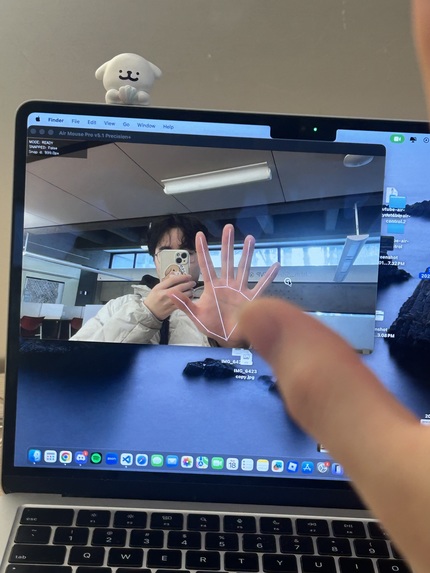
The running program


Inspiration
We started this project from a very ordinary problem:
using a computer when our hands are busy.
Whether it was washing dishes, eating, or making food, we kept running into the same situation. I wanna scroll reels or switch youtube videos, to scroll, click, or pause something without touching a mouse or trackpad with sticky hands. It's just not cool to stop what we were doing just to interact with the screen broke the flow.
So we decided to see if we could control basic computer actions using simple hand movements instead.
What We Built
We built a camera-based air mouse that allows basic mouse control through hand gestures:
Moving the cursor with whole hand palm Pinching to click (index and thumb) Holding a pinch to drag Using a second pinch gesture to scroll (middle and thumb) A quick keyboard shortcut to pause the system at any time (ctrl + option + cmd + p) q to quit the program completely
The goal wasn’t to replace a mouse entirely, but to make quick interactions possible when touching the computer isn’t ideal.
How It Works (Briefly)
A webcam tracks hand movement and interprets a few simple gestures. These gestures are translated into standard mouse actions like moving the cursor, clicking, dragging, and scrolling. The system focuses on stability and control so that small, unintentional movements don’t cause random actions on the screen.
What We Learned
Simple ideas can turn into complex problems once real-world use is involved Small design choices can greatly affect how natural an interaction feels Gesture-based systems need clear rules to avoid accidental actions Building something practical requires thinking about everyday use, not just whether it “works”
Challenges
One of the biggest challenges was preventing accidental clicks and drags, and to really fix the small parameters and adjust the sensibilities to really make it feel natural and smooth enough to be functional. Small hand movements or brief pinches could easily trigger unwanted actions early on. We had to rethink how gestures were interpreted so the system felt intentional rather than sensitive.Even with the help of LLM's, it was also a headache to implement new frameworks and tools that we never had experience with as a first year SWE and a first year physical therapy.
Another challenge was making scrolling feel controlled instead of too fast or unpredictable.
Final Thoughts
This project was less about creating something flashy and more about solving a small, real problem. It’s designed for moments when using a traditional mouse isn’t convenient, and it succeeds in making those interactions quicker and cleaner.


Log in or sign up for Devpost to join the conversation.