-
-
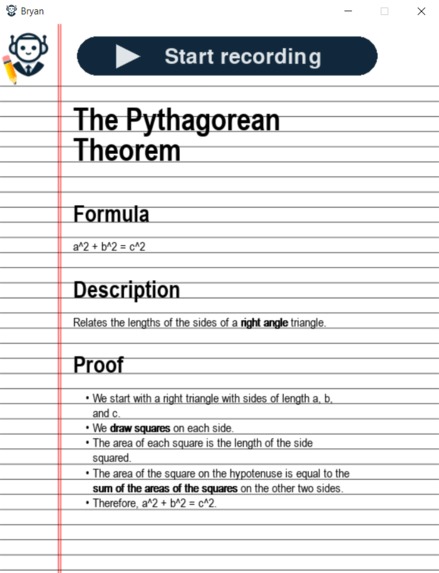
Lecture notes created by Bryan
-
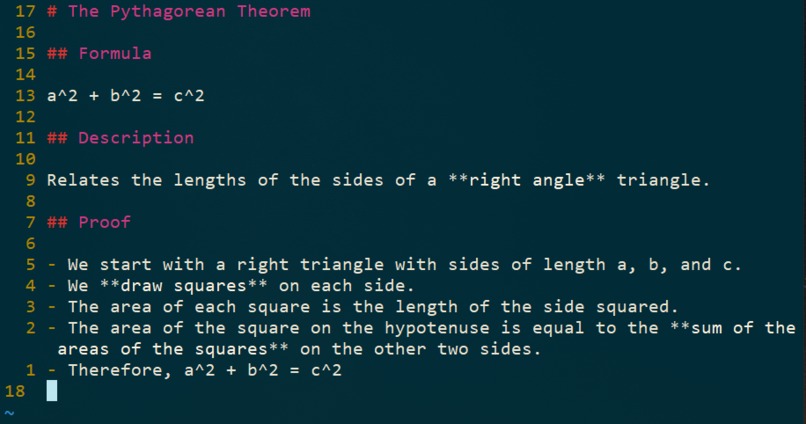
Markdown file created by Bryan


Bryan
Your friendly note taking assistant
Inspiration 💡
Our main inspiration for Bryan stemmed from the challenges we faced as students trying to keep up with fast-paced lectures. Taking effective notes while also paying attention to the professor can be daunting, and we wanted to create a solution that benefits all students, especially those with accessibility issues who may find it challenging to take notes in real-time. We aimed to enhance the learning experience by providing a tool that accurately takes notes, allowing students to focus on understanding the material rather than struggling with note-taking mid-lecture.
What it does 🤖
Bryan is your study buddy in class. It accurately transcribes the professor's lectures and takes notes on it in real time. The notes are formatted in the readable Markdown file format, and bolds/italics relevant points. This format can be easily exported and stored for future use.
How we built it 🔨
We began the project by using PyAudio to capture live audio. We then configured OpenAI's Whisper model to filter out background noise and generate a near real-time transcript of the audio. After that, we fine tuned a GPT-3.5 model to convert transcribed speech to markdown format. Finally, we combined and integrated all of these elements into a PyGame application using multithreading to reduce delay in the note generation as much as possible. The user is able to save both the transcribed text and the generated markdown notes after the session is over.
Challenges we ran into 🚩
We challenged ourselves to use PyGame for the UI, rather than a standard website. To do so, we had to create our own markdown renderer, which required a lot of tuning to ensure the text always aligns with the lined paper, among other challenges.
We also faced difficulties filtering out background noise from the audio input. We originally wanted to use Google Cloud for speech recognition, but we had to switch to OpenAI Whisper so we could clean up the audio quickly using the artificial neural network.
Another challenge involved converting transcripts to notes in real-time while continuing to record audio. To avoid gaps in audio recording, we opted to write to two temporary audio files. The first file is written to for the initial 10 seconds. Once 10 seconds elapse, we promptly initiate another thread to resume recording on the second file. Simultaneously, we halt the recording for the first file and upload it to OpenAI. This approach enables us to seamlessly capture audio while also segmenting it into manageable 10 second fragments.
After completing each of our respective tasks, we encountered a final challenge: integrating everything together. We had to engage in extensive debugging as we encountered numerous unexpected problems, possibly attributed to our lack of sleep.
Accomplishments that we're proud of ⭐
We're proud of creating something that we as students can actually use in class to help improve our learning and productivity. We're also very proud of leveraging PyGame to render our front end. We stepped outside of our comfort zone to learn something new at this hackathon. Rendering markdown manually was very difficult, but we managed to pull it off.
What we learned 📚
We learned the benefits of trying new things, such as Pygame, as it allowed us to learn and grow as developers. Above all, we learned the value of taking the time to find a truly compelling idea, something we ourselves could use.
What's next for Bryan 🚀
- Making Bryan more accessible by deploying it to a website.
- Fine tuning with more data.
- Styling options for the notebook, such as font and color.
- Another LLM pass through the entire notebook after the presentation has concluded to increase accuracy.
- Integrate images into the note taking software.
Built With
- gpt
- machine-learning
- natural-language-processing
- openai
- pygame
- python
- whisper


Log in or sign up for Devpost to join the conversation.