-
-
BTST Tracker

Inspiration
Using Instagram,Facebook and other social media platforms is a part of daily routine nowdays .We think that we are spending less time on Social media but actually it is so addictive that we spend hours on it and which afterall results in** depletion of our vision** by affecting our eyes.Hence, we tried to solve this issue by developing ** BTST Tracker** (Brightness Tracker and Screen Time tracker) .
What it does
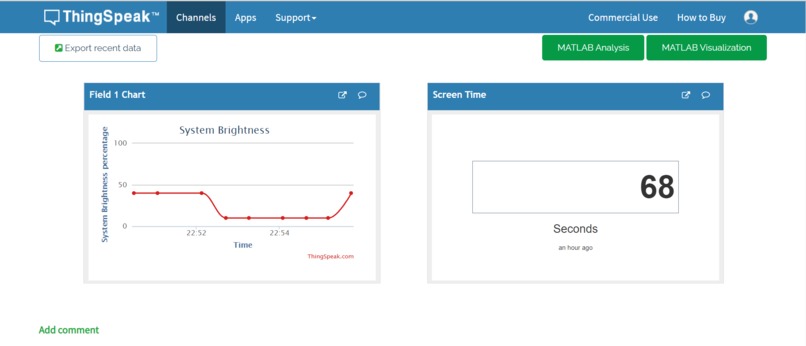
This is a Brightness and Screentime Calculator which gives ** alert** to the user after a particular time interval via SMS for taking breaks .It calculates the age of a person using face recognition and suggests breaks accordingly. It also displays real time data on a Dashboard in the form of Line graphs .So, that user can Analyse his activity .
How we built it
As we described the idea of BTST tracker above. Now the tasks was to first detect Age of the user, Brightness and screetime. And with corelation of these three we derived conclusions. Age detection was done by python script utilising open Computer Vision, which is a one time use script that return age instantly. Since Brightness is a major factor in vision efficiency , brightness calculation was done by screen_brightness_control module. Since computers are now multitasking efficiently we also had to track what apps user is using and how much time he spent on a particular application with modules like win32gui and ** psutil** , App tracking was done easily and efficiently without consuming much resources of the PC.
This project works using the rest APIs ( write api and read api) available in the thingspeak cloud. These are the steps : 1) frist main.py file is running in the system which run the detect.py to capture the age and gender of the user.and update it in the temp.txt file. 2) main.py call the send_data.py to extract the updated data from temp.txt file 3) Then send_data.py calculate the brightness and Screentime using BrightnessCalculation() and ScreentimeCalculation() function 3) All four data ( Age , gender, Screentime and Brightness ) is pushed to thingspeak could using its WRITE Api keys This process of sending data is running in infinite loop in the background of the system to track the user. We are running Ubuntu server in a digital ocean droplet These are the steps follows in server to generate the OUTPUT REACT : 1) ReactBySms.py file is running in infinite loop 2) In every loop it takes all tha credentials of twilio account from conf.py file in order to send the sms in the registered phone number 3) Then ReaBySms.py file extract all the four data from thingspeak cloud using it's READ API key. 4) According to the condition written in the code it call Sending_sms() function to collect all the credentials and do request to twilio server in order to send sms alert .
Challenges we ran into
Main challenge was to integrate all the components of the project .We tried google api but it was not efficient so we shifted to ** ThingSpeak** for Dashboard purpose .Also integrating open cv age detector to the main file was a challenge . Apart this arranging proper data according to age to optimise recommendation was a challenge .
Accomplishments that we're proud of
After Trial and Errors at last we were able to integrate different components of the Project . And also we were able to solve this health and lifestyle related challenge by this project upto some extent .We explored rarely used APIs through research , we used them and they were really very helpful in making our project a successful experience to learn .
What we learned
We learned about some new APIs and explored OpenCV .Also we learned to integrate different components of the project into a single unit . We got to know about Digital Ocean Cloud .Also , we learned how we can use ThingsPeak as a Dashboard for Showing *Real-Time Data . Also we got to know about Ubuntu Server.
Built With
- argparse
- boltiot
- digitaloceancloud
- googleapiclient
- iot
- opencv
- python
- restapi
- thingspeak
- ubuntuserver
- win32gui


Log in or sign up for Devpost to join the conversation.