-
-
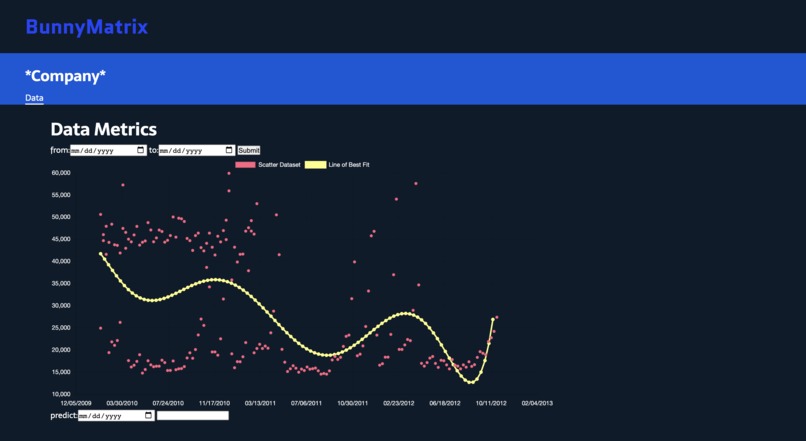
This is a screenshot of the main page.

Bunny Matrix
What Inspired Us
Bunny Matrix was created while discussing our interests, experiences, and goals. Initially, we felt lost as we were having a hard time coming up with an idea. All four of us agreed that we want to gain experience, learn new implementations, make connections, and have fun hacking. We communicated our ideas to each other and changed our plans to reflect new additions. We believed our project should not only be possible to create with the time restriction but also be practical and impactful. Some ideas we had included making a leaderboard of professors on Course Critique, using the Google Maps API to plot a heat map of forest fires in the country, and creating a calendar for GT Engage events. Ultimately, we proceeded with a project that allows businesses to take advantage of modern machine learning algorithms to predict future business opportunities. After hours of discussion, we decided to create a tool that not only visualizes a generic time-dependent business key performance indicator (KPI), e.g., weekly sales, but also predicts future KPI movement utilizing machine learning on past performance.
What We Learned and How We Built This
Throughout this hackathon, we learned a lot from new libraries to new languages. We found a number of libraries that simplified the implementation of several complex functions. One of the first libraries we attempted to implement was the D3.js as one of the team members had some experience using it. This library was used to parse the hundreds of rows of data in the CSV file, to produce the dataset in a JS array, and to construct a preliminary scatterplot visualization of the dataset. However, D3 was relatively complicated for beginners and required a server to operate in. We decided to utilize Chart.js as it provides more intuitive functions and has a bigger user base to get support. Overall, the most important library we used is Regression-js. This library enabled us to conduct numerous regression analyses and plot the regression line under multiple modes including linear, exponential, and polynomial with an order of an integer. Regression-js only provided us with a mathematical model that takes in an input X (time in our dataset) and gives an output Y (Walmart weekly sales).
The real question was how we could take the data regression-js provides and implement it in Chart.js. The library provided us with a regression equation but not an actual line graph which we need. We came up with a quick solution to instead take an arbitrarily large number of equidistant X points and calculate the respective Y values for each through the regression equation. The points are plotted and connected with straight lines. As the number of points approaches infinity, the regression line becomes more representative to the extent of the accuracy of the mathematical equation. The resulting regression equation was also used to predict current and future values of the KPI metric, the first step in machine learning models. In addition, we added complementary functions that improved the functionality of the regression analysis, like the ability to get a specific predicted KPI metric value with a given date and the ability to zoom into the graph. The latter function was implemented by a simple trimming of the visualized dataset (though the regression line suffered no effect, to our advantage).
Challenges We Faced
One of the challenges we faced while implementing the JavaScript library was making future KPI predictions. The drawn line of best fit was almost completely horizontal. This issue arose because we could only represent a date in numerical values using the getTime() method. However, the method used returned the time in milliseconds which was too large compared to the difference between the data points. We solved this problem by creating a manipulateTime() and revManTime() functions which kept the ratio between the time values but made them easier to deal with. After resolving the issue, we also improved the regression model so that it predicts the future KPI metric more accurately by customizing the regression analysis used to seven-degree polynomial regression. Another challenge we faced was coming up with an idea. At first, we were not sure what track to choose as some members were unfamiliar with certain fields. As beginners, it was hard for us to come up with an idea that combines web development with data science. After researching for topics, connecting with mentors, and attending several of the data science workshops, we came up with the business visualization and prediction tool that we were all proud of and passionate to contribute to. And we are confident in our program.
Built With
- chart.js
- css
- csv
- ejs
- express.js
- github
- html
- javascript
- json
- node.js
- npm
- regression-js


Log in or sign up for Devpost to join the conversation.