-
-
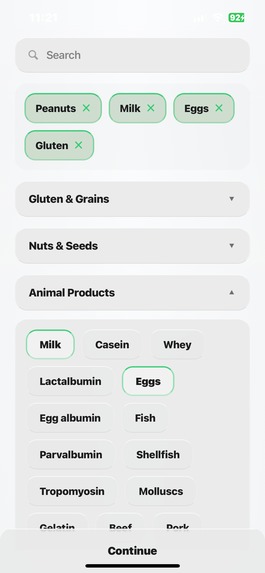
User Setup
-
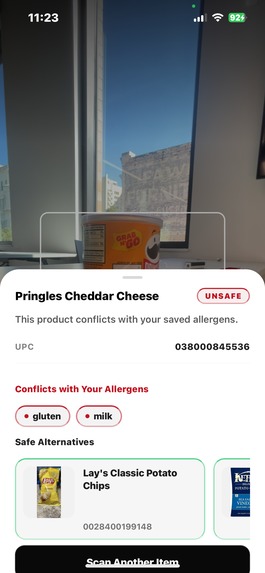
Results Screen
-
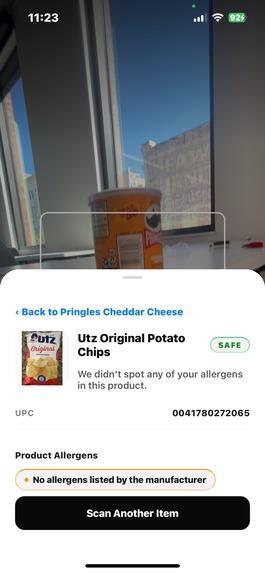
Recommendation Screen
-
Setup Screen
-
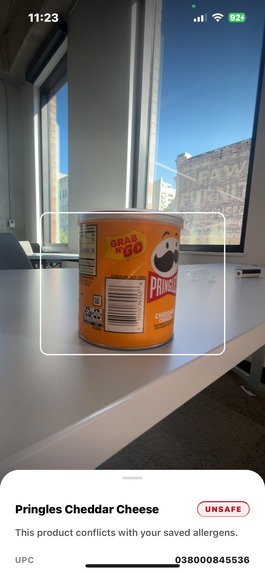
Scanning Screen


A RowdyHacks XI Creation
🚀 Setup & Installation
Prerequisites
- Node.js (v16+), Python (v3.8+), and OpenRouter API key
Backend Setup (Run from backend/ directory)
cd backend
python -m venv venv
source venv/bin/activate  # Windows: venv\Scripts\activate
pip install -r requirements.txt
cp .env.example .env
# Add your OpenRouter API key to .env: OPENROUTER_API_KEY=sk-or-v1-xxxxx
uvicorn main:app --reload --host 0.0.0.0 --port 8003
Frontend Setup (Run from frontend/allergen-app/ directory)
cd frontend/allergen-app
npm install
cp .env.example .env
# Add your machine's IP to .env: EXPO_PUBLIC_API_BASE_URL=http://YOUR_IP:8003
npx expo start
Find your IP:
- macOS/Linux:
ifconfig | grep "inet " - Windows:
ipconfig
Testing:
- Press
ifor iOS Simulator (macOS) - Press
afor Android Emulator - Scan QR with Expo Go app (ensure same WiFi network)
Verify Backend: Visit http://localhost:8003/docs for API documentation
💡 Inspiration
Food allergies can turn a simple grocery trip into a stressful guessing game. Our team wanted to make that process easier, safer, and faster — especially for people who constantly need to double-check ingredients or risk severe reactions.
We created an app allowing you to scan any product, instantly know if it’s safe, and get smart alternatives powered by the gold-standard of food databases, supplemented by OpenAI. That’s ALERG'Z — a personalized food companion built to bring peace of mind to those with allergies 👍
⚙️ What it does
ALERG'Z is a mobile app that helps users identify allergy-safe foods with just a barcode scan.
Here’s how it works:
| Step | Description|
| ------------- |:-------------:|
| 1. User Profile Setup |Users input their allergens when they first open the app, user data is stored with an SQLite database|
| 2. Product Scanning |When a barcode is scanned, ALERG'Z instantly fetches data from OpenFoodFacts to identify the product and its ingredients.|
| 3. Allergen Detection |The backend cross-checks ingredients against the user’s allergy profile.|
| 4. AI-Driven Alternatives |If a product isn’t safe, ALERG'Z uses ChatGPT (via OpenRouter) to suggest similar, allergy-friendly alternatives tailored to the user’s region.|
| 5. Visual Feedback |Each recommendation includes live-fetched product images for a smooth, engaging experience.|
All of this happens in seconds, giving users clear, visual answers and personalized options — no ingredient lists or guesswork required.
🛠️ How we built it
- Frontend: A sleek, modern React Native interface designed for both speed and accessibility. We focused on a clean user experience where every tap feels instant and intuitive.
- Backend: Built with FastAPI in Python, enabling rapid, concurrent API calls to OpenFoodFacts and ChatGPT's generative model for alternative recommendations.
- APIs & Data:
- OpenFoodFacts API for product details and UPC lookups
- OpenAI API for intelligent food alternative generation
- OpenFoodFacts images for visual product data
- OpenFoodFacts API for product details and UPC lookups
- Architecture:
- Asynchronous background threads to fetch product images dynamically
- JSON-structured responses to sync data seamlessly with the React Native client
- User authentication and profile management using SQLAlchemy + FastAPI ORM
- Asynchronous background threads to fetch product images dynamically
This setup allowed us to achieve real-time scanning and recommendations — even on limited bandwidth.
🚧 Challenges we ran into
- Image Updating: Allowing dynamic loading of page elements to ensure a fast, accessible user experience.
- API Rate Limits: Balancing performance while staying within OpenFoodFacts and OpenAI rate constraints required optimization and caching logic.
- Prompt Engineering: Tuning the AI prompt for consistent, list-formatted responses from OpenRouter took a lot of iteration.
- Cross-Platform Sync: Ensuring React Native and FastAPI communicated perfectly across threads and sockets pushed us to fine-tune CORS and websocket behavior.
🏆 Accomplishments that we’re proud of
- Built a fully functional allergy-detection and recommendation system from scratch in just a 24 hours.
- Achieved real-time barcode scanning and analysis with a fast, responsive UI.
- Successfully integrated multiple APIs and AI models into one seamless experience.
- Designed a clean, user-first mobile interface that feels both modern and trustworthy.
Most importantly, we created something that could genuinely make life easier for people managing allergies every day.
📚 What we learned
- How to efficiently orchestrate multi-API workflows in FastAPI using background tasks and concurrent threading.
- The power of prompt design — small phrasing changes can dramatically impact AI output.
- Strategies for frontend-backend synchronization in real-time, user-centric applications.
- How valuable user empathy is when building healthcare-adjacent products — the human side matters just as much as the technical side.
🚀 What’s next for ALERG'Z
- Ingredient-level risk scoring to show how “safe” a product is for a specific allergy.
- Expanded database support for region-specific food APIs (USDA, Tesco, Carrefour).
- Camera-based label scanning for offline use when barcodes aren’t available.
- Personalized dashboards to track safe foods, allergen exposure, and nutrition trends.
- Social recommendations, allowing users to share safe product discoveries.
Our vision is to make ALERG'Z the go-to app for allergy-conscious consumers — empowering users to eat confidently, anywhere.
📁 Repo Structure
ALERGZ
├── README.md
├── LICENSE
├── .gitignore
├── backend
│   ├── main.py
│   ├── requirements.txt
│   ├── allergen.db
│   └── app
│       ├── api
│       │   ├── scan.py
│       │   ├── recommend.py
│       │   └── __init__.py
│       ├── database
│       │   ├── models.py
│       │   ├── db.py
│       │   └── __init__.py
│       ├── schemas
│       │   └── product.py
│       └── __init__.py
├── frontend
│   └── allergen-app
│       ├── package.json
│       ├── tsconfig.json
│       ├── babel.config.js
│       ├── eslint.config.js
│       ├── .env
│       ├── app
│       │   ├── _layout.tsx
│       │   ├── (tabs)
│       │   │   ├── screen1.tsx
│       │   │   ├── screen2.tsx
│       │   │   ├── screen3_camera.tsx
│       │   │   └── explore.tsx
│       │   └── components
│       │       ├── GlassSearchBar.tsx
│       │       ├── SelectedItemsArea.tsx
│       │       └── ui
│       │           └── icon-symbol.tsx
│       ├── assets
│       │   └── (images, icons)
│       └── scripts
│           └── reset-project.js
├── docs
│   └── (design / hackathon notes)
└── misc
Built With
- ai
- babel
- expo.io
- expo/vector-icons
- fastapi
- gorhom/bottom-sheet-backend:-fastapi-(python)-with-openai/openrouter-client-integration-database:-sqlite-using-sqlalchemy-external-apis:-openfoodfacts-(product-lookup)
- node/npm
- openai-(recommendations)
- openfoodfacts-api
- openrouter
- postgresql
- python
- python-mobile-frontend:-expo-(react-native)-+-expo-router
- react-native
- react-native-reanimated
- sqlite
- typescript


Log in or sign up for Devpost to join the conversation.