-
project logo
-
demo of button and finger detection


Inspiration
I'm an avid rhythm gamer and I found that many games I wanted to play required a ridiculously expensive controller or uncomfortable key configurations. While thinking about a solution to such an issue, I stumbled upon another problem some people - specifically seniors and those with disabilities - have; that some may not know the layout of traditional keyboards, and others may not have the physical capabilities of using a keyboard or mouse (eg. amputees, Parkinson's). As a result, I desired to create software that would eliminate the cost barrier for some forms of entertainment and heighten the ergonomics of computer peripherals.
What it does
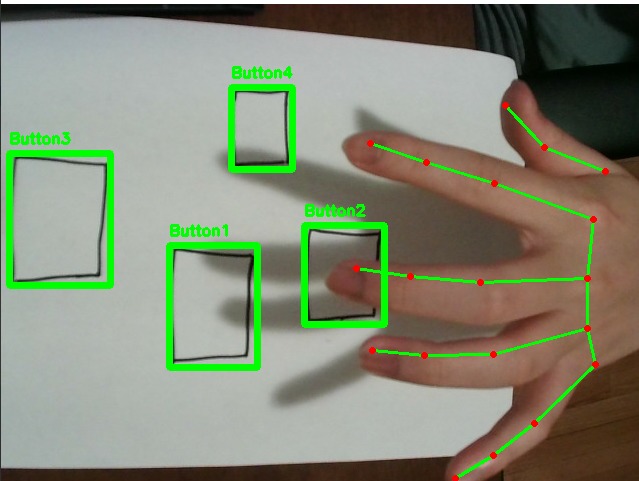
With just a cheap webcam, a piece of paper, and a writing object (eg. marker), Cheat Sheet allows users to create a customizable peripheral by drawing any number of buttons on paper! By using machine learning and image processing algorithms, it can detect when a user "presses" a button on the paper "controller" and plays back a series of hotkeys that users can customize in a saveable config file.
How we built it
Using Google's machine learning library MediaPipe and computer vision (OpenCV) in python, the program was able to detect the motion of hands and the placement of drawn buttons on a piece of paper. Macro configurations and hotkey playback were implemented using a GUI automation module and simple JSON dictionaries.
Challenges we ran into
This was the first time I worked with computer vision, so it was a challenge to learn and utilize many methods and algorithms for image processing. It was also hard to manage the workload as this was the first solo project I've done - team members didn't get in :(((
Accomplishments that we're proud of
I'm relatively happy about how the prototype turned out within the short period of time available, with all essential functions working such as button detection, finger tracking, and macro playback. Learning new skills when required was also an accomplishment I felt like celebrating.
What we learned
I learned how to use MediaPipe solutions, essential knowledge of OpenCV, and how to tie everything together into a functional python program.
What's next for Cheat Sheet
Right now, Cheat Sheet is only able to take inputs from a single finger with static delay when the hand is oriented horizontally. I hope to increase the versatility of the program to include multi-finger/hand tracking and real-time inputs to make it even more applicable to real-world usage. Additionally, I hope to commercialize this project as a service selling add-ons (eg. specific configurations for games, faster performance) due to its commercial potential from the ability to eliminate the cost barrier for computer peripherals. I also wish to see that Cheat Sheet would be able to assist those with disabilities in overcoming the barrier for comfortable peripheral usage.
Built With
- machine-learning
- mediapipe
- opencv
- python


Log in or sign up for Devpost to join the conversation.