-
-
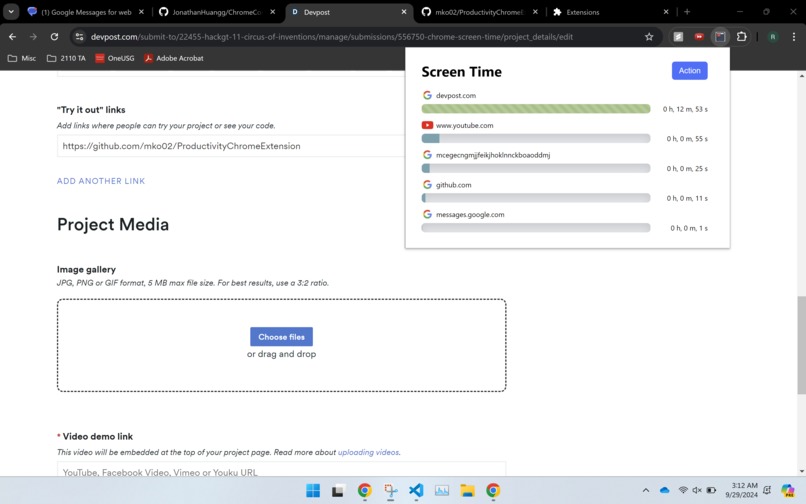
Extension pop-up displaying the 5 most visited sites for the day
-
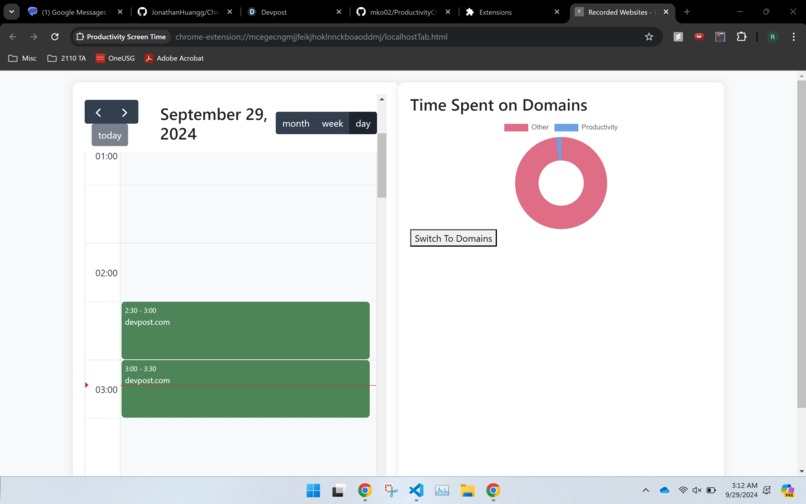
Statistics page with a calendar to view your screen time each day and a pie-chart of categories


Inspiration
The average American spends just over 7 hours online every day, almost half of their waking hours. We think it is very important to understand where that time goes, to better understand ourselves. Most modern phones have an intuitive and simple way to see how much time you spend on each app, however, we found a lack of Screen Time information for chrome and other web browsers that we secure and private.
What it does
Chrome Screen Time is a simple and secure extension that allows users to clearly visualize what they spend their time on. Clicking on the extension shows the users the top 5 websites they have used for the day. Additionally, clicking the statistics button a new tab opens up showing a calendar view of the users chrome usage for the day. Contained in the statistics is also a breakdown of what types of websites the user was on, entertainment, education, news, etc...
How we built it
We developed a React and Vite based Chrome extension. Using TypeScript and JavaScript we created an extension with a pop-up and a variety of local hosted statistics pages to give users unfiltered access to their web-browsing patterns, all while staying private and secure. Using Chrome's service worker our extension silently runs in the background cataloging when you switch tabs and focus.
Challenges we ran into
The biggest challenge we ran into was keeping the system closed off and secure. Our main goal was to create a completely offline extension that ensures the users privacy, but this led to challenges keeping data synched and a reasonable size. Additionally we needed to account for a number of edge cases, such as the user powering off their laptop, quickly switching through tabs, and more. These edge cases all had wildly different solutions making us learn a number of new skills.
Accomplishments that we're proud of
We are most prod of the UI, specifically the pop-up from the extension. None of us have extensive front-end experience so it was quite a learning experience. We are also quite proud of how we stored the data on the users end, all of it is completely local and rather robust allowing for a lot of room for analytics.
What we learned
As a team we learned a lot from this project. First, this was the first time any of us worked with chrome extensions. Additionally, this was the first time some of us have worked with react and TypeScript. Outside of technical skills this was a great learning opportunity for design principals and best practices for UI/UX.
What's next for Chrome Screen Time
We have a lot of ideas for new features. First, we would like to allow the user to create new categories and manually set websites to different websites. Additionally we would like to add more analytics, it would be awesome if users could see when they are most likely to lose focus, or more macro trends among weeks and months.
Built With
- chrome
- css
- html
- javascript
- openai
- react
- typescript
- vite


Log in or sign up for Devpost to join the conversation.