-
-
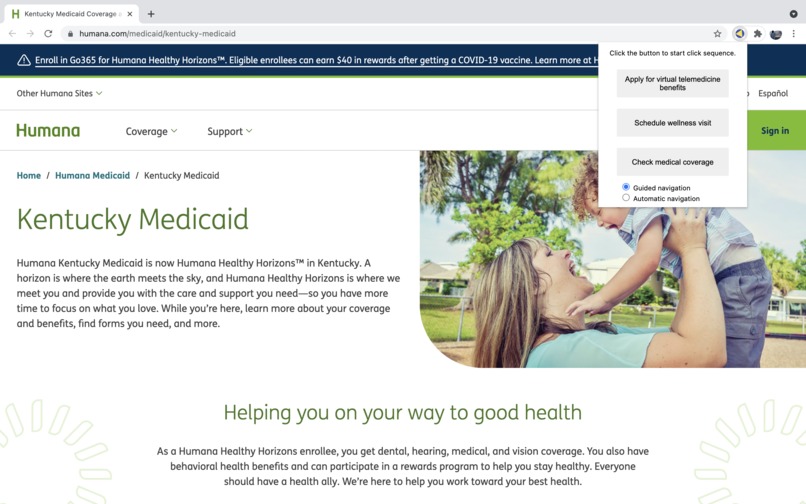
User point of view of pop up for navigating sites
-
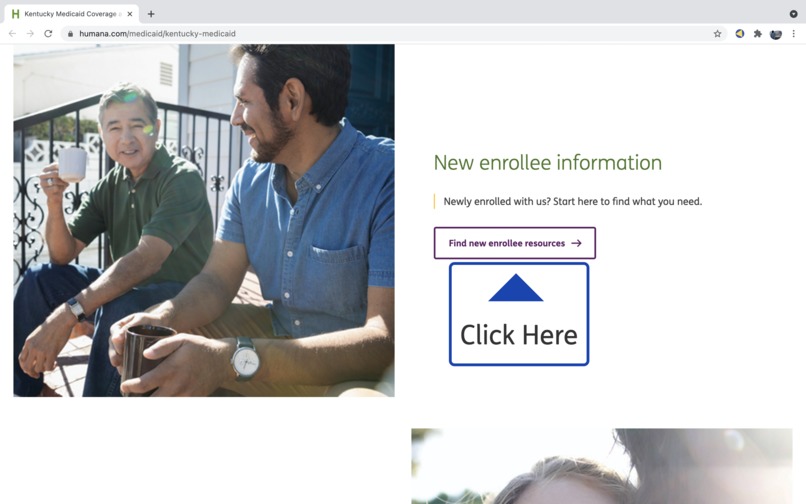
Example of tooltip labeling each click the user should make to get to a destination
-
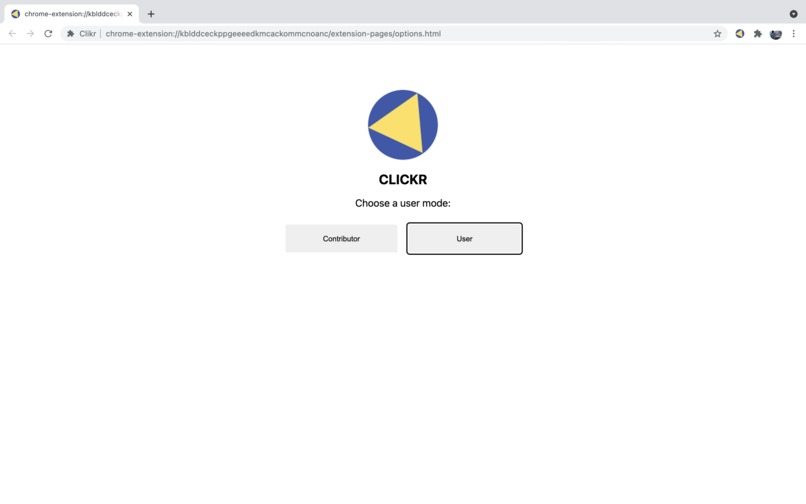
Choose your role in options (also shown when extension is first installed)
-
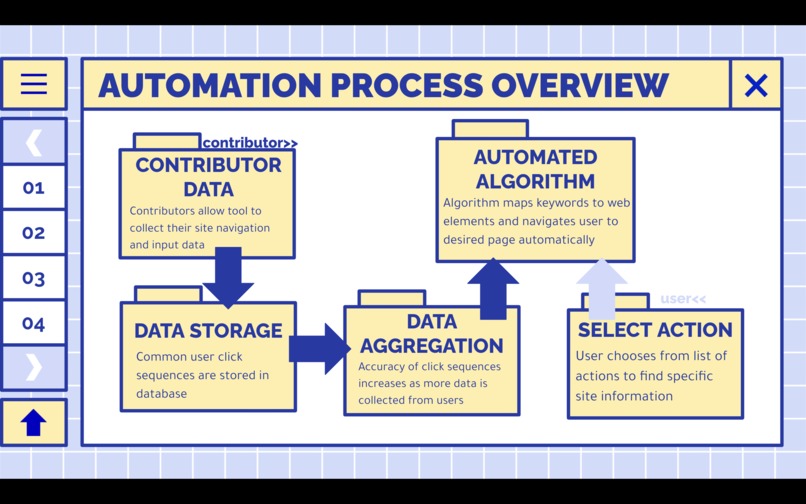
Process overview
-
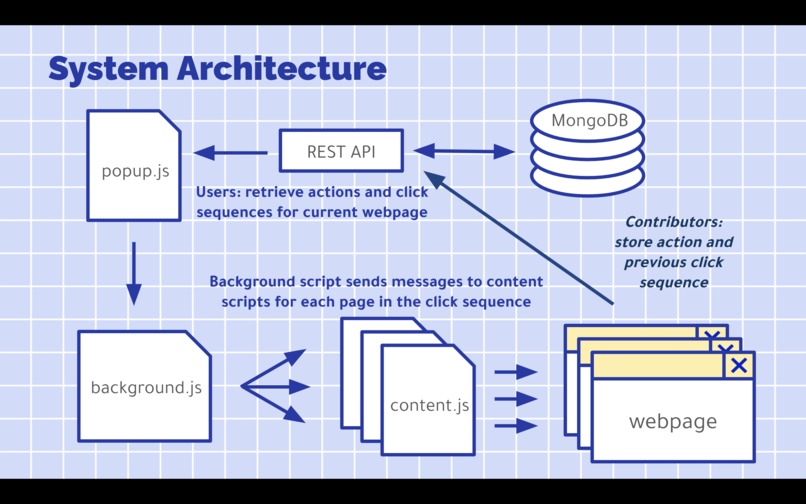
System architecture


Inspiration
As our world becomes increasingly digitized, it can be difficult for those who are technologically challenged to overcome the learning curve of technology today. Some individuals are barred from many useful and often necessary resources because they find web apps inaccessible and difficult to understand. For those willing to help, some sites are designed in a way that is difficult to explain and meant to be intuitive to those familiar with the web. We decided to find a solution to the question: How can we utilize automation to develop an accessible web navigation tool for individuals who struggle digitally?
What it does
Clikr is a Google Chrome extension that aids users in navigating the web. On one side, contributors (technologically-savvy individuals) opt in to have the tool collect data their site navigation and input data so that common user click sequences and inputs are stored in a database. On the other, users (those who have difficulty navigating the web) choose a key action relating to their site needs. This key action is mapped to web elements and navigates the user to their desired site page automatically by outputting a common click sequence relating to the keyword.
How we built it
We built Clikr by creating a Google Chrome extension with two primary features. The extension collects data from contributors' click sequences for different sites by utilizing a REST API to store the data in a MongoDB database. This data is then applied when a user clicks on a keyword. Data is pulled from the database and matched with elements on the site page to invoke JavaScript functions to click through webpages until the desired information is reached.
Challenges we ran into
We initially had difficulty developing a REST API to connect a MongoDB database with the Chrome extension so that HTTP requests could retrieve and output data. We had not worked with database connections before, so it came with a steep learning curve and lots of troubleshooting. We also worked to ensure the click sequence on the user end functioned correctly due to the code originally only moving through a few of the pages in a sequence. This was especially challenging because it involved messaging between multiple scripts, since actions are triggered when the user interacts with the popup (popup.js), the content script is what controls the current webpage, and the background script is the only script that maintains state while the webpage changes. We had difficulty determining how to time the messaging between the background and content scripts so that the message is sent after the page is loaded, and we needed a way for the background script to know when to send the next message for the next "click." After trying multiple methods, we were able to find one that works reliably.
Accomplishments that we're proud of
Setting up the database was a process we were proud of once all the code fell into place. We were also proud to successfully develop the automated clickthrough function that retrieved both IDs and InnerHTML elements to ensure a linked item could always be clicked despite HTML differences in webpages. Additionally, we developed a "learning" mode that teaches users how to navigate the web with ease by pinpointing where users need to click to find a specific feature or needed information.
Community Impact
For businesses, Clikr would reduce call center traffic for website navigation issues and increase overall user experience of products by improving their usability for technologically-challenged groups. Socially, contributors could help to improve technological accessibility without any inconvenience to themselves by allowing their data to be collected by Clikr. As a result, site navigation barriers that typically deter individuals from using the web would be removed, and these individuals would be able to feel more accepted into our increasingly digital world.
What we learned
A majority of our team had no experience developing Google Chrome Extensions, so it was a new and exciting experience for us to develop a working extension that connected to a database and had many complicated features. Our experience gave us a lot of insight on the wide range of uses for Chrome extensions and the ease at which developers can test these extensions directly on Google Chrome.
What's next for Clikr
We would like to further improve the “learning” mode for Clikr by developing a text-to-speech API that would narrate instructions to users for even greater ease of use. Furthermore, rather than pulling keywords directly from HTML elements, we would use Natural Language Processing techniques to analyze what user action a sequence may fall under based on common keywords to better accommodate to users and their needs.


Log in or sign up for Devpost to join the conversation.