-
-
Users are greeted to the Clip! landing page as they enter our web application
-
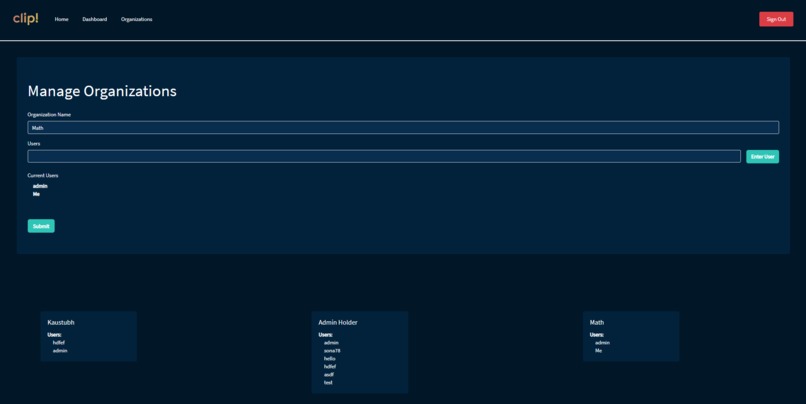
Clip! users are then prompted to create an organization and add other users based on their username
-
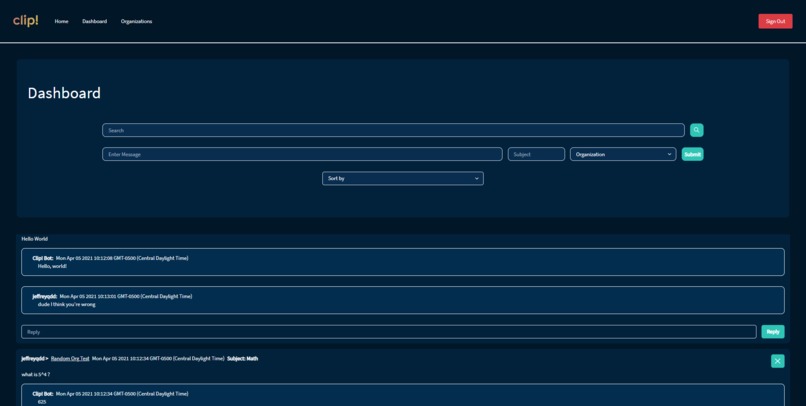
Students, Teachers, and Organizers can ask questions, receive answers from our Clip! Bot, and reply to others within their organization
-
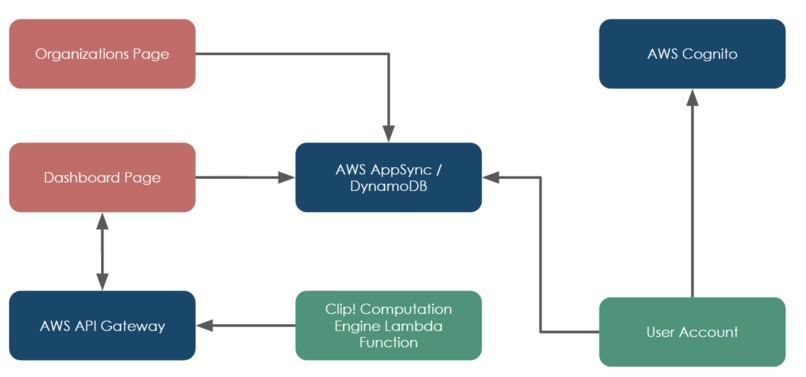
The platform is built on a serverless structure within AWS using Lambda functions for the computation engine and AppSync for data storage


Inspiration
During the COVID-19 pandemic, millions of students across the globe have shifted towards remote learning. Unfortunately, this substitute for regular classes misses out on the regular classroom interaction present with in-person learning. One of the main issues is that students lack the normal question-answer sessions while learning that help them understand concepts and clarify their understanding. By recognizing this issue, we set out to create a platform that would mimic this dynamic educational collaboration present within in-person schooling.
What it does
The purpose of the Clip! platform is to set up individual educational communities in which students can ask questions, get answers automatically, as well as reply to other students. For a brief walkthrough, a student or other user can create an account from the website, create their own organization, add other students based on their usernames to the community, and begin asking questions on their dashboard page. Using the integrated Clip! Bot, students can get automatic answers from the wolfram API, google, or khan academy for any subject. As an added bonus, students can also enter large text sections and receive a summary of those articles within the dashboard page as well using our sentence weight calculator
How we built it
The Clip! Platform was constructed using several different technologies. We chose to build the frontend with React due to its quick customizability and structured state integration. After recognizing the initial issue of student-to-teacher and student-to-student interaction, we decided to create 2 main pages: Organizations and the Dashboard. The Organizations page communicates with the database to create a web of student networks where any student can create an organization and add other students onto that same community. On the Dashboard page, a student can access all communities that they are added to and ask questions, with all of the information immediately being sent to the Clip! computation engine. The data structures of this web application were built using Amazon Web Services. With the initial web application hosted on Amplify, all data is collected with AWS AppSync and DynamoDB. For the computation engine, the Wolfram and Google APIs, as well as Khan Academy web scraping, are used to retrieve results based on the user’s question using a python script on a REST API. With the secure Cognito platform, the Clip! Platform separates the overall data based on the username and segments the organization/dashboard data.
Challenges we ran into
While building the Clip! application, we ran into a number of issues. Our first major issue was with the Lambda functions that we used to integrate our Python backend into our web app. When we ran our application for the first time, our Lambda function and handler functions failed and led to a number of errors. In order to solve this, we did a large amount of further research into Lambda functions and realized that our issue was with the headers in the return section of our handler function. We edited these headers and fixed our Lambda function issue. Our second major issue occurred when we tested our organization user adding feature. This feature allows users to add other users to their organizations. However. Our original app failed to do this. In order to solve this, we iteratively debugged our software and realized our issue was with AWS DataStore. We solved this issue by switching from AWS DataStore to AWS AppSync
Accomplishments that we're proud of
First, being able to code such a complex network of data features within 48 hours was a major accomplishment for our team. Creating this level of scalability within such a short amount of time was difficult and required persistence on the part of each member. Second, we are proud of keeping the data structure of our application entirely serverless starting from the hosting side with AWS Amplify as well as the core processing unit using Lambda functions. This structure ensures quick scalability into the future for millions of potential users. Finally, we were especially proud of being able to implement the summarization algorithm without using machine learning, thus ensuring a fast run time while maintaining the accuracy of selecting the most important sentences.
What we learned
Building the Clip! platform helped us familiarize ourselves with new technologies ranging from cloud infrastructure and its application in real-world scenarios as well as understanding its vast capabilities to popular frontend technologies such as React. We also were able to get a grasp on technologies such as web scraping with Beautiful Soup and the Wolfram Alpha API. We were able to gain a better understanding of these technologies and dive deeper into their more advanced topics.
What's next for Clip!
We plan on improving Clip! by improving the UI and overall user experience. We also want to add more utilities such as 1 on 1 messaging, video call functionality, and note-taking aids. For the text summarization, we plan to transition over to using Latent Dirichlet Allocation. We plan on introducing the application to our local schools and fellow students and teachers to get crucial feedback on real-world use and create a stable and user-friendly experience for all.




Log in or sign up for Devpost to join the conversation.