-
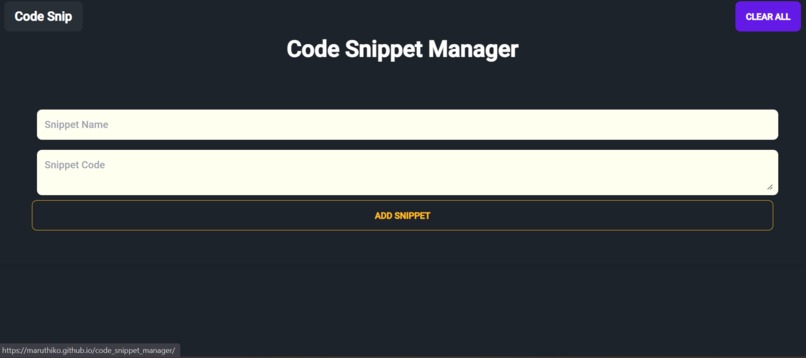
Welcome to Code Snippet Manager

Inspiration
The inspiration behind the Code Snippet Manager project was to create a simple yet powerful tool that allows developers to efficiently manage and organize their code snippets. As developers often come across reusable pieces of code during their work, having a centralized platform to store and access these snippets can significantly boost productivity and save valuable time.
What it does
The Code Snippet Manager is a web application that allows users to add, view, and manage their code snippets. Users can provide a name and the corresponding code for each snippet they wish to save. The application then stores these snippets, making them readily available for future use.
How we built it
The Code Snippet Manager was built using HTML, CSS, and JavaScript as the front-end technologies. We utilized the daisyUI framework, which extends Tailwind CSS, to design an attractive and responsive user interface. The app interacts with the browser's Local Storage to store the user's code snippets persistently.
Challenges we ran into
During the development process, we encountered several challenges. Some of the major challenges were:
- Designing an intuitive user interface that is both visually appealing and functional.
- Implementing Local Storage to store the snippets and ensuring the data remains consistent across sessions.
- Handling user input and form validation to ensure the app handles edge cases gracefully.
Accomplishments that we're proud of
Despite the challenges faced, we are proud of the following accomplishments:
- Creating a user-friendly and sleek UI using daisyUI, which greatly enhanced the overall look and feel of the application.
- Successfully implementing Local Storage, allowing users to access their saved snippets across different sessions.
- Building a fully functional Code Snippet Manager with CRUD (Create, Read, Update, Delete) capabilities, making it a powerful productivity tool.
What we learned
While working on the Code Snippet Manager, we gained valuable experience in the following areas:
- Leveraging daisyUI and Tailwind CSS to create a responsive and modern user interface.
- Working with Local Storage to enable data persistence in a browser-based application.
- Handling user input and form submissions, and implementing form validation for better user experience.
What's next for Code Snippet Manager
Moving forward, my plan is to enhance the Code Snippet Manager with the following features:
- Adding user authentication to allow multiple users to have personalized code snippet collections.
- Implementing a search functionality to quickly find specific snippets based on keywords or tags.
- Integrating cloud storage to enable users to access their code snippets across multiple devices.
- Incorporating collaborative features, such as sharing snippets with team members or the developer community.
The Code Snippet Manager has the potential to become an indispensable tool for developers, and we are excited to continue its development and make it even more robust and feature-rich in the future.


Log in or sign up for Devpost to join the conversation.