-
-

Darkmode
-
Lightmode


Inspiration
The inspiration for this project came from my schoolwork. Whenever I work on activities and assignments, I often feel overwhelmed and burnt out. To address this, I created this project to help maintain good mental health, avoid burnout, and stay productive. I also enjoy tracking my accomplishments, as it motivates me to complete tasks earlier rather than rushing at the deadline.
What it does
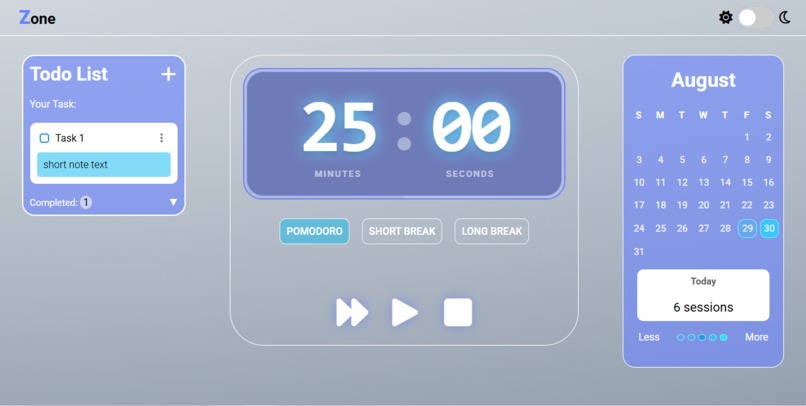
This project is a Pomodoro-based productivity tool with three main features: a timer, a to-do list, and a daily session tracker.
Pomodoro Timer
- Includes three modes: Pomodoro (25 minutes), Short Break (5 minutes), and Long Break (15 minutes).
- After each Pomodoro session, the timer automatically switches to a short break and starts on its own.
- After completing four Pomodoro sessions, it switches to a long break.
- Each completed Pomodoro increases the session counter.
- Includes three modes: Pomodoro (25 minutes), Short Break (5 minutes), and Long Break (15 minutes).
To-Do List
- A simple task manager where users can add, edit, delete, and view tasks.
- Tasks are separated into active and completed lists.
- A simple task manager where users can add, edit, delete, and view tasks.
Daily Session Tracker
- Inspired by GitHub’s contribution graph.
- Each day displays a box that changes color intensity based on how many Pomodoro sessions were completed.
- Hovering over a date shows the exact number of sessions done that day.
- Data is stored in localStorage, so progress is saved even after refreshing or reopening the app.
- Inspired by GitHub’s contribution graph.
How we built it
This project was built using pure HTML, CSS, and JavaScript — no frameworks or external libraries.
Challenges we ran into
The biggest challenge was creating the date-based session tracker:
- Making the calendar display correctly for the current month.
- Dynamically updating colors based on the number of sessions.
- Ensuring data persistence with localStorage.
Accomplishments that we’re proud of
- Successfully building the session tracker and making it work reliably.
- Designing a UI that, while simple, shows clear improvement in my frontend skills.
- Completing a project that combines functionality and productivity features I personally need.
What we learned
Throughout this project, I learned:
- How to properly start, stop, and reset timers in JavaScript.
- How to use localStorage to persist user data.
- How to work with the Date() function to generate and update calendars.
- How to loop through arrays with methods like
forEach()to dynamically display tasks. - Most importantly, I learned that even when something feels overwhelming at first, persistence and practice with syntax and logic eventually make it manageable. I also learned to manage my time better as a student with multiple deadlines.
What’s next for CODESPROUT2025
If there’s another hackathon like this, I’ll definitely join again and give my best. Future improvements could include:
- Adding user authentication to save progress across devices.
- Integrating notifications or sound alerts for timers.
- Improving the UI/UX for a smoother experience.


Log in or sign up for Devpost to join the conversation.