-

The connection screen of Communiko, the user enters their name (or alias) and presses the "Connect" button after connecting their Pico W
-
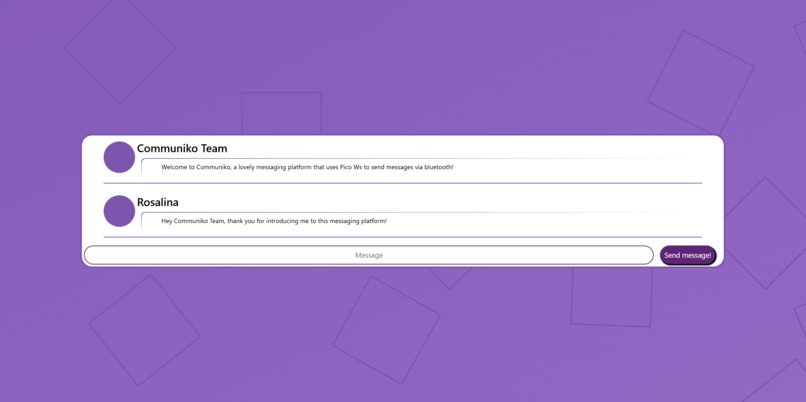
The communication screen of Communiko, for each message added the central box expands to accommodate the new messages
-
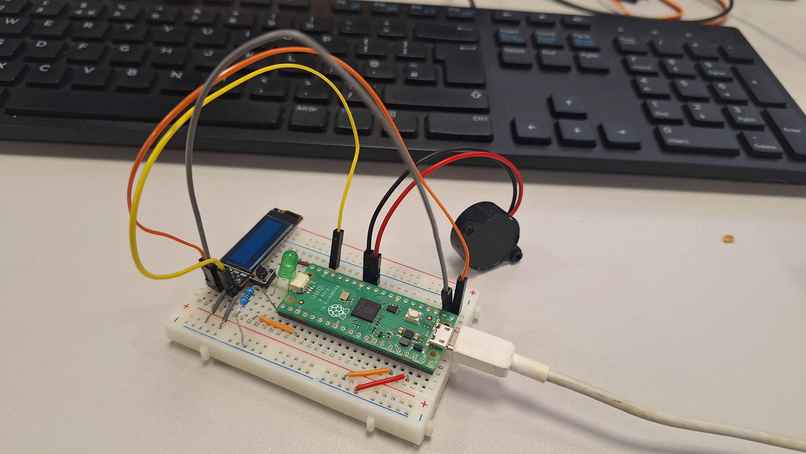
A Pico H unit, set up with an LED, buzzer and LCD screen to notify the user that a message has arrived, and a button to acknowledge it.


What it does
Our project allows for short-range text wireless communication between Raspberry Pi Pico. It forms a Bluetooth peer-to-peer chat application, which allows people to connect with one another. It could be used in areas where WiFi/mobile data is less accessible/effective, as the Bluetooth signal does not require either of these.
How we built it
The project was based around 2 Pico Ws, connected via their onboard Bluetooth module. We were originally going to use a Pico H with an added Bluetooth module, but we only had access to one extra module, and the Pico Ws did not work effectively with the Pico H, and thus we opted to use the more difficult to work with Pico W wireless connection.
Challenges we ran into
We faced both hardware and software constraints, almost all involving the Bluetooth connectivity built into the Pico Ws. There was little to no documentation, and that which there was was poorly explained, which led to difficulties when trying to use them to communicate with each other.
What we learned
Some of our team had never used a Pico before, and thus were able to learn the skills required to do basic controls on them. For other members of our team, who had experience with Picos, but not with connecting them via Bluetooth, they were able to learn about connecting and transferring data between Picos via Bluetooth, and the challenges involved with the built-in Bluetooth connectivity on the Pico Ws.
What's next for Communiko?
If we were to continue this project, we would use the extra Bluetooth modules for the Pico Hs, as these are easier to use, with better documentation. Unfortunately, we only had one of the modules available, and were unable to procure a second one in time, and thus had to resort to the onboard modules on the Pico Ws.
Built With
- github
- micropython
- python
- pywebview
- raspberry-pi


Log in or sign up for Devpost to join the conversation.