-
-
Dockerhelper YouTube

Inspiration
The inspiration for DockerHelper stemmed from the common, often time-consuming, and sometimes frustrating experience of manually crafting Dockerfile and docker-compose.yaml configurations. While containerization is a cornerstone of modern development, getting the initial setup right, optimizing for layers, ensuring security best practices, and adapting to different project structures can be a repetitive hurdle. We envisioned a tool that could leverage the power of Large Language Models to understand codebases and intelligently automate this process, freeing up developers to focus on core application logic rather than boilerplate configuration. The idea was to create an assistant that not only generates configurations but also learns and improves over time.
What it does
DockerHelper is an intelligent backend API service designed to:
- Analyze Git Repositories: It ingests public or private (GitHub/GitLab via OAuth) repository URLs, clones them, and analyzes their file structure, dependencies, and primary language/framework.
- Leverage LLMs for Insight: It sends key information from the analysis to Large Language Models (like OpenAI's GPT series or Google's Gemini) to understand the project's containerization needs (e.g., base image, ports, build steps, run commands).
- Generate Docker Configurations: Based on the LLM's insights and best practices, it automatically generates
Dockerfilecontent anddocker-compose.yamlconfigurations. - Learn & Improve (RAG): It implements a Retrieval-Augmented Generation (RAG) pipeline. Users can mark successfully used configurations. The system then embeds the analysis data corresponding to these good examples and stores them in a ChromaDB vector store. For future generations, it retrieves similar successful examples to augment the LLM's prompt, aiming for higher accuracy and relevance.
- Iterative Refinement & Versioning: Users can provide natural language feedback or error messages to improve an existing generated configuration. The system maintains a version history for configurations, allowing users to revert to previous states.
- User Management & Security: Provides user authentication (password, Google OAuth, GitHub/GitLab OAuth) and ensures users can manage their own saved configurations.
Essentially, it acts as an AI-powered co-pilot for Docker and docker-compose configurations.
How we built it
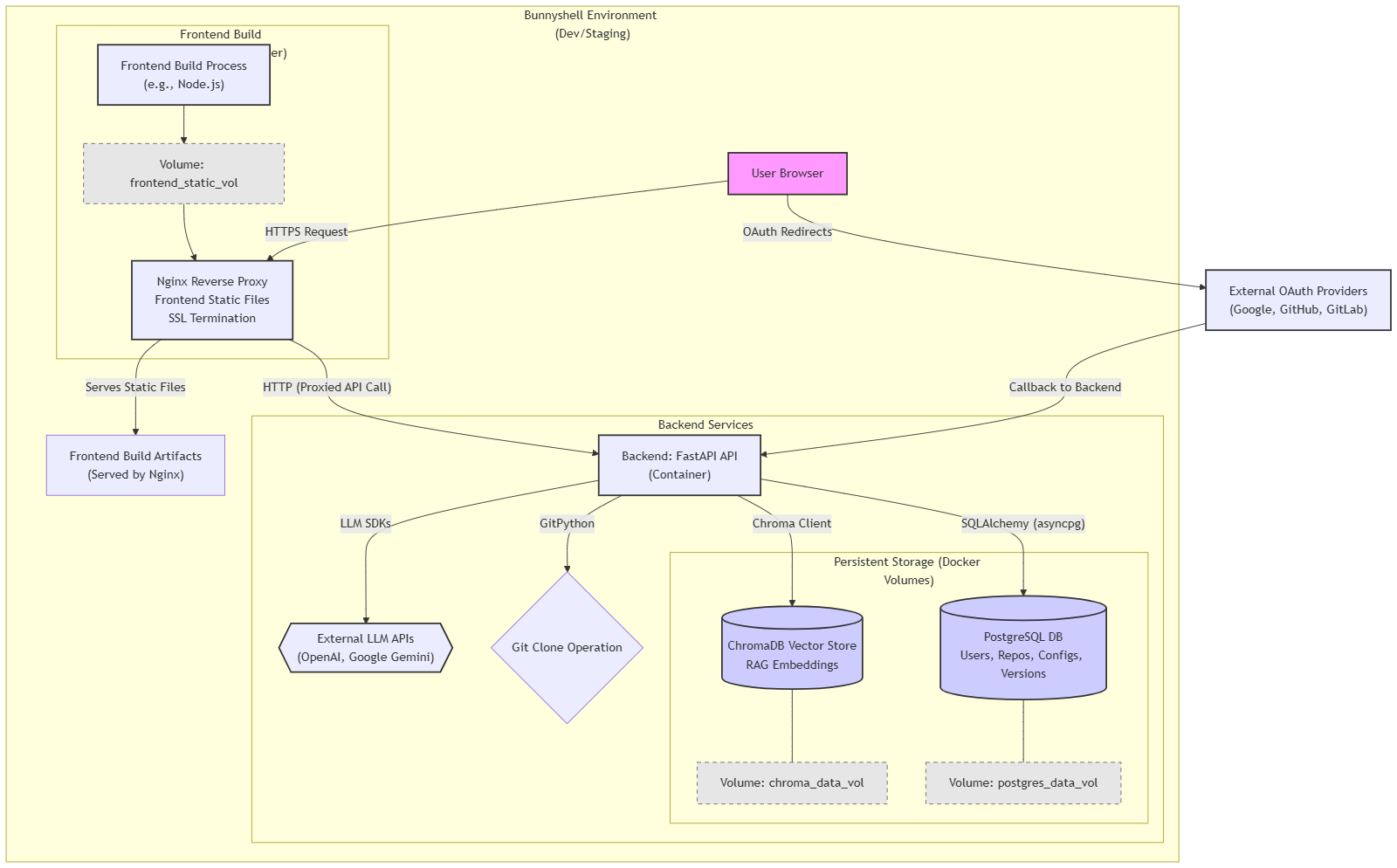
DockerHelper is built with a Python backend using the FastAPI framework for its robust performance and ease of use in creating RESTful APIs.
- Core Logic:
- Repository interaction is handled using the GitPython library for cloning.
- LLM interaction is managed through a flexible client system supporting providers like OpenAI and Google Gemini via their respective SDKs. Prompts are carefully engineered for analysis, generation, and improvement tasks.
- SQLAlchemy (with
asyncpg) is used as the ORM for interacting with a PostgreSQL database, which stores user information, repository analysis results, generated Docker configurations, and their versions. - Alembic manages database schema migrations.
- Authentication:
- JWTs are used for session management, with password hashing handled by Passlib.
- OAuth 2.0 integration for Google, GitHub, and GitLab is implemented using the Authlib library.
- Retrieval-Augmented Generation (RAG):
- Text embeddings for repository analyses are generated using Sentence Transformers.
- These embeddings are stored and queried in a ChromaDB vector database (configured for persistence).
- The RAG pipeline retrieves relevant examples to augment prompts sent to the LLM.
- API & Development:
- Pydantic is used extensively for data validation and settings management.
- The application is designed to be containerized using Docker, with a
docker-compose.yamlprovided for local development orchestrating the backend, PostgreSQL, Nginx (as a reverse proxy and potential frontend server), and a placeholder frontend service. - Persistent data (PostgreSQL, ChromaDB) is managed using Docker volumes.
- Loguru is used for enhanced logging, and standard FastAPI error handling is in place.
- Development Environment (Conceptual): While building, we simulate a deployment environment conceptually like Bunnyshell, where services (backend, database, frontend via Nginx) interact over a network, and HTTPS is handled at the ingress/proxy layer.
- Frontend: The frontend user interface was developed as a modern Single Page Application (SPA) using Next.js with TypeScript, providing strong typing and a robust development experience. For UI components, we leveraged Radix UI primitives, often styled further or composed using Tailwind CSS for a utility-first approach to achieve a clean, responsive design.
Challenges we ran into
- Prompt Engineering for LLMs: Crafting prompts that consistently yield accurate and correctly formatted Dockerfiles/Compose files, especially for diverse project structures and edge cases, was an iterative process requiring significant experimentation. Getting the LLM to only output the code without extra explanations was a key challenge.
- RAG Implementation - Text Representation: Determining the most effective way to convert structured repository analysis data into a concise text string for generating meaningful embeddings (for RAG) required careful consideration and tuning.
- Context Window Limits: For the "improve configuration" feature and RAG, sending the original configuration plus examples or feedback plus instructions sometimes neared LLM context window limits, requiring strategies for summarization or selective inclusion.
- OAuth Complexity: Integrating multiple OAuth providers (Google, GitHub, GitLab), each with slightly different API responses and token handling nuances, required careful attention to detail and robust error handling. Managing redirect URIs across different environments (local, deployed) and ensuring HTTPS was correctly handled by the backend when behind a reverse proxy was also a common hurdle.
- State Management in Containers: Ensuring persistent storage for PostgreSQL and ChromaDB data using Docker volumes and configuring the application to use these paths correctly within the containerized environment required careful setup in
docker-compose.yamland application settings. - Asynchronous Operations: Managing asynchronous database calls, LLM API requests, and background tasks (for RAG indexing) effectively within the FastAPI framework required a good understanding of
asyncio. - GitPython & File System Interaction: Handling temporary directories for cloning and ensuring proper cleanup, especially cross-platform (like Windows file locking issues encountered earlier), needed robust error handling.
- Dynamic Routing and useParams: Ensuring dynamic routes (like those for viewing specific configurations or handling OAuth callbacks with parameters) worked correctly with static export or standalone builds required careful configuration of getStaticPaths or understanding how Next.js handles these in different output modes.
- Checks & Linting during Build: Integrating TypeScript checks and ESLint into the Next.js build process sometimes surfaced stricter requirements or configuration conflicts that needed resolution to ensure a clean, error-free static output.
Accomplishments that we're proud of
- Functional End-to-End Generation: Successfully building a system that can take a Git repository URL, analyze it, and produce a working
Dockerfileordocker-compose.yamlusing LLMs. - Multi-Provider OAuth Integration: Implementing secure authentication with major providers like Google, GitHub, and GitLab, enabling key features like private repository analysis.
- RAG Pipeline Implementation: Designing and integrating a Retrieval-Augmented Generation system that allows the tool to "learn" from user-verified configurations, with the potential to significantly improve suggestion quality over time. This is a step beyond simple LLM prompting.
- Iterative Improvement & Versioning: Providing users with tools to not only generate but also refine configurations with natural language and revert to previous versions, making the tool more practical for real-world use.
- Robust API Design: Creating a well-structured FastAPI backend with clear Pydantic schemas, dependency injection, and considerations for stateful services, setting a good foundation for future development.
- Solving Real Developer Pain Points: Addressing the often tedious and error-prone task of Docker configuration, with the aim of boosting developer productivity.
What we learned
- The Power and Nuance of LLM Prompting: Small changes in prompt structure, wording, and examples can have a significant impact on the quality and format of LLM outputs. Iteration is key.
- Practicalities of RAG: Implementing RAG involves more than just vector search; selecting what to embed, how to represent it, and how to effectively use retrieved context in prompts are critical design decisions.
- Importance of Asynchronous Design: For I/O-bound tasks like external API calls (LLMs, Git providers) and database operations,
asyncioin Python/FastAPI is essential for building responsive applications. - OAuth Flow Details: Each OAuth provider has its subtleties. Careful reading of documentation and robust error handling for the token exchange and user info fetching steps are crucial. Understanding
redirect_urimanagement and HTTPS termination by proxies is vital. - Stateful Services in Containers: Proper use of Docker volumes is fundamental for data persistence. The interaction between application configuration (file paths) and volume mount points needs to be precise.
- Iterative Development: Starting with core functionality and gradually adding complex features like RAG and versioning, while testing at each stage, proved to be an effective approach.
What's next for DockerHelper
- Enhanced Frontend UI/UX: Develop a more polished and feature-rich frontend to make the tool highly accessible and user-friendly.
- Automated Testing of Generated Configs: Integrate a basic "test build" feature where the backend attempts to build the generated Dockerfile (in a sandboxed environment) or validate a
docker-compose.yamlusingdocker-compose configto provide immediate feedback on its validity. - Expanded RAG Capabilities:
- Allow indexing of user-uploaded successful Dockerfiles/Compose files.
- Use feedback from the "improve" endpoint to refine RAG examples or fine-tune smaller models.
- Experiment with different embedding models and vector search strategies.
- Support for More Git Providers: Add OAuth and analysis support for Bitbucket, Azure Repos, etc.
- Deeper Static Analysis: Integrate static analysis tools for specific languages/frameworks before sending data to the LLM to provide even richer context, potentially reducing LLM token usage and improving accuracy.
- CI/CD Integration: Provide webhooks or CLI tools to allow developers to integrate DockerHelper into their CI/CD pipelines for automated Docker configuration suggestions on new projects or branches.
- Community Features: Allow users to (optionally) share anonymized successful configurations to build a larger community knowledge base for the RAG system.
- Advanced Configuration Options: Expose more granular control over the generation process (e.g., selecting specific base image variants, security hardening options, multi-stage build preferences).
Note:
Server hosting is quite expensive, and there will be downtime, please message me in case the server is down and you need to test on [email protected]
Built With
- alembic
- authlib-(oauth)
- chromadb
- docker
- docker-compose
- fastapi
- gitlab
- gitpython
- google-cloud-gemini
- llms-(openai/gemini-via-sdks)
- loguru
- nginx
- postgresql
- pydantic
- python
- sentence-transformers
- sqlalchemy


Log in or sign up for Devpost to join the conversation.