-
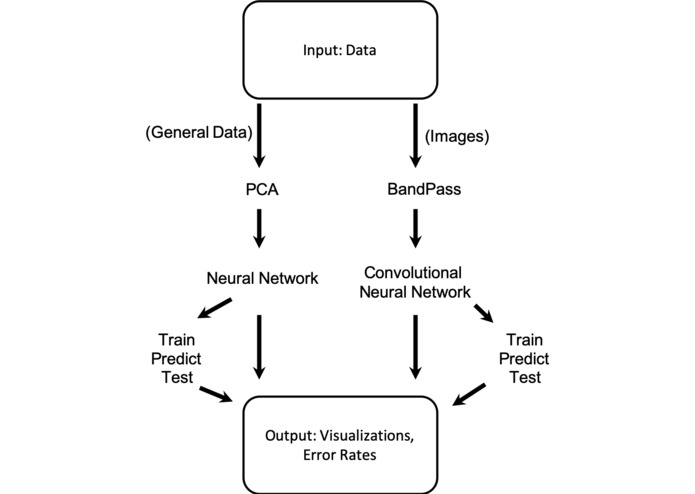
ETEPCL Workflow
-
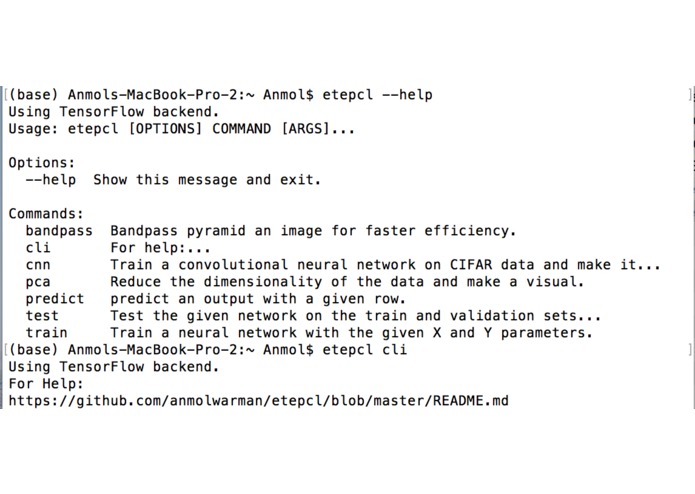
Help Functionality Example
-
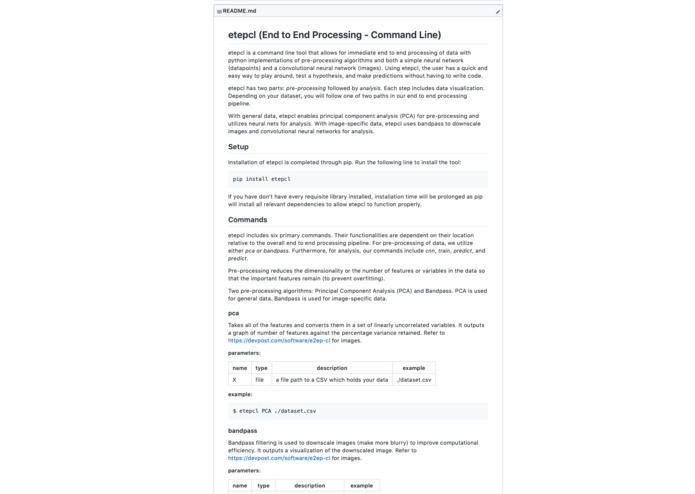
ReadMe Overview w/ Command and Help Documentation
-
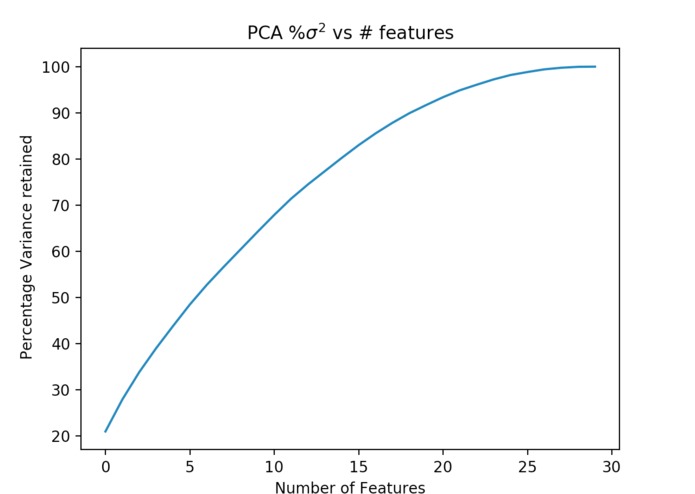
PCA visualization comparing variance retained versus number of features.
-

Original Image
-

Bandpass filtered Image


Inspiration
Even with increasingly accessible resources to machine learning and deep learning education, building the first model or even just trying to play around with neural nets without knowing the background theory or how to code is a daunting task. Any available web-app resources require some form of uploading and/or preprocessing data, things that might be inconvenient or unrealistic for greenhorn users. What is a way we can easily and in an accessible fashion allow people to train and tinker around with neural nets without the hassle of building a model (with code) or background experience? Furthermore, can we create an automatic, quick, and easy way to perform hypothesis testing?
What it does
Our tool enables users to quickly test hypotheses by training and applying deep learning models just within the command line without having to write any sort of code. The ease and efficiency of this method allows users to try out a variety of different models quickly and rapidly analyze their datasets through interpretable visualizations. The tool takes in general data along with image data.
The user has the option to use the simple neural network, which is generally appropriate for normal data with many features. The user can also train using a convolutional neural network, and this is typically appropriate for image data that needs to be classified. Furthermore, users have the option of pre-processing by reducing dimensionality using principal component analysis (PCA) for the simple neural network or bandpass for the convolutional neural network (CNN).
As we built our product, we recognized that a great tool for the command line would need to both be useful and usable. Thus, we kept these descriptors as requirements when developing the End-to-end processing tool.
Usefulness?
We realized both developers and non-developers alike need a more straightforward, immediate (and less technical) method of hypothesis testing. Integrating this functionality directly into the command line would serve useful as a rapid means of receiving feedback on a particular hypothesis you have on a dataset or to just experiment with fundamental concepts in the machine learning field.
When looking for immediate feedback within datasets, it's often unwieldy to open up and utilize a separate web app compared to having all the functionality available in the command line. To further aid in the usefulness of our command line tool, we automatically generate easily interpretable visualizations of our results within the end to end processing pipeline, eliminating any detracting clutter within the command line.
Usability?
To aid with usability, we used intuitively named commands (train, test, predict, pca, etc.) and documented use cases well. Each portion of the end to end processing pipeline can be called individually, allowing the user to execute both the common and uncommon flows easily. Furthermore, our command line tool integrates well with alternative packages to avoid long running processes and enabling concurrent work.
How we built it
The project was built using Python. The simple neural network framework was built using scikit-learn, and the convolutional neural network framework was developed using keras with a tensorflow backend. The PCA and bandpass processes were performed using numpy matrix operations. The Click package was used to create user-friendly and understandable command line interfaces and tools. Finally, Matplotlib was utilized to generate the visualizations within each part of the pipeline.
Challenges we ran into
Besides reconstructing multiple preprocessing functions from scratch (PCA, Bandpass, CNN), our biggest challenge was deploying the Github Repository as a Python module and understanding how to construct the actual python CLI file using Click. We also ran into errors with graphics card capabilities.
Accomplishments that we're proud of
Not only are we proud to have built our first command line tool, but it was also difficult to find applicable ways for a command line tool. We really believe that our tool can ease the process of training deep learning models without having to write any Python code. This increases the accessibility of deep learning for those who have no coding experience but would greatly benefit from the power of deep learning.
What we learned
- The significance of command line for developers
- Command Line Interface Creation Kit (CLICK)
What's next for E2EP-CL
There exists a menagerie of preprocessing methods, deep learning techniques, and data visualization today. While some of these are more suited for niche problems, we'd like to consider the balance between the simplicity and effectiveness of our tool against the decreased marginal utility of adding more complexity for our users. We'd be excited to utilize the framework of our tool to build a secondary interface for more advanced machine learning users, catering to specific techniques and use cases.


Log in or sign up for Devpost to join the conversation.