-
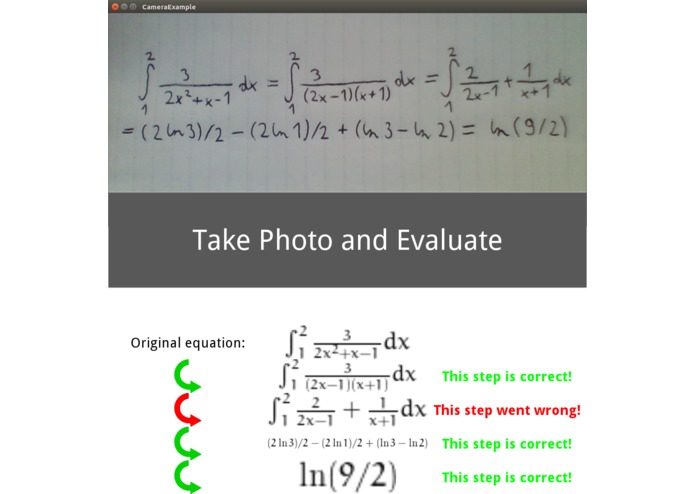
Incorrect simplification
-
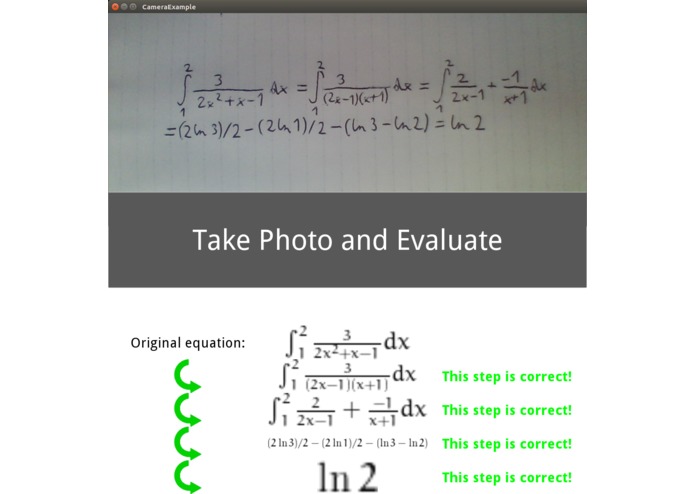
Correct simplification


Inspiration
Doing lots of math homework, making silly mistakes and explaining yourself to upset supervisors.
What it does
It clicks a picture of a step-by-step solution of a handwritten maths problem which is not producing the expected answer, and tells you which step it went wrong at.
How we built it
For OCR, we used an online API called mathpix that converts an input image into a latex file. Next, we parsed the file to extract the individual equations and account for variations in possible input layouts. Once the equations were extracted, we used sympy to evaluate the solution(s) of each equation in the complex domain. If the solutions of two consecutive equations match, the step is correct and gets a green mark in the output. If they don't it gets a red mark.
Challenges we ran into
One difficult part was to parse the raw latex file that we received from mathpix into equations that sympy understands. Slight changes in the way we write equations produce slightly different latex outputs. Thus, we needed to make our parser robust and general enough to not be tipped over. The other challenged we faced was that sympy is quite picky about what it accepts as correct. For example, going from x = 2 to x^2 = 4 got initially marked as incorrect, because the second equation has multiple solutions. Some of the less interesting, but more time-consuming issues include setting up some of the pretty bare-metal dependencies, or fixing caching issues.
Accomplishments that we're proud of
Our app works as good with a small arithmetic 2-liner as with a long, multi-line definite integral. Also, it is satisfying to see the app catch mistakes in our equations that we didn't intend in the first place.
What we learned
Symbolic equation evaluation is hard. Dependency setup is harder.
What's next for EqCheck
An Android app to make the camera easier to use. :-)
Built With
- kivy
- latex2sympy
- mathpix
- python
- sympy


Log in or sign up for Devpost to join the conversation.