-
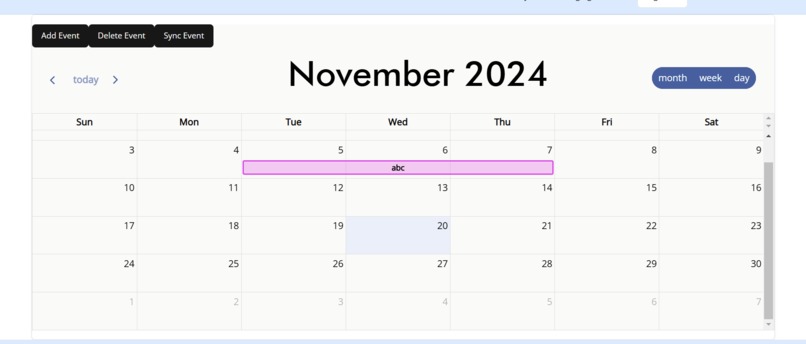
overview of personalized calendar
-
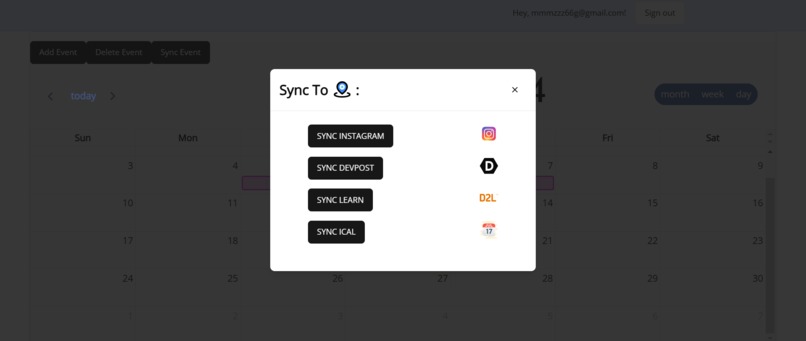
pop up to sync platforms to calendar
-
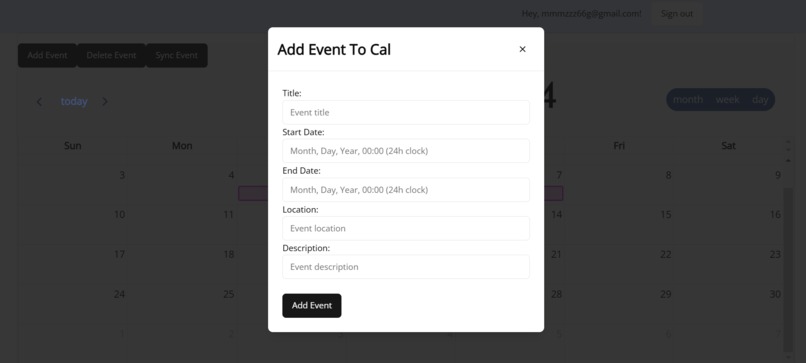
pop up to add events
-

landing page


Inspiration
As university students, we have noticed that too many people spend hours manually inputting their courses, appointments, and events into calendars (including ourselves). While some software can generate calendars for specific platforms, they often don’t support integration across multiple sources like D2L, Google Calendar, Instagram etc. So, how can we save everyone time? By creating a calendar website that syncs events from various platforms automatically!
What it does
The website has a login system that allows users to make their own personalized calendar, giving the option to sync club events from instagram, courses on d2l, hackathons from devpost, and ics calendar files. Like all calendars, there are also options to add and delete your own events to your personalized calendar.
How we built it
The frontend is hosted on Vercel and written using React and Next.js. We used typescript for the react components and a mixture of css and tailwind to style the different components/pages. For the database, we used Supabase to store information regarding the user’s username, password, and events in their personalized calendar.
Backend is hosted on oracle as a virtual machine. We purchased a .org domain and used CloudFare and NGINX to open and route between ports/IP addresses. When changes are pushed to the database, the real time function will detect these changes and send them to the backend. The backend will then use this information to determine what information should be updated in the database and subsequently sent to the frontend. We also wrote our own APIs with python to scrape devpost, instagram, d2l, and ics files to sync the information obtained from these pages to the calendar.
Challenges we ran into
One challenge we ran into was branch management. As each of us were working on similar parts of the app, we had trouble syncing our changes and pushing without breaking the codebase. To fix this, we added branch protection rules and a Jira board to standardise tasks. Another challenge we ran into was regarding hosting. We needed a hosting service for both the frontend and backend, as well as the Postgres database. We settled on using Vercel to host the frontend, and using NGINX to deploy the backend with a VM using a reverse proxy. The glue that put our app together was Cloudflare; it let us route both the frontend and backend IPs to their individual domains (with SSL security) with the same routing DNS.
Accomplishments that we're proud of
We’re proud of styling the calendar using a suitable colour palette, and making sure the calendar conformed to proper styling standards, like using Tailwind CSS, and animation classes. Another result we were proud of was being able to deploy the app to the web; we went through multiple loopholes to get everything deployed. Finally, we were proud of getting the backend to work seamlessly with an API on a cron; getting the scrapers to sync with the frontend was a lot more difficult than we first determined.
What we learned
We learned how to develop a proper frontend using react. Initially, we used css to style it, but we ended up with mostly tailwind due to its simplicity. During the process of developing the frontend, we learned valuable things about the functions, designs, and bare-bones of how a website works. In an attempt to scrape events from a variety of sources, we learned how to use and build our own scraping apis. It greatly helped our backend and streamlined our workflow.
What's next for Everything Calendar
Most of our pages are styled, but we will work on making them look better in the future. Furthermore, we will attempt to unify the colour theme and give the entire website a unified style. We will also improve our page routing so the user can have an easier time to use our website To make the calendar more useful and allow users to better integrate it to their everyday life, we will make a better notification system. One option we wish to add is an alarm system, much like the clock’s alarms, to the calendar. People can have alarms set for their vital events, which delivers a more timely reminder. We also plan to add features targeting specific groups such as university students. We wish to add common calendar sets such as course calendars for popular courses so students can add them with one click (somewhat like uw flow). Other common event sets that we might wish to integrate are standard exam times, major conference times, party and concert times, and more.
Built With
- certbot
- cloudflare
- docker
- kubernetes
- next.js
- nginx
- oracle
- python
- react
- resend
- supabase
- tailwind
- terraform
- typescript
- vercel


Log in or sign up for Devpost to join the conversation.