


Inspiration
The inspiration for this project stemmed from a deep understanding of the architectural and construction industry's operational nuances. The essence of architecture and engineering isn't merely confined to building structures, but in crafting meticulous information that guides the construction process. However, the journey from design data to actual construction is hindered by numerous inefficiencies and a disjointed flow of crucial information. The traditional paper and pencil methods are not only tedious but also impede the seamless collaboration needed amongst the myriad stakeholders involved in bringing a design to life. Particularly, the floorplan layout design, a critical phase, is both time-consuming and costly, with the cost of hiring a designer ranging between $800 and $2,700 depending upon the location. The modern era of modular construction demands a quicker turnaround, while homeowners are keen on reducing planning costs to allocate more towards actual construction. We empower both the designers and clients to experience creativity and collaboration seamlessly.
Solution
The solution we envisioned is a groundbreaking fusion of Artificial Intelligence and digital collaboration. We've embarked on a journey to streamline the design and approval process through an intelligent conversational bot capable of generating floor plan layouts. This isn't merely a drawing tool, but a sophisticated AI-driven platform that employs generative models and neural search to create, refine, and finalize designs.
Here's how we approached this endeavour:
- Building the Core: At the heart of our project is a custom-trained Cohere model adept at understanding floor plan layout textual context. This core facilitates natural conversations between the user and the system, translating user inputs into precise textual contexts for design generation.
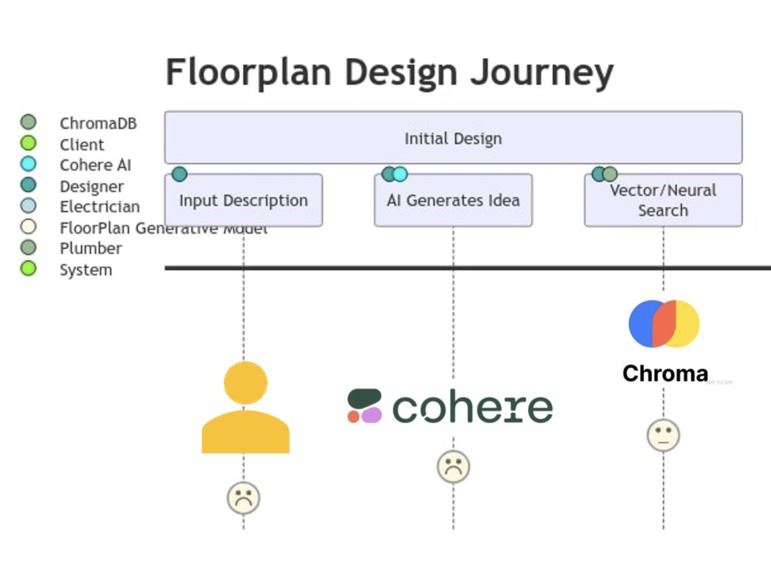
Neural Search: The designs are further refined using a neural search on embeddings, ensuring the generated layouts are aligned with user preferences and requirements.
Generative Design: Our platform harnesses the power of generative models to transform textual contexts into visual floorplan layouts. Users can naturally converse with our model, which then passes the interpreted context to a vector search query. The resultant JSON metadata guides the floor plan generator model API in crafting multiple design variations.
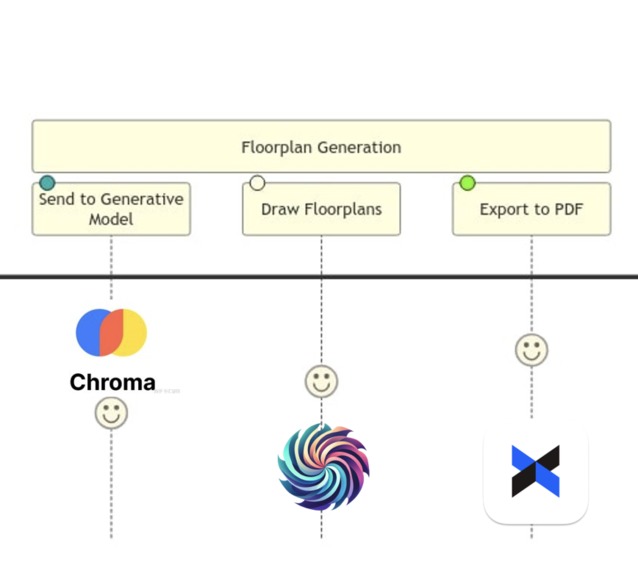
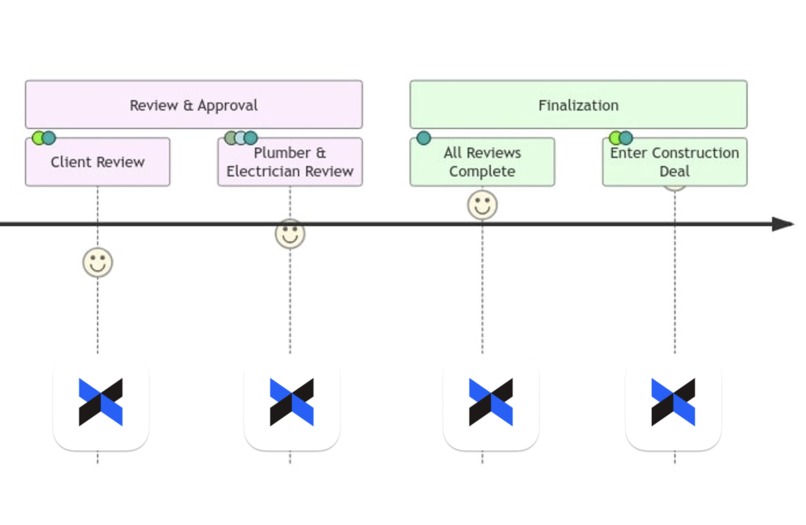
Human-in-the-Loop Feedback: The platform allows for real-time feedback and iterations. Users can send designs for approval and suggestions to clients and other stakeholders, who can then annotate, comment, and sign off on the designs using the Dropbox Sign API.
Streamlining Approvals and Documentation: The Dropbox Sign API is seamlessly integrated to facilitate document sharing, e-signatures, and storing all versions and signed documents securely. This ensures a streamlined approval process and a well-documented trail of design evolution.
How do we do it?
Cohere AI: Harnessing the Power of Cohere AI for Intelligent Floorplan Design Conversation
STEP 1: PREPARING THE DATA
Preparation of a comprehensive dataset comprising numerous floorplan images JSON (converted from raster PNG images). Each image in this dataset represented a unique design with its own set of characteristics and constraints. The challenge was to convert these JSON representations into a textual format, which would serve as the training data for our custom model for design-based conversation.
{"room_type": [1, 5, 3, 3, 3, 5, 2, 4, 17, 17, 17, 17, 17, 17, 17, 15], "boxes": [[46.0, 67.0, 154.0, 200.0], [46.0, 39.0, 106.0, 63.0], [110.0, 67.0, 154.0, 119.0....]] "edges": [[46.0, 67.0, 46.0, 200.0, 1, 0], [46.0, 200.0, 68.0, 200.0, 1, 0], [68.0, 200.0, 68.0, 184.0, 1, 0], [68.0, 184.0, 106.0, 184.0, 1, 2], [106.0, 184.0, 106.0, 136.0, 1, 0], [106.0, 136.0, 154.0, 136.0, 1, 4], [154.0, 136.0,....}
JSON to Textual Context: We have generated text descriptions in terms of both simple languages as well as floorplans with accurate dimensions and units.
        def generate_simple_textual_representation(room_adjacencies_str, room_sizes, room_areas):
            description = ""
            described_rooms = set()
            for room_type_num, room_type_str in enumerate(room_types_str):
                if room_type_str not in described_rooms and room_type_str not in [ "interior_door", "front door" ]:
                    count_same_rooms = room_types_str.count(room_type_str)
                    size = room_sizes[ room_type_num ]
                    width_units = size[ 0 ]
                    length_units = size[ 1 ]
                    area_units = room_areas[ room_type_num ]
                    adjacencies = room_adjacencies_str[ room_type_str ]
                    if count_same_rooms == 1:
                        description += (
                            f"There is a {room_type_str} which is adjacent to ")
                    else:
                        description += (
                            f"One of the {room_type_str}s is adjacent to ")

                    if len(adjacencies) > 1:
                        description += ', '.join(adjacencies[ :-1 ]) + " and " + adjacencies[ -1 ]
                    else:
                        description += adjacencies[ 0 ]
                    description += ". "
                    described_rooms.add(room_type_str)

            return description

        print(generate_simple_textual_representation(room_adjacencies_str, room_sizes, room_areas))

        detailed_description = generate_textual_representation(room_adjacencies_str, room_sizes, room_areas)
        simple_description = generate_simple_textual_representation(room_adjacencies_str, room_sizes, room_areas)
Output:
Simple version:
Description: One of the Bedrooms is adjacent to Living room and Balcony. There is a Balcony which is adjacent to Bedroom. There is a Bathroom which is adjacent to Living room. There is a Kitchen which is adjacent to Living room. There is a Living room which is adjacent to Kitchen, Bedroom and Bathroom.
Setting: 2BHK
JSON File: 45452.json
--
Detailed version:
Description: One of the Bedrooms has dimensions of approximately 69.00units x 65.00units (Area: 4485.00unit² ). It is adjacent to Living room and Balcony. The Balcony has dimensions of approximately 69.00units x 15.00units (Area: 1035.00unit²). It is adjacent to Bedroom. The Bathroom has dimensions of approximately 30.00units x 21.00units (Area: 630.00unit²). It is adjacent to Living room. The Kitchen has dimensions of approximately 30.00units x 20.00units (Area: 600.00unit²). It is adjacent to Living room. The Living room has dimensions of approximately 102.00units x 85.00units (Area: 8670.00unit²). It is adjacent to Kitchen, Bedroom and Bathroom. The total area of the floor plan is approximately 18220.00unit².
Setting: 2BHK
JSON File: 45452.json
--
STEP 2: TRAINING THE CUSTOM MODEL
With a rich dataset in hand, the next expedition was to train a custom model using Cohere's platform https://dashboard.cohere.com/models/create We uploaded our textual dataset onto the Cohere platform, readying it for the training process. Once trained you should see your custom model endpoint.
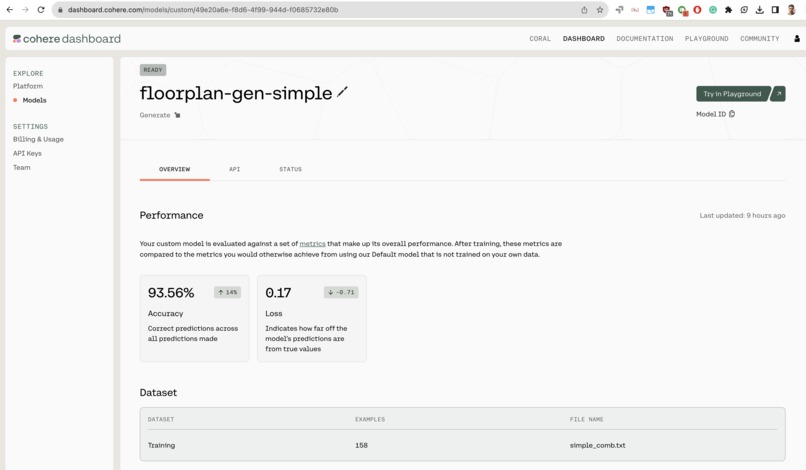
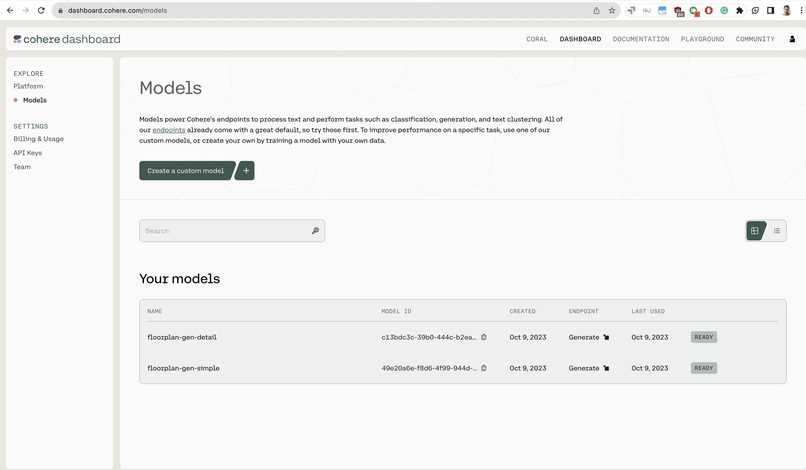
The objective was to equip the model with the ability to understand, interpret, and generate floorplan design ideas based on textual prompts. It empowered our custom model to handle complex relationships and dependencies in the data, paving the way for generating coherent and contextually relevant floorplan ideas based on user inputs.
Step 3: Unveiling the True Power of Cohere AI
Post-training, the model was ready to interpret the rough descriptions provided by clients and generate solid design ideas, marking a significant milestone in our project.
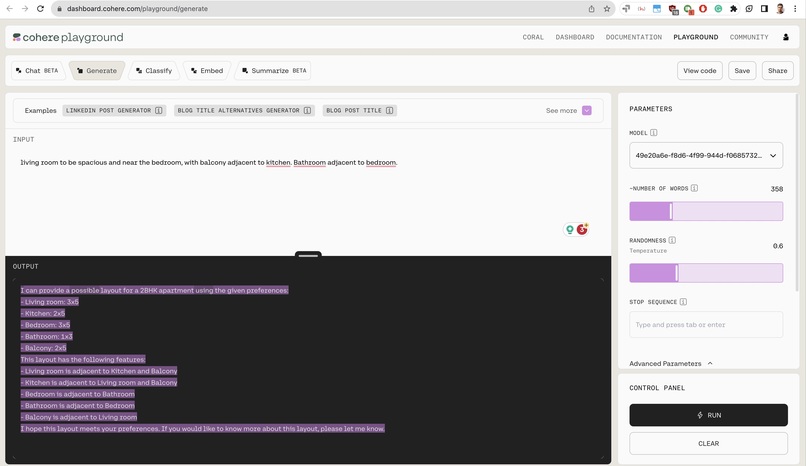
Prompt Interpretation:
Designers could now input rough descriptions into our platform, which were adeptly interpreted by the Cohere-powered model, outputting a solid design idea with all constraints considered.
Seamless Integration with Cohere API
import cohere
co = cohere.Client('API_KEY') # This is your trial API key
response = co.generate(
  model='49e20a6e-f8d6-4f99-944d-f0685732e80b-ft',
  prompt='<YOUR_PROMPT_HERE>')
print('Prediction: {}'.format(response.generations[0].text))
Floorplan Generator: Harnessing the Power of Discrete Diffusion Model for Intelligent Floorplan Layout Design
In the journey of creating an intelligent system for floorplan design, our next significant stride was the development of a Floorplan Generator model. Our model is derived from the cutting-edge approach delineated in the paper titled "HouseDiffusion: Vector Floorplan Generation via a Diffusion Model with Discrete and Continuous Denoising" by Mohammad Amin Shabani, Sepidehsadat Hosseini, and Yasutaka Furukawa Read the paper. This paper pioneers a novel methodology for vector-floorplan generation employing a diffusion model, bringing a fresh perspective to the conventional processes in floorplan design.
Core Principles of the Diffusion Model:
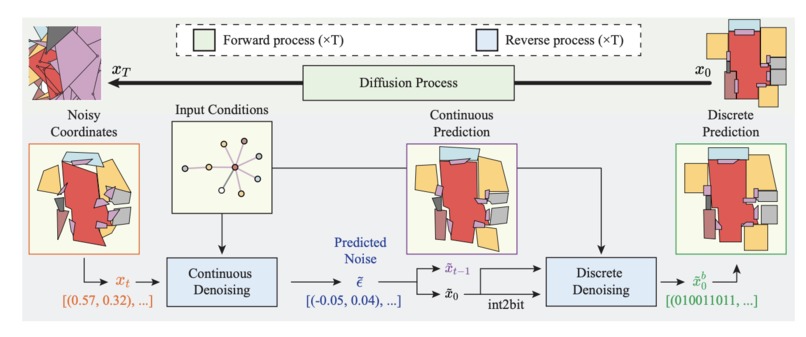
The diffusion model proposed in the paper primarily focuses on denoising 2D coordinates of room/door corners through two inference objectives:
Single-step Noise as Continuous Quantity: This aspect aims to precisely invert the continuous forward process, which is crucial for accurate floorplan generation.
Final 2D Coordinate as Discrete Quantity: This facet establishes geometric incident relationships such as parallelism, orthogonality, and corner-sharing, which are fundamental in floorplan geometry.
Transforming Floorplans into 1D Polygonal Loops:
The paper presents an innovative way to represent floorplans as 1D polygonal loops, where each loop corresponds to a room or a door. This representation is integral for graph-conditioned floorplan generation, which is a common workflow in the domain.
Employing Transformer Architecture:
At the heart of the diffusion model lies a Transformer architecture. It controls the attention masks based on the input graph-constraint, facilitating the direct generation of vector-graphics floorplans through a discrete and continuous denoising process.
Evaluation and Performance:
The model was rigorously evaluated on the RPLAN dataset, showcasing substantial improvements in all metrics against the state-of-the-art, even with significant margins. Notably, it demonstrated the capability of generating non-Manhattan structures and controlling the exact number of corners per room, indicating its proficiency in creating complex and accurate floorplans.
Our Implementation:
Harnessing the profound insights and methodologies from the HouseDiffusion approach, we tailored the Floorplan Generator to our project's specific needs. The adjacency constraints were meticulously implemented to ensure the accurate generation of floorplans, adhering to real-world architectural principles and client requirements.
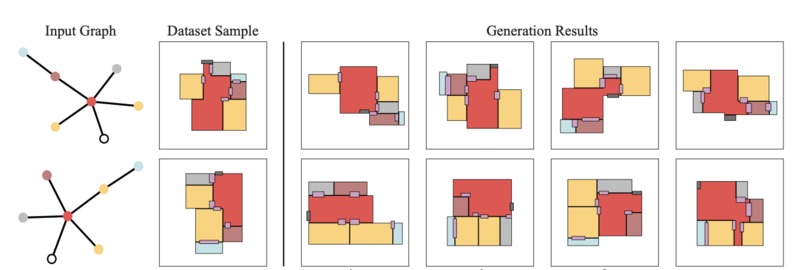
With a robust Floorplan Generator now part of our toolkit, we are well on our way to delivering a comprehensive solution that encapsulates the entire spectrum of floorplan design, from initial idea generation to final approval and agreement.
HOUSE DIFFUSION API CODE
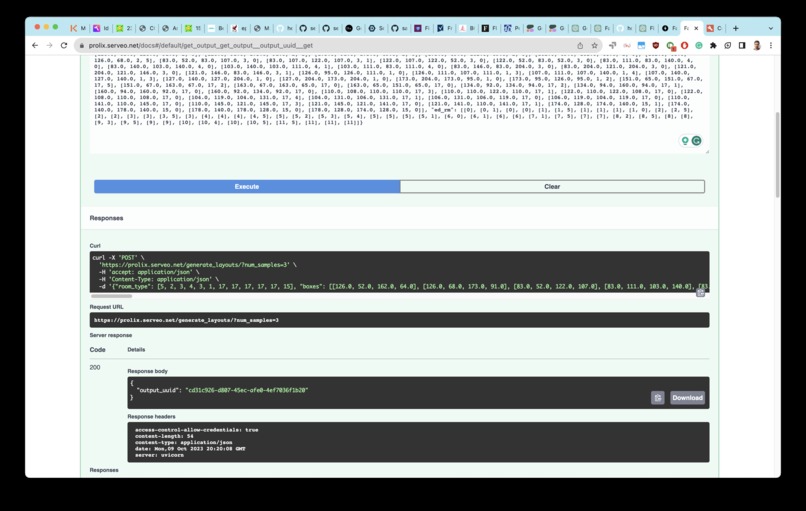
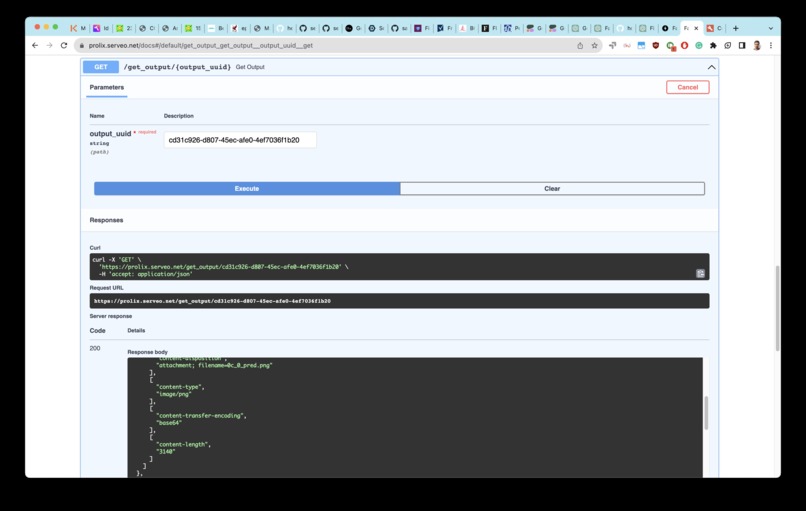
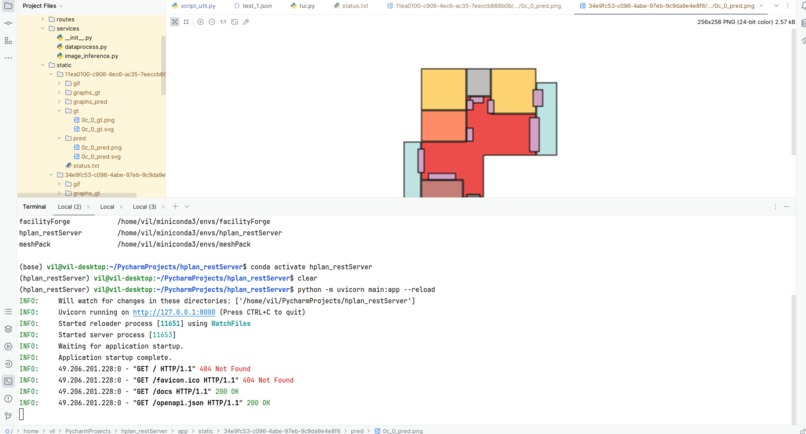
I built the model inference APIs using FAST API, the user just needs to send the json data and the API start the job and returns the output_uuid
import uuid
from app.models.config import Config
from app.models.hplan_data import HplanData

from fastapi import APIRouter
from fastapi.encoders import jsonable_encoder
router = APIRouter()
config = Config

@router.post("/generate_layouts/")
async def generate_layouts(datapoint: HplanData, num_samples: int = 5):
    from app.core.celery_app import run_inference_task

    datapoint = jsonable_encoder(datapoint)
    output_uuid = str(uuid.uuid4())

    # run_inference_task.delay(args_dict, output_uuid)
    run_inference_task.delay(datapoint, num_samples, output_uuid)
    return {"output_uuid": output_uuid}
import os
import glob
import base64
from fastapi import APIRouter, HTTPException
from fastapi.responses import Response

router = APIRouter()

@router.get("/get_output/{output_uuid}")
async def get_output(output_uuid: str):
    output_path = f'app/static/{output_uuid}'
    status_file = os.path.join(output_path, 'status.txt')

    # Check if the status file exists
    if os.path.exists(status_file):
        # Read the status file
        with open(status_file, 'r') as f:
            status = f.read()

        # Check if the status is 'completed'
        if status == 'completed':
            # Get all image files in the 'pred' subdirectory
            image_files = glob.glob(os.path.join(output_path, 'pred', '*.png'))

            if not image_files:
                raise HTTPException(status_code=404, detail="No images found")

            # Return the output file(s) as a response
            responses = []
            for image_file in image_files:
                with open(image_file, 'rb') as f:
                    # Read the contents of the image file
                    image_data = f.read()

                    # Encode the image data in base64
                    encoded_data = base64.b64encode(image_data).decode()

                    # Add the encoded image data to the response headers
                    headers = {
                        "Content-Disposition": f"attachment; filename={os.path.basename(image_file)}",
                        "Content-Type": "image/png",
                        "Content-Transfer-Encoding": "base64",
                    }

                    # Create the response object
                    response = Response(content=encoded_data, headers=headers)

                    # Append the response object to the list of responses
                    responses.append(response)

            return responses
        else:
            return {"status": "in progress"}
    else:
        return {"status": "not started or invalid uuid"}
Neural Search: Bridging Conversational AI and Design Precision
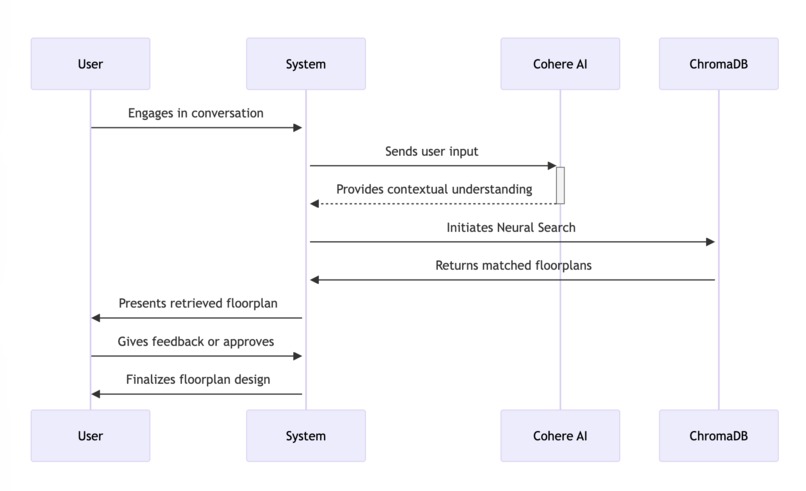
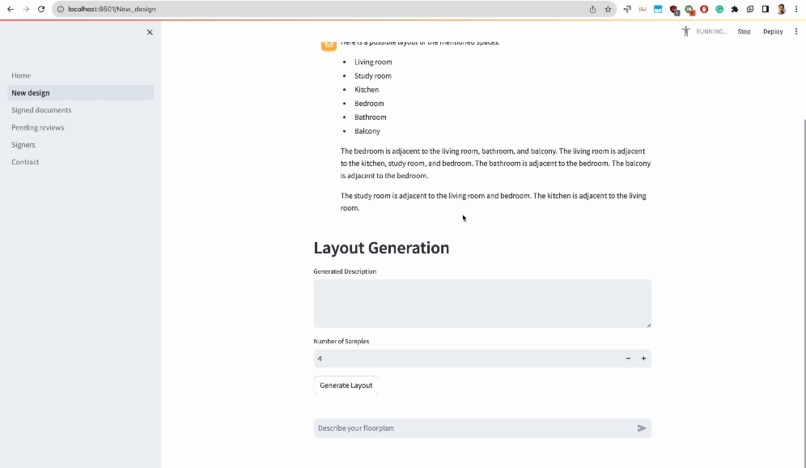
This aspect of our solution plays a pivotal role in refining generated layouts to ensure they are in sync with user preferences and requirements. By marrying the capabilities of Cohere's intelligence language model and ChromaDB vector query, we've crafted a seamless interaction flow that retrieves the most suitable floorplan from our dataset based on the user's natural conversation and prepares to send it to our house-diffusion model.
descriptions = [entry["description"] for entry in parsed_data]
# Create or access the collection in ChromaDB
collection = client.get_or_create_collection(name="Floorfacility", embedding_function=cohere_ef)
collection

# Add the embeddings and metadata to the collection
metadatas = [{"source": entry["json_file"], "setting": entry["setting"]} for entry in parsed_data]
ids = [f"id{i}" for i in range(len(parsed_data))]

collection.add(
    embeddings=embeddings,
    documents=descriptions,
    metadatas=metadatas,
    ids=ids
)

collection

query_text = "Beautiful spacious 3BHK rooms. One of the Bedrooms is adjacent to the Living room. There is a Study room which is adjacent to Living room. There is a Bathroom which is adjacent to Living room."
results = collection.query(query_texts=[query_text], n_results=20)
print(results)

# Extract the best matching metadata
best_match_metadata = results['metadatas'][0][11]
# Extract the source (which contains the JSON file path) from the metadata
best_match_json_path = best_match_metadata['source']
print(best_match_json_path)
- Utilizing ChromaDB, performing a vector query on Cohere-generated embeddings to sift through our dataset for floorplans resonating with the user's conveyed context.
- Eliminating the traditional need for providing original JSON content, offering a user-friendly conversational interface instead of articulating design visions.
- The process retrieves a floorplan aligning closely with the user's preferences, marking a user-centric milestone towards achieving the desired floorplan design.
Reimagining Approvals and Documentation with Dropbox Sign API
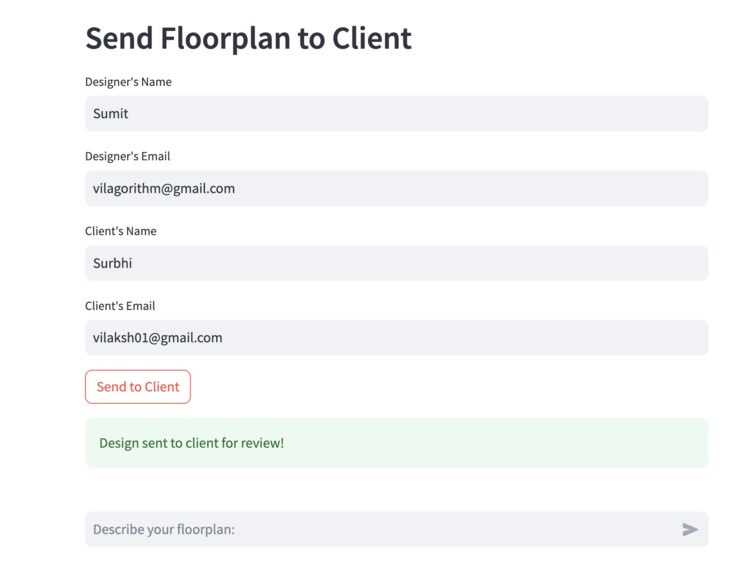
Our platform, integrating Dropbox Sign API, enables real-time feedback and iterative design. Users can send designs to stakeholders for approval or suggestions. Stakeholders can annotate, comment, and sign off on designs directly on the platform, speeding up the approval process and enhancing design quality through collaborative iterations.
Streamlining Approvals and Documentation:
Dropbox Sign API facilitates streamlined document sharing, e-signatures, and secure storage of all design versions and signed documents. This integration simplifies the approval process and ensures a well-documented trail of design evolution, fostering transparency and accountability, thus modernizing the traditional pen-and-paper approach in the design and construction domain.
def send_floorplan_signature_request(floorplan_images_paths, designer_email, designer_name, client_email, client_name):
    with ApiClient(configuration) as api_client:
        signature_api = apis.SignatureRequestApi(api_client)

        # Define Signers
        designer = models.SubSignatureRequestSigner(
            email_address=designer_email, name=designer_name, order=0
        )
        client = models.SubSignatureRequestSigner(
            email_address=client_email, name=client_name, order=1
        )

        # Attachments
        attachments = [
            models.SubAttachment(name="Floorplan Design", signer_index=0, required=True,
                                 instructions="Upload the floorplan design."),
            models.SubAttachment(name="Client References", signer_index=1, required=False,
                                 instructions="Upload any reference images or documents for the Client.")
        ]

        # Open the floorplan images as file objects dynamically
        file_handles = [open(path, "rb") for path in floorplan_images_paths]

        # Form Fields for Feedback
        feedback_fields = [
            models.SubFormFieldsPerDocumentText(
                document_index=0,
                api_id=f"feedback{i}",
                type="text",
                required=(i == 1),  # Only require feedback from the client
                signer=i,
                width=200 + (i * 200),  # Adjusting width for illustration
                height=200,
                x=20 + (i * 30),
                y=300,
                name="Feedback",
                placeholder=f"Provide feedback for signer {i}..."
            ) for i in range(2)
        ]

        data = models.SignatureRequestSendRequest(
            files=file_handles,
            title="Floorplan Collaboration",
            subject="Please review the floorplan design",
            message="Review the attached design and provide feedback or approve it.",
            signers=[designer, client],
            attachments=attachments,
            form_fields_per_document=feedback_fields,
            test_mode=True
        )

        try:
            response = signature_api.signature_request_send(data)
            # Close the file handles
            for file_handle in file_handles:
                file_handle.close()
            return response
        except ApiException as e:
            # Close the file handles even if there's an exception
            for file_handle in file_handles:
                file_handle.close()
            print("Exception when calling Dropbox Sign API: %s\n" % e)
            return None
Setup and running the project
We have two separate sets of programs running. First is the generative model server via serveo.net, to start the server use our GitHub API and run these in separate tabs:
$ python -m celery -A app.core.celery_app worker --loglevel=info
$ python -m uvicorn main:app --reload
$ ssh -R 80:localhost:8000 serveo.net
Next are Stremalit pages, which are simple to run via the streamlit command.
Challenges Faced
Integration Complexity: Integrating the Dropbox Sign API to ensure a smooth user experience while keeping the signing process intuitive and non-disruptive was a challenge. Especially free tier limitations, and rate limits blocking development.
Model Training: Training the Cohere model to interpret floor plan layout textual contexts accurately required a deep understanding of both the architectural domain and machine learning techniques.
Real-Time Collaboration: Facilitating real-time feedback and collaboration amongst multiple stakeholders while maintaining the integrity of the design data posed a significant challenge.
Cost Efficiency: Striking a balance between developing a sophisticated AI-driven platform and keeping it cost-effective for end-users was crucial.
Lack of knowledge: Very poor with frontend skills :(
What We Learned
This project has been a profound learning experience in understanding the transformative potential of AI in disrupting traditional industries. We've also grasped the significance of human-centric design in AI applications, ensuring that technology augments, not replaces, the human expertise and collaboration essential in the architectural domain.
Our project is a testament to how AI can bridge the gap between the abstract intricacies of design and the concrete realm of construction, fostering a symbiotic relationship between human creativity and machine precision.
What's next!
We are expanding the model for various kinds of facility layout design. And better real-time collaboration, using Dropbox, like Github for designers and clients in architecture and construction.
Picture Jane, a small business owner who aspires to open her pathology lab. Before diving into purchasing costly equipment and tools, Jane needs a clear vision of her facility's layout to ensure optimal workflow and efficiency. Traditional planning methods can be both time-consuming and expensive, causing significant strain on new business owners like Jane.
Enter FacilityForge: Jane inputs her lab's dimensions and specific requirements, such as reception, sample collection areas, testing laboratories, storage, and office spaces, using natural text context or by creating layout/selecting templates in our application. Our AI engine intelligently grasps the geometric relationships between different elements within the facility, generating multiple tailored layout variations for Jane to explore.
Within minutes, Jane can visualize her dream lab and compare different design options that maximize efficiency, minimize costs, and create a welcoming environment for her patients and staff. FacilityForge's user-friendly interface allows her to make adjustments and compare alternative layouts effortlessly, ensuring the best possible design for her unique situation.
By harnessing AI, FacilityForge saves entrepreneurs like Jane time and resources, allowing them to focus on what truly matters: growing their business and serving their customers. Our versatile solution caters to a wide range of industries, from retail stores and gyms to small factories and more, empowering business owners to design and optimize their facilities with unparalleled ease and precision.


Log in or sign up for Devpost to join the conversation.