-
-
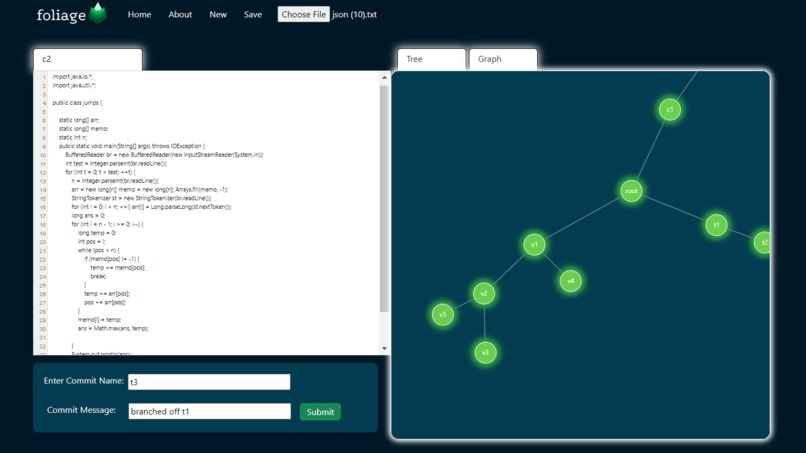
Our website front page

Inspiration
Students and developers entering or are familiar with the realm of software engineering may be intimidated by the idea of git and version control. It is a hassle to remember all the git commands, while also having no way to visualize the changes made throughout the coding process. If only there was a way to see all the commits of code (or even changes of other pieces of text, like notes) made in a single place, through an intuitive structure, and can be interacted with easily. That is why we developed Foliage, a tool that solves all these problems.
What it does
Foliage provides multiple different functionalities that improve the developer experience. Our main functionality is the provide a visual tree structure to users that saves all commits that they have made. Users can backtrack easily if they decide they don't want to continue working a feature or if their entire approach is wrong, all they have to do is click the node that is associated with a specific commit they want to return to instead of using confusing git commands. Branching off of previous commits is extremely easy, all you have to do is click on a node, and edit it, and give it a name, and bam!, a new branch is made! We support commit messages too, and they can be seen by hovering over the node. One of the coolest features we build was to the ability to detect similarity between documents, using an algorithm we designed. Connected nodes are further apart if the text similarity score is higher, and closer if the text similarity score is lower. Saving work is important too! So we developed a way to save all progress and the ability to reload it when necessary. In addition, we added some features for users to use to see how their code is changing, including a graph that displays the changes over the amount of commits made.
How we built it
We developed a backend server in flask and python, that will manage all the client data. We developed a recursive tree data structure that provides all our functionality, such as adding nodes, loading text, saving workspace, etc. Our text similarity algorithm utilizes 2D dynamic programming to detect Longest Common subsequence a quick amount of time, allowing for more efficient use for users. Our backend also utilizes matplotlib to generate graphs for our user to see their coding progress. Our front end was developed in HTML, custom CSS, java script, D3.js, and bootstrap. Javascript manages all our frontend components, such as button presses, input fields, POST/GET requests to our server for data and changes, etc. D3.js is a graphing library in javascript that allows us to generate tree graphs, and we build a version of a tree graph that integrates with our functionalities well. We developed custom CSS to make our website look even better! HTML is the core of our components, and we use bootstrap to develop pretty components quickly. We also used Canva to develop our cool looking logo.
Challenges we ran into
The major challenge we ran into was the front end, as most of us don't have frontend experience. The biggest challenges in that area was developing the tree structure that users would interact with. Thankfully we did a lot of research and learned the D3.js library quickly to be able to solve this issue. We also learned front end quickly, which allowed us to build our website. On the backend, the recursive algorithms that our tree used became very hard to code out, and took a lot of bug testing to fix them.
Accomplishments that we're proud of
We are most proud of creating an awesome looking front end. We are especially proud of how the tree turned out, as that was the hardest part to do. We are also really proud of our logo, we think its looks awesome!
What we learned
We learned so much about frontend development during this hackathon, to the point where we would feel very comfortable doing a lot of frontend in the future. We also learned a lot about javascript and how to connect front end and back end seamlessly.
What's next for Foliage
We would love to develop more features, our ideas include merging different nodes together and having a merge conflict screen like in GitHub. We also want to completely merge this in with git, and add some other git features like branching, etc. We would also want to build a better text editor that has all the syntax highlighting features a normal IDE has (even though Foliage is not only used for coding!). We also love to add more user metrics so they can see how their code is changing. We see a lot of potential in Foliage, and how we can make the development process so much easier, for both beginners and experts in the field.
Related to developer track (warp)
This tool is meant to improve the process of coding and development by allowing people to see their git commit history through a more intuitive structure, as well as allowing them to branch off easily through a UI instead of writing obscure commands into a terminal. We provide metrics to our users through graphs, and allow them to move around the tree structure to customize how they want to view and organize their project. We provide typical git features (although visually in our case), like commit names, messages, reverting back commits, etc.


Log in or sign up for Devpost to join the conversation.