-
-
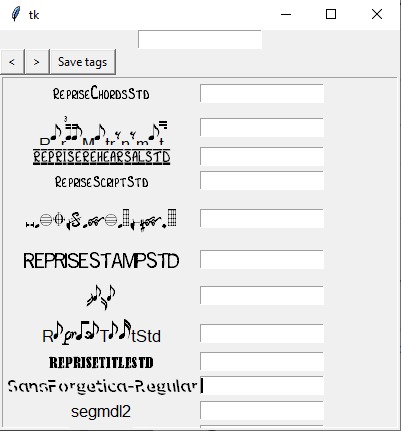
Screenshot of application

FontOrganizer: A Typesetter's Helper
A font organizer and visualization platform, designed for usage by comic letterers/typesetters and graphic designers. Currently only supported on Windows.
Current features:
- View the different fonts installed on your computer in their corresponding font face in a compact manner
- Tag fonts with custom characteristics, such as Sans Serif, Handwriting, Comic, etc.
Future features:
- Sort fonts by characteristics/tags
- Create visualization (in Photoshop file?) grouping fonts with similar characteristics
Inspiration
As a typesetter for fan scanlation group and a graphic design enthusiast, I like to choose my fonts for different projects carefully. Since font-choosing often takes me hours for me to be satisfied with my product, I wanted to be able to tag fonts that I had already downloaded with the attributes and characteristics I associated with them.
I thought this would be especially relevant to HeroHacks, since many of our favorite superheroes originate from comics, which of course are in part created by letterers and typesetters.
Why is this useful? (and what is lettering/typesetting?)
When a comic publisher chooses to publish a comic, they often assign a letterer to choose fonts for covers, titles, word bubbles and sound effects. While it sounds like a deceptively simple task, choosing a font that fits the scenario is often a time consuming task.
Typesetting is a synonym for lettering, though the term is more commonly used in the graphic novel translation community, where typesetters have the added task of making the font look similar to the original untranslated text. Graphic designers also face the same challenge when choosing different fonts for headers versus body text, articles versus code editors, website mainpages versus website blog posts, etc.
This application aims to help by reducing the time spent finding similar fonts by allowing you to tag fonts. When you find a font that really vibes with the design of your project, tag it with the project name! Like how well that font goes with that sound effect? Tag it with the sound effect!
What I learned
Tkinter and Python for sure. I've just started learning Python this semester in college, so I wanted to see what I could build with it on my own. Definitely learned a lot!
Challenges
I had never used tkinter before (I used a very heavily modified version provided by my school) so learning how everything worked and how to create different elements was very difficult, especially when functionality was different from the graphics that I'd used before.
For the future
I hope to fix the issue of some fonts not displaying in their own typeface. I definitely hope to get the tag searching features working because that would be really useful for me personally. I also hope to add functionality that would create a Photoshop file visualization displaying all the fonts, and fonts tagged with the same tags would be closer together.


Log in or sign up for Devpost to join the conversation.