-
-
Full Heylo Logo
-
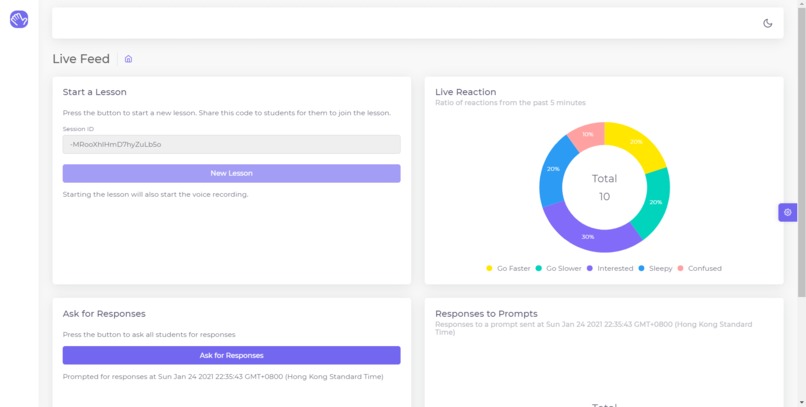
Dashboard for Teacher Real-Time
-
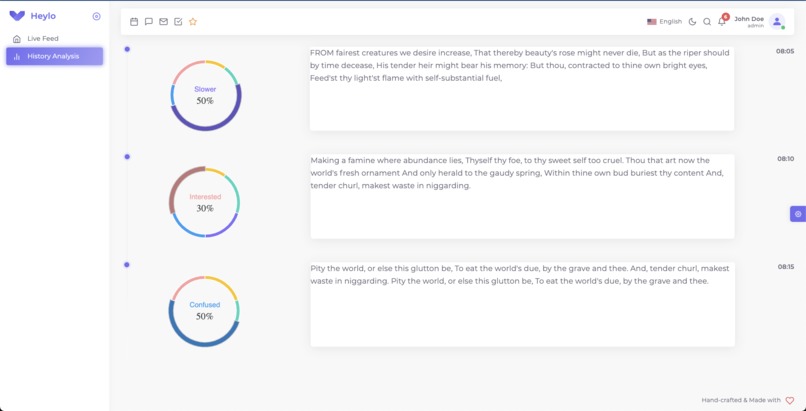
Dashboard for Teacher After Lecture


[#Heylo] [#DataForSocialGood] [#MarshallWaceChallenge]
Highlights
Enhance interactions between teachers and students while ensuring students' privacy.
Using facial detection and recognition to pick up students' reactions and feelings during the lecture.
Analysis of the anonymous data collected during the call to generate feedback in real-time.
More detailed analysis of the data to produce a dashboard at the end of the lecture for the teacher to look at.
Inspiration
Since the beginning of the COVID-19 pandemic, more and more lectures are delivered online. Even if there has been great progress in the different tools produced to help make the user experience the best and closest as possible to a real classroom, there is still a lot more that we can do.
Students often feel uncomfortable showing their room or the way they look at home to their peers and teachers and may feel reluctant to turn their camera on. Because of this, teachers do not receive as much interaction with their students which hinders in creating the most conducive environment for learning.
The aim of Heylo is to enhance interaction and understanding between teachers and students in online classrooms while ensuring high student privacy and reducing the overall students' anxiety. This goal is reflected in the name Heylo where we merged the words Hey and Hello to represent our aim to connect with younger students despite the absence of physical interactions. The cute and friendly aspect of the tool helps to make the students more relaxed about using it and interacting during a lesson.
What it does
Heylo is a tool that can be used simultaneously with a lecture happening online. While the teacher and students participate in the lesson on their chosen platform (Zoom, Blackboard...), they can activate Heylo.
The add-on will use the students' webcam to detect whether the student pays attention to the lesson and the teacher will be informed of the proportion of students losing focus. Additionally, the students can react anonymously to the lecture (too slow, too fast, confused, sleepy, interested). If the teacher feels the need to, they can also request students to submit a reaction. If it appears that a high number of students are having the same feeling, the teacher will be notified.
Once the lecture is over, the data over the whole lecture will be analysed and graphed into a dashboard for the lecturer to look at.
How we built it
The pop-up app for the students was made using C# incorporated with facial recognition algorithm by Python.
The data collected during the lectures is stored using Google Cloud Firebase and we used Vue.js to help to make the dashboard.
We used Python for the facial recognition algorithm, CSS for the UI/UX, Inkscape for the design.
And finally, Discord for team communication and sharing :)
Accomplishments that we're proud of
We produced an app that can help many students in struggles that we ourselves experienced, integrated different languages with each other within 36h!
What's next for Heylo?
We started experimenting with speech recognition, using an algorithm from Google Cloud, to produce a more detailed dashboard so that we can refer to the different subjects mentioned in the lecture instead of the time.
We could add a "This is important" / "Pay attention" button for the teacher to use in order to notify the students in real-time that they must be particularly careful of a specific moment in the lecture. This could also be used in the dashboard for the teacher to see the students' reactions to important content.
Creating a login and accounts system, especially for teachers might be a good idea to access data more efficiently.
We do realize that some students may want to access Heylo on their phone if they don't have access to a computer, so it would be a good to also develop a version for Android and iOS.
Students faces, especially for young ones, may differ greatly depending on their age, so we would also need to improve our facial recognition algorithm to detect facial expression of children more accurately.
The students' and teacher's pop-up are for now very basic, a little bit more work on UI/UX could make it look batter, cuter and more attractive to use, especially for young students.




Log in or sign up for Devpost to join the conversation.